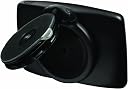
๐บ๏ธ Your ultimate road companionโnever miss a turn or a deal!
The TomTom START 55TM features a vibrant 5-inch touchscreen with lifetime traffic and map updates across the US and Canada. It offers advanced lane guidance, real-time fuel price tracking, and reliable 24/7 roadside assistance, making it an essential GPS navigator for savvy drivers who demand accuracy, convenience, and peace of mind on every journey.
| ASIN | B007M4Z7GO |
| Additional Features | Touchscreen |
| Battery Average Life | 3 hours |
| Brand | TomTom |
| Built-In Media | Adhesive Disk, Car Charger With Integrated Traffic Receiver, Documentation, Fuel Prices Voucher, Lifetime Maps Voucher, Mini-Usb Cable, Roadside Assistance Voucher, Tomtom Start 55 Tm Device, Vehicle Windshield Mount |
| Compatible with Vehicle Type | Car |
| Connectivity Technology | USB |
| Control Method | Touch |
| Customer Reviews | 4.0 out of 5 stars 1,028 Reviews |
| Display Type | Resistive |
| Human-Interface Input | Touchscreen |
| Item Weight | 8.96 ounces |
| Manufacturer | TomTom Incorporated |
| Map Types | North America |
| Mfr Part Number | START 55TM |
| Model Name | START |
| Model Number | 1EF0.017.04 |
| Model Year | 2013 |
| Mounting Type | Windshield Mount |
| Resolution | 480 x 272 |
| Screen Size | 5 inches |
| Special Feature | Touchscreen |
| Supported Satellite Navigation System | GPS |
| Touch Screen Type | Resistive |
| UPC | 636926056878 |
| Vehicle Service Type | Car |
| Warranty Description | 1 year |
C**E
The best GPS I have ever owned!
When I first moved to my new home state I needed a GPS to guide me around. My sister kindly loaned me her TomTom GPS and I had no problems with it. When I decided it was time to get one for myself I foolishly (though I had researched it) decided upon the Garmin model nuvi50LM. Garmin was the first brand name GPS I had ever heard of so I figured I'd give them a try. What a mistake. It constantly took me on wild goose chases frequently changing the initial course completely. Where I was within a few minutes of my destination, it would suddenly "recalculate" and place me ten minutes away from the same address. Even after repeatedly entering the desired address it would still take me far from the correct location. This happened more often than I can say. Plus it would constantly loose the satellite connections and leave me stranded in unknown territory. After causing me to be over ten minutes late to an important appointment I decided it was time to part ways with this disastrous monstrosity of a GPS. So I decided to replace it with the TomTom START 55TM model. I cannot express how delighted I am with it. What features I truly appreciate so far are: 1. It not only announces the street names but besides alerting you to the upcoming street to turn on, it actually prepares you for the next turn after that so you know what lane to be in (I can't say how often I had to quickly change lanes with the Garmin if the next street to turn on quickly followed the last). 2. It easily allows you to cancel your current destination plans and immediately calculate where you want to go next (the Garmin was a real pain as far as this issue was concerned). 3. It conveniently lists the street you are presently traveling on at the bottom of the screen if you missed seeing the street sign (the Garmin made you click on the road you were traveling on and then would take you to a totally new screen. A very annoying procedure). 4. To sum it up, EVERYTHING is so much easier to see and understand on the TomTom compared to the Garmin. I'm sure I'll come up with other advantages as I get more familiar with the unit's features. If you would rather mount the unit on your dash face rather than the windshield (the TomTom includes a windshield mount only), I highly suggest purchasing the car mount below available from Amazon which sells for the reasonable price of $14.95 (there are others available that do the same job but cost a lot more). Just type in the heading below into the Amazon search bar: "Windshield Dashboard Car Mount for TomTom GPS with EasyPort Pattern START 40 45 55 XL XXL ONE 125 ONE 130 ONE 140 XL by Arkon".
Q**R
Very disappointed at first but........
I have had a tomtom XL for years and it always worked flawlessly. I decided to upgrade for free lifetime maps and traffic. When I turned the unit on, it asked me to connect to my computer for updates. I did so and about 90 minutes later, it was ready to go. Or so I thought. It couldn't find my destination although my XL found it quickly. The START 55TM kept sending me around my block. I was finally able to plan a route by canceling the route in the unit. I took it with me on a 50 mile trip and it seemed OK at first. After about 15 miles the unit began to stutter. I was so startled that I began to laugh and almost became a statistic. When I got near my destination, it sent me to the wrong road and I had to ask for directions from a passerby. On the way back it ceased stuttering but the unit repeated all the directions twice. Then I noticed the map had flipped so the arrow representing the car always pointed toward me, easy to solve, I turned the unit upside down and made it home with no trouble. It left the task bar hard to read, though. I also could not get the traffic to activate even in a town or on an interstate. The manual suggested I needed an accessory. Support suggested that I did not. A further frustration was the lack of documentation. No instructions at all. The manual was slightly less helpful than not reading it at all because the content is muddled and confusing at best. The "manual" contains generalities and possibilities with few specifics so reading it is a waste of time. Too bad. I liked my other tomtom. I don't know what could have happened that the product deteriorated so. Unfortunately for me, my wife has taken possession of the XL, so I can't get it back. The only bright spot is that Melecia, at customer service is sharp and efficient. She answered my questions and gave me helpful information. She worked with me professionally, and politely to solve my situation. Tomtom, please take notice. Update 6/24/2013 Made several calls to Tomtom support and Enid and April (at Tomtom support) appear to have straightened out the problems. I took two short trips and the unit worked well. So, to be fair, I have raised my rating to four stars only because it seems a little slow in picking up satellites and because it seems to have a tendency to revert to the route planning screen. A touch brings it back to "normal". I deliberately chose a different route than the unit had provided and there was a little confusion before it straightened itself out. During that time the unit kept insisting that I make a U-turn even though I was only a mile from my destination. When I used the POI to set a destination it also told me I had arrived even though I was still about a quarter mile away from my destination. The traffic feature appears to be working but I will need to test it on a longer trip. All in all, not a bad deal for the price. There are a lot of features packed into the unit. It also gives you a lot of information. Through use of the overlays you can obtain even more information about a needed destination quickly. One thing is a must. Create a account with Tomtom home. Create a back up and update it. That may save a lot of grief down the road. Demonstrations of features are also available from the home page. Update 7/7/13 Just returned from Gettysburg. The way out of the reenactment battlefield was blocked off by police. The START 55 took me around the blocked off areas, through developments, little used roads and back roads until it got me back to the main highway. It even picked out a restaurant that turned out to be both good and inexpensive. I warned me of traffic problems 6 to 7 miles ahead and indicated whether or not I needed to pick an alternate route. I'm impressed...... Gave my old TOMTOM (XL335) to my wife. It still works flawlessly after almost 10 years. I only gave it a 4 star rating because it mispronounces the names of some roads and there is no way to "lock" the unit. Another GREAT DEAL from TOMTOM and AMAZON. Another tip of the hat to Amazon customer service who straightened the unit and me out.
K**R
Easy and Fun to Use
I researched and researched. I read review after review. I checked price comparisons. My son has a Garmin and he really likes his unit. After all of that I made the decision to buy the TomTom 55TM 5-inch with the Lifetime Traffic and Maps. It was a smart decision on my part. The price was great and it does everything I need it to. It has kept me from getting lost several times and when I felt hungry or needed gas...well, there it was on my screen. Reviewers mentioned the problems when they do updates on their computer hookup....no problem for me. It was quick and easy. The voices are fun plus I downloaded a car that looks just like mine so there I am!!!driving down the road. I like the 3D feature. It shows all the turns and so accurate that it is easy to see exactly where I am at any given time. 2D is okay but not as fun. I like the automatic re-routing feature without it freaking out. My son's tells him to turn around several times before it finally says "re-routing". Maybe this is something that you pre-program in? The screen is easy to see and some reviewers mentioned that the touch screen was not sensitive enough..well, for me it was really soft touch. I wouldn't want it to jump to another view or action while I am trying to drive and completely lose my way by accidentally touching it and 'force' it to move on, so to speak, without me planning it to. I gave this a 5 star on the overall features and ease of use. Others most definitely do not agree but I guess that is why we do reviews and see how each person makes their own mind up on products..Happy Driving!!
M**E
Could be better
Over-all this GPS does get the job done. It has quirks, as mentioned by others sometimes says the opposite direction it actually means and that can be a huge problem. My GPS unit is updated and you would think at this point some update would have addressed this issue. It's atheistically pleasing(for the most part), I'm glad that it pre-announces streets I need to turn onto/look for. I do love the variety of restaurants, gas stations, parks, museums I can search for with the product. That feature I can see really helping me to explore new places and get the most out of traveling. So why not more stars? Small, but important things lacked. Things that I had higher expectations of. The lane assist is adorable, but could be difficult at times as it uses the same generic "lane" picture for every off-ramp. If I'm somewhere I've never been before and come across a unique exit I need to take the GPS does not reflect that. It is the same image of any other exit(or small variation of*) it goes onto when using the lane assist feature. I think that this feature should of been much better tuned to reflect the real exits, lane changes, people are making when driving. *-Edit, with more usage I notice some change with lane assistant, I still have the concern that the lane assist may be a bit too generic in very unique circumstances. The GPS does not seem to(could this perhaps be by settings?) tell me if where I am approaching is on the left or right. This is that issue of, if I'm in unknown territory I don't know and the GPS is suppose to help me out there. As I approach a destination I just hope I spot it in time. The mount it comes with is absolutely infuriating. This is arguably a huge/small issue depending how you look at it."Oh just buy a better mount" some might say. On principal, when I just paid over 100$ for a device, it should have well working parts. There should not be issues. Yet the more I use the mount, the less it seems to want to snap onto the GPS, and the mount does not like to stay attached to the GPS much at all. To it's credit, so far, once it's attached and on the windshield(often 10 minutes of fiddling, first world problem, I know, but annoying nonetheless) it has yet to fall off. However, it has fallen off other times trying to get it to stay on the windshield so there is the concern its going to come off during driving which would be a hazard. It seems to have been a good idea/bad execution. UPDATE: The mount did end up falling off during driving, while in use on the highway. No longer will I be using the mount. The mount thing makes me want to ask TomTom.... Do you test anything in real world situations? Random, real people, let them see how a new item works for them and get their feedback, before putting it on the market? I think maybe more of that would help in discovering problems and issues with products before they're on the shelf. So ya, it's okay overall. It will get you from A to B. But, you might have to invest in a better mounting device and don't expect too much from the lane assist.
S**B
Worth learning how to use my Tomtom
I bought the 55M a few weeks ago. Downloaded and updated both computer programs and unit. First time download was long. After a four hour trip it worked well. On the return it seemed to have trouble locating satelites although I was two hours from NYC and really not near remote. Then driving eastward on the Mass turnpike it refused to have reception. The unit message said wait, as it was trying to connect, but I found that in the background it was tracking the route. So I figured it was an update issue, I plugged into the computer for any updates. I had the 'wait' issue again and besides sending it back I am going to call them first..like the package says. Overall I like the unit and I believe it will do what it's supposed to do and do it well. It is easy to program but for me without it being plugged in and using battery it would not locate any POI's from current position and was intent on finding a supermarket from my last location of 60 miles away. Plugged it into the truck and it snapped out of it. I bought the dash mount that was recommended but am going to return it because I have found a nice spot high on my Silverado windshield that works great and I really like that the plug in is sleek against the unit so the cord turns and is easy drapped over my mirror without notice. After I call the company I will update this review. I really like reading product reviews on Amazon. Thank you to all who take the time. Called Tomtom and the CSR had all the right answers. Great job. I discovered an interesting feature with my unit. I dropped it as I was putting it back into it's cradle. My unit preceived that drop as a vehicle accident and displayed the my location and buttons that listed "Call For Help" "Drive to Help" I did not know it had this feature. All in all a great unit and I'm happy with the purchase and would recommend this unit.
M**P
Has trouble searching for addresses, many maps wrong
The product was packaged well and worked (sort of) the first time which is nice. You have to attach it to your computer regularly to get the map updates which is inconvenient. The screen is easy to read and it took maybe one day to get comfortable with it. Here's the problem: 20% of the time I put in an address it can't find it in the database. I thought that problem would be solved with lifetime updates but it isn't. I am convinced it is a flaw in the search algorithm. The error occurs when searching for an address by any other method other than entering the zip code (this is a short cut I discovered - you just put in the zip code of where you want to go and then it always finds the streets). But seriously - how often do you know the zip code of where you're going? Maybe this is an isolated problem to the Las Vegas market, but that's where I use it. Also on one occasion the map was dead wrong - it had an out of the way crossing in North Las Vegas listed as an intersection and so plotted my trip accordingly. As I approached the 'intersection' it was a bridge without ramps and the road dead ended in to railroad tracks. Had to backtrack. Tom Tom has a way of reporting mistakes so they get fixed on the next map release but sorry, that's what I paid you folks for, Tom Tom. A quick check of Google maps showed Google had it right. Does this mean a free service from a company that doesn't specialize in maps is superior to a company that maps is their specialty? Be sure to get the zip code of where you want to go or this may be a disappointing purchase for you. Update 10/12: Lowered rating to 1 star since I can't give it zero stars. Recent gaffes include sending me to the airport when I should have been 5 miles away, and not having a street number database for LAS VEGAS BOULEVARD. An alert dialog came up telling me I had to give a cross street to get directions. You have got to be kidding me. Tom Tom is worthless garbage. Sending back. Another 10/12 update: More guffaws before I return: As I pass the 15 fwy and Flamingo Rd (think Caesar's Palace) it tells me I'm at the 15 and Russell (think Mandalay). As I get to Tropicana it tells me I'm at Spring Mountain. A full mile behind in updating and then misses the exit I need to take. It's not that I need it for obvious drives like this - I just wanted to see how unbelievably bad this GPS is for giggles. You want to know why Apple maps on the new iPhone 5 is such a disaster? They contracted with...wait...you guessed it...TomTom. Run, Apple, run as fast as you can. I made my point and returning tomorrow. You buy it after reading this - it's on you, friend.
R**M
Affordable and user-friendly GPS. Would recommend.
I know there's a lot of features one these products but I"ll hit a few key ones for me. First of all, I know my phone has GPS but that means that if I don't have cell signal...I don't have GPS so I'll always have a stand-alone unit. 1) Anyways my old GPS only had one option for detours. This one gives you mulitple options for deotours based on distance you want. It also has a great feature to avoid a certain part of the route. For instance, one of my routes for work has a bridge out for a couple months so I can select it to avoid that part and it'll give me the next quickest route. 2) I can calculate the distance from a start point different from where I am at the moment. Not as vital but it's handy as I haven't had a GPS that allowed me to do that before. 3) The screen is also a lot more user-friendly to input and I don't have to press anywhere near as hard as my previous units. 4) I like how it remembers recent inputs so i can make a selection quicker if it's a town, road, etc I've typed in before. There's a lot more features on here but these are a few key ones that are important to me. I really like this GPS and would recommend it to you!
A**R
Best GPS for the price
The TomTom 55TM replaced my Garmin 660 which I've used for about 7 years. The Garmin 660 retailed for $1,075 in 2006 so you wouldn't think it would be a fair to compare the two; however, after using the 55TM for the 3 weeks, I'm ready to retire the Garmin. The 55TM's display does wash out in bright sunlight more than the Garmin 660 but it is still readable. A plus is that the 55TM's display is laid out much better making it easier to read with just a glance while driving. The voices are much better on the TomTom also. I haven't had the traffic feature before but the TomTom quickly finds the local traffic station which shows construction sites on area interstates - time will tell whether this is really a useful feature. The touch sceen seems sensitive enough to me - not like an Iphone but perfectly acceptable. The suction cup mount is rather compact, which I like - it's been attached to my windshield for 3 weeks and is still holding firmly. The unit does detach from the mount rather easily but hasn't caused me any issues. My one criticism of TomTom is that their lower end units only provide one waypoint - sometimes I like to select a route off of Google and then program this route into the GPS - this sometimes requires that you add multiple waypoints to convince the GPS to take the selected route. One thing I wasn't aware of with the 55TM is that when in 2D mode, up is always North no matter how far you zoom in; however, in 3D mode you're always headed up so I leave it in the 3D mode. I'm not sure which model some of the reviewers are referring to concerning map updates but I didn't have any issues signing up for the lifetime maps and traffic. Updating the map straight out of the box was slow and took about 2 hours but Map Share updates since have taken less than a minute. Overall I'm well pleased and recommend the 55TM, especially at the discounted price.
L**.
Il fonctionne tres bien, mise a jour reguliere, ...
Il fonctionne tres bien, mise a jour reguliere, attention, il ne capte pas dans les batiments si vous voulez installer votre itineraire en avance...
D**J
Beware not as advertised..
The online update took over 3 hours to do with my very high speed internet connection.. Also the link to road side assistance does not function and that service is not available for this device.. And I also could not activate the lifetime free maps and updates.. So beware... And this screen is very small..
A**G
Four Stars
It's O"K" for my use
R**I
Fonctionne bien
J'aime TomTom... alors! Systรจme de fixation fragile.
M**U
Surprise duty of $32.00 and installation not very user friendly
So far not very impressed with the product and price. We were charged 30 percent duty on this thing. I could have bought cheaper at Canadian Tire!
Trustpilot
2 months ago
3 days ago