Buy anything from 5,000+ international stores. One checkout price. No surprise fees. Join 2M+ shoppers on Desertcart.
Desertcart purchases this item on your behalf and handles shipping, customs, and support to Tunisia.
📼 Turn your past into viral-worthy memories today!
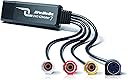
The AVerMedia EZMaker 7 is a compact USB 2.0 video capture card that converts analog VHS, V8, and other composite video signals into digital formats compatible with Windows 10/11 and Mac OS 10.11/10.12. It includes CyberLink editing software for easy video trimming and DVD authoring, enabling users to preserve and share old home videos with professional polish. Its plug-and-play design and broad device support make it an essential tool for digitizing legacy media.


| ASIN | B00603S1OS |
| AV Output | AVI, MPEG-2 |
| Antenna Location | Image Capture, Video Recording |
| Best Sellers Rank | #102 in Internal TV Tuner & Video Capture Cards |
| Brand | AVerMedia |
| Built-In Media | C039 AVerMedia DVD EZMaker 7, Quick Guide, USB Cable |
| Compatible Devices | Personal Computer |
| Customer Reviews | 3.6 out of 5 stars 698 Reviews |
| Global Trade Identification Number | 00795522963765, 00999996709502, 04710710674595 |
| Hardware Interface | USB |
| Item Dimensions | 3.2 x 1.1 x 3.2 inches |
| Item Part Number | 61C0390000AK |
| Item Weight | 1.7 Ounces |
| Manufacturer | AVERMEDIA |
| Mfr Part Number | C039 |
| Minimum System Requirements | Compatible with Windows and Mac OS |
| Model Name | C039 |
| Model Number | C039 |
| Operating System | Windows 10 |
| Platform | Windows 10, Windows 11 |
| Recommended Uses For Product | Image Capture, Video Recording |
| Tuner Type | PAL, NTSC |
| UPC | 999996709502 795571057613 795522963765 898029645018 809385666548 795522964045 809186271651 807030496052 163120601264 100177338422 803982783868 172304347812 012300176798 132018346129 763615932004 |
| Video Capture Resolution | 480p |
| Warranty Description | 1 year |
J**O
Great Product - might need extra cord
This worked great. Keep in mind that you might need an extra cable to actually attach to a VCR. I believe other reviews had more technical explanation of it, but my husband had several on hand so it wasn't an issue to me. However, if we didn't have that cable that would be annoying as another thing I would have to buy. Other than that, this worked great. I installed the software on a windows 8 OS and it was fine. The software also comes with video editing! So fun!! I put 4 hours of home dance videos onto a DVD. Then I gave them out as gifts to my friends where were in the dances. We had so much fun watching them and they really appreciated the thought. Great product, easy to use. Shipping was accurate. Oh and if it wasn't obvious I went from a VCR to computer. It sounds like you can also hook this up to a camcorder, but I haven't tried that.
R**D
Works well on the Mac, but with some rough edges
It really does work as advertised on a Mac, and the video quality of the finished transfer was no worse than the original VHS tape. It also has software specifically for making transfers to a Mac. This isn't as necessary as it is on Windows, because you could do this with just the transfer hardware and various apps that are already widely used in the Mac video world. However the included "Aver Studio" app makes it easy enough that a non-gearhead could do it. You walk through a couple of basic choices on what format you want the transfer to be and then when you start the transfer, it gives you a video and audio monitor so you can see where you are, plus some tools for trimming the head and tail of the clip right in the app before you finally save it. The reason for 4 stars rather than 5 is that the software, while it looks quite elegant on the screen, has a sort of not-ready-for-prime-time feel with odd command logic and very limited documentation. I suspect it would take anyone 2 or 3 tries before you get everything right. There were also 2 specific problems: a) The Mac software in the box won't install with any Mac OS after 10.8 or 10.9 which means it's at least 3 or 4 years out of date. After some hunting on their website, I found a download that works with El Capitan (10.11) and Sierra (10.12) but I was pretty much on my own in working through this. b) When I was transferring clips from a VHS tape, I experienced a bug where after about 15 minutes or so the sound I was monitoring started getting distorted with noise bursts that got worse and worse to the point that after about 25 minutes the sound was unintelligible. Much to my surprise, the bug did NOT affect the quality of the sound in the finished transfer (which was fine) so it was only an inconvenience in monitoring the transfer rather than a fatal flaw. Still, it was pretty alarming. (One caveat: I didn't test this with any other tapes or tape players, so it might possibly have been an oddball bug with the tape I was transferring.) Overall, looking at the many options for doing this kind of transfer, I think this was the best choice for someone using a Mac.
B**N
Rarely works, weak picture quality, but the hardware can be forced to work correctly if you're good with computers.
If the tool works, it can work. But I had to fight it for a full day. I tested it on four Windows computers (two Windows 7 and two Windows 8.1). Out of four computers, it only worked on one. One displayed the video garbled up. Two wouldn't display any video at all. The CD didn't have drivers for Windows 8.1, I had to download them off the internet. The instructions didn't match the steps for installation, I had to be a bit clever during the process. No instruction was given for the provided software. Once I was able to poke around and find the correct tool, it did start encoding the VCR tape video/audio. I had a long video tape, a couple of hours long, and it kept splitting it into 4 GB chunks (I presume so those chunks could each be written to DVD.) Further, the video quality wasn't good. Old fashioned TV did something called interlacing, where they faked 60 frames a second. Frame 1 would display only even pixel lines, frame 2 would display odd pixel lines, frame 3 back to even pixel lines, frame 4 back to odd pixel lines, etc. The software tool would combine even lines from frame 1 and odd lines into frame 2 to make a new frame, and leave the picture at 30 frames per second. That meant lots of jagged lines and "combing" effects, and movement isn't as fluid anymore. Even when there was little movement, the edges of shapes were still jaggedy. And the output format was restricted to an old fashioned MPEG format, not great for modern devices. I suppose if you wanted to only burn a 20 minute segment from VCR to DVD only and you didn't care about picture quality, this tool works. But if you want to convert a huge VCR collection and keep the VCR quality, the package fails miserably. I eventually did get what I wanted. A free tool called virtualdub allowed me to "filter chain" with the exact de-interlacing process I wanted (so it generated good 60 frames per second NOT interlaced). I was able to take that output, and feed it into another free tool called Handbrake, which converted the raw format into proper h264 for video and mp3 for audio. The end result was a compact file, a clean picture, and the output format is very interoperable with so many other tools (such as DVD Flick and imgBurn to burn my DVDs). In short, if you know your way around computers, this hardware gives you the options you need. But you need to find the right software tools and manage them yourself. And you have to get lucky hoping the driver will work with your computer. If I had to do this all over again, I'd do more research and spend money on a nice higher quality device with better success rates and better software. Normally I'd give 1 star, but I did manage to salvage this thing, so I bumped it up to 2 stars. Edit: Picked it back up again a few months later. It stopped working entirely. The thing appears broken.
D**R
Simple, fast, easy, GOOD!
I am about to go and write a BAD review for a similar item, (EasyCAP DC60) which I bought prior to ordering the AVerMedia C039. If this review spares one person from making the similar mistake, I'll be glad. Like lots of folks out there, I have old personal videos on VHS, VHS-C, and 8mm tape, and I'd like to convert them to digital to share and store. The cost of having that done is a bit off-putting, and you just have to leave off your old tapes (or mail them) with someone and hope they do a good job of it. Having captured video in the past from magnetic media via (now antiquated) capture cards, I took a peek online and found that since then, the hardware has come a long way! Now you can also EASILY capture the sound along with the video (used to be more to that), and it's all in a convenient USB device that's all external. I thought I could save a lot of $ by trying to convert my own videos, with less than a $20 investment, and I assumed I could lick the technical gotchas confronting reviewers frustrated by the (much cheaper) EasyCAP device. That is too big a subject to delve into here, but suffice it to say despite not being a noob I couldn't get very far with it. I was a tad hesitant to try another similar device fearing I'd get burned twice, but after taking a look at AVerMedia's professional lineup of products and support at their website I went for it. SO HAPPY! What a total difference in quality. I am using it for now on my notebook, which has no DVD drive, so I had to go the route of downloading the drivers from their website. I installed them, plugged in the device, and immediately started capturing video through the built-in cam, then live via the cables from the old Sony HandyCam, and then finally from one of the old tapes, just like that. As I do not have a DVD drive for this PC I can't comment on the included software (going to install that later) so I am using a free version of AMCAP from the web, and it works fine so far for what I need to do, except that I have to convert the files later to get their size down. There is a bit of a learning curve left as to efficiently capturing and compressing the video but I believe I will be able to accomplish my goal of converting my own videos at a tiny fraction of the cost of paying someone else to do it, and it should be kind of fun. Using the AMCap program, the onscreen display sometimes looks a bit choppy and laggy, but when I play back the recorded video file it's fine, so that is likely due to my little notebook's graphics capabilities and is not reflected in the quality of the recordings. It might turn out that I need a meatier PC to do the actual work but that is in no way the fault of the capture device. I am on Windows 7 starter, on a little ASUS notebook, and this device works just fine for what I need it to do. I would not hesitate to recommend it based on my experience thus far.
B**.
Must know what you are doing
The included software loaded slowly, but works OK. A little slow, but I guess that's to impel one to buy the upgraded software. To hook up to a VCR, you'll need a patch cord between the VCR and included cords. The cords in the box are female, and so are the jacks on the VCR, so you'll need three male patch cords (two audio, one video). I am a novice when it comes to converting VHS to DVD, so it would be nice if the free software came with a help file. I have had zero luck after two attempts of actually writing a DVD that can be read by my DVD player. The final step of writing to the DVD never completes, even after waiting 7 hours to write a 16-minute long video. Pros: easy (but slow) installation of software; low cost Cons: need patch cords; no help file in software; very slow writing of DVD. December 10 update: I was finally able to make a straight copy from VHS to DVD fairly reliably. I copied about 15 hours of video, and the program failed only once. A "straight copy" means no editing of the file to add graphics or title cards. I never was able to make the editor work. Oh, well, at least my precious videos are now on DVD. FYI: I was able to copy one of hour of VHS recording onto one DVD.
T**R
Still works in Windows 11, but you need to use custom resolution in OBS. Support is AWESOME!
I've used my Avermedia DVD 7 capture device extensively with windows 7, but when I tried again with windows 10, I ran into issues. Blue screen in OBS. No display in VLC either. I got the card working with OBS on Windows 11, but this will likely work for windows 10 also. First, download the driver from the AverMedia website. Thank you AverMedia Tech Support for this info! They helped me 11 years after my purchase! To use with OBS, configure the following settings for the video capture device: Device: AverMedia USB Polaris Analog Capture Resolution/FPS Type > Custom Resolution:720x480 FPS: Match Output FPS Enable "Use custom audio device": Analog Audio In (AverMedia C039 USB Capture Card)
A**1
No problems for converting VHS to digital
I have used this usb dongle via a composite video connection to my VHS player to convert dozens of family videos; paired with the free software, Avermedia Power Director on my desktop computer (AMD Ryzen with 16 GB Ram). I capture direct to AVI 640x480 (yes it's gargantuan sized like 100 gig/hr), and then compress to MPEG-2 at a variable data rate around 18000, with noise reduction and softening to 640x480, and it produces excellent results on the big screen that look better than the vhs player connected right to the big screen (each video is about 2.5gig/hr). If you use a lower data rate, you will likely get artifacts of anything moving. I recommend capturing a 15 second AVI and then playing around with a bunch of different compression settings to see what works for you. Dont have any other applications running in the background, including virus scanners! Video capture can be tedious to get it right, but is worth it when converting a bunch of VHS when they're like $20/ea if you send them out. I also used the Avermedia audio plugin to fix a few of the tapes that had annoying buzzing (noise reduction option) and it worked great.
B**G
Capture video in media suite, then edit files in adobe premiere!
YES! Finally a way to get stuff from a stinkin' VCR tape to a dvd. I have tried using two vcr/dvd-r combo units and each presented its own issues. Needless to say I got frustrated, read good reviews about this, pulled the $40 trigger, and am pretty happy. The thing installed on windows 7 like a charm. Like anything else install the driver first, then when you plug it in via usb the pc recognizes it. Then I installed the software suite. This is where it loses a star. It is a clean interface that tries to make things simple for the average user. I first tried the production method where it allows you to capture the raw video from your input source (my vcr) then you can edit on the next step? not sure, it seemed to have minimal options short of burning it to a disc. Which on that note, the default recording setting is high quality, this resuled in a 7gb file for a 120min tape. The normal mode was far more reasonable and allowed it to fit on a 4.7gb dvd. Well my file was too big, decided to try the process over again with the burn to disc feature. This works like your vcr/dvd-r units where you literally hit record on the computer, it starts burning the disc in real time, you hit play on the vcr and watch it burn in real time. I ended up crashing the software and got an error message about the media being lost and some A000005 error code. MINUS STAR But here is where it gets cool if you're not the average user, you can find the files on your pc after you "capture" them in the avermedia suite. (inside c/programfiles/cyberlink/power producer) Drop those bad boys into premiere pro and now you can cut out the static, fade transitions, fix audio, export into a nicer file, etc. I ended up using windows DVD maker to burn the final output file to disc. So in summary for those who felt like reading, if you know the resources available on your pc, this is a great product, But for the average person Im not sure I could recommend it.
S**N
ürün
bu ürünü daha öncede kullandım memnundum fakat bozulmuştu yeniden aldım
M**N
Muy buena para streamings.
La compré con la duda de poder o no utilizarla en streamings, ya que investigué y existen dos versiones de la misma tarjeta, y una solo captura para grabación, afortunadamente la que se vende aquí es la que también sirve para transmisiones en vivo, OBS la aceptó sin problemas. Otro asunto importante es que NO ES NECESARIO usar el S-Video, punto a favor. El precio es un tanto elevado para algo de calidad SD, pero el material se siente durable, la calidad es la máxima que se le puede sacar a la definción estándar, además incluye un cable extensor para que la tarjeta no quede colgada en las laptop. Su empaque también me pareció muy cómodo y bonito.
F**S
DVD ezmaker
Good quality
H**N
big challenge for drivers!!
The drivers came with products all are out of version. I couldn't use it with MAC OS, but finally after lot of challenges it works with windows 10.
R**I
funcionou bem
placa funciona de acordo com o esperado, software q acopanha é bom para o uso de captura e conversão para mp4
Trustpilot
2 weeks ago
5 days ago