Desertcart purchases this item on your behalf and handles shipping, customs, and support to Tunisia.
🚀 Elevate your workspace with next-gen WiFi speed and security—because your network deserves the best!
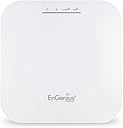
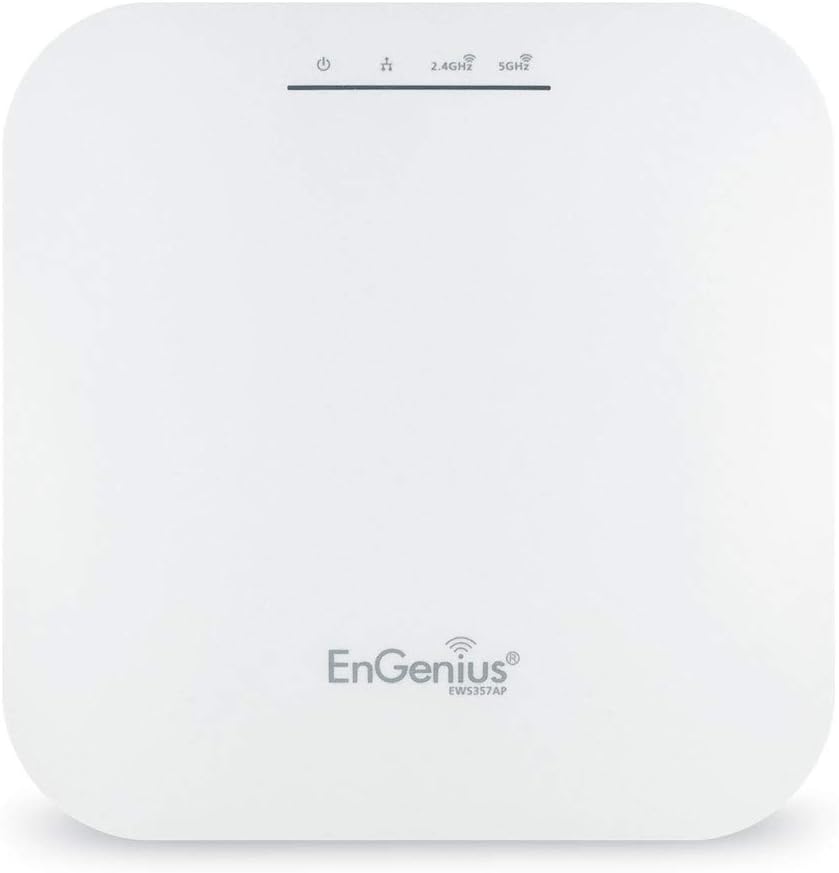
The EnGenius EWS357AP is a WiFi 6 AX1800 dual-band wireless access point delivering up to 1.73 Gbps speeds with 2x2 MU-MIMO and OFDMA technology. Featuring a 1 Gbps PoE+ port for flexible installation, 1GB RAM for smooth performance, and WPA3 security, it supports license-free remote management tools. Designed for professional environments, its ceiling-mount form factor ensures optimal coverage and a clutter-free setup.


| Antenna Location | Business |
| Antenna Type | Fixed |
| Asin | B07Q59N1VY |
| Best Sellers Rank | #295 in Computer Networking Wireless Access Points |
| Brand | EnGenius |
| Built In Media | 1 x Ceiling Mount Base (15/16" Trail), 1 x Ceiling Mount Base (9/16" Trail), 1 x Ceiling and Wall Mount Screw Kits, 1 x Quick Installation Guide, 802.11ax WiFi 6 2x2 Managed Indoor Wireless Access Point |
| Color | White |
| Compatible Devices | UNIVERSAL |
| Connectivity Protocol | Wi-Fi |
| Connectivity Range | 328 square_feet |
| Connectivity Technology | Wireless |
| Control Method | Remote |
| Controller Type | Switch |
| Coverage | 328 feet |
| Customer Reviews | 4.3 4.3 out of 5 stars (150) 4.3 out of 5 stars |
| Data Transfer Rate | 1 gigabits_per_second |
| Frequency | 5 GHz |
| Frequency Band Class | Single-Band |
| Global Trade Identification Number | 00655216009479 |
| Item Type Name | Wireless Access Point |
| Item Weight | 1.3 pounds |
| Lan Port Bandwidth | 1000 Mbps |
| Manufacturer | EnGenius Technologies} |
| Maximum Upstream Data Transfer Rate | 1200 megabits_per_second |
| Mfr Part Number | EWS357AP |
| Model Name | 802.11ax WiFi 6 2x2 Managed Indoor Wireless Access Point |
| Model Number | EWS357AP |
| Number Of Antennas | 2 |
| Number Of Ports | 1 |
| Operating System | ZyNOS |
| Other Special Features Of The Product | Internet Security |
| Ram Memory Installed | 1 GB |
| Router Firewall Security Level | True |
| Router Network Type | Wireless |
| Security Protocol | WPA3 |
| Unit Count | 1 Count |
| Upc | 655216009479 |
| Warranty Description | 1 year Manufacturer |
| Wi Fi Generation | Wi-Fi 6 |
| Wireless Compability | 802.11ax |
User
Easy to set up, just works
I can strongly recommend this for a technical audience. If you know what a spanning tree is, the difference between a router and a switch, and how to configure a static Windows/MacOS/Linux network interface, why an AP might wish to convert multicast to unicast, then this is a product for you. If not, expect a learning curve.I got the EnG 30W PoE injector with this. Simply plug in the laptop (or computer) into the PoE LAN port, the AP into the PoE port, configure the ethernet interface to 192.168.1.10/24 and connect a browser to 192.168.1.1. No internet access needed; fully configurable in isolation. Go through the settings; Basic for LAN setup (you want the AP to use DHCP to get an address for its management interface; it's still a switch however). Switch to Wifi and set up the dual radios, 2GHz and 5GHz. Enable AX. Enable beam steering (yes!) if you want. Enable spanning trees. And of course change the admin password. Hit all the saves and apply buttons. Watch it generate Linux files (it will show you Linux config diffs!) and restart services. Unplug the ethernet from your laptop, plug into LAN and done. Just works. Then go find its DHCP lease on your DHCP server (for the management interface) if you want to access it again. I will probably give it a static address on my 10 net outside the DHCP range.It's an EXCELLENT product for a technical user. Straight to it, no marketing mumbo-jumbo. And for a $130 with the PoE injector added. That's a good price IMO. Assuming it's reliable it'll be one of those infrastructure piece that just works until it's retired because it's technically obsolete rather than fraught with an endless parade of problems (Netgear, looking at you here).They do seem to also offer integration with more IT-friendly management platforms/tools, since obviously if you have 20 APs in a building you can't realistically manage them using a laptop and ethernet cable. But for us techies, ethernet and a browser is just right.It can sit on a surface like a shelf when used with a tablet stand. I attached an image where it's on an Amazon Basics tablet holder (the Amazon part is B006ZT4VA0; go to any product listing and paste it into the URL in lieu of the one you're looking at).
User
EnGenius WiFi 6 ax
Easy setup for some or small business access point. Great WiFi access coverage across entire house. Latest WiFi 6 implemented on access point. Latest WiFi devices plugs, lights swiches and bulbs from amazon, goggle and others connect without problems. Have three ac access points all managed by EnGenius android app. Excellent value for WiFi 6 device.
User
Fast! Very Fast!
I bought three of these along with a matching switch with built in controller I will likely have to replace in the future because these access points are capable of more than the 1G ports on the only reasonably priced switch that powers these.They are fast, as in hitting speeds between wired Realtek and wired Intel NICs! Over 900Mbit's in perf. The coverage is remarkable, even on the back side of the unit you get decent speeds.Now the bad, not sure if i's these units specifically OR endemic to 802.11ax but these access points don't like Apple Macs with the 802.11ac wave 1 adapters. they are constantly dropping and reauthorizing. This isn't happening with Apple iOS devices or seem to happen with cheap IoT devices. I've found no solution to this, though disabling fast roaming seems to have helped some.
User
Good, but not great, access point
I've had this access point up and running for a couple months now and I finally think I'm comfortable writing a review for it. The headline sums it up pretty well... it's a good access point, but it's not great.It will pass many of the standard metrics people are concerned about when it comes to Wi-Fi, like speed and range, well enough. This is actually my second Wifi 6 (802.11ax) device. This one doesn't perform quite as well, or have quite the same range, but it's within 90% of the other most of the time. Sustained speeds (on 5Ghz) in excess of 600Mbps, between two 11ax devices, is "typical" for the Engenius... With occasional spikes higher and lower depending on other factors.However, it's some of the things you may not frequently think of, where this AP loses a star. These include:Latency is higher with this device than with other access points. A ping to my router is double/triple (from sub 1ms with another AP to 2 to 3ms with this one) my other access point, with no other changes to network configuration. My instinct says this is probably caused by underpowered hardware, but the problem doesn't seem to get worse as the load increases, so that may not be the case. While an additional 2ms of ping isn't going to cause much harm for most applications, it bothers me knowing it's not as good as it could be.Compatibility with older devices is poor. We all have one or two devices that don't have a good upgrade path. In my case, it was a MyQ garage door opener. While the device isn't that old, it is a very basic 801.11n implementation. While it has connected to other 11ax access points, it will NOT connect to this one. I attempted everything from disabling WPA3 and AX support on the 2.4 band, to setting a completely unsecured secondary network with all but the most basic features disabled. No joy. An older laptop and a Surface 3 both refused to connect with the device in WPA2/WPA3 hybrid mode, where other WPA2-only devices connected without issue. The other 11ax AP I've used was also in WPA2/WPA3 hybrid mode... and these devices all worked fine.The user interface, while revealing a decent amount of control/options, is incredibly slow. This was originally what led to my assumption above that the device was using underpowered hardware, but the performance of the web UI is so inconsistent that I believe it has more to do with poor design (or extremely low prioritization) than with the actual performance of the hardware.Overall, this is a pretty decent buy for the $100 price point. If all of your clients are relatively new (802.11ac or newer) you'll like be very satisfied. But if you have older devices, (or recent devices, made poorly, by a garage door opener manufacturer) you may have some frustration.
User
6 Stars for stability, 5 stars for ease of installation with POE and 5 stars for management page.
Covers 2500 Sq ft of traditionally framed office space, single floor. Handles at least 120 devices including guest access. No one complains of coverage or speed anymore. POE deployment was a snap. I have one minor complaint and that is the lights (there probably is something in the firmware to control this, I honestly haven't looked). Anyway the lights look like a miniature Christmas light display, with Red, Green and Blue. It was easier to get a small piece of white/cream colored tape and cover them as this AP is deployed int he central hub of the building.
User
Fine, not amazing.
These work fine but I find the signal strength a little lacking and the administration interface is meh as well. If you're buying these for home use, I'd suggest maybe looking into TP-Link's Omada lineup. Overall not bad but I've had enough issues with them that I wouldn't really recommend them.The main issue I face is poor wifi signal (my house is 1089 sq ft with 2 aps, I shouldn't have signal problems), and a possible memory leak in the AP's firmware which causes the AP to tank in performance until you reboot it. Also, while they're meshable the implementation is a little wonky and they don't share any information, so you basically have to log into all of them individually to make any changes.
User
It helps!
I was skeptical about this product and whether it eould help with the bad wifi in my house. I had the router one room away from my wireless video doorbell and the lag was terrible or it would constantly drop signal.Now with this bad boy right here I get signal everywhere. It's wonderful. No lag anywhere 2400 sq ft ! Def would suggest buying this
User
Every home should have four
Switching my home from a mesh system to several access ports has made the Wi-Fi connection blazing faster in my house. Engenius access ports are often used in businesses, poor work great in homes as well. You may need a little bit of help with the AP’s settings.
User
Atención y seriedad al 100%
la atención fue excelente, siempre pendientes de que el cliente estuviera satisfecho.
User
Excellent product
Excellent product
User
Pretty good WiFi 6 access point
It was easy to set up. The firmware could be better with clearer options. The signal and speed are both good on a 500 Mbps internet service.
User
Longue porté 5ghz
Beaucoup d'option de configuration.Signale très puissant.
User
BEWARE this is not cloud managed
These are "on prem" unless you buy a skykey. Beware.
Trustpilot
1 month ago
5 days ago