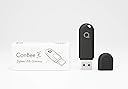
🚀 Elevate your smart home game with ConBee II — the universal Zigbee gateway that just works!
The ConBee II is a compact, universal Zigbee 3.0 USB gateway designed for seamless integration of smart home devices across multiple manufacturers. It operates locally without requiring cloud access, ensuring privacy and reliability. Featuring a power amplifier for extended signal range and broad OS compatibility—including Windows, Linux, and Raspberry Pi—it empowers professionals and tech enthusiasts to build robust, customizable home automation systems with ease.


| ASIN | B07PZ7ZHG5 |
| Best Sellers Rank | #341 in USB Computer Network Adapters |
| Customer Reviews | 4.4 4.4 out of 5 stars (6,401) |
| Date First Available | April 27, 2019 |
| Item Weight | 0.282 ounces |
| Item model number | BN-600107 |
| Manufacturer | dresden elektronik |
| Product Dimensions | 2.36 x 0.71 x 0.35 inches |
L**E
It works. It is easy to use. using python to control zigbee devices via the deconz rest api
update March 10 2024 - i am really quite happy because it does not ever cause problems, it just works. have used it every day since Jan 23rd 2022. original review June 17 2022 - here is some example python code to control zigbee devices via the conbee II deconz rest api - but first run the conbee II instlaller it will install the deconz app/service and the phoscon app import requests, pprint # ***** you must have the deconz app or service running for this to work ****** # - on windows: from start menu run the deCONZ app - it defaults to port 80 # - on pi from cmd line w/ ui: > /usr/bin/deCONZ --http-port=8008 runThis = 0 windows = 0 portWin = '80' portPi = '8008' if windows == 1: ipAddr = 'http : // <ip address here>:' + portWin key = 'A0xxxxxxEE' outlet1 = '1' else: ipAddr = 'http : // <ip address here>:' + portPi key = '7ExxxxxxA2' outlet1 = '1' if (runThis == 0): # ---------------- get api key # # 1) start the 'phoscon app' from the 'deconz app' ui # # 2) enable 'authenticate app' in 'phoscon app'-gateway-advanced # # 3) set runThisApi = 0 and run the code and you will receive an api key payload = {"devicetype": "my application"} r = requests.post(ipAddr+'/api/', json=payload) # [{'success': {'username': '4E2BA46CB6'}}] if (runThis == 1): # ---------------- turn socket on payload = {"on": True} r = requests.put(ipAddr+'/api/'+key+'/lights/'+outlet1+'/state', json=payload) if (runThis == 2): # ---------------- turn socket off payload = {"on": False} r = requests.put(ipAddr+'/api/'+key+'/lights/'+outlet1+'/state', json=payload) if (runThis == 3): # ---------------- light state r = requests.get(ipAddr+'/api/'+key+'/lights') pprint.pprint(r) pprint.pprint(r.json())
A**.
Works with all of my aqara products (so far)
I originally purchased the Aqara Hub M2 for my Aqara sensors (window/door, temp, water, motion). Problem was that the Hub did not pass on my water sensors to Home Assistant. That was a deal breaker for me. I then tried the Sonoff stick, and had similar issues, except the Motion Sensor would not show any updates/changes and I had lots of troubles with pairing. I then tried the Conbee and everything showed up nicely! Setup was not super smooth (did not automatically get detected), but I eventually figured it out. Adding devices was pretty easy. The web UI is nice, but definitely needs some enhancements (annoying help pop ups always show up when you go into Conbee). Overall, I am happy because I accomplished my goal.
J**A
Reliable Zigbee Integration
The ConBee II works flawlessly with my dedicated Home Assistant setup on a Dell 5050. Easy to set up, great range, and seamless integration with Zigbee devices using Zigbee2MQTT and deCONZ. Solid choice for smart home automation!
H**9
Get a USB extension cable for it!
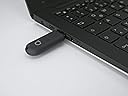
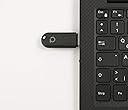
Nice little adapter for zigbee devices.. However, as everyone who buys this should know, is that you need a USB extension cable for it to work. Meaning if you plug it into your raspberry pi or laptop or nuc... It's not going to detect none of your zigbee devices... Something about interference with the signals coming from the pin or nuc or laptop. SO, WHY DON'T THEY PACKAGE WITH AN EXTENSION CABLE? Or make this adapter work "better" (as it should - meaning without the cable)? Anyway, once you get it connected a few feet away from your pi or laptop etc. It detects everything with problems... I connected an ikea bulb and aqara motion detector and everything is fine. I use home assistant and as a first time user it was tough getting deconz working (configuration). Sure all the info is there but these developers and hardcore diy home automation guys assume you know their lingo etc. Anyway it's working fine.. Will update after playing around more with it.
A**R
Easy setup
Easy setup with home assistant, worked well for pairing a few aqara devices thus far.
A**R
Plug and play for home assistant
I used to have a diy zigbee adapter for a raspberry pi, but the bare pcb and connectors got damaged. I was setting up home assistant and decided to grab a ready to use offering. This was the reccommended choice and it didnt disappoint. It was immediately detected and I have had no issues adding zigbee devices all over the house.
F**H
As shown
As shown
A**Z
Range is excellent!
My biggest concern was the range. I was using the Mijia hub before this to connect to Home Assistant using the Xiaomi custom addon but the range was very limited. I had to have line of site or close to it in order for things to work. I considered getting additional hubs and just adding them to each room where I would like to have zigbee sensors and switches but quickly realized that would be an expensive solution. So, I figured I'd try this and wow, the stick was easy to set up and the range is excellent. My Home Assistant server is approximately 4 walls between my bedroom and I am able to connect my smart switches. I even took them outside and the signal was able to reach. I saw little to no delay either at each distance I tested. Worth the price if you're on the fence about it and want wireless sensors and switches. Another huge plus is I can disconnect the mijia hub from my wifi.
F**M
Integrates well with ZHA + home assistant in raspberry PI
P**H
Had this for a while, but only recently got around to setting it up with my Domoticz HA. Deconz (the software from the manufacturer) is easy to get and install. It just worked for me. Got to the companion 'web app' that is installed with it, click to add a sensor, press the button on the do-hickie, and off you go! Much better than I expected and they have support for a lot of gadgets in there. I've only added the aquaria stuff so far, but that was failed to add back into my aquaria hub for some reason, and this just detected them. Too a couple goes to pair some stuff, but I belive that is fairly normal. Seems like a good product.
C**N
Great! I've had it running for about Two years now and it works through out the house with my ZHA (Zig-BEE) integration. I have a lot of dead areas for WiFi and the plugs and TRADFRI IKEA lights with Zig-Bee work seamlessly. As well as all of my Aqara devices i.e button switches, sensors etc. Without having an Aqara HUB! Installed with a USB cable onto a Raspberry Pi with a 200 Gig Hard Drive. Much better than WiFi devices and trying to keep track of all the individual I.P addresses. * NOTE: you have to "tethered" it onto a Pi with a good USB Cable and move it away from the PI rather than having it plugged in directly to your Pi. IF you install a larger Hard Drive (KINGSTON 200GIG!) for Home Assistant. Otherwise it causes interference and won't communicate to your devices, plugs, sensors, bulbs. Overall, it's less expensive than a dedicated HUB like IKEA, Aqara, SonOff etc. It works really well, but you should have a solid knowledge of integrating this type of controller into your Home Automation program such as Home Assistant. Hope this helps someone.
B**T
La mejor descripción sería - pasan los años y sigue funcionando. Llevo con el conbee más de 4 años y sigue funcionando como el primer día, despreocupado total de él, allí está haciendo el trabajo que se le pidió en su momento, coordinador toda mi red zigbee. No puedo comparar con otros cordinadores que han salido con los años porque tampoco he tenido la necesidad, sencillamente funciona.
J**N
I’ve been using the ConBee II with Home Assistant, and it’s been a great addition to my setup. The installation is pretty straight forward and once that’s done, it runs reliably and integrates well with automations. It’s stable and consistent, which is exactly what you want for a smart home hub. The range covers about two to three rooms in my apartment, which is fine for most setups. For larger spaces, adding a few Zigbee wall plugs or repeaters helps build a stronger mesh network. Overall, the ConBee II is a dependable, well-supported gateway that works as expected once everything’s set up.
Trustpilot
3 days ago
1 month ago