Desertcart purchases this item on your behalf and handles shipping, customs, and support to Tunisia.
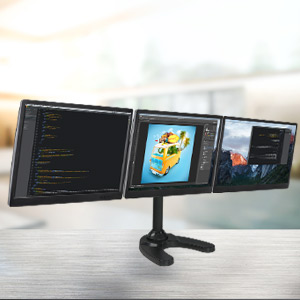
๐ฅ๏ธ Triple your screen, triple your impact โ command your workspace like a pro!
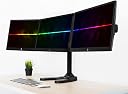
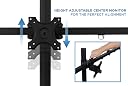
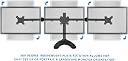
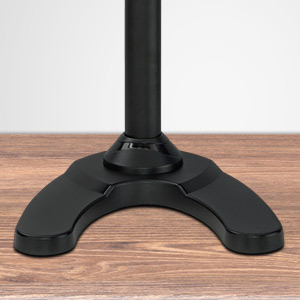
The Mount-It! MI-789 is a robust triple monitor stand designed for up to three 24" screens, supporting 22 lbs per arm with VESA 75x75 and 100x100 compatibility. It offers height adjustability up to 19", full 360ยฐ swivel and rotation, and versatile mounting options including freestanding and grommet bases. Crafted from heavy-duty alloy steel and backed by a lifetime warranty, it delivers a stable, ergonomic, and customizable multi-monitor setup perfect for professional multitaskers.


| ASIN | B00FQU7CPU |
| Best Sellers Rank | #606 in Computer Monitor Arms |
| Brand | Mount-It! |
| Color | Black |
| Compatible Devices | Monitor |
| Customer Reviews | 4.2 out of 5 stars 442 Reviews |
| Enclosure Material | Alloy Steel |
| Item Weight | 9.8 kg |
| Manufacturer | Mount-It! |
| Material | Alloy Steel |
| Maximum Tilt Angle | 15 degrees |
| Maximum-Supported Screen Size | 24 inches |
| Mfr Part Number | MI-789 |
| Minimum-Supported Screen Size | 19 inches |
| Model Number | MI-789 |
| Mounting Type | Floor Mount,Stand |
| Movement Type | Articulating , Fixed, Rotate, Swivel , Tilt |
| Number of Items | 1 |
| Number of Packs | 1 |
| UPC | 617401054220 713012040673 |
| Unit Count | 1 Count |
N**J
Good Quality. Sturdy.
Very solid triple monitor stand. Although the description says max 24 inch, I was actually able to mount 27 inch (diagonal)thin frame asus monitors on this (note their width straight across is 24in). I only had two of those, but it would support a third. Iโm using the third slot with a 21.5in monitor in portrait. Note sure if theyโve updated the version since some of the original reviews, but the center monitor is adjustable up and down. Looks to be by a couple of inches. I was able to get the monitors to adjust and line up perfectly. This is a very sturdy monitor stand. The base is nice and heavy and the design with the two โlegsโ pointed forward helps support it from Tipping (this is how Iโm using- not bolted to the desk) All of the adjustments tighten up adequate to stabilize the monitors in every direction possible. If you need to raise the lower your monitor often, this is probably not the stand for you. Although it does have a vertical adjustment (probably about 18 inches) it uses two screws to lock in place. So moving would be a pain. I donโt have a need to move it once set, so works great for me. Overall I would recommend this stand for anyone looking for a triple monitor stand. Great value for the $$$.
C**B
VERY HAPPY with the quality of this stand.
This stand is much more solid than I expected and is very sturdy and high quality. My only minor quibble is that the center monitor is slightly higher than the monitors on either side and I haven't been able to even them out, even after following the included instructions. It about 1/4 to a 1/2 inch difference but I can definitely live with it. There is an option to use the metal stand or to bolt it directly to the desk. I opted to bolt mine to the desk and it works perfectly (though I did have to drill a hole into the desk, but my desk is quite old and cheap, so I didn't mind). I did try out the metal base with only one monitor attached and it seemed very solid. The base is very sold and heavy and seemed to me more than up to the task of holding up three monitors. I left the swivel adjustments just loose enough to be able to move the monitors around, but not so loose that they will move on their own. This way I can tilt a monitor or two (or three!) to portrait if I am working with documents that could benefit from a longer vertical view. It takes 5 seconds to move a monitor to portrait and maybe 10 seconds to change the setting in Windows 7. I'm very pleased with this purchase, especially for the very reasonable price and would definitely recommend it.
H**.
Great Bang for Buck! Only one problem...
This is a very high quality monitor stand that is only lacking in one area that is preventing it from getting the 5th star from me. First off, the bang for buck here is incredible. I've heard of people spending upwards of $150 - $200 to get a stand to do what this does and I got this stand at the $90 price point with free shipping. And the stand is extremely flexible; all the bending and tilting it does will allow you to get the perfect set up you'd like. (I'd recommend sticking with 23.6" or smaller monitors so you can have some more wiggle room to make adjustments. Yes it can support 24" monitors, I tested it, but I prefer 23.6" and smaller for that extra bit of adjustability and wiggle room.) Second off, if you're like me and like to specifically view the 1 star reviews of products to see what complaints people have, you're going to come across some misguided folk who are going to lie to you. You will read from some of the 1 star reviews that you can not adjust the tension for the vertical tilt of the monitors. That is false. You CAN adjust the tension required to adjust the vertical tilt on the monitors. There are black end caps on the vesa mounts that you have to pop off to see a bolt that you can tighten via the wrench that is included. And that brings me to my next point - props to Mount-It! for including all of the necessary tools / screws for installation, along with very easy to read instructions. Now you're probably wondering what stopped me from giving this stand 5 stars. The center pole does not have a large enough opening at the top to fit power cables, larger HDMI cables (rocketfish cables for example) or DVI cables through it, so it was disappointing to discover that I could only run small HDMI cables through it. I can imagine what it would look like if I was able to run all my cables through the stand and have them all disappear from sight. It would look glorious. Unfortunately, Mount-It! must not have considered how thick some connections can be, which led to a slight degree of disappointment. EDIT: A few moments ago I discovered you can pop off a cap at the top of the center pole that is limiting the diameter of the pole, thus, increasing the number of cables and variety of connections that you can fit through the hole. It feels pretty cramped with just three cables in there though, and considering you need to be able to fit 6 to hide all cables.... This aspect is still slightly limited and disappointing. Staying at four stars until I can get all 6 cables to be hidden. Overall, I'd highly recommend this stand to a friend. And to strangers, too, of course.
S**Y
Beats the Major Brand Name price/value.
Lets start out with this thing is BIG!!!! It take up about 80% of my desk. I have 3 24inch monitors in portrait mode set up on this mount. Ever since I went to NVSurround I've wanted a triple monitor stand. All the competition is expensive but thats what you get when theres a small market and not a lot of manufacturers. Mount-it! has done a great job with this monitor stand. It's built tough, its heavy so it doesnt shake at all. It has ALMOST all the bells and whistles. tilt, swivel, rotate. Just short of height adjustment. I was mostly excited for the rotate because i like to switch between portrait and landscape with my displays for gaming/photography. It took 2 people to adjust the monitors to a comfortable height on my desk. Has wire management clips and down the back support tube. Be prepared to buy longer cable though. At the end of the day, I would buy another one of these if I needed to. For 85$ this beats any ergotech or any other brand for what you get.
A**P
Ok mount - very very very hard to align 3 monitors if that is even possible
I am a big favorite of reading the reviews and picking up a good product so here is a short breakdown of the mount! Pros: 1. Does it work - yes! 2. Is it built well - yes! 3. Does it stand well with the base - yes! 4. Does it have cable management - yes (not very ideal though)! 5. Is it height adjustable yes (this is very nice)! 6. Would you recommend it - Depends! Cons I will explain a little more in detail. 1. Biggest and most annoying thing - if you want the monitors to be exactly aligned it is almost impossible with this mount. The reason for this is that the middle monitor does not actually move down. The directions say that you are supposed to tighten the top screw and release the bottom one to move it up or down but that is just flat out false - when you see the construction on the inside you will see that it is not possible to make it go down. 2. The arms will droop slightly depending on the angle position of the monitors which makes the alignment with the middle monitor very very hard. 3. To align all monitors perfectly they need to be exactly the same model - I have 3 asus 24 inch monitors and one of them is the previous generation of the other 2 and lets just say that's the one that droops the most. 4. Even Though the build quality and sturdiness is great the swivel function is tightened with a nut and key - omg all 3 of them are in different directions. The nuts do not give but I think the design could be it better and easier to work. 5. the left and right monitors do not have an option of being picked up or dropped down vertically! It will drive you nuts until you figure that out. - I would love some sort of nut that would allow me to loosen it to align the two outer monitors with the middle one if the middle monitor is not going to move! 6. The column is useless for cable management - you have to put the cables in before you put the screws to stand it up! You would figure it would have a separate channel of at least something to guide the cables away from the screws. Synopsis: Will I keep it! Yes - I managed to align everything after 4 hours where it does not bother the hekk out of me. It is good stand for the price - it is sturdy - gives 2 options for mounting - if you have a wooden desk that is. Would I recommend it? I would if you just want a stand where the position of the monitors does not freak the hell out of you. If you the two outer monitors are not aligned with the middle one does not bother you, it is definitely a very nice alternative to a stand that costs 300 dollars. For a person that will get bent out of shape if the monitors are not aligned - I would not recommend it you will go nuts and you may still not be able to get it to the point where you want so to save yourself the crazy just spend the extra money and don't think twice about it.
J**T
Awesome triple monitor stand.
Love this monitor stand. I have three ASUS 24" 144MHz. Monitors sitting in the stand and have enjoyed the set up well over a year. The stand is very stable and has supported my monitors while on top of my roll up desk. The multiple adjustment points is the main selling feature of this stand I can choose to run all three monitors flat or in a surround "arched" format. The only Con is that in the set up I had to cut slots in the brackets to move the monitors up on the right and the left side. They seemed to sit 1/2" lower then then center monitor. Anyway for the price I can not complain and feel that I made out like a bandit. Very clean and stable triple monitor stand. For the price it is worth every penny.
J**A
OK with some problems.
UPDATE: The more that I use this monitor stand, the less I like it. I thought that I could live with the monitors not lining up, but it is becoming more difficult to do so. Another issue that even with the slightest adjustments, the screws loosen causing the monitors to sag or tilt. I cannot recommend this monitor stand, and would tell people to avoid even trying it! The Mount-It! Freestanding Monitor Stand suited most of the reasons why I wanted one. The best thing about it is that it brings the monitors up to eye level and off the desk, for that much needed desk space. It was a little difficult to put together, in part because it is heavy. But you want something heavy for the stability. I wish that I had another person help me attach the monitors, because the thing kept tipping over. But once put together, it is very sturdy. (You'll need to do a lot of adjusting to the arms and the tilts. But once you've got it down, tighten everything up.) My only problem with this product, is that the monitors do not line up. I was looking for a nice, clean line across all three monitors, but they aren't all even. The one on the left is about 1" lower than the center, and the one on the right is about 1/2" lower than the center. I tried to adjust the arms and the swivel component, but couldn't get it to even out. If the monitors lined up, I would have given it another star. I almost thought about sending it back because of it, but it was such a struggle to put together, I didn't want to have to go through the process again, so I'll just live with it.
A**A
What a beautiful machine they put onto my desk!
This machine is amazing. First off, it is HUGE.. Not just huge but heavy. If you are not comfortable holding 70 lbs of monitors and machine up, get assistance putting your monitors on this thing. I suggest pillows under all of your monitors. Secondly, make sure you know what height you want the monitors to sit at prior to adding all the monitors, this thing is a real pain to change your mind on only because its so big and heavy. Finally, make sure you tighten things up prior to your final position if the thing is not easily accessible. Because of how large it is and how unwieldy it is, any change you have to make after final installation will take forever. I absolutely love this thing. It not only caries my three 24" monitors with some ease, the base is large enough that it supports them without the fear of it tipping (a fear you need to take care of while building this monstrosity). Ignore the "through the body" wire harness, and get yourself some good old fashioned zip ties. Also get some extra long video cables. This takes a lot of real estate and your are talking about a cable that has to reach from one side of all the screens to where ever your computer is. I also suggest getting either extra long power chords for the monitors, or bring a power strip just for the monitors. Know where you are going to place this thing before you put everything together however. This thing is so big and ungainly that trying to move it after you've built everything is a bit on the dangerous side only in the fact that you want to be careful and not break your stuff. Consider your moves with this thing very carefully prior to movement. With all of that said, it comes with plenty of extra parts so if something does break in transit (that is not metal), they have you covered. It also comes with various ways to mount your system in case you want to permanently mount it, as well as the tools (except the drill bit -7mm- and drill). I would buy this again as it is a great deal. I would recommend this to anyone trying to mount 3 monitors. Its a fantastic assemblage and I am loving it.
T**N
Eyefinity / Nvidea Surround approved. Provides a Great surround setup
Pros- Build quality - I feel like a banker, this is very heavy duty. Will give a 90 degree angle left panel to right panel, perfect angle for Eyefinity or Nvidea Surround. I didn't want to have my monitors in a straight line and this stand really gives great angles on the panels. Adjustment, You could run the 3 in a straight line, or a Eyefinity surround setup, becuase of the way the arms articulate. You can Place your panels anywhere. The turn 360 degrees, swivel almost 180 degrees ( side monitors) Weight. Very heavy, was able to support it's self while installing monitors. while it was very unbalanced, it was heavy enough to not fall over. Cable routing, you can attach the cables to the adjusting arms, then route them straight down the main tube and out the back, leaving a very clean finish. Size, Im running 3 23" monitors. it works, I would have room for 24 NP, with a surround setup. weight is no problem, no sag experienced. Price - cheaper then most other stands. Mounting - Comes with hardware to desk mount, to mount with included stand, and to screw to a desk. Also comes with hardware to mount on flat backed monitors and curved back monitors CONS - Once the monitors are on, height adjustment is EXTREMLY difficult. You have to unscrew two screws and the arm assembly just slides up and down the main tube. Although there are lots of height options, changing them is probably a two person job ( one person to hold the assembly, one person to do the screws.) I personally set my height, and had to move it up one hole becuase i could see the main tube over the middle screen and it was ugly. Initial setup - Uses a bolt to adjust the pivot, can be hard to setup and readjust the pitch on the monitors. Takes alot of space to setup, but if you're going to run 3 monitors you better have enough space to set it up in.... Final setup - Becuase there is so much adjustability, it is hard to set up all 3 monitors in a straight line. The moniotrs are adjustable on the X, Y, Z, and one more plane. infinite adjustment and options... I would buy 2 more, one for another computer, and a third just to have. couldn't be happier with build quality, espically the surround feel it can provide in surround
R**B
Strong and sturdy
Excellent unit. Impressively sturdy and supports my 3x ASUS VN247 screens (23.5") nicely and at a good range of angles. Many user reviews claim the screens fall down because the angle adjust bracket is loose - these are things you need to tighten to suit your needs and screen weight. I also read someone complaining that the center screen doesn't line up - there's an adjusting bolt on that bracket which allows you to raise or lower depending on your needs. This is all written directly in the instruction manual, so it's obvious these reviewers didn't read. The kit also comes with a bracket option to drill a hole into your desk for inserting a bolt through - perhaps used for heavier screens if you're still using the legs, but also for those who don't want to use the legs, or perhaps just to prevent the unit from being able to be moved around. Affordable price and sturdy construction. Although one of the arm's plastic cable organizer connects came defective and it's missing the clip end to keep it closed. The price of this unit is considerably cheaper compared to stores nearby, but it doesn't impact the quality.
S**M
What else do you need in a monitor stand?
I like it a lot, it has all the bells and whistles you need in a monitor stand. The base takes a lot of space, but I guess it needs to be big to support the weight - besides, it still takes less space than having three monitor bases sitting on your desk. You can also bolt it directly on the desk if you're willing to drill holes in it (mounting bolts are included). Overall I'm very happy with it, very good built quality, feels likes it's made to last, easy to assemble, decent price, and works exactly as intended.
D**T
Decent but cheaply made
Fairly easy to install and holds 3 24" Dell monitors nicely. Product came with scratch on the base and one of the plastic cable holders was broken.
H**C
Great value, regained tons of desk space
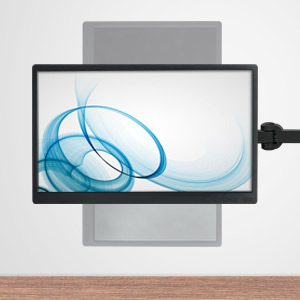
Prior to getting this I had 3 screens sitting on their own. With this stand they're now at a height I actually want, and have a lot of deskspace back. Assembly was no problem at all, nor was attaching the screens (23" 1080p). Some of the bolts on the joints had to be loosened with considerable effort from the allen keys (so much so I was afraid the key would snap before the bolts started turning), while others needed tightening. A small concern before buying was this part of the description: "The monitor can be installed in either portrait or landscape mode. The mounting panel cannot rotate to interchange from either of the modes". Thankfully the "cannot" seems to be a typo, because they most definitely can. Pros: - Screens can be freely rotated from landscape to portrait (or any angle in between) anytime - articulated arms give great flexibility to mount screens at exactly the angles you want - good build quality, solid base - cost: hard to beat $90, was put off in the past by 3-screen stands which cost north of $200 Cons: - center screen mount feels loosely attached to the stand, it actually jiggles easily. Takes away a bit of confidence in its ruggedness - screen mount can rotate 360ยฐ freely) but there are no distinct stops at each 90ยฐ increment (e.g. landscape, portrait), making it harder to line up all screens at precisely the same angle of rotation. - weighted base should extend forward another inch or two for additional stability. As it is currently, if the outside screens are angled to face you head-on it will almost certainly topple over. In retrospect, if I have to bolt it to the table, I may as well have gotten the version of this with the clamp instead of a base for $30 less. - you can't realistically slot 6 cables (3 power, 3 video) through the central tube - can't adjust assembly height easily, since arms are attached to central tube with 2 screws. Not an issue for me personally since I knew I wanted it as high as possible.
Trustpilot
3 weeks ago
2 days ago