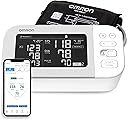
๐ Take control of your heart health with precision and style!
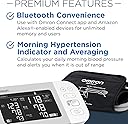
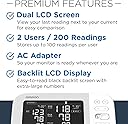
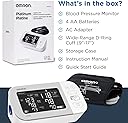
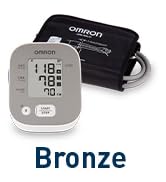
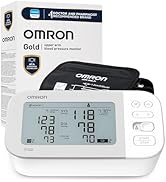
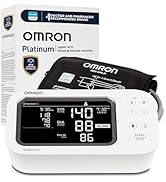
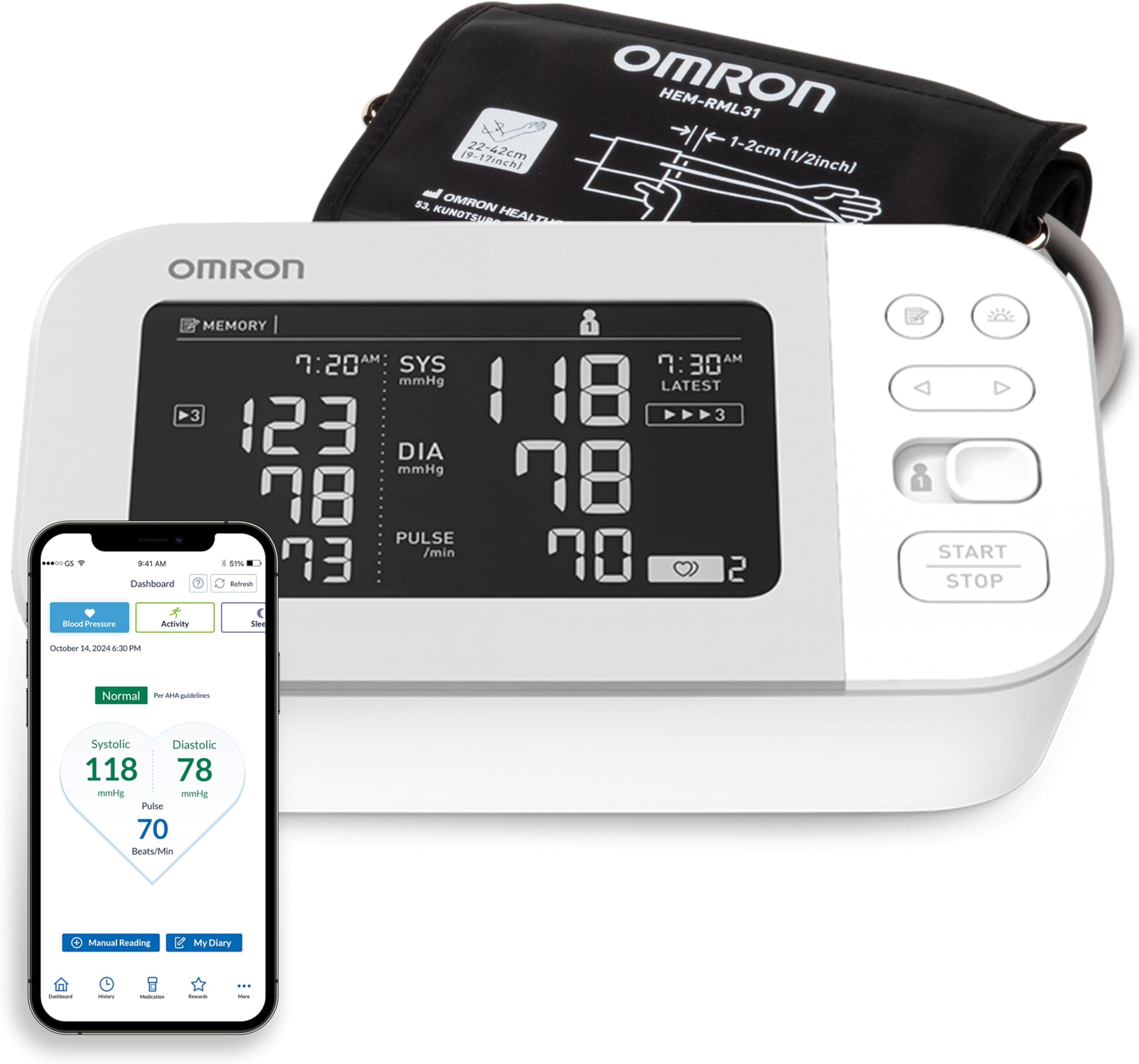
The OMRON Platinum Upper Arm Blood Pressure Monitor combines clinical-grade accuracy with smart features like Bluetooth connectivity, a unique morning average alert, and a dual-display screen. Designed for two users, it stores up to 200 readings and syncs effortlessly with the OMRON Connect app. Backed by a 6-year warranty and FDA registration, itโs the trusted choice for proactive, data-driven heart health management.


| Asin | B07RX8WQ4K |
| Batteries | 4 AA batteries required. (included) |
| Best Sellers Rank | #109 in Automatic Arm Blood Pressure Monitors |
| Date First Available | August 22, 2019 |
| Item Model Number | BP5450 |
| Manufacturer | AmazonUs/OMRC7 |
| Product Dimensions | 4.7 x 7.5 x 3.3 inches; 7.36 ounces |
User
Easy to use and very accurate.
The Omron Platinum Blood Pressure Machine is very reliable and accurate and it comes with a nice carrying case. It closely matches the readings of the machine used by my physician. It has 2 programs to store your results for easy access, and it also records irregular heartbeats. I am very pleased with this purchase and its ease of use. Omron is recommended by many physicians and I find it to be a machine that can be trusted to give accurate results. If you want to feel confident with your blood pressure readings, look no further, Just get the Omron Platinum, I highly recommend it.
User
Great monitor, excellent Customer Suport.
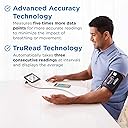
Iโm happy with this monitor, the readings seem fairly accurate. I like that you can set it to take 3 separate readings at short intervals and it shows the average of the 3. For me, that shows a more accurate reading than just doing it once.Iโm trying to keep a log of my blood pressure so I downloaded the app onto my IPhone and my results sync to it each time I take a reading. The app records the readings and shows an average over a week, a month or a year. What Iโm not happy with is the app froze on my IPhone this morning and the only option was to delete the app and reinstall it. After doing that, all my history was gone so I canโt see my averages for the week, month or year. My readings are still in the memory of the monitor but there doesnโt appear to be a way to recover them to the app. So Iโm just starting back at square one and building new averages as from today. Letโs hope the app doesnโt freeze again and I lose all my history again. I checked all the FAQโs on the app but it doesnโt appear that there is anyway to recover your history from the monitor to the IPhone app. Disappointing!Update: I contacted Customer Support regarding the issue with the app. Their reply was prompt and they informed me that there is an option within the app to save all readings to their cloud. Although this was not clear in the instructions, I have now set the app to save all my readings. Their Customer Support was excellent, hence I have now increased my rating to 5 star.
User
Easy to use and accurate, app is better than it used to be
I purchased this almost 2 years ago after having sinus surgery and discovering I have high blood pressure. I wanted something that could be used for more than one person if necessary and a app that would keep track of readings for me. The monitor itself is easy to use and accurate. I've taken my blood pressure before going to a Dr appointment for a recheck and the readings have always been close.Battery LifeWhen I first purchased this, I was taking my BP 3 or 4 times a day for about a month. I have it set to True Read with 15 seconds between readings. That's 9 - 12 readings a day for a month. I eventuallybacked off and just check in the morning before I get out of bed and at night before I go to sleep, so it's now at 6 total readings a day. With this much usage, I find that I have to replace the batteries about every 3 to 4 months. If you don't use True Read or don't check daily, the batteries could easily last for a year or more.Movement and Irregular beat detectionI'm not sure I would rely on it to detect something like Afib. I have found that a very slight movement will show as irregular heartbeat and it take quiet a bit of movement to trigger the movement alert. When I first noticed this on readings, I started paying closer attention to what was happening at the time of the reading and more often than not, there was a slight movement in my arm, but there were times where it would show up with no movement. After several occurances with no movement, I decided to discuss with my doctor and have further testing done. This can't replace a trip to the doctor, but it can give you important information to discuss in your visits and may help catch something early.Mobile AppThe app has come a long way in the last two years. It's advertised as automatically syncing with your device, but I have found that to not be the case. The previous version of the app would never sync unless you opened the app. The latest version will sync without the app open, but it seems pretty random. Sometimes I open it to find that the previous reading has already synced, but most of the time, it hasn't synced since I last opened the app, which has most likely been a few days.
User
Accurate And Easy To Use. App Get's It Done, But Could Use Improvement.
I purchased the OMRON Platinum to replace to become the primary blood pressure monitor because my wife started to monitor her blood pressure more closely and didnโt like my Withings BPM. I have had previous experience with OMRON monitors and liked this one because it was able to have two profiles, store a lot of data and has an iPhone app.SetupSetup is easy and everything you need is in the box. The cuff has the tubing already attached, so you just need to insert the tube end into the left side of the machine. No need to look for batteries. They are included and are inserted in the bottom of the machine. It also comes with an AC adapter. Instructions are clear on how to start up the machine and set things like date, time, how many times you want to take your BP for averaging, the interval between and setting up the machine to work with the Omron Connect App.Taking your BPIf you have never taken your BP before, I suggest that you talk to your doctor or at least read online on what to do (and not do) before taking a reading and how to properly place the cuff on your arm. The manual does mention all of this, but at a higher level with the exception of using the cuff and the operating the machine because their focus is on the use of their product, not educating you on what to do before โ thatโs your job and I wonโt get into the placement and alignment. Taking the reading is simple put the cuff on as instructed, select your profile from the switch (1 or 2) then press the START/STOP button. The cuff will inflate and deflate, if you have select to do averaging, it will do it multiple times, then at the end, it will give you your BP and heart rate.DisplayThe display is white text on black background which is opposite of most LCD screens. I found that this setup made it easier to read in varying light conditions and the text appears sharper than most displays I have seen. Systolic, diastolic and heart rate numbers are in large, easy to read text. It will also show you your last reading on the left side of the screen. At times there is a lot of information on the screen, but not really all that important or necessary, for example, inflate and deflate and some others โ you know it is happening because you can feel it. If not, you got a bigger problem than your BP.AccuracyFrom my experience with the monitor is that it is accurate to within 2 mmHg. My readings were done at a consistent time, sitting with cuff at proper height on arm, 5 -7 minutes rest period prior, without eating for 30 minutes prior, no coffee or exercise prior to it, and 1 minute interval between consecutive readings. I used the devices 3 reading average BP and also ran 3 individual readings and dropping the first (normally most inaccurate) then average the last two. The averages matched within the mentioned mmHg that my friend, who is a doctor, took for me during my evaluation across several days using the โold fashionโ method. If you read the reviews from people that said the device was highly inaccurate, there was a high likelihood of user error, even as simple as probably not remaining still or setting the interval too close on the multiple reading setting.Omron Connect appYou donโt have to use the app as the device has internal storage for a lot of readings, but I like having all my data on my phone to give me a complete picture of weight, activity, BP, pulse, ecg, etc. The device pairs to the phone via Bluetooth, not wi-fi (like the Withings). You transfer the readings to your phone by going into the app and pressing the sync button. This is where the app gets a little wonky. Sometimes, it sync on its own, sometimes you have to press the button, sometimes it fails to get the data for find the device. But, it tells you what to do to fix the issue. Not a big deal for me, but definitely not as seamless as the Withings which immediately transfer the readings via wi-fi to the phone. This is only feature, to me, that requires more work.Overall, I am very pleased with my experience with the product and have recommended it to other family members and friends.
User
Easy to use. Gives all the information I need.
This product is very easy to use to get immediate readouts. I do not use the history function but it seems a bit confusing for tracking patterns.
User
Reliable BP machine
Excellent device, which has reliability and accuracy reported by major organizations - look them up. I have purchase 4 of these machines, for use in various settings and with several relatives. All performed well. I have compared them with traditional manual cuffs and even a mercury manometer, with good results. There are several versions of this product, especially the gold and platinum models. We have found the backlit platinum version to be the best for visibility, with the white on black numerals. It is certainly better in low light and for persons with limited vision. I have mentioned elsewhere that any single BP reading will vary to a degree, which is why you need to take several readings and look at the average. That variation also occurs based on the machine, setting and operator. A BP reading taken as soon as you set foot in your physicianโs office, without time to rest, will probably not be as accurate as one taken after you have had time to relax and settle. That is the main benefit of this device, in that you can take your readings in the comfort of your home and bring them with you to your physicianโs office. I have read several articles that report automated BP machines may be more accurate than manual BP machines. This is a little embarrassing, in that after 40 years as a practicing physician, I thought I could take a better BP than any machine. So, I have swallowed my pride and bring a record of my home BP readings on this machine to all my physician visits. You might visit the American Heart Association sites and read their opinions on how to take BP readings. They are enlightening and address some of the more โinterestingโ comments in some reviews.
User
My MD likes how it works
Love it and my MD likes the accuracy of the readings.
User
Reading are Not correct, not even close.
Warning, there is no returns / no refunds on this item.Wish I could give this zero or negative stars.At first look without using it, It seems to be made well.The reason I purchased this was because my doctor wants my blood pressure a little lower. It is at the high end of the safe range, he woul like to see it closer to the middle of the safe range.Major issues:1) Will not stay connected with Bluetooth, keeps disconnecting, then you must go through the pairing process each time.2) Will not stay synced. Must keep runing through the Bluetooth pairing process inorder to sync device to app. Wait a few minutes the app says it is not connected to the device, yet I am still sit at my desk with the BP monitor within two feet of my phone.3) Worthless App, After you spent 10 to15 minutes each time, trying to get this thing to pair with the app and to so-call sync it. The app says it synced, yet the app shows no results. App does not show any reading, so what is it syncing? What is the app for? I wanted to be able see past reading and to be able to shows my doctor if needed. Says it stores up to 100 reading for teo users. Where are these reading stored, not in the app. If they are, it does not show them to you. Select dashboard, white screen. Select Blood Pressure, white screen.4) **** MAIN issue. Incorrect readings. I took this with me to my doctor's office. I wanted to make sure I was doing it correctly and that the reading were correct, or at least in the same ballpark. Why did I do this? The first two reading I took looked way off. At my doctor's office, I showed him how I was doing it. He said, that looks correct, the reedings were way off, 221/162. So my doctor took a reading with his equipment, then tested this blood pressure reader. He put the band on my arm and took the readings. He switched back and forth, three times each, between his machine and this one. My doctor even took a manual reading to ensure his equipment was correct.Results:My doctor's equipment reading were 128/81, 127/80 and 129/81 for the three reading. Doctor's manual reading 127/81, in the same tiny ballpark as his blood pressure machine. The difference between his machine readings were basically null, within 2 points of each other on both upper and lower readings and his manual reading.Using this blood pressure machine, my doctor took the readings. He even checking the arm band and tried repositioning it. Doctor's reading with this blood pressure reader were as follows: 219/152, 181/119 and 198/129 for the three readings.Please remember, my doctor was switching between his BP machine and this one for each reading.a) Readings are WAY off, by as high as 91 points.b) The reading are all over the place. Upper numbers are fluctuating between 91 to 54 points.Lower reading fluctuating between 71 to 39 points.My doctor nor I trust the readings from this machine. There is no reason for my doctor to make this fail. Besides, I took two reading the day before and they were way high (the reason I took this with me to my doctor's appointment).Based on this machine, I have Super Hypertension Stage 3 and I should be in the hospital or dead.My blood pressure is at the upper end of the safe range, no where need being a critical or life threatening health concern as this machine says.I am now out $84+ on this junk. (No returns, no refunds).If you for some reason decided to buy this Blood Pressure reader, Please, Please check and confirm the reading with a doctor's BP reader or one at your local pharmacy before you start relying on its reading for any health related issues.
User
Excellent BP monitor as most OMRON's are.
UPDATED!I wanted to update my review due to this device CORRECTLY identifying an erratic heart rhythm.So I was taking my husband's BP and this little heart erratic rhythm symbol kept appearing.At first, I suspected that it was just him moving his arm.So as I took the next test, I also monitored his pulse on the other arm.Sure enough, exactly when this device detected a missed beat, I could feel the missed beat too.As it turns out, he was having a reaction to a new medication that the doctors removed him from.The doctors also confirmed the erratic rhythm with ECG.After 24 hours off the meds, his heart returned to normal rhythm and this BP monitor confirmed that too.THIS IS A MUST HAVE!______________________________ Previous Review Follows ______________________________We upgraded to the Platinum Model BP5450 mostly for the soft cuff and some of the extra features.Our other machine, which is old but still works fine, had that dang "Formed Cuff" which is a real pain to use, especially on small arms.This soft cuff (I think it's called, D-ring) is basically like the one in the Doctor's office. Easy to put on and doesn't pinch the skin.Some of the features are nice, like the screen showing the previous readings as well as current.We did NOT buy it for the Bluetooth connectivity or its App.I did download it, but the App is not good at all!It's a pain to get working because Omron DEMANDS an account to be made.So, I set up an account, but of course, NO WAY was I putting in my actual identity! NO WAY, NO HOW!What was really annoying too, is that I went to see how it integrates with my Google Fit, but when I saw it pop up wanting my Google account info and making it clear that it will have access to my REAL IDENTIFICATION, again,NO WAY, NO HOW, NU-UHUH!So if you want this for the app, I'd suggest forgetting about that.If you want it because it's a great and seems accurate BP monitor, they yes, I highly recommend it.Omron really does make the best monitors.
User
OMRON Platinum Blood Pressure Monitor
Great purchase, it's so nice to be able check my blood pressure whenever I want. The monitor is for two users and has a guest feature, so if some it at your home and not feeling well you could check their BP and pulse.Like many reviewers here I too had some difficulty pairing the unit to the app. However I've figured it out.When following the set up instructions user 1 has to set up an account with a verified email address. When pairing the monitor too the app the switch on the monitor has to be set to user 1 and on the app you have select user 1 as well. As long as you do that the pairing should be smooth. For user 2, user 2 will have to have the app on there own phone and set up an account with there own verified email address and when pairing select user 2 on the monitor and user 2 on the app.The OMRON app sync's easily with Apple Health app. Select sharing on apple health app. Select apps then select OMRON connect then turn it on then you can select what you want the OMRON app to write and read on the Apple health app.When I take my blood pressure I open the OMRON app and the Apple health app turn on the BP monitor take my blood pressure and the readings show up instantly on the OMRON app and after a few seconds the readings automatically sync to Apple Health. If you forget to open both apps before you take your BP just open both apps and on the OMRON app top right just tap the little Sync button and within a few seconds both apps are updated.I have location services set to Never on my iPhone for the OMRON connect app and it works perfect.I hope this review will help those having difficulty with the setup
User
Byer be aware
I bought his machine in May and noticed right away that the cuff that comes with it is big enoguh to go around my waist. This is a high end product and I was surprised, when I was in touch with the company, that there is no smaller cuff available for this model short of the Extra Small (7"-9").This is a top of the line rig and in every FAQ it is emphazied that it's importan to use a correct size cuff. How can you use one when there is no reasonable size available. I wouldn't have any problem paying for one.I'va seen a lot of messages that the Bluetooth and the app don't work. Mine has worked 100% of the time (Samsung S9+) but the chart in the app is confusing, so I'm back to plugging the figures into Excell like I've been doing for years. A better chart would improve the app 100%.I'd like a opinion from the management why there's is no reasobable size cuff available for this model, instead of just a repply from the tech support that sorry but what you see is what you get.
User
No pressure here, buy it it's good.
Super good blood pressure monitor. Easy to use and straight forward directions. Very worth the money.
User
Great product
Great product, accurate and reliablebut what truly stands out is the exceptional staff and customer service.Highly recommend!
Trustpilot
5 days ago
2 weeks ago