

🔑 Unlock Your Productivity with Style!
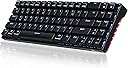
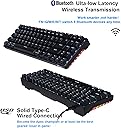
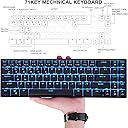
The RK ROYAL KLUDGE RK71 is a 70% compact mechanical keyboard featuring 71 keys with red switches, designed for both gaming and office use. It offers dual connectivity via Bluetooth and USB, ergonomic design for comfort, and customizable backlighting, making it a versatile choice for any professional or gamer.


| ASIN | B07VVVC13N |
| Additional Features | Bluetooth, Lighting, Wireless |
| Antenna Location | Gaming, Office |
| Brand | RK ROYAL KLUDGE |
| Built-In Media | USB Cable |
| Button Quantity | 71 |
| Color | Red Switch |
| Compatible Devices | Gaming Console |
| Compatible Operating System Family | Linux, MacOS, Windows |
| Connectivity Technology | bluetooth-usb |
| Customer Reviews | 4.2 out of 5 stars 633 Reviews |
| Enclosure Material | Acrylonitrile Butadiene Styrene |
| Hand Orientation | Ambidextrous |
| Item Dimensions L x W x H | 13"L x 4"W x 1.6"H |
| Item Weight | 0.82 Kilograms |
| Keyboard Backlighting Color Support | Single Color |
| Keyboard Description | Mechanical |
| Keyboard Layout | QWERTY |
| Manufacturer | RK ROYAL KLUDGE |
| Mfr Part Number | RK71 |
| Model Name | RK987 |
| Model Number | RK71 |
| Number of Keys | 71 |
| Number of Sections | 2 |
| Power Source | rechargeable battery |
| Recommended Uses For Product | Gaming, Office |
| Special Feature | Bluetooth, Lighting, Wireless |
| Style Name | Contemporary |
| Switch Type | Red Switch |
| UPC | 791324559502 |
| Unit Count | 1 Count |
C**.
BT, usb c, quality feel for $37!
*six month update* I have been using this keyboard every day for my work at home setup and I am very happy with the purchase. The longest I have gone without charging it has been about a week and I still don't even know if it needed a charge. The keyboard goes to sleep when not in use so if I walk away for lunch it just needs to be woken up before typing away. I am not a Mechanical keyboard enthusiast, but just a noob so I am not familiar with the $200 builds and simply don't have the budget to justify that kind of purchase which is why this one has been a steal. If I could do it again I would have bought the blue clicky keys since there are no coworkers to bother while working from home. *one month update* Everything below still pertains. I enjoy it, no weird bugs are occurring. I wish it displayed the battery life somewhere. I am just charging it every few days so it doesn’t die on me mid work but I never know what the life is at. I suggest getting a palm rest if you are using it for 8 hour work shifts as it is higher than standard office keyboards. First impressions To clarify I am using this for office work and personal. I do not have a gaming pc but instead bought it for the tactile clicky feel. I bought it with brown switches as blue would be too loud. So far it’s been really good value for the $37 I paid. I went deep into the rabbit hole of mechanical keyboards and was ready to pay more than $100 but refrained from doing so because most didn’t have Bluetooth. Like I said I’m not gaming so I don’t need bt. This has everything I want, it has a quality weight to it, the keys have a metal cool touch to them, and it successfully paired with all my devices. It also switches from one to another in seconds. All on top of the fact that it has usb c which will be a must for my Mac. For this price you can’t go wrong if you’re like me and just want an entry level mechanical keyboard for typing duties. My only gripe is that I miss the 10 digit keypad. I plan on buying that separately since I didn’t see rk offered a 100% of this version.
F**M
Works great.
I really like this keyboard. Before I had a huge mechanical keyboard ans a regular mouse. I believe that the large keyboard and mouse where contributing to my wrist problems: swelling, stiffness and discomfort. After switching to an ergo mouse ans this keyboard my wrist has greatly improved. I still get fatigued but it isn’t nearly as bad. I do miss have the number pad. I use it for her real computer use and for front end development. The one I got is the brown switch ans I love the sound. The keys were mostly smooth. One did have something similar to hang nail ans kept getting caught on another key. I popped it off and filed it with an emery board. It’s a nice little keyboard. I just plugged it in and it worked.
C**Y
Kludge: An ill-assorted collection of parts assembled to fulfill a particular purpose.
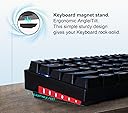
I like the name. Not because it's accurate, but that it's funny and odd. I'm going to mainly focus on gripes since nobody has time for positivity. Ease of Use ------------- There's a wired mode and a bluetooth mode. You'll need to toggle a switch on the bottom to change between them. The switch is easy to toggle, but this still isn't ideal. However, there's no room on the top of the keyboard for any such thing, so it's just a design compromise that you have to live with. It can save bluetooth pairing knowledge with up to 5 devices at a time, which can be switched between within seconds with a simple key combination. I found myself doing this not because I needed to, but because it was nifty. Nifty in a swiss army knife sort of way. Like sometimes you want to just flip all the tools out and put them back in one by one. I can't speak for the Mac mode, but it seems to be just as seamless to change to as everything else. The one glaring problem I have, that wasn't caused by an understandable design compromise, is that the Escape key is stacked with the Tilda and Backquote keys. That's fine, but not only did they choose to have the tilda be the primary key, they labeled it with the secondary keys. You can switch which set of keys are the primary and secondary, but it switches the entire row as well. You seemingly can't change Escape, which is a much more commonly used key than Tilda, to be primary without also changing the F1-F12 keys to be primary. Not the end of the world, but having to hit FN + Escape to use the Escape key is bad and I don't like. The manual explains things clearer than I'd expect a wholly Chinese product to explain them. I saw no poor English, no bloat and only 1 typo. Well done. I will be referencing the manual constantly while writing this and I want to emphasize just how clear and to-the-point it is. Someone had their head screwed on straight that day and they clearly got a real English speaker to go over it and test this stuff to make sure it makes sense. Key Quality ------------- My main keyboard is a Ducky Shine 5 with real MX Brown keys, so that is my point of reference. The keycaps are not top quality, but they're not glaringly low quality either. The main characters are the ones that have transparency for the backlight, but some of them didn't turn out perfectly. There are some dark spots on some keys with the lighting on. Personally, I can live with this. The white characters for the special functions are printed on, so these will surely wear off with time. I think I actually prefer the presses of these knockoff switches over the real Cherry MX Browns. I never really liked those, but these have a nice twang to them that I find enjoyable, so I think in this case, cheapness worked out for the better. The angles to the key edges are sharper than I'd like. Lighting, Looks and Battery -------------------------------- I thought that this was a full RGB keyboard and maybe I could even customize every key like I can with the Ducky Shine 5. Nope. To be fair, it does say that it's single color in the fine print on the product page. It has RGB on the sides, which it showcases and maybe this is even intentional for the purpose of misleading people into thinking it's RGB when it's not. Either way, I can't complain since it does say what it is on the product page and the side lighting does look slick. I just hope you like the color blue. It has "17 backlighting effects" including [off]. I just use static on low brightness since I find everything else distracting/unnecessary. It does have brightness control and effect speed control. Despite being only 1 color, it definitely could also be a lot more basic than it is. Evidently there is an RGB version of this since the manual has instructions for it, but it seems to be single colors only. Not full customizability as some keyboards offer. When it's in wireless mode, it will turn off the backlight automatically after only 1 minute to save power. Depending on what you're doing, this can be irritating. I haven't really tested how long the battery lasts, but it's not a concern to me as long as it lasts for 1 day of use, which I'm sure it does. If absolute battery life is a concern then probably go for one of these kinds of keyboards that have a bigger battery. I've seen one that claims 4000mah, which is 4x more than this one claims. Additional Notes -------------------- Easy to pick up and manipulate, which is an important aspect to a compact, clearly on-the-go type of keyboard. On the side, there's an angled indent that hands fit nicely in. It feels solid in the hands and would be hard to drop accidentally. When looking dead-on, there are visible screws under the keys in a few places around the keyboard. If this bothers you, you can probably hide them easily with some sort of white tape or just paint the screwheads white. The charging indicator is shared with the spacebar LED. At first I thought this was a really nice touch because it looks like it might fill up the space bar as it charges, but disappointingly, it's just a static light. - Has a couple magnetic rubberized feet for the back legs that are neat. - Decent length USB-C cable - Key-puller Conclusion ------------- It didn't meet my wildest expectations, but for $40, I can't complain as long as it holds up over time. It's probably better than I should have expected.
U**B
Love this keyboard
Royal Kludgy bring backy the RK71 updated! This thing rocks! I still use it EVERY DAY from time of purchase. Color is amazing and still holding up. I bet I've only charged it up like 20 times in 3 years. Easy to use. Long AF battery life amazing value for money. One of the best computer products I've bought.
M**L
Apparently there are two hardware revisions and the latest one is inferior.
I've ordered two of these with red switches - one in September and another one in December. The first one was manufactured in June 2020 and was almost perfect in regards to size/typing/sound. The second (top one on the photo) have manufacturing date in September 2020 and it uses different switches/keycaps which in my opinion are inferior to the previous revision. Switches: - The older revision have RK red switches vs. TTC-K switches in the newer revision; - TTC-K switches feel somewhat more scratchy and just a little bit more loud. - Spacebar is rattly when pressed on sides in the second (newer) revision; Keycaps: - Latest revision keycaps have better fonts (thinner and no splits in loop elements of letters); - But they also have sharp ridges and corners while previously key ridges/corners were smoothed out; - Latest keycaps feel like a cheap thin plastic while the previous ones have just 'normal' feel to them (i.e. you don't notice them much); - Older revision have Mac/media related functions printed on the keycaps (but media keys weren't working in win mode anyway). Overall, the latest revision feels definitely inferior - a bit more noisier while typing, noise is more high pitched and resting fingers on it is uncomfortable because of sharp(er) key corners/ridges. Four/five stars for old revision, unfortunately only three stars for the newer one. EDIT (12/27): I forgot to mention the MOST ANNOYING difference - in the old revision Esc/`/~ key works as escape with number keys layout but in the lastest revision escape is bound to Fxx layout. I can probably live with inferior hardware - but this inconsistency in handling one of the most important keys (Esc) is a deal breaker.
D**D
Coolest keyboard ever!
I am in love with this keyboard! It has a wow factor of 1,000! This keyboard feels like it's built like a tank. Indestructible! It has great weight and feel to the touch. The clicks are precise and accurate. The LED's take it to a whole new level. Honestly, I can't say I've ever been happier about a computer purchase than this one. It works great wired or wireless BT and has a long lasting charge. If you're reading this, BUY THIS MECHANICAL KEYBOARD. You will love it as much as I do, I promise.
V**A
esc key was the major problem.
Think carefully if you want to buy it. To me the "esc" key is a big problem. I always use esc to cancel the current move, e.g. un-select words/sentences, but this one always give me `. If you need ~, that means shift+esc. If you need esc, that means fn+esc. Big headache. I've touched it by mistake more than 10 times in the past hour. Overall, it is a high quality keyboard. The switches are not cherry, but it is fine. Update 2 days later: Problem is partially solved. Since I use Mac and Bettertouchtool, I can set ` to esc. I don't use ` key in my work anyway, therefore it is an acceptable solution to me. Everything looks good so far.
H**Y
So far okay but could have some improvements. Edit: Working well, would recommend
I bought the black keyboard with red switches. I mainly use the keyboard as a scribe so I am typing 8 hours a day. I have had this for a couple of days. Price: 54.99 or 38.99 with $16 dollar coupon. Not bad at 39 bucks. Not sure if I would pay $55 for this keyboard. There are better options if you are willing to pay slightly more. for $39, really hard not to pass up on this. Construction: Mainly plastic, however well built. It's chunky yet light and small enough to pick it up with one hand or carry in a bag. The backlight has many options and settings, however the RGB side lights are useless and you can't see them unless you have a white desk and its pitch black in your room. Switches: They are an off brand Cherry MX red switches. They don't feel the same, but they are light to the touch and feel pretty soft. The key caps do not come with rubber O rings so they can be a bit on the louder side. If you bought this with a coupon, you can use the 16 bucks left over to buy some aftermarket rings and put them on if you want. - My main concern with this is the quality of the key caps. I don't know how long it will take before the caps start to lose its display. Will update in a few months. Connectivity: I had the hardest time connecting to via bluetooth. My one gripe is I wish this came with a dongle instead because it has a dongle cutout on the back. It's a bit of a learning curve but you will get the hang of it. Battery life: The battery is rated at 1000 mah with a load of less than 200ma. Battery life will depend on how bright you set the lights and have the rgb side lights on or off. Assuming you have everything blasted on high and bright as possible. The math checks out to about under 5 hours of constant work time. If you are conservative and set the backlight at 50%, turn off RBG sides I have gone a full work day without charging it and works fine. If you are worried about battery life, you could charge it with a phone charger, just don't exceed 1 amp. Will update on battery life in a few months. Overall: This is had made a good impression so far and happy with the typing experience. The connectivity of the device was annoying and learning to switch from wired configuration to wireless is a learning curve. At $39 dollars, I can't complain with its performance so far and the hiccups can be overcomed. I will update the review after a few months of use. Update: The keyboard is doing well and happy with its performance. Goin about a week between charges (could go longer) with backlight at lowest setting and no RGB sides. I stand my my statement on the useless rgb sides. Keycaps are holding up, it's not losing they lettering with use. Would recommend but would wait for the $10 or $16 off coupon. Potential upgrades: Soft rubber Orings for keycaps, reduce noise by about 40%. Keyboard switch lube, you can't remove them but there is a way to apply them without removing switches.
م**ي
مالقيت ال usb حق الwirelees
الكيبورد حلو لكن مالقيت اليو اس بي حق الواير لس
C**N
no sirven las F# y es ANSI
naturalmente es ANSI y no miente en la foto al respecto. no hay versión con la extra tecla a la derecha del shift izquierdo (para mayor y menor en español) como en los ISO. más allá de esto y si en contra de como se presenta, no parece haber forma de activar las teclas F#, no dice nada en el manual al respecto e intentando control+fn como dicen en muchos lados hace que las teclas de los números se vuelvan las de media (en vez de numeros por default y media con fn) y picando fn también las activa en vez de las F. están bonitos los efectos de luz y chidas teclas pero no tiene base tampoco y lo antedicho de las F no recomendable. aparte de que no hay versión ISO pero eso sabía desde que lo compré
C**N
No vale la pena
No es un buen producto y puedes conseguir un teclado de mejor calidad por el mismo precio. El acabado de las teclas y la base de teclado es de mala calidad, muy liviano y en general los componentes se sienten sumamente baratos. Claramente es un teclado relativamente económico, pero no compite con los otros teclados del mismo precio. Sí es cómodo y suenan bien los switches, pero tiene demasiados problemas y bugs. Además, descargar el software es innecesariamente complicado y de páginas que parece que traen virus, incluso la página oficial activa el antivirus de Windows. Las segundas funciones no sirven (por ejemplo, controlar el volumen). Devolveré el producto, por el mismo precio recomiendo un teclado Ajazz o por un poco más un Hyper X Alloy.
A**A
False advertising
The product name specified that the products contained red switches, which don't give a tactile bump when pressed, instead, I received blue switches, which is not what I wanted. Please correct the name of the product, this contains blue switches, not red.
خ**ي
مش ول بد
خرب معي زر الU واy أنا اخدت اثنين واحد تمام وثاني زي ماقلت خرب علي بس انه الكيبورد زين بس أنا حظي نحس
Trustpilot
2 weeks ago
2 weeks ago