🌡️ Stay ahead of the curve—control comfort on your terms!
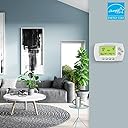
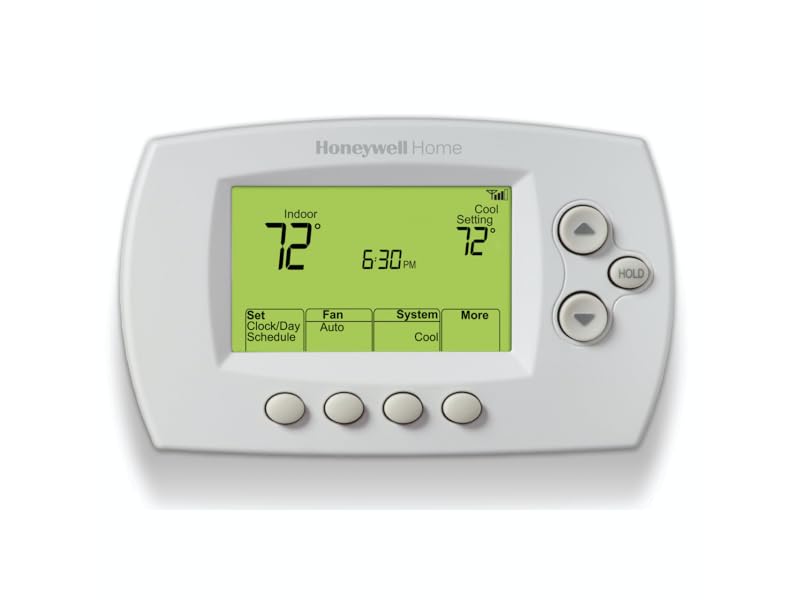
The Honeywell Home RTH6580WF is a sleek, Wi-Fi enabled 7-day programmable thermostat designed for easy DIY installation and seamless smart home integration. Compatible with major voice assistants, it offers remote temperature control via dedicated apps, Energy Star certified efficiency, and Smart Response technology that adapts to your home's heating and cooling patterns. Perfect for professionals seeking reliable, energy-conscious climate control with modern convenience.


| ASIN | B00Y6M2OUC |
| Additional Features | Auto Changeover, Daylight Savings Time Ready, Energy Star certified, Smart Response Technology, Wi-Fi enabled |
| Best Sellers Rank | #31,829 in Tools & Home Improvement ( See Top 100 in Tools & Home Improvement ) #38 in Home Programmable Thermostats |
| Brand | Honeywell Home |
| Brand Name | Honeywell Home |
| Color | White |
| Connectivity Protocol | Wi-Fi |
| Connectivity Technology | Wi-Fi |
| Control Method | Voice |
| Control Type | App Control |
| Controller Type | Amazon Alexa, Google Assistant , Vera |
| Customer Reviews | 4.2 out of 5 stars 15,577 Reviews |
| Display Type | LED |
| Finish Types | White |
| Included Components | Quick reference card, Quick start guide, Screws and anchors, Thermostat, Thermostat ID card, User guide, Wallplate (attached to thermostat), Wire labels |
| Item Dimensions D x W x H | 1.5"D x 5.75"W x 3.5"H |
| Item Type Name | Wi-Fi 7-Day Programmable Thermostat |
| Item Weight | 16 ounces |
| Manufacturer | Honeywell Home |
| Manufacturer Part Number | RTH6580WF1001 |
| Manufacturer Warranty Description | Warranty. |
| Material Type | Plastic |
| Model Name | RTH6580WF1001 Wi-Fi Thermostat |
| Model Number | RTH6580WF1001/W1 |
| Mounting Type | Wall Mount |
| Number of Batteries | 2 AA batteries required. |
| Number of Items | 1 |
| Power Source | Corded Electric |
| Product Dimensions | 1.5"D x 5.75"W x 3.5"H |
| Product Style | A. Wi-Fi Thermostat |
| Shape | Rectangular |
| Special Feature | Auto Changeover, Daylight Savings Time Ready, Energy Star certified, Smart Response Technology, Wi-Fi enabled Special Feature Auto Changeover, Daylight Savings Time Ready, Energy Star certified, Smart Response Technology, Wi-Fi enabled See more |
| Specific Uses For Product | Air Conditioner, Furnace, Heat Pump |
| Specification Met | energy,energy star certified |
| Temperature Control Type | Heating and Cooling |
| UPC | 085267771955 |
| Unit Count | 1 Count |
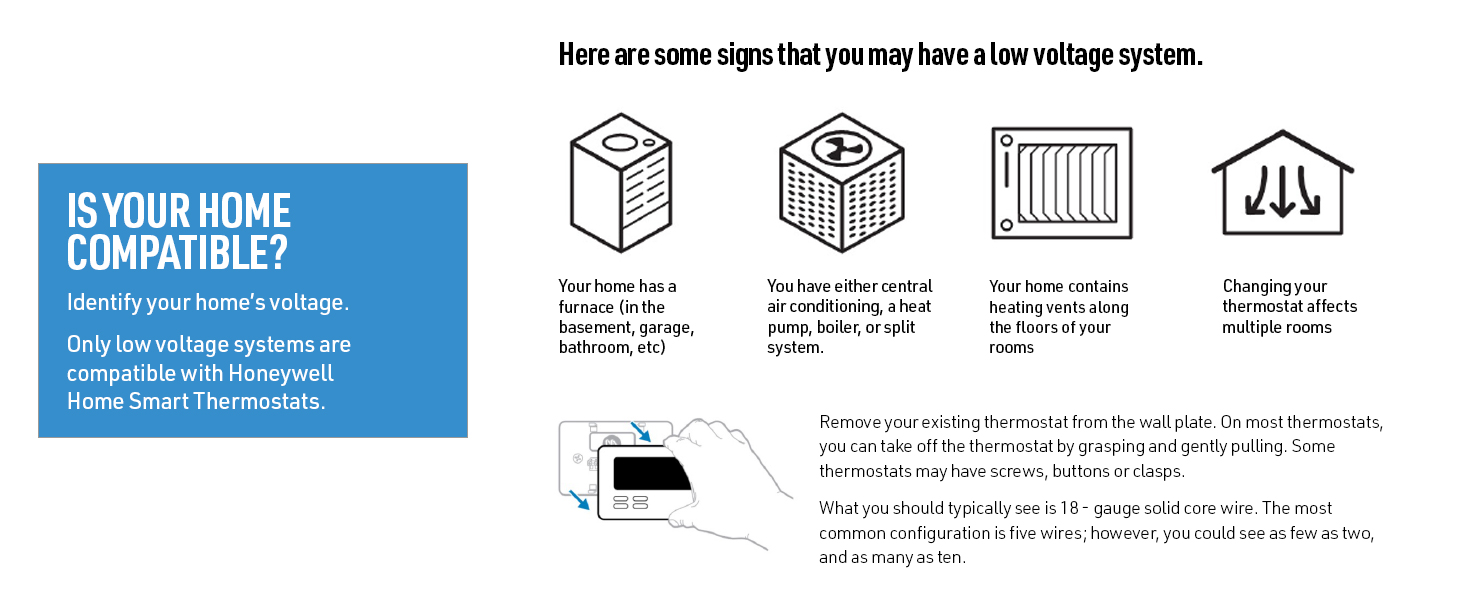
| Voltage | 24 volts |
| Wattage | 24 watts |
E**E
Awesome thermostat with easy programming!
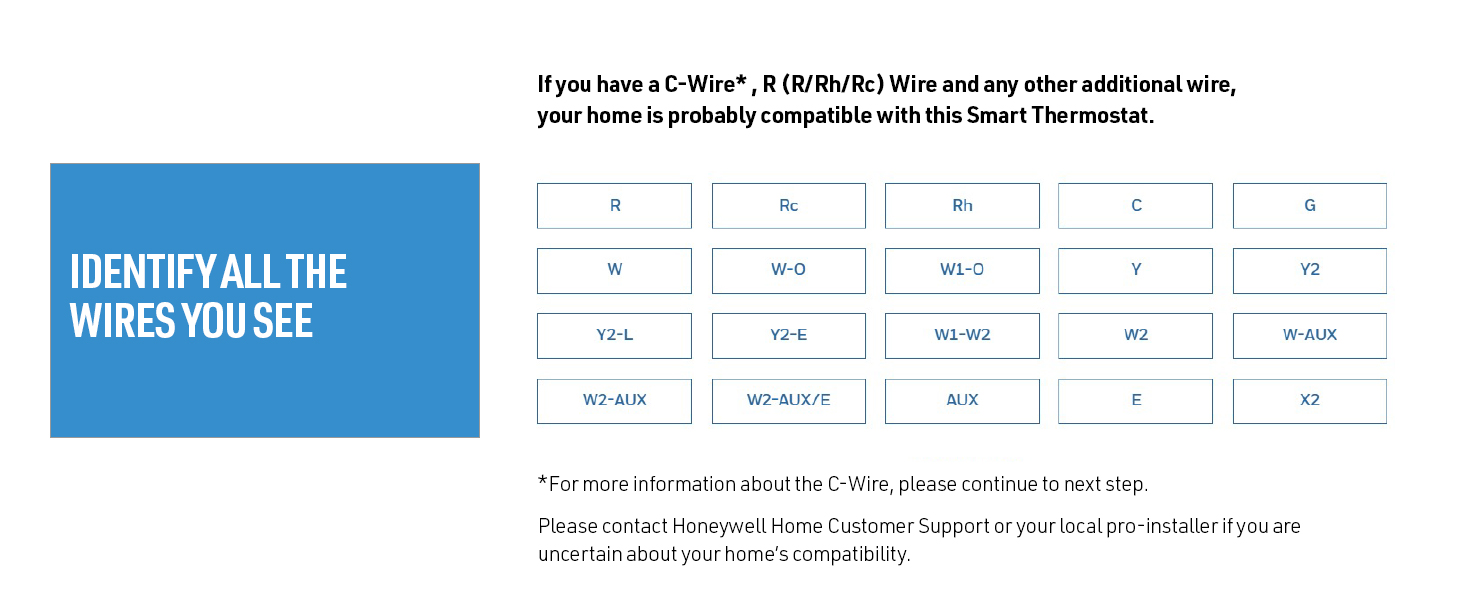
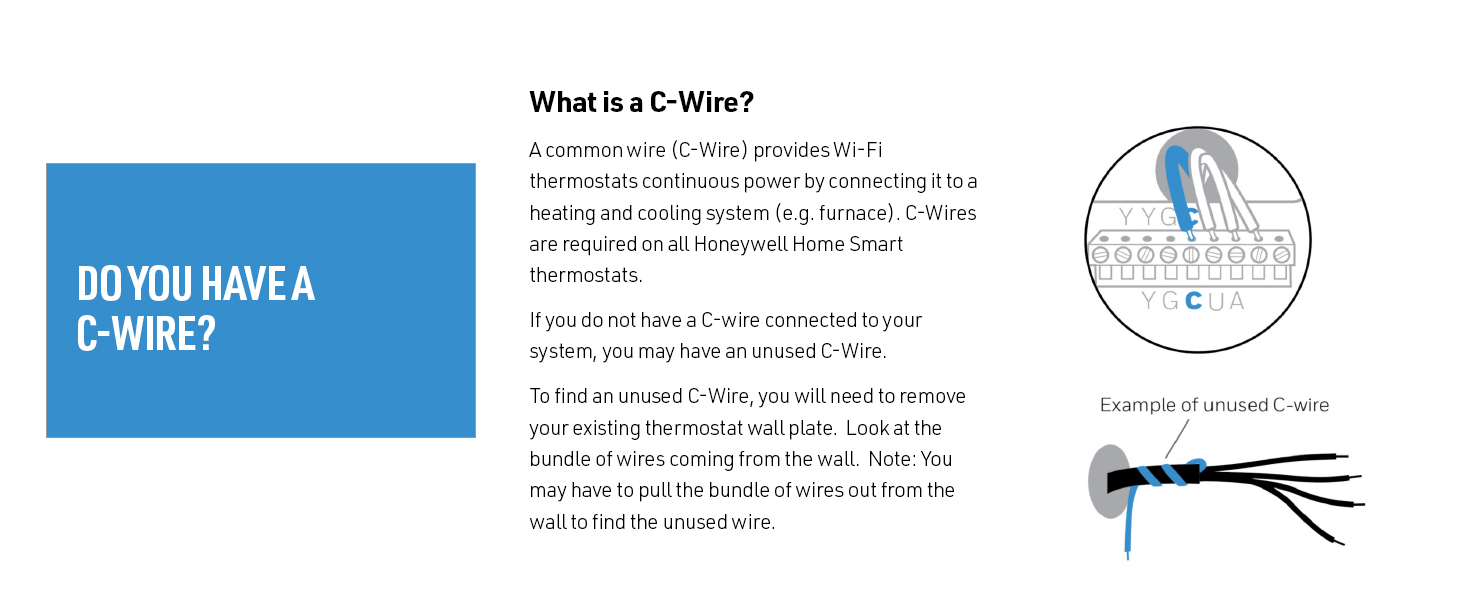
I have been in search of affordable, remote access capable thermostats for some time. The Nest is just too pricey for me, especially with two thermostats needed in our two level home. The Nest units sure look nice, in typical fashion as one would expect from their Apple designer pedigree. I even contemplated buying one per year to soften the sticker shock, but the reviews for them had one glaring thing that stood out, and that was the wide temperature swings before heating or cooling started. For the price, I expect a tighter temperature range. The Nest also appears to be better suited to automatically adjustng itself based upon your actual coming and going, while the Honeywell is based solely upon a schedule. If you want a thermostat that will manage itself, the Nest is probably the way to go. In our family, we generally have set times we are at home and away, so the Honeywell works best for regular schedules. Honeywell has three step up models, including the new Lyric, which looks quite a bit like the Nest (which itself resembles the old, mercury switch, round type thermostat). From what I read, the Lyric offers more self managing like the Nest, but is also around the same price. Given the choice between the Lyric and the Nest, I would go for the Lyric, if only because Honeywell has a long history with thermostats, but I am a cheapskate! The next lower tier Honeywell WiFi model has a snazzy color touch screen, with time and outside weather indicator (and probably forecast). While I would have loved to have this model, it was still almost twice the cost of the RTH6580WF. Below that is the WIFi model that has almost the same screen monochrome LCD as the RTH6580WF but with touchscreen functions. To me not worth the slight price premium. So the RTH6580WF was the model for me. One of the concerning things for the Honeywell was the need for a "C" wire, which I assumed my systems would not have available, forgetting about the loose wire left unconnected at my previous thermostats. A quick check with a voltmeter that they were not connected at both ends, made it clear all I had to do was connect the proper terminal at the transformer to have a working "C" wire. Easy peasy and no sparks! Installing was easy, especially with the good documentation included (including labels for each line). Just be sure to disconnect the power to the transformer beforehand. The hardest part was making sure the wall mount was level, which speaks about the simplicity of it all! The wifi connection portion was easy with the included instructions. After a delay for the thermostat to automatically update its firmware, it was on the network. Setting up the online account was easy, just be sure to hold on to the paper card supplied with the thermostat if you are away from the thermostat, as it contains the thermostat information the website requires. The iOS and Android apps are easy to operate and progamming is straighforward, just be sure to press submit or your programming will not go through. The software works via a connection to Honeywell, with no direct control of the thermostat available, from what I can tell. That is a negative to be sure, but it is an acceptable tradeoff, and I believe most WiFi thermostats suffer from. I have to assume Honeywell will be around for quite a bit longer, and with such a huge user base, keep the system up and running. I have experienced a few times in the several months of use that the portal was down, but the system came back up within an hour. I wish the software would provide ore information on times of use and the like, as well as the ability to lock out changes at the thermostat, as my kids have a habit of turning the thermostat settings to extremes of heating and cooling (like turning the A/C on when it is freezing outside). The system can be configured to send messages if selectable temperature extremes are met, but I have not yet tinkered with it enough to verify how well it works. More finegrained control of this would also be an improvement, but I am unsure of the limitations of the thermostat itself as far as this is concerned. The web portal and apps work fine however for sending changes remotely as I have been able to adjust the temperature adjustments made at the thermostat. In all, this is a highly recommended device, with the two in our home working without issue for several months now.
A**N
Great smart thermostat, here's my experience since May 2022
I purchased this in May of 2022, and posted this review in December of 2022 after 7 months of use. I had been considering various smart thermostats off and on for well over a year and finally decided to go with this one, and I am glad that I did. I bought two of them, one for each zone. The installation was as easy as it gets and took about five minutes per thermostat. Didn't even need to read the instructions, just turned off the circuit that powers the furnace so that the old thermostat lost its 24V power source (verified by the thermostat losing power on the display). Pulled the thermostat off of its mount, took pictures of the wiring for reference, unscrewed the five wires and the old mounting plate, screwed in the new mounting plate (the screw holes perfectly aligned for both the old and new Honeywell units), reattached the five wires in their appropriate slots, turned the power back on to the furnace circuit and everything worked perfectly. The next step was to setup the new smart thermostat for WiFi, and this took a little bit longer because the process can be finicky. You have to remove the thermostat from its mount for about ten seconds and then put it back in, this helps initiate/restart the WiFi setup process. Then quickly go to your wireless device and join the new thermostat network. Then in my case, I had to manually open a browser tab to http://192.168.1.1 to complete the WiFi setup. If you don't see the new thermostat network or if that network address for it doesn't open up, then you will need to remove the unit from the mount for 10 seconds and then put it back in and repeat the process. A list of WiFi networks should open up on the above noted address, and from there you can join your 2.4Ghz WiFi network. Once WiFi setup is complete, install the Total Connect Comfort app and create an account. You will then need to register your new thermostat(s), all you need is that piece of paper from the box that says the MAC ID and MAC CRC. Once the new thermostat is registered, you will be able to control your thermostat from anywhere with any device. Total Comfort Connect has an app and a web portal that allow you to access, configure and adjust your thermostats. The web portal gives you more options, for example, I could not find an option to remove a thermostat on the app, but you can on the web portal. So if you can’t find what you’re looking for in the app, check out the web interface. While this device gets ~70% 5 star ratings, the other ~30% appear to be largely related to improper installation and/or frustration associated with the installation. The instruction PDF for this unit is 140 pages and could easily overwhelm most people. I have condensed the process into this short review as it related to my install, which was switching from an older Honeywell thermostat to this newer smart thermostat. Note that I already had the 'C' common wire and this was a simple replacement as everything I needed was already in place. Honeywell does log your thermostat settings and usage of your HVAC system and send monthly reports to the email where you registered the thermostat account. They probably sell this information without your personal identifying information. For example, in this report they compare your current month’s usage to the prior month. This includes how many hours you used the A/C and Heat, and how many hours they were off, as well as the average thermostat temperature settings for your home and away schedules. Some people will be opposed to this as a matter of privacy, so beware if that’s you that this is what you should expect. I am big on privacy, but I am not bothered by this enough to refuse to use the product and I will still recommend it to others. I hope this review helps others make their decisions to use or not use this thermostat. My family is very happy with it, and we have so far had no problems or complaints. If this changes, you can rest assured that this review will be updated to reflect that. I like that this new unit is not a touch screen, so there are no smudges, and the screen is much clearer than the old unit. It is really nice to be able to control the HVAC system remotely, to easily setup a schedule, and to easily make adjustments from the app. Stay warm/cool!
C**Y
You need a 2.4 GHz connection! (1 year update)
Physically installing it was cake! I was lucky enough that my previous thermostat (pictured) was also a Honeywell that happened to use the same base (th5220d1003), so I didn't have to do any wiring. Setting up the wifi was much more involved. On the day it was scheduled to arrive I changed the name of my wifi to something shorter because another reviewer mentioned that this can be an issue. I then spent the rest of the morning resetting all my devices (including some plugs and switches) over to that. Totally on me. I made that choice. When the thermostat arrived and had been installed is when it all went sideways. I couldn't make the thermostat connect to the wifi. Honeywell tech support had me follow the directions I'd been following for an hour two more times and after a half hour told me I needed to connect on a 2.4 GHz service. I knew I had dual service (and remembered that with a previous provider I had two named wifi connections) but couldn't remember much more than that. So, I called my internet provider who set me up with two distinct connections. (This didn't cost anything as it was already a part of my service.) This did mean the wifi name changed again, though. So, while getting the thermostat to connect to wifi went well, I also had to reconnect all my other devices for the second time that day. Alexa integration was easy from there. I've set up a simple schedule for temperature control. I can remotely control the temperature with Alexa but not set the system from AC to heat or turn it on and off. That has to be done manually or with the Total Connect Comfort app that Honeywell recommends. (The app has some preset schedule that you'll want to delete if using Alexa primarily. I actually didn't notice this for weeks! I thought my husband was messing with the temperature.) The truth is, the setup really ruined my day. I was frustrated and snappy. Not at all the person I like to be. But I'll get years of use out of this thermostat that will, hopefully, save me money. It feels like an ok trade-off. ****One year later and I'm still happy! I don't have (or notice?) any cycling issues and the system seems to turn itself on and off at normal intervals. I love using a timer and voice commands but my favorite things have been turning the ac back on after a week's vacation when we're still an hour from the house or deciding it's finally cold enough to turn the heat on while still laying in bed. 8/23 - This disconnected from WiFi when I was installing some blink cameras. As I was trying, without much success, to reconnect it, the heat came on and I was never get it to work properly again. I had my old thermostat in a drawer so I just plugged it back in with no issues. I'm disappointed but ultimately not unhappy with the purchase. I'm not sure my energy savings quite paid for it, but between the savings and "value of use" it was well worth it. I'm upgrading to a newer smart thermostat.
A**N
Good Choice, Solid Performance
Bottom Line: The installation was ALMOST effortless, and the performance has been rock solid. I'm very pleased by the unit and would certainly buy it again. I, too, had to unplug the unit once during installation in order for it to complete the temporary wifi connection to my android phone. However, that was the only hiccup. Otherwise, the installation went smoothly. In short order, the wifi link to my WPA2-encrypted router was complete, using a 2.4 GHz channel per instructions. For the past month, I've monitored the home remotely to determine if I needed to engage the aux heat strips during unusually cold periods. I currently live 500 miles farther south, and have not yet moved into the home, so remote control of the HVAC was the purpose for the purchase. The thermostat interface is simple and basic, but entirely sufficient. I don't have to mess with it to see the relevant information; it's all there on the main display. As a recently retired electronics engineer, I have an extreme distrust of new technology, because most companies chase the easily-wowed but ignorant masses with pretty bells and whistles at the expense of design maturity and reliability. To a former design engineer for the military, this is a frustrating trend. Similarly, I cannot abide the intrusiveness and privacy concerns over voice-activated devices monitored by Amazon and/or Google (or whomever). You can do all that lazy nonsense with this thermostat, but I don't want or need it. I want and need rock-solid internet connectivity and sufficient remote control for when I'm in a different state and I'm worried that the heat pump won't be able to pull enough heat out of the air to warm the house. And in this scenario, Honeywell delivers. As with all purchases, particularly electronics, there is a risk of buying a lemon or experiencing infant mortality with one or more electronic components. Fortunately for me, I saw no evidence of quality concerns with the device. It appeared well-made, competently assembled, and sufficiently documented. I do urge people to follow the instructions carefully and slowly. I suspect I moved too quickly, possibly doing steps out of order, which may have caused my wifi hiccup. Either way, it was easily corrected with the power cycle and more carefully following the instructions. I have no issues with the phone app. It works fine and allows me to do everything I want to do. It's streamlined, effective, and reliable. Surprisingly, it doesn't annoy with poor design details or irrelevant BS. (Not looking to be entertained by my thermostat. I just want the bloody thing to work and do what I tell it to do, when I tell it, without becoming a new and contrary personality in my life.) In this regard, the app has been a pleasant surprise. In summary, if you are looking for a solid performer and you value reliability over gee-whiz style and the latest marketing fad, then consider the Honeywell RTH6580WF. It's a very good value, delivering full performance at a much lower cost than most alternatives. Consider repurposing all that saved money towards something of greater life impact than a "stylish" thermostat. Good luck.
J**Z
Simple to install and simple to use WiFi Thermostat. Works with Alexa!!!
For $84 and free 2 day shipping, this is the best WiFi thermostat for the price. I looked at all the expensive options, but I eventually chose this based on simplicity and the fact that you can do pretty much everything from the thermostat itself. I had a honeywell thermostat that looked exactly the same, except this one has one extra button. That one only gave me the ability for weekend and weekday schedule. With this thermostat, I can have a different program for each day. Just that alone is a major upgrade. The WiFi capabilities are much more than what I could ask for. Only gripe I have about the WiFi is that it is not dual band and only works with 2.4ghz networks. The app is simple to use and offers a few more benefits than using the thermostat on the wall. With the app, you can group days you want to have the same schedule and set them all at once. You can also set a hold for a specified amount of time. If you change the temperature it will say hold until your next set point. Then you can change that time to whatever you want. Then at the end of the hold it will automatically return to the schedule. It also works with Alexa once you have enabled the Honeywell Skill. Here are things that I don't like, but are not enough to take a star away. -There is no battery backup and it requires a C Wire. But since it's on WiFi, it will automatically set itself if you disconnect or if there is a power outage. -There are no reminders to tell you that you need to change your filter. -If you manually change the temperature, it will show "hold until XX:XX" on the screen instead of the actual time. They could have programmed it to also show the current time at the top corner or something. All in all, it is a GREAT thermostat. The WiFi capabilities are nice, and if you forget about the WiFi or the WiFi stops working, it's still a GREAT thermostat. If you don't need all the fancy features of the nest or ecobee, then this is the thermostat for you. I just want to be able to change my temperature if my schedule randomly changes, and this allows me to do that. I am more than satisfied.
L**.
Only lasted 2 years!
If I could give it zero stars I would. I purchased this thermostat almost exactly 2 years ago this month. I read 14k predominantly positive reviews, but remember reading a review that it only lasted 2 years! I thought what are the odds? Well they weren't in my favor and the thermostat crapped out after 2 years! First I had a problem with functionality but that was because my C wire wasn't connected at the furnace. I called my HVAC guy a friend and he connected it and it worked. Then I tried connecting it to my wifi, initially there was difficulty connecting, I did everything the manual stated but it didn't work. So I called tech support followed the same steps over the phone and it connected. I didn't want anything overly complicated so I chose this thermostat. I'm basically home and increase, decrease the temperature when I want manually or by the app. Which is not great, takes several seconds to connect. Once it disconnected from my wifi, couldn't reconnect so I logged in from their website and reestablished connectivity, it happened again. So the app is meh. It's summer here and it's hot and I don't keep the air conditioning on too low don't like it cold but I came home two evenings ago and it felt warmer than usual. I thought the air conditioner should go on soon and cool off. After a few hours it was still warm so I checked the app to lower it and it was disconnected and couldn't reconnect to my wifi. So I went to manually do it and the display was BLANK! I freaked out as it was so hot and humid. Too late to call tech support so called the next morning on my way to work. They told me to check the voltage in the wires, basically the electricity. I already turned all my circuit breakers on/off the night before and the furnace had a steady red light. I later read that a steady red light was no signal from the thermostat as the number one reason and a few of others like electricity, furnace door is open, pilot lights, problem with the furnace but I knew it wasn't any one of those reasons. When I got home I texted my HVAC guy since I don't have a voltage analyzer and he never got back to me, guess I have to find a new guy, company which will be expensive because he was my sister's ex and a friend...no more! A friend of my mother's knows about electricity and came by today and connected the white and red wires which should turn on the heat of the furnace, it didn't work. Then I read to turn on a/c connect yellow and red and it didn't work. So I thought I needed to call my electrician, but decided to check my furnace in the attic and turned it off then on and viola it went on! Kept the a/c on for several hours until the house was cool, then disconnected the wires. I tried the white and red wires and the heat went on. So it's not electrical never thought it was because everything was working but the thermostat! The warranty is only 1 year so I'm now trying to find a better thermostat, hard to do, pros/cons with many including the most popular round one that didn't get great reviews and I don't like the interface. But DON'T BUY THIS!
D**L
My first wifi thermostat and very happy with the results
We had always had the standard, basic Honeywell thermostat. One of them failed, so I decided to replace both and this unit had great reviews. The installation was just as easy as my basic thermostat (we have basic furnace and A/C and no heatpump), the only exception being the need for the "common" wire, which fortunately had been put in the wall even though it was not connected to the basic thermostats. The red wire is usually your 24 volts A/C and if you connect a volt meter between the red and what you think is your common wire, you will see it showing 24 volts. If you see zero volts, and you know your red wire worked from the prior thermostat, your common wire may not be connected to the common terminal in the furnace control board. Activation and programming was not difficult, and the panel walks you through the process. Just read the directions and follow them in order as instructed. When you first connect the panel for the first time, my furnace fan turned on for a few minutes then turned off, even though the panel said everything was "off". The panel display took about 10 seconds to show a display so be patient. If you get no display after a minute, it may mean you did not connect the common wire or your common wire is not connected the common terminal on the control board of your furnace. The steps included initial set up of time and date, then connecting to your home wifi network, then registering the unit with Honeywell's server so you can access through the internet (you only have to this once for multiple units). You have to register as part of the setup. Once you get all set up, you can see your virtual thermostat controls on your phone simply by logging into the Honeywell server (if you more than one you can see all of them). I don't know if I will use this remote feature much but it works perfectly. You can, of course, also set the thermostat directly from the front panel and the buttons are easy to see. Like other thermostats, you can program by date and times for temp. I set up two units, and had no issues with either one. Only had them a month or so, but so far happy with the results. Oh, and these are WAY less expensive than the NEST thermostats which cost well over $200. I don't have Alexa so can't speak to how it works with that service. I did not have to get tech support so can't speak to that either. A good looking panel and nice bright backlight. I only wish you could leave the backlight on all the time, but that is not an option.
C**S
Easy to Use. Great for monitoring remote locations.
I needed to get a temperature monitoring system at a property about 1 1/2 hours from my home. I looked at a number of different options, including the battery powered temperature alarms that would call out if the temperature fell below a certain level. While those sounded great in concept, it would not work there as the phones used the cable lines and required power to the routers to make the phones work. Strike that idea. I looked at a number of other options, and in the end, this thermostat met all of our needs for less than $100.00. I can now monitor the temperature remotely, and have set a number of alerts to notify me if the temperature goes beyond certain ranges, if the thermostat loses connectivity with the server, and the like. I have an app on my smartphone, and can log in at any time to see what the temperature is there, and can even adjust the temperature, which is an added bonus from my original needs. The only issue I ran into was with the installation. I had one of the older, classic round Honeywell thermostats that can be found everywhere that have been used for something like 50-60 years. I used the tech support line. I took a picture of my wiring with my smartphone, sent it to them by email, and then called them. Within about 20 minutes of starting that process, I was talking with tech support, who had looked at my photo, and told me exactly what needed to be done with the wiring. I got what I thought was bad news -- I needed to get a transformer to power the thermostat. Off I went, and purchased a 24v transformer from amazon.com, and had it shipped. After it arrived, I followed the instructions tech support gave me, and it works like a charm. The entire installation process once I opened the package, did the wiring, connected it to the wifi network, and created my login account took about 20 minutes. All in all, I had about forty five minutes to an hour invested in this project, spread across a few weeks. The process is fairly intuitive, and with tech support's assistance, installing this thermostat can be done by nearly anyone. My only complaint about the process is that I now have the transformer wiring running down from the thermostat across the face of the wall to the power outlet where it's plugged in. It's not a big deal, but it looks a little weird having a wire running from the thermostat down behind a sofa. I could certainly snake the wire through the wall to make it more cosmetically appealing, and I might do that at some point. But, for now, it works, and is working great. I'm really looking forward to this winter when heading up, knowing that I can turn up the heat before leaving home, and arriving at a warm destination.
R**E
Honeywell Wi-Fi 7 day Programable Thermostat
Easy to install and easy to setup. Wi-Fi is a little tricky but still fairly easy to setup, using a laptop made it much easier to setup and register. The app and computer software works well. Thermostat works as expected. So far so good. Good price for a decent thermostat.
C**N
Calidad y fácil instalación
De lujo, de excelente calidad y el App está muy bien!!!
R**I
Not easy to use also the application not work in UAE
L**Z
Great Value
Good quality Honeywell Controller
A**O
non utilizzabile in Italia
Trustpilot
3 weeks ago
2 months ago