🚀 Upgrade to Archer AX10 — The smart router that keeps your digital life effortlessly connected and ahead of the curve!
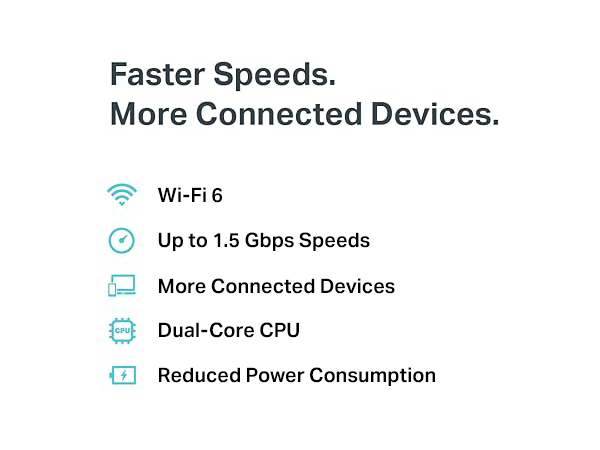
The TP-Link Archer AX10 is a WiFi 6 router delivering AX1500 dual-band speeds with advanced features like OFDMA, MU-MIMO, and Beamforming for enhanced network efficiency and coverage. Powered by a dual-core 900MHz processor, it supports up to 254 devices with 4 Gigabit LAN ports for wired connections. Compatible with Alexa and OneMesh extenders, it offers smart parental controls and seamless integration for modern smart homes and professional multitasking environments.


| ASIN | B07ZSDR49S |
| Best Sellers Rank | #858 in Electronics ( See Top 100 in Electronics ) #8 in Computer Routers |
| Customer Reviews | 4.2 4.2 out of 5 stars (18,973) |
| Date First Available | October 30, 2019 |
| Item Weight | 13.4 ounces |
| Item model number | Archer AX10 |
| Manufacturer | TP-Link |
| Product Dimensions | 10.24 x 4.96 x 1.3 inches |
R**S
Handy little gadget
I bought this to use while at a program with multiple "modes" of wifi available to me that I could test with. This little router is nice for the price, and as I have TP-Link's higher end routers at home with mesh wifi at my house, I figured this would be good since it would have a similar interface and features. It turns out that it has some interesting features but also some quirks. OOTB, the firmware needed an update which was painless. I don't like using the phone app for configuration, but it is handy. The web interface is functional and responsive, although I don't like how the pages load templates and then fill in the "settings" after the page loads. The "Internet" page in the web interface has a password field for networks with passwords, but it is plain text so passwords aren't hidden, even if you refresh the page for instance. Wifi tethering was the reason I bought this router. When you look at available networks, it doesn't just show available SSIDs, but lists explicitly the available SSIDs, network frequency, and MAC address. There is a lock feature, so networks with multiple APs can be explicitly connected to. In early wifi systems where the mesh standard wasn't implemented yet, this alleviates issues where some devices don't connect to APs properly. You can also specify a specific band to connect to. In the building I'm in, the wifi system has a problem on the 5GHz band, so I can lock the connection to a specific 2.4GHz AP with the right mac address and although the connection is a bit slow, it functions. There was no possible way for me to get wifi on a 3 year old laptop by changing the wifi hardware settings in the driver, which seems odd. A bit of a fluke for Windows? Anyway, there are other reasons to carry a travel router. The VPN function was a breeze to setup. I linked the router to my VPS and had Wireguard running easily. Turns out that unlike my home system, this router allows you to toggle specific devices to use the VPN. There is also a server option which could be handy if you have multiple routers and want to link networks without running a separate machine. I tested the guest network with some friends and it works great. Able to specify bands and have both guest and primary network on both 2.4GHz and 5GHz simultaneously unlike my Orbic hotspot. The guest network does not allow access to the web interface for configuration. Number of devices appears to be significant... You can specify subnet mask and DHCP server settings. By default you get 254 devices, which should be enough. DNS can be overridden for wifi tethering, including using DoT and DoH encrypted DNS without requiring a separate forwarding agent for systems that don't support encrypted DNS. The only disadvantage to messing with DNS is that on some networks, you may run into issues connecting to networks if they use web based login pages that can't be accessed when DNS is overridden, so be careful with that. I was able to setup my router to connect to NextDNS with DoH but not DoT. DoT wouldn't work for some reason; the server was detected but NextDNS reported that it wasn't using a profile. This wasn't the case with DoH. One feature request I have would be the ability to have advanced DNS configuration settings by device or at least by network, so the guest network could use a different DNS configuration or perhaps the default DNS from the wifi. The last feature I like about the router is QoS. My Verizon Orbic has a very high speed connection before I use up my data when I have a decent signal, however sometimes QoS is a good feature to have to ensure you don't abuse your own data caps if you're going to be out a while and need to conserve data. It's also useful if you're sharing a hotspot through a travel router without QoS like the Orbic, and want to make sure nobody uses all the data. NAT can be disabled, which might be interesting to try with the VPN feature. The MAC address of the wifi tether connection is completely changeable, and with the web interface can autodetect the devices' MAC address you login from and clone it. This is useful for instance, if you pay for wifi access from another device but later want to tether that wifi through the router without paying again or signing in again. I haven't tested router mode, usb mode or any of the others. Router mode would actually be useful from the Verizon Orbic or a hotspot with an ethernet port on it with the IP passthrough mode enabled and a short ethernet cable to cut down on wifi interference. The biggest most major quirk the AX1502 has is the 12volt USB-C power. I bought a USB battery, but with the router connected while my laptop is, it slows down the laptop charge rate. Same with my wall adapter. Both of these are Anker chargers. The next model up of this travel router supports USB-C 5V, but it's 3A which is also not really great for standard adapters. Don't lose the stock power adapter, which ironically enough is a 12volt USB A plug! I hope it's safe. The router itself literally draws about 3 watts of power max, so it's probably fine to get another small battery for it if I need, but I'd rather not have to carry yet another thing in my bag of tricks. Wifi range is decent, but obviously don't expect miracles. There are no external antenna connectors or even antennas. Literally just plugin and go. Works best for short range applications, but the signal will go through a wall or two. Performance is decent, but not my main consideration with this router. Most hotspots are not fast or even reliable to begin with so when tethering it's not really a consideration. VPN performance was identical to running Wireguard software on my laptop, which is a plus. One quirk is, IPv6 is not supported for Wireguard clients on the router. Why this is the case makes sense, but I don't have faith that this travel router is really IPv6 compatible to begin with. Size is fine, just feels a bit plasticy and cheap. Hopefully the chassis won't break.
J**F
Works as needed - Share hotspot / wifi
I have only had this a little time. I will share that the product worked as expected. I was able to connect the router to hotspot and share it in client mode without issues. I was very happy because I was trying to do this with an outdated DD-WRT router which only supported the G band wifi. The old DD-WRT router I had was too slow for the purpose and couldn't keep a constant signal. This TP-Link was able to keep good speed / no connection drop (as of now) and has surprised me in its ease of setting up thru a wizard and a PC browser thru the LAN port. All was easy going and no issues. I was happy that wifi could be turned off and it just shared the connected wifi via ethernet only as I wanted. The price is cheap compared to me trying to source a new router and the hassle of flashing DD-WRT to one. As long as it holds up without connection drops, the price was well worth it to me. So far happy.
A**S
Great router. May require extra work at times.
Last update: 2.4ghz network is now unusable. Still have several devices that are not 5ghz compatible so this router is now worthless. It lasted 4 months. Amazon return window is 1 month. Please avoid this product. Edit: 3month update. Router sucks. Probably won't purchase TPlink again. Firmware update that claims "fixes wireless performance" has crippled my few devices running on 2.4ghz. 5ghz is still fine. I am also no longer able to clear logs, function is there but it doesn't work. Support is atrocious as they appear to have issues communicating to English speaking customers. /Original Review/ Nice router for the price. Brick house/walls and signal reaches all rooms. 2k square feet. I'm a fan of the TPLink interface. This router has the typical modern features you would expect. The android app works well and allows you to change basic functions. Please turn on QoS if you wish to view current traffic statistics. You do not have to register to use the app, please look for (Skip) on the top right of screen. Concerns: As others have stated, the 2.4 or 5 band will disappear and stop working. The available band will also sometimes have performance issues. I have found this happens because the router will sometimes change the SSID to match each other. Example: If your 2.4 wireless name is Wifi24 and your 5ghz name is Wifi5, the router will sometimes change the Wifi5 to Wifi24. So now it's broadcasting both bands as Wifi24. This causes numerous issues. If you manually change the name back, it will work fine again. Small inconvenience: Some routers will now offer Arizona as a timezone as they don't follow DST, this router doesn't.
S**E
Great Little Router...
Originally bought this to serve as a client adaptor for an older PC that did not have an up-to-date wi-fi card. Set-up was straightforward, and the router worked flawlessly. I've since replaced the older PC, so I no longer need to use this device in its original capacity, but I find it to be quite handy in other applications. Good value for price - especially since I purchased a returned unit at a discounted price. Would definitely buy again.
M**.
As described
I**I
Setup is a breeze. No problem. I use the Tether app. You can also connect LAN cable from PC to this Router and type 192.168.1.0 whatever and set the router the old way. Run within 5 minutes and show strong wifi signal everywhere in our condo. I leave Tech support rating blank since I do not call or attempt to cal! them. Amazon should dispense with this evaluation since not all buyer need help. Overall: Highly recommended - excellent value for money
A**M
الراوتر ممتاز جدا حل مشكلة التقطيع التي كنت اعاني منها وكذلك المدى يصل إلى جميع الغرف كل ذلك بسعر رائع
G**A
Excelente producto, lo adquirí por que comencé a tener problemas con mi mi compañía (Axtel) ya que la calidad de sus módem deja mucho que desear y a pesar de que iba a la velocidad contratada por medio de cable, por wifi no me daba ni 1/5 de la misma. Con este router se soluciono el problema, la conexión es muuucho mas estable y con el logro las velocidades de subida y bajada simétricas contratadas incluso a través de WiFi.
A**I
It's a very nice router it's work fine I like it very much
Trustpilot
1 week ago
4 days ago