Desertcart purchases this item on your behalf and handles shipping, customs, and support to Tunisia.
🎥 Elevate your display game—because 4K is the new standard!
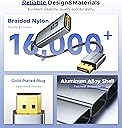
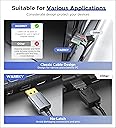
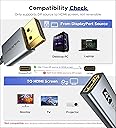
The Warrky 4K DisplayPort to HDMI Adapter delivers crisp 4K UHD video at up to 60Hz with flawless audio pass-through. Its uni-directional DP 1.2 to HDMI 2.0 conversion supports HDCP 2.2 for premium streaming content. Built with a durable aluminum shell and braided nylon cable, it offers long-lasting reliability and heat resistance. Compatible with a wide range of laptops, desktops, and monitors, this plug-and-play adapter is ideal for professionals and gamers seeking seamless multi-display setups.


| ASIN | B081GMCNNF |
| Best Sellers Rank | #124 in Audio & Video Connectors & Adapters #184 in Computer Cable Adapters |
| Brand | Warrky |
| Built-In Media | HDMI Adapter Cable |
| Color | Silver Grey |
| Compatible Devices | Desktop, Laptop, Monitor, Projector, Television |
| Connector Type | DisplayPort, HDMI |
| Current Rating | 11 A |
| Customer Reviews | 4.6 out of 5 stars 18,928 Reviews |
| Finish | Glossy |
| Finish Type | Glossy |
| Input Voltage | 7 volts |
| Manufacturer | WARRKY |
| Mfr Part Number | WARRKY-AV-DH01 |
| Model Number | WARRKY-AV-DH01 |
| Nominal Power | 77 watts |
| Number of Items | 1 |
| Number of Ports | 2 |
| Package Quantity | 1 |
| Power Plug Type | No Plug |
| Specific Uses For Product | Home and office use, Gaming, Video streaming, Presentations |
| UPC | 769638630729 |
| Unit Count | 1 Count |
| Warranty Description | Life-time |
| Warranty Type | Extended |
A**S
Solid Build and Reliable 4K Output
This DisplayPort to HDMI adapter works exactly as advertised. It delivers a stable 4K signal without flickering, signal drops, or resolution issues. Setup was simple and plug and play with no additional configuration needed. The metal casing feels durable and well made, and the braided cable adds extra strength compared to standard plastic adapters. The connectors fit snugly without being overly tight. Important to note that it is uni directional, so it works from DisplayPort to HDMI only. As long as it is used correctly, performance has been consistent and reliable. Great value for the quality and build.
K**N
Initial Review - Getting A Little More Than Advertised
So far so good. I have a GTX 1080 Ti graphics card, and it has 3xDisplayPort and 1xHDMI. I wanted to save the HDMI port for direct connection of my VR headset. And I still wanted to be able to connect my 4K HDTV as well as my secondary ultrawide monitor that only uses HDMI. I could've connected the HDMI for the monitor into the HDMI port on the motherboard and used the integrated graphics on my Intel CPU, but I preferred to have it connected to my GPU so that I could manage the resolution, refresh rate, and colors through the Nvidia control panel. So I bought two of these for the purposes of connecting both TV and secondary monitor. I am happy to report that I got more than what was advertised for the product specifications. The product specs state that it supports up to 30hz at 4K, but this is not the case. When using it to plug into my graphics card DisplayPort and connecting to my 4K TV with HDMI, I get the option to enable 60hz refresh rate for the TV. And when connecting to my ultrawide monitor, I was able to enable it at 75Hz at it's native resolution of 2560x1080 so it supports that refresh rate at that resolution as well which is fantastic. I then tried plugging only the ultrawide in using the adapter to test and see if I could get G-Sync to enable for the FreeSync on the monitor and I did not get the option to do this, so I don't think it will support FreeSync. Lastly, my TV is capable of HDMI 2.0 10bit HDR. Upon trying to enable HDR through Windows 10 display settings, it would not enable even though it recognizes that it's an HDR compatible display and gives me the toggle for it, when I click the toggle, it will enable, then the screens will go black for a quick second and then come back to normal and the toggle will be off again. So while this adapter will allow Windows to communicate with the TV and recognize that it supports HDR, the adapter itself will not support transmitting an HDR signal. So to summarize, while the specs of the adapter state that it only supports up to 30Hz at 4K, it in fact will do 60Hz instead, and will also support at least 75Hz at ultrawide 2560x1080p resolution. Since I do not have a display that has support for higher resolution and refresh rate over HDMI (my gaming monitor only doing it over DisplayPort) I cannot test and verify any other resolutions and refresh rates that it may actually support. And to finish off everything here, I will make note that I am aware of some of the reported issues by other users about it failing after a short period of time and such, so for now I will say that the product works, and does more than is advertised, but if anything happens within the next few weeks, I will come back here and update my review to reflect that. Thanks for reading.
J**S
Good quality, worked flawlessly, good value
CONSTRUCTION The adapter is solidly constructed, with metal casings rather than plastic at each end and a substantial cable that is strain-relieved. While the DisplayPort end does not have the latches sometimes seen, it seats firmly and the lack of a latch is good. The HDMI end, also, receives a cable firmly. It's doubtful that poor connections will be an issue. TESTING I tested this in several different scenarios. 1) Ubuntu 18.04 on an HP-8000CMT internal DisplayPort 2) Win10 on an HP-8000CMT internal DP Under both Ubuntu and Win10 the video was clean and crisp at 1080P, and neither operating system nor the BIOS had any difficulty detecting and using the port. Audio via the adapter was not tested, as the HP-8000 implements an early version of DP and does not support audio over the link. 3) Using an NVIDIA GTX750ti on both Ubuntu and Win10 supported both 1080P video and integrated audio seamlessly via the DP connection, including hot swap support. Using an HDMI-DP adapter and an HDMI-DVI adapter this would permit support of three HDMI monitors via the relatively inexpensive 750ti. I did NOT test resolutions higher than 1920x1080 (1080P) due to lack of a suitable test monitor. MONITOR CONNECTIONS Do remember that this will convert DP output from a computer to HDMI input to a monitor. It will NOT convert HDMI from a PC to feed a DP port on a monitor. All in all, I would say this seems to be the best of the various DP-HDMI adapters I see offered here, and the price is certainly attractive given the quality.
L**5
So Far So Good, But May Not Work With An HDMI Splitter
I am using this on a Lenovo slim profile I7 that has two Display Ports and one VGA port as compared to my Dell XPS that had two DVIs, two VGAs, and one HDMI. I had an HDMI splitter out (4) so I could run a monitor to a TV in my office as well. At first I thought this thing was not working as I could get signal for just a moment. But then I went direct DP adapter to HDMI to the TV and it seems to work. If I am correct, even if the splitter has its own power, you may NOT be able to use this item with any kind of outbound splitter. It is serving its purpose for now until I upgrade my computer. If it lasts a year it was worth $8.
T**R
Does what I need - very happy
I like to stream videos to 4k tv on my desk while I'm working on my main computer. This adapter lets me use one of the 3 DP ports on my video card to the HDMI only tv. The HDMI port fits snugly to my HDMI cable and the DP connector is solid in the card port - no latch, but not needed. Adapter case, cable & connector build is solid as listed. Content video never exceeds 1080p video or whatever streamer provides, so capability listed is not reached. Image is great with no degradation or glitches.
D**S
Works great with Minisopuru 13-in-1 Triple Monitor Docking Station on my Macbook Pro
While I have a M3 Max Macbook Pro which is advertised to support 4 total screens, I was having difficulty getting a third external monitor working. Finally I just "quit" trying and used the (what I consider as a cheat solution) DisplayLink which I know is a bit of a cop-out, but I'm not gaming so I don't need blistering high refresh rates. I then purchased the Minisopuru 13-in-1 Triple Monitor Docking Station to provide 3 external monitor ports. Unfortunately, I didn't read the fine print, as one of those monitors was only available via a DisplayPort connection, not HDMI. There is lots of discussion about "passive" vs "active" DisplayLink and how passive adapters won't work on devices and monitor connections that require active, but I had no idea which I needed for my monitor and that Minisopuru device. Anyway, I bought this passive Warrky adapter and it is working great feeding the 3rd external monitor (HP 23f) with a clean, clear and stable video signal!
N**K
Worth it
High quality, no issue. Easy to use and allows me to use more ports on my PC.
M**S
Affordable without stellar quality
Im always on the search for affordable a s practical tech. This device works very well, is plug and play, great braided cable quality, and is easy to use. I have no complaints about this product and I highly recommend it.
K**A
Great product, strudy, does exactly as described!
The back of my PC has just two HDMI ports, and one of them is blocked off due to the metal plate, you can't quite fit a HDMI cable through it. I needed access to it, but then had an idea. My PC has three different display ports. I figured a converter like these would exist, and they do. My PC is hooked up to my monitor through the HDMI that is accessible. I wanted to be able to stream things through my PC and display them on my TV as well as play games through my TV, too. I can turn on my monitor & TV and have them both on simultaneously, as seen in the uploaded video. Also, I can simply just have my TV on, though, it works just like a normal HDMI cable. However, if you do buy this product, make sure you select the correct settings for your monitor. At first, I didn't think it worked, but my setting were not correct. If you use this item, you can also use it to have two monitors operate as one, so there's more room to work with (like 2 monitors in one, when you have two monitors next to each other and you want to turn the two of them into one display), or you can do what I do, and simply duplicate what is on each monitor. If you want to make two monitors into one, you select "extend" (I believe). There are only 4 options, so it's easy to work out. To do this, you have to hold the windows key and then P (Win+P). Then, a menu will pop up (seen in the image I uploaded). From there, select the setting you wish to use. In my case, I selected "duplicate." This allowed the screen to be duplicated onto my TV and it works just like a normal HDMI cable now. This item is great as it is very flexible and gives you multiple different things you can do, not just one. You can see in the image I uploaded, there is the menu I am talking about. That is the menu you'll want to use when you get this product, to make sure you have everything set up correctly. The cable itself is braided and sturdy and each end is metal instead of plastic, so it's very robust and unlikely to break. I've had absolutely zero issues with latency, too. I tried a cheaper one, but it's worth spending a little bit more to get a good one like this one. Does exactly what you need it to do and it works well, too. In the video, you can see that both my monitor and PC are displaying the same thing. That is just to illustate how it works/how well it works. Both display the same exact thing with no latency. So, if you have any display ports, consider them HDMI ports as well, as this device can turn them into just that👍 I usually have at least one con with things I I buy, but not here. I can't find any faults with this item, it is really good, hence 5 stars!
E**L
Would recomend
Very good quality, and only after it arrived did i realise that it has lifetime warranty. Would recomend it for anyone needing a hdmi to dp adaptor.
S**E
Adattatore solido, affidabile e perfetto per collegamenti video
Ho acquistato questo adattatore WARRKY da DisplayPort a HDMI e sono davvero soddisfatto. Fa perfettamente ciò che promette: trasmette il segnale in 4K con stabilità e qualità, senza alcun sfarfallio o incompatibilità. La costruzione è robusta, il cavo in nylon intrecciato dà una sensazione di affidabilità e protegge bene il cavo stesso dall’usura quotidiana. La connessione è stabile e semplice da usare: basta collegare e funziona, senza configurazioni complicate. L’adattatore supporta anche modalità come 2K a 60Hz e 1080P a 120Hz, rendendolo versatile per monitor, TV e proiettori. In sintesi: ottimo adattatore, ben costruito, efficiente e perfetto per chi ha bisogno di collegare dispositivi con DisplayPort a schermi HDMI — merita assolutamente 5 stelle! 💻➡️📺✨
T**R
Simple fix to your needs. Works for its intended use. Excellent product. Excellent price.
Excellent product. I read the reviews on this product before I purchased it. I can't really add anything as my own review because everything others have posted is complete and informative. Also, worthy of a 5 star rating. Excellent product. Excellent price. Fast delivery.
松**志
安価で良い商品
良い商品
Trustpilot
2 months ago
2 weeks ago