Buy anything from 5,000+ international stores. One checkout price. No surprise fees. Join 2M+ shoppers on Desertcart.
Desertcart purchases this item on your behalf and handles shipping, customs, and support to Tunisia.
⌨️✨ Type in style, stay ahead of the curve!
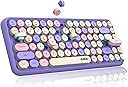
The FELiCON 308i Retro Wireless Keyboard combines vintage typewriter aesthetics with modern Bluetooth 5.0 technology, offering a compact 84-key layout with quiet, ergonomic round keys. Designed for professionals on the go, it supports seamless multi-device connectivity across Windows, Mac, iOS, and Android, while its smart sleep mode maximizes battery efficiency. Lightweight and stylish, it’s the perfect blend of form and function for millennial managers craving both flair and productivity.


| ASIN | B0962P1BD4 |
| Best Sellers Rank | 64,434 in Computers & Accessories ( See Top 100 in Computers & Accessories ) 950 in Keyboards (Computers & Accessories) |
| Country of origin | China |
| Customer reviews | 4.3 4.3 out of 5 stars (1,476) |
| Item model number | 308 |
| Package Dimensions | 35 x 15.2 x 3.8 cm; 600 g |
K**.
A very, very pretty keyboard!
An update after 6 weeks use :: The keyboard is my firm favourite. I actually prefer the feel of the keys to that of my Logitech K380. Although they are deeper, much less effort is required to press them. I make very few typos. A massive plus is that the keyboard has the PgUp, PgDn, Home and End buttons, which many of the smaller keyboards don't have. There are no issues with battery life - something I was worried about when I read other reviews. I'm still on the original battery. They keyboard "falls asleep" after being left idle for 5 or so minutes, and it takes a few keypresses to wake up and reconnect. But it's not at all an issue. Something else important to keep in mind is that it comes with NO DONGLE. So your computer either needs to have a bluetooth built in or you can get a separate dongle to connect such devices. I simply got the TP-Link UB400 Nano USB Bluetooth 4.0 Adapter from Amazon and I was good. And I love the look and feel of this keyboard so much I wouldn't be without it. ----------------------- I am normally a very fussy keyboard customer because I touch-type and sometimes I need to type A LOT. Here I'll describe what I love about this keyboard and the problems with it that you should be aware of before buying it. By no means this is a professional keyboard, and by no means it is a perfect typing experience. As you have probably gathered, one of my reasons for purchasing it was "because it looks good". Well, it does -- it's the nicest looking keyboard I've ever had. A few times I walked into my office, I went, "OMG! Just look at my lovely little keyboard!" My husband is probably getting fed up with this, but it's true -- it's a very pretty keyboard. You will get a lot of comments on it -- that's for sure. I even purchased a couple of matching mice to go with it (Logitech Pebble Mouse in pink goes really well as does Jelly Comb in "Red Wine" if you're also in the market for a matching set like I was), and voila -- look at this beauty! Another -- and probably my main -- reason for the purchase was the small form factor. I have a very limited desk space, where I need to fit a Microsoft Surface in its docking station, a desktop with a large monitor, a keyboard and a mouse for the Surface, and a keyboard and two mice for the desktop (because I am ambidextrous), and, having purchased a massive huge drawing tablet, which arrives tomorrow, I was in an understandable hurry to make some room. Having used Logitech K280 for a couple of years with my desktop, even though the keyboard feels good to type on, it seems absolutely huge on my small desk, and especially unreasonably so considering that I hardly ever use its numeric keypad. My Logitech K280 is probably no bigger than other full size computer keyboards, but even before I had to consider making some room on my desk, it did feel bigger than I needed it to be. This one is small -- AND it's pretty that somehow, the ergonomics and the feel of the keystroke become so much less of a concern. With this little keyboard, my desk is wire-free, tidy, and there's now room for the graphics tablet I'm expecting tomorrow. Height-wise, the keys are probably closer to the mechanical keyboard experience than to any other. If you're a laptop keyboard user, such as Microsoft Surface or an apple keyboard, this will take some getting used to. Keystroke-wise, they are a little spongy, and they do feel like during very fast typing, they may stick, though only very slightly but probably enough to miss a letter or type a lower case instead of a capital. As I said, sometimes I need to write a lot, and though at those times the typing experience and the keystroke do matter to me, I don't think this keyboard is bad enough to impair my speed to a degree considerable enough for me to opt for an uglier version if that makes sense. I knew this wouldn't be perfect, and it isn't, but this keyboard IS good enough. Not to type all day every day, but it's okay. The keystroke here is not outstanding, but it's a perfectly usable keyboard which allows me to achieve reasonable speed and accuracy, and the look of the keyboard does make up for that -- for me at least. The keyboard is not noisy. You quickly get used to the whole new typing experience. The round keys are not a problem. It's all good. There are a couple of drawbacks. The spongy-feeling, tall keys are one. The other one is that the letters don't show up well on the darker keys. It's not a problem for someone who touch-types, and it is … because to start with I was looking for my PgUp, PgDn buttons, etc., as they're not where I'm used to look for them, and you can't easily see what's what in dimmer lighting. I'm sure it's something I'll get used to. The biggest problem for me was, though, the fact that this keyboard does not come with a USB dongle. It was meant to substitute my desktop keyboard, and because my desktop does not have a Bluetooth connection with it, I had to purchase a separate Bluetooth dongle in order to be able to connect this keyboard to it. I was at a loss when I opened the box and there was no Bluetooth dongle -- it was so exciting to see this lovely keyboard and so frustrating not being able to use it! But I figured it out in the end. Which brings me to my next point. The instructions are poor. There are instructions in English, but I wasn't able to establish how to connect the keyboard to my Surface (which DOES have a Bluetooth in it). So, in the end, I put the Surface Bluetooth in the pairing mode and started pressing some buttons while looking at the instructions. Honest to God I don't know what I pressed for some light to start flashing, but something did flash and the keyboard connected to my Surface. I think it was Fn+C, but don't quote me on it. The instructions are sparse, and they're poor. I found the "unboxing" experience surprisingly satisfying. The keyboard came in a nice box, which was made out of decent card, it had a picture of the keyboard on the front and back, in its full colour glory, and it was well packaged inside the box. So, a plus there! Very happy with my purchase overall. Very. I would buy another one of these, but considering how bad some people say battery life is on them, I purchased for my Surface the Logitech K380, which boasts two-year battery life (and an amazing typing experience with it) just to be on the safe side -- and a big pack of AAA batteries. I decided to do away with my older large Logitech keyboard and if the worst comes to the worst -- i.e. I run out of batteries and find myself unable to type large chunks of text on these deep spongier-feeling keys -- I will use the new Logitech K380 instead. But somehow this keyboard is so pretty and I like it so much something tells me that is not going to happen.
J**L
Perfect Pi companion
I'll start with the negative: The instructions aren't clear of how to turn the keyboard on. There also isn't an off button. Fn and c turn the keyboard on. It defaults to sleep mode after being left alone for a short duration. The good: For programming, most languages use American English, so once set up the keyboard is great for use with my Pi or small laptop. It also works great on the IPad and is compact enough, light weight, with comfortable keys that give a satisfying click. Looks wise, it's trendy without being a distraction. Battery life seems fine as does connectivity after hours of use.
L**R
Works fine but has some key issues
I use this keyboard connected to a Windows Laptop in the English (UK) setting. I personally really like the sound of this keyboard and it looks nice. The round buttons were hard to get used to at first but I adjusted pretty quickly, case in point: I am using it now). I use it for playing Genshin Impact which involves a lot of keyboard usage and other than me accidentally hitting the wrong keys, it works perfectly well, but I think I am slightly more likely to hit the wrong keys on this keyboard due to the round buttons so I wouldn't recommend if you are looking to play a lot of PC games. The keys are also in the wrong place for a few things, but over time it becomes easy to remember (this may be related to me using a UK English keyboard). These are: £ - which doesn't exist on this keyboard but you can still use (its shift + 3 by the way, instead of the # it shows, the # is the button underneath the backspace which if you shift + click is the ~) @ - which is reversed with the " the ~ key when you shift = click is actually ¬ The main issue is that it has a habit of disconnecting or well, appearing to disconnect. That is, if you haven't used it for a bit (even if your laptop/computer screen hasn't gone to sleep) it will not type anything. There are two ways around this issue that don't involve disconnecting & reconnecting. 1. keep hitting the button that you need (it will respond after a few repeated clicks) 2. click ctrl + c - this seems to work like a charm for my keyboard In fact, disconnecting it (in the sense of forgetting it from your Bluetooth devices ) caused me the most trouble: once it really wasn't responding and my usual tricks weren't working and I stupidly decided to disconnect it, I even thought it had run out of battery...cue me spending a more and more stressful 10 mins trying to reconnect it. Rule of thumb: do not lose the instructions, without them I wouldn't have remembered how to connect the keyboard back to my laptop
R**A
Nice little keyboard
This is a very attractive keyboard that works well. The only odd thing is that the symbols for @ and " are reversed, so I have a few problems using sites that require the @ symbol until I found where it was. Setting up the keyboard was fairly easy, though I had to buy a Bluetooth dongle as my PC doesn't have Bluetooth! But now it all works perfectly. It is a compact keyboard compared to the standard PC keyboard but it's comfortable to use.
H**H
Love this! Detailed review of all features (following a lot of use) below
I LOVE this keyboard, and will provide a detailed review of: size, battery life, ease of use, keyboard layout (some features might be confusing to figure out at first, so I thought I’d save someone else the trouble), aesthetic, the noise, the keys, features (that didn’t fit into the above categories), Bluetooth pairing, value for money, and my overall opinion. Hopefully that’ll explain WHY I love it and answer any questions you might have about using it if you do purchase it. SIZE The keyboard is not a full size keyboard. To give an idea that means a bit more than a measurement with no context, it is a couple of finger widths wider than the screen of a 12.9 inch iPad Pro, OR just a tiny bit (less than 1cm) wider than the longer edges of a standard piece of A4 paper. BATTERY LIFE This keyboard takes 2 AAA (triple A, to clarify) batteries. It is said that with 8 hours of use a day, these batteries should last 7 days. In my experience with using this keyboard, the battery life far exceeds this. I use it for absolutely everything, and have even quickly connected it to my phone a couple of times so have used it a lot. EASE OF USE: I read the reviews before making this purchase, so knew that when I first got the keyboard, after inserting the batteries, I had to press the function key (Fn, the second key to the right of the space bar) and the C (as in, the letter C key) at the same time to put the keyboard into Bluetooth pairing mode. In some reviews people had difficulty with this, but I found it very easy to set up. After pressing Fn + C, I went to the Bluetooth of my iPad and connected it like I would any other Bluetooth device. It paired immediately and each time the keys are pressed (the first couple of presses wake up the keyboard and it is immediately working like it’s built in and will wake my iPad as it only needs to be paired once, on it’s first use with the device) there is an immediate response. I haven’t experienced any lag. KEYBOARD LAYOUT: The keyboard is laid out like a standard UK qwerty keyboard, with an enter key that is a small bar instead of the larger shape used on most full sized keyboards. Despite its compact size, the keys are spaced comfortably apart and I have no difficulty with the spacing. As the keys are round, I find that I make much fewer typos when I am typing quickly without looking. Your fingertips move into the spaces between the keys, and as they are round, you don’t press the corner of a neighbouring key and cause a typo, which is very helpful. It also makes al the buttons look like those Love Heart sweets, especially with the pastel colours. It is laid out like an apple keyboard, in that the number 2 key when used in combination with the shift key produces an “2” symbol and not quotation marks, which are instead generated by pressing the shift key and the button right next to it. [NEXT PART RELEVANT FOR USE WITH APPLE PRODUCTS] However, the rest of the layout is not like an apple keyboard layout. Instead of the keys along the bottom left being “control” “option” “command,” they are “control” “WIN” “Alt.” Instead of the keys to the right of the space bar being “command” and then “option,” they are instead “Alt” “function” “control.” If using an apple product and wishing to use shortcuts that usually involve the command key, you have to press the WIN key on the bottom left, to the left of the space bar. The print screen button takes screenshots on apple products just like on other devices. AESTHETIC: It looks so visually pleasing. The colours are pastel and fun, and everyone who has seen me using it has commented on how lovely it looks, usually then saying it reminds them of sweets or the Love Heart sweets. The round buttons have been a bit of a talking point. Some people find that they look weird, but most think they add to the appearance and do make it harder to accidentally press the neighbouring keys when you’re typing. It appears exactly as advertised. There is a small logo on the right hand side of the space bar, but it is not dominant, although it is obviously visible as it is black. Every key is properly labelled in black and none of them are faded, mislabelled, or wonky. THE NOISE: I have to give the sound a mention. It isn’t a very very loud clunky keyboard, but it makes a very satisfying sound as you type, which is noticeable. A lot of people have made comment on this too, to say that it makes them want to sit down and type, or that they want to buy it for the sound alone. It does make typing more enjoyable. THE KEYS: None of the keys are loose, sticky, or hard to depress. Typing is easy, the buttons depress quite a way so you really feel like you’re pressing the keys, unlike with the butterfly keyboards of MacBooks and things which are quite shallow and don’t give the same response. They spring back immediately and with a second satisfying little noise. They are spaced comfortably and can be used for a long time without difficulty or discomfort. Typing is really quite effortless, and after a lot of use the keys have not loosened, developed any issues, or become any less responsive. Nor have they become louder or started to make a less satisfying sound. They hold up very well to almost constant use. FEATURES: The keyboard is not backlit, but it took very little adjustment to get used to the finger placement of these keys and very quickly I didn’t really have to look when I typed, so this is a feature that might not be missed. Because the keys are pale pastel colours and labelled in black, it only takes very dim ambient lighting and you can see which key is which, so backlighting isn’t a feature I have missed. When caps lock is on, a red light comes on at the top right of the keyboard. Also when Bluetooth pairing, a red light at the top right of the keyboard flashes and goes out once you have paired. The keyboard puts itself to sleep after periods of inactivity to save batter, but after 1 or 2 taps of any key, all subsequent key presses result in action - i.e. a couple of taps and it’s working like it never powered down for a bit. BLUETOOTH PAIRING: I’ve touched on this in other parts of this review. To pair this keyboard with an apple product (I have not tried it with anything else) yo hold the FN and C keys at the same time, then go to the Bluetooth tab in settings and select the device as you would for any other Bluetooth accessory. Pairing is quick and as easy as that, and is only something you have to do at the start of your use of the keyboard with that device. Even when the keyboard has been asleep, it remains paired with the device you last paired it with, and can be used to wake up and then unlock that device. Switching from my iPad to my phone was easy too. I just went into settings and disconnected from the keyboard, pressed Fn and C at the same time, and went to the Bluetooth tab in the settings of my phone, and selected the device, which again immediately paired. To switch back again I did the process the other way round. You do not have to pair the keyboard again after changing the batteries, which is also helpful. VALUE FOR MONEY: There are more expensive keyboards that are similar or almost identical, and this one was sort of in the middle of the price range. In my opinion it was absolutely worth the money and would make an excellent purchase as a treat to yourself, or a gift for someone else in your life. I absolutely love this keyboard and have recommended it to numerous other people, and as it comes in many different colour options there is something to please everyone. Personally, I love the lilac keyboard with the pastel multicolour buttons (lilac, green, cream, pink) but that’s clearly why I bought this colour option! It would be perfect for an aesthetic study space to try and encourage a teenager to do their homework, a university student looking to personalise their study environment, a professional looking to make their work environment feel more like their own, or anyone looking for something fun, visually pleasing, easy to use, and satisfying to hear (if you like the sound of typing).
A**N
Cute but really tiny and not so quiet.
This keyboard looks really nice. I have had compact keyboards before and they clearly state the dimensions, but the way the keys are positioned makes it TINY. It's not suitable for extended writing at all - you'd hurt your wrists. Would be okay for a kid or if you were just browsing online or something, but not for writing. I also didn't find it very 'soft' as far as noise (def not silent) and function. I guess it could be okay depending what you use it for, but I've had to return right away.
M**H
Completes my working from home set up
This is a really great keyboard, it comes nicely packages & the colours are bright and it looks a bit like a mechanical keyboard but it's quiet to type on and pressing the keys feels really nice when typing, they keyboard takes 2 AA batteries & you then connect it via Bluetooth, it's easy to connect & you can use it on windows, IOS & android systems as well.
C**L
Stopped working :(
After 2 months it stopped working, got maybe 5 uses out of it and the battery died, didn't mind popping new batteries in but every time I put new ones in it still says it's out of charge. Don't know who to contact for help about this, if it is a consistent thing with these or I just got unlucky but was a waste for me. I got busy and used my old keyboard for a while but now the return window is now closed and I can't find any support. Think a couple months is too soon for something to break and I'm dissapointed because when it did work it was lovely to type on and worked nicely.
L**E
Un super rapport qualité prix
On ne retrouve nul part un clavier de ce type à ce prix, agréable au toucher et compact et design c'est tout ce que je demandais. Je ne recherchais pas du mécanique pour rester discret et bien je suis pas déçu il reste très silencieux tout en gardant une bonne sensation de pression Seul détail peu embêtant est que j'aperçois les "stickers" coller a certaines touches selon la luminosité de la pièce (voir photo)
A**I
Appena presa, già rubata (tranquilli)!
Tastiera molto divertente e piacevole all'occhio: permette una scrittura "old style" con una corsa dei tasti che regala una certa qual soddisfazione. Mi piacerebbe poterla usare ancora ma, appena giunta a casa, mi è stata rubata da mia figlia quattordicenne che l'ha sequestrata nella sua stanza, collegata al suo MacBook Air. Al momento pur avendo avanzato diverse offerte come riscatto, non ho avuto riscontri apprezzabili. La tastiera sembra non verrà restituita!
C**S
Me encanta!
Funciona bien y es muy bonito
I**A
Cute and useful
Love the small size and how lightweight it is, I can move it around easily for cleaning/making space. The keys are soft and feel great when typing. They do make a sound, but it's not super noisy (I personally like it). The Bluetooth connected right away to my laptop and it stays connected. The keyboard goes into standby mode after a while of not using it and the next time you type it takes a few seconds to "wake up". It would be perfect if I didn't have to wait those few seconds, but it really doesn't take long. It also looks super cute, just like in the pictures! The color is a very light blue, borderline mint green, but a little more in the blue side (see 3rd picture). I definitely recommend it.
E**F
Rengine aşık oldum.
Ipad Pro’yu bilgisayar gibi kullanabilmek için aldım. Rengine bayıldım. Başta bağlandı konusunda problem yaşar mıyım diye düşüncelerim vardı ama hemen bağlantı yaptım. İki ince pil ile çalışıyor. Aynı renk mouse bulabilirsem onu da almayı düşünüyorum çok tatlı duruyor. 1 hafta içinde Almanya’dan elime ulaştı. Türkiye’de satılan ajazz klavyelerin yarı fiyatına geldi. Bir klavye fiyatına ıPad için paperfeel, klavye ve metal tablet tutucu aldım. Mutluyum 🥰
Trustpilot
4 days ago
3 days ago