Desertcart purchases this item on your behalf and handles shipping, customs, and support to Tunisia.
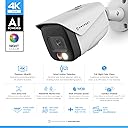
๐ต๏ธโโ๏ธ Elevate your security game with AI-powered 4K clarity and color night visionโbecause your peace of mind deserves the best.
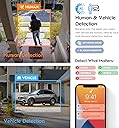
The Amcrest UltraHD 4K IP PoE AI Camera combines an 8MP sensor with a 129ยฐ wide-angle lens and advanced AI detection to deliver crystal-clear video and smart alerts. Its dual illumination technology enables vibrant color night vision up to 49 feet, while the rugged IP67 metal housing ensures durability in any weather. Compatible with multiple platforms and cloud storage, this camera offers professional-grade outdoor security with seamless remote access and active deterrent features.


| ASIN | B0837485XG |
| Alert Type | Motion Only |
| Antenna Location | Outdoor Security |
| Best Sellers Rank | #127 in Bullet Surveillance Cameras |
| Brand | Amcrest |
| Built-In Media | 1 x UltraHD 4K (8-Megapixel) AI PoE Bullet IP Security Camera White (IP8M-2796EW-AI) 1 x Quick Start Guide 1 Year Warranty Provided Directly from Amcrest |
| Color | White |
| Compatible Devices | Smartphone |
| Connectivity Protocol | Ethernet |
| Connectivity Technology | Ethernet |
| Controller Type | Iris |
| Customer Reviews | 4.3 out of 5 stars 728 Reviews |
| Effective Still Resolution | 8 mp |
| Effective Video Resolution | 8 mp |
| Enclosure Material | Metal |
| Form Factor | Bullet |
| Frame Rate | 15 fps |
| Global Trade Identification Number | 00850007530877 |
| Indoor Outdoor Usage | Outdoor |
| Indoor/Outdoor Usage | Outdoor |
| Item Weight | 1.5 pounds |
| Light Source | LED |
| Manufacturer | Amcrest |
| Memory Storage Capacity | 256 GB |
| Mfr Part Number | IP8M-2597EB-28MM |
| Model Number | IP8M-2696EW-AI |
| Mount Type | Wall Mount |
| Night Vision | Night Color |
| Night Vision Range | 164 feet |
| Number of Channels | 1 |
| Number of Items | 1 |
| Other Special Features of the Product | Image Sensor, Motion Sensor, Night Vision, Portable |
| Photo Sensor Resolution | 8 mp |
| Photo Sensor Technology | CMOS |
| Power Source | Ac/dc |
| Recommended Uses For Product | Outdoor Security |
| Room Type | Classroom, Kitchen, Living Room, Office |
| Special Feature | Image Sensor, Motion Sensor, Night Vision, Portable |
| UPC | 850007530907 850007530877 850007530921 |
| Unit Count | 1 Count |
| Video Capture Format | MP4 |
| Video Capture Resolution | 4k |
| Viewing Angle | 129 degrees |
| Voltage | 12 volts |
| Waterproof Rating | IP67 |
| Wattage | 4.2 watts |
| Wireless Technology | Power Over Ethernet |
R**9
Exceed your Expectations on POE Cameras
I was hesitant of trying a new camera (I've been burned a couple times of buying cameras on Amazon, due to poor quality and worse customer service). I decided to give this one a try.. and I am glad I did.. Not only did this camera exceed my expectations, but the customer service also exceeded my expectations! First of all, I ran into a issue when I received the product, the camera would not power on, I tried different ports on my POE switch, I tried different cables, and came to the conclusion that the camera was dead. (This can happen with ANY product from any company)... but where this stands out from the rest... I contacted them via email and got a response quickly.. I was given some things to try for troubleshooting (such as swapping cables, reset button, remove any SD card, etc). After troubleshooting, the camera was pronounced dead. I was able to get a replacement camera shipped to me quickly and the second camera worked PERFECTLY out of the box. A few things that caught my attention, this camera is made of METAL plus it had a microsd slot. Durable and ability to save images to a onboard storage made this standout. I did add a micro-sd card to the camera (which you have to remove couple screws, VERY easy to acomplish.) I was able to get mine setup quickly wiht the app and have access to view the rear of the house. Please note, this is POE and will require a adapter to power the camera or a POE network switch to power the camera. I don't have a NVR yet, so I am just depending on the camera for live views on my backyard. (view the dogs).. I will note, the image was CLEAR and crisp, in addition, the night time view was just as good! I have researched and found that this camera will intergrate seemlessly with most generic surveillance systems that support IP cameras. I have not been able to test in depth on the extra featues with AI Human/Vechicle detection, but I have no doubt that it doesn't exceed ALL expectations you have. This camera is well worth the purchase, and once I decided on a physical NVR or NVR software, I bet I will be looking to purchase more Amcrest cameras, especially if they are anything like this one! Give a try, I bet your expectations will be exceeded! A+++
C**S
Another Awesome Product from Amcrest
This review is for the Amcrest UltraHD 4K (8MP) IP PoE AI Camera, FOV 129ยฐ, 49ft Color Nightvision, Security Outdoor Bullet Camera, Human & Vehicle Detection, Active Deterrent, 4K @15fps, IP8M-2796EB-AI (referred to henceforth as Color HD4K). I was previously using the Amcrest UltraHD 4K without the color nightvision (IP8M-249EB-V2 referred to henceforth as HD4K). See the photos for size and package comparisons. If you are considering an upgrade from the HD4K (IP8M-249EB-V2) to the Color HD4K (IP8M-2796EB-AI), here are few things to keep in mind: 1. The color night vision on the Color HD4K is amazing and alone, well-worth the upgrade. 2. The Color HD4K has a wider field of view than the HD4K (105ยฐ vs. 129ยฐ) 3. The Color HD4K and the HD4K do NOT have the same screw patterns on their bases. This means that you will have to drill new holes to mount the camera new camera (See photo of bases). Installation: The installation using the AmcrestViewPro app was not the best experience, but is was fine. I did have one app crash when adding the camera, but that literally happens every time I add a camera with the app. After the crash, I just start over and it works the second time. The app isn't very polished but I've actually started using the web browser interface (just enter your camera IP address into the the web address bar in your browser) and it's pretty impressive. It's very intuitive and easy to use. You can adjust the video picture, add text to the video stream, and a lot more. Why I'm Excited About This Camera: APPLE HOMEKIT!! To be clear, there are currently no POE cameras with native Homekit support. BUT, those who know about Homebridge, Home Assistant (HASS), or Scypted understand that this camera can ABSOLUTELY be added to Apple Homekit (WITH APPLE SECURE VIDEO). In my home, I'm using Home Assistant with the Scrypted addon to bring this camera into Homekit. Amcrest cameras are ideal for this setup which is why they are recommended on the official Scrypted website. Here's why the Color HD4K is perfect HASS/Scrypted/Homekit: 1. Quality of this camera is amazing for the price (lots of people use Unifi cameras but they are SO EXPENSIVE). 2. Great video quality, so the image is clear in Homekit. 3. Like most other POE cameras, the video loads instantly. Even in Homekit. 4. This camera supports multiple streams. This lets me have a low res and high stream to use in Scrypted. I can have the low res video play in Homekit when I stream video from outside of my home and use the high res stream for a NVR. 5. This camera natively streams to correct video format for Homekit (h.264) Overall, I could not be happier with this camera. The quality is great, web interface is handy, and it works flawlessly in Apple Homekit w/ Homekit Secure Video. My next project will be to add an NVR to the setup for 24/7 recording. The NVR will likely be from Amcrest, along with any other cameras that I add in the future.
R**Y
Super wide view and solid built
Functionality: I can make all of the necessary configurations with any browser. Currently using Chrome. Saving is very important as I make any changes. Overall experience: โข I am not a fan of bullet cameras but decided to give this one a shot (am in love with the spotlight, more later) โข Connected to my network quickly and joined my BlueIris server. โข Very surprised at the size of this camera. It was actually a bit bigger than I expected and is very, very solid metal. โข This camera is positioned in a spot on our farm overlooking our ducks because there was a couple of features of this camera I wanted to test out in this area. โข It is very clear that it is waterproof as undoing the screws from the dome piece I could hear the air being released. It was also very simple to add the SD card. Image: โข The 129-degree field of view makes for an excellent image and is much wider than you would expect as well as most other cameras. The image is crystal clear and the coverage is amazing. โข While not a stated feature, for some reason I feel that this camera has a bit higher viewpoint if that makes sense. I can see more top to bottom. That may be due to placement or the wider angle but either way, it has been a perfect fit for this location. Night Vision: โข The night vision kicks on and looks great when needed. โข I will forever always try to purchase and recommend cameras that have the spotlight feature. Ever since it was updated to being able to be โalways onโ during motion, I have just raved about it. Having that additional light powered by POE is incredible to me. While itโs not a floodlight, it is just enough during the night when I am walking out there to light up my path. โข Really appreciate the night color Technology. Makes the night time images much easier to see Audio: โข While I am not using audio to trigger recording, it is very nice to be able to listen in on the ducks as they go about their day. โข It is crystal clear and cutting adjusting for the wind noise was easy to accomplish with the provided settings. Playback: โข Itโs great to be able to select by file type when looking at recordings. This makes it much quicker to go through the videos of the day. AI: โข This is where I wanted to do some additional testing. This camera is pointed at our ducks on the farm and I wanted to test itโs motion, human detection as well as trip-line (IVS). โข I was able to easily block out where the ducks are located in the detection area very quickly. Then using IVS, set trip lines coming from both directions to pick up any animals or humans. I also set the detection to humans. โข Notifications and video seemed to be captured every time it was feeding time (human) and anytime the trip-line was tripped (dogs running by) which was fantastic to see. I have been able to see these events specifically as well as know if any racoons show up in the area again. There have defiantly been some false positives but I would much rather that then not capturing something. Overall, this is a great bullet camera with an incredibly wide-angle view. I have found a permeant spot with this camera overlooking my ducks and can view their entire pen as well as anything approaching with it. While I wish the hood was a bit more movable, it is not necessary due to the camera facing more north. The camera and image though are top quality from Amcrest as usual and with the included spotlight, this is easily in one of my top 3 cameras from Amcrest.
V**T
Detailed PoE camera with a little setup required
Good image quality and a solid wired security camera. The PoE connection kept the installation simple for my setup by carrying power and data over one cable. The picture is detailed enough to identify what is happening in the monitored area, and the wide view is useful for covering more space. Night viewing and motion features are helpful, although getting the best results takes time spent on placement and sensitivity settings. This is better suited to someone comfortable with a wired network camera than to a plug-and-play consumer system. Once configured, it has been a dependable addition to my home monitoring setup.
M**X
An Impressive Piece of Gear
This Amcrest bullet security camera, model IP8M-2796EW-AI, has been an overall positive experience to set up and use. I am using it to replace an older model camera with lower resolution, and have attached the new one to the rear of my property on the garage. The packaging for the camera was top notch. It was packed securely in foam padding, and included a mounting template, screws and anchors, and the necessities to ensure a water-tight connection to the ethernet port if necessary. Some brief documentation was also in the box, although I found myself consulting the more thorough online documentation while learning the nuances of the device. As has been my experience previously with other Amcrest cameras, set-up was simple. I attached the camera to a PoE switch to provide power and to perform initial configuration before mounting it. It obtained an IP address from my DHCP server, and after logging in to the familiar web interface and changing the default password, I set a static address for the device. For this type of gear, I prefer to group the cameras within the same consecutive static IP space - it just makes them easier for me to manage, but isn't a necessity for operation. After completing the initial configuration, I mounted the camera in its new home on the outdoor wall of the garage and aimed it in the direction that I want to observe. The camera housing is quality, and it feels quite durable, so I wasn't fearful of breaking it while mounting. Once mounting was complete, I attached the permanent PoE ethernet cable and began to configure the details of the device. I utilize my fleet of Amcrest cameras with Synology's Surveillance Station, and I was pleased to see that this camera model is present in the Synology, so I did not have to configure it as a generic Amcrest device. The camera's AI features are really good at detecting both humans and cars. The alley at the rear of my property is infrequently traveled by cars, but people do walk through it during the day. In the Synology, I configured it to record only on detection of these advanced events, and it's doing a great job. The camera's image sensor is EXCELLENT, at 8MP. The detail captured by this sensor is really good quality. Should something nefarious occur at the back of my home, I am confident that this camera will capture anything needed to identify those involved. The nighttime image quality is also exceptionally great. I have also scheduled the camera, within its web interface, to only flash the white light during specific overnight nighttime hours - hours during which I want someone to know it's there, in case they have bad intentions. While performing configurations and in an attempt to get everything set up just right, I consulted with Amcrest's detailed PDF documentation for the product. They cover the bases, detailing answers to any of the questions I had along the way. There's also the option to reach out to support, and even a few support forums for deeper discussion, but I didn't require that level of help with this device. In all, Amcrest has delivered another device that doesn't disappoint. I feel comfortable knowing that this watchful eye is present to keep watch over things on my property.
G**R
Read this before you buy.
I have 7 Amcrest cameras and I've been using them since 2016. 5 of the 7 cameras are Amcrest IP8M-2496EW-V2 UltraHD Outdoor Bullet PoE IP Security Camera, 4K. Aside from them having basic detection, they all work very well. I wanted something that had a security deterrent, the LED on this camera is trigged by a human detection. You can set it to stay on, or flash. At night when you set to to high flash, its perfect, exactly what I want, it makes it very obvious to the person in my yard you're being recorded. The IVS human and vehicle detection worked as it should, and image/video quality was good. The issue... After getting it installed, I found out that any motion detection and IVS events when played back using the Amcrest Surveillance Pro desktop and mobile app it would not start at the time of the event, it would 30 seconds to as much as 9 minutes before the event. For example, a triggered event at 2:00am, when you play it back would be 1:51:02am. Then if you scrubbed or skipped up to the event using the timeline, it would start to show you the triggered event then loop back 5 seconds 3 times, and then jump back to 1:51:02am again. I checked and the camera had the latest firmware version available. I opened a case with Amazon, they sent me a replacement camera. (thank you for great Customer service!) Meanwhile, I also opened a support ticket with Amcrest. It did take them a couple of days to get back, but once we started communicating support was on point. I kept the original camera on hand hoping Amcrest would find an issue with either my settings or maybe identify a hardware issue. Amcrest Support sent me a beta version firmware to install. The install didn't clear my settings, but I still formatted the SD card and factory reset, and put my settings back in. The issue was still present. Then I installed the Amazon replacement camera, did the same steps, SD format, updated firmware to beta version supplied by Amcrest Support. Issue is STILL present. I then installed a 128GB SD card from one of my perfectly working IP8M-2496EW-V2 cameras. Formatted SD, and sadly, it still had the exact same issue. Amcrest Support tech bench tested the same camera and could not replicate the issue. They think the batch sent to Amazon might have a defect. Sadly this means any replacements I get are most likely going to have this defect. I ended up sending both the original camera and the replacement back to Amazon. Amcrest Support and Amazon Customer Service gets 5 stars here, however the camera itself, gets the lowest 1 star. I spent nearly a week going up and down my ladder on my garage to try to resolve this issue. I really like Amcrest cameras and would hate to change brands, however, I did purchase a Ring Floodlight Cam Wired Plus. Without turning this in to a Ring camera review, I really hate their software, love the hardware. I will check back with Amcrest support to see if they can get me a camera that is known to not have the defect! **Update** I heard back from Amcrest Support and they confirmed this, they bench tested camera and had the same/similar issue. So this was not limited to only a batch of cameras. If you have a camera that does this, you need to reach out to Amcrest Support.
A**Y
Feature Packed and Easy to Install and Use
Installation and Mounting - I ordered this camera with the intention of replacing an older lower resolution Amcrest camera (ASH42-W - similar bullet style), and I was very happy to see that the mounting holes aligned perfectly, so it made for a simple installation. Fortunately, I have used enough Amcrest cameras to know the process to setup and install on the app. I really like the fact that a barcode is provided that enables the SN to be loaded into Amcrest App. Installation was mostly effortless, and I was moving from a WiFi camera to a POE camera, so now I didnโt have to worry about a separate power source, which made my installation so much cleaner. I am a long-term user of Amcrest Surveillance Pro, and continued to use that application to access this camera. Camera Resolution/Image Quality โ I really really like the color night vision on this camera. I have this camera overlooking our pool and it picks up great at night with the pool lights on. Compared to the older 4mp camera that I was replacing, I also really like the wider FOV (101o vs 129o) which lets me capture a broader span of my back patio. Another big upgrade is the added mic, which has great sensitivity to listen in on audio in the area. It does pick up some wind noise, but no more than my other outdoor security cameras. All in all, I am really impressed with this camera. Of the 10 or so Amcrest cameras, I feel that this is the highest quality camera of the bunch. I really like the clarity and resolution of the video (both day and night). The price point I think is fairly reasonable given the considerable features that this model offers. I really like that it has the AI features to help distinguish humans and vehicles. All in all I give this camera five out of five stars.
M**5
If False Positive Motion Alerts is an Issue, This is the Camera for You.....BUT
My objective was to find an outdoor camera with the obvious characteristics- clear picture, a fair-sized field of vision (FV), multiple options for storing video and snapshots, etc. but also one that solved the problem of false positive motion detection events. I own two other Amcrest indoor cameras so I am familiar with the hardware's performance (picture clarity, FV, etc.) These cameras are good products as far as the basics but they tend to generate false positive motion alerts with just about all alerts being triggered by a change in lighting conditions including minor changes in many cases. On a cloudy day if all of a sudden the sun peaks through the window and with the camera not being anywhere near or pointed at a window, motion alert ! At dawn or dusk as the lighting conditions change, motion alert ! These cameras have sensitivity adjustment parameters but their effectiveness has limitations. With this camera's smart motion features, I was hoping these false alerts would not be a problem, particularly since this is an outdoor camera and subject to more intense and more sudden changes in lighting conditions. This camera does a very good job of eliminating false positive motion events. The camera is mounted on the side of my home's front door, 11' high and its FV consists of a walkway leading from the front door to the driveway, a 63' x 21' driveway plus a lawn area roughly twice the size of the driveway. After installing the camera and prior to activating its smart motion detection features, false motion alerts occurred similar to my two indoor cameras. Examples: The moving shadow on the lawn of a bird flying overhead outside the camera's FV, bushes along the walkway swaying in a strong wind and a chunk of snow falling to the ground, the sun hiding behind the clouds and then reappearing, headlights of passing cars. After activating the camera's Intelligent Video System (IVS) analytics, the number of false motion alerts has been zero for about a week. Initially when I stopped receiving alerts, I thought the camera had stopped working but what was happening was that it was working correctly. The camera has many other settings to customize it to the needs of the particular FV and to the desired quality of the videos and snapshots it produces....excellent range, very high quality picture, multiple storage options for video and snapshots, ability to manage it via a browser or a phone's app (though the app is not full function). However, for me the differentiating factor is its motion detection accuracy. If the hardware has the longevity I am hoping it does, this would have been a very good buy. The one downside is the quality of its user manual but I find this is an issue with just about every vendor. UPDATE Per the above review, I had rated this camera 5* but unfortunately I have to reduce it to 3*. All of the above continues to be true and I am happy with its performance but its overall usability is less than stellar. The management of the IVS implementation (see above) is not fully baked yet. When being notified of motion events by IVS via email, there are no settings to control the no. of emails generated for a motion event. I have received as many as 5-10 emails notifying me of a 2-3 minutes long continuous motion event. Setting(s) for this are available in other cameras but not available for this one. Also, the new IVS technology cannot be managed via the AmcrestView Pro app. I attempted to implement Push Notifications for motion events detected by IVS but the App does not have this capability. A tutorial on the Amcrest website clearly illustrates how to do this but Support told me that their video is incorrect. Only way to be notified of IVS-detected motion events is through lots of unnecessary emails. It is unfortunate that such a camera has such an incomplete implementation- the package of hardware/firmware/app/documentation seems to be missing pieces so managing the performance of its excellent IVS technology is kludgy.
Trustpilot
4 days ago
2 weeks ago