Desertcart purchases this item on your behalf and handles shipping, customs, and support to Tunisia.
🎞️ Relive your past in stunning 22MP clarity — because memories deserve the spotlight!
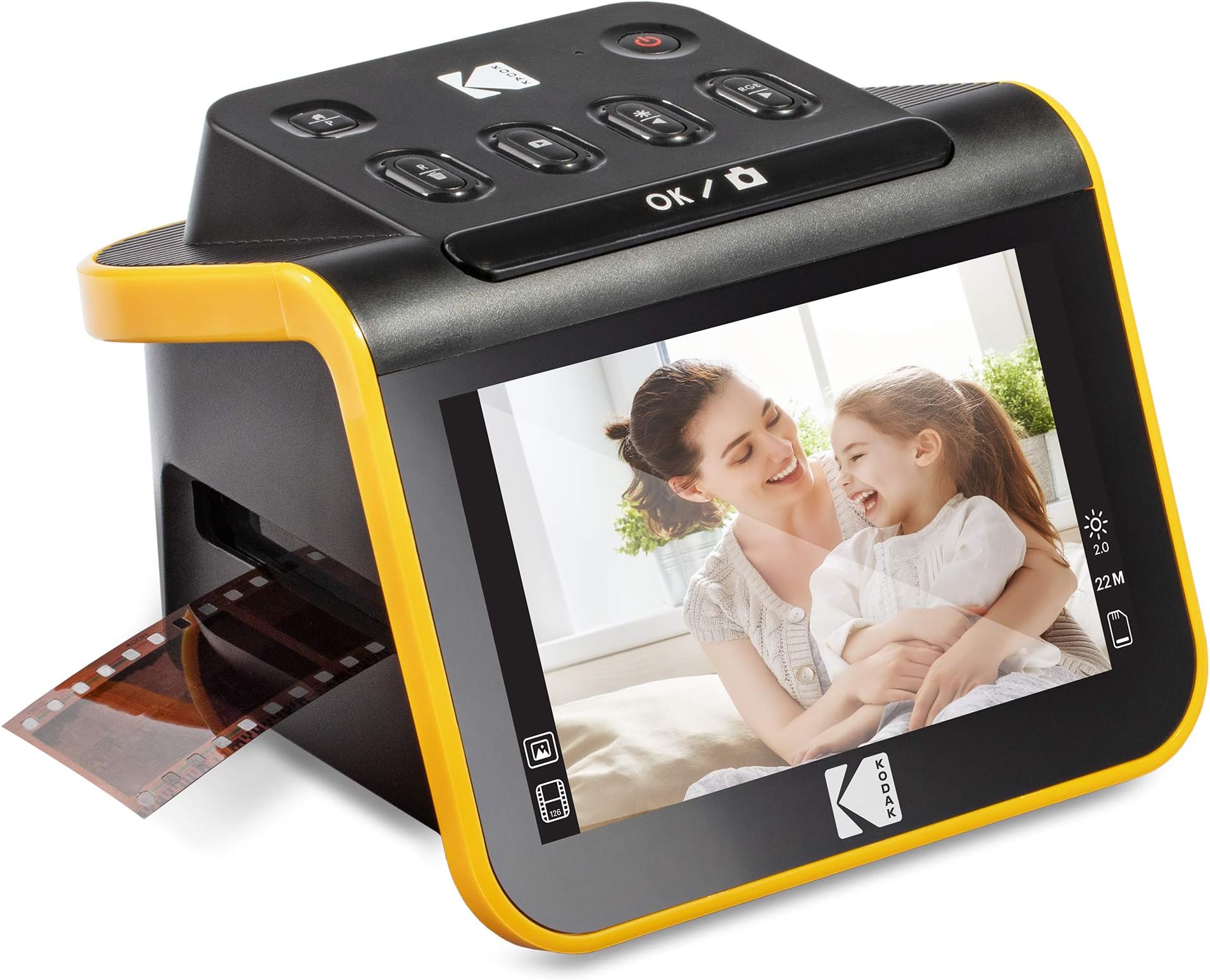
The KODAK Slide N Scan is a sleek, high-resolution 22MP film and slide scanner featuring a vibrant 5-inch LCD for instant preview and editing. Compatible with multiple film formats (135, 110, 126, 50mm), it offers quick-feed continuous scanning and saves images directly to SD/SDHC cards (up to 32GB). With USB-C and HDMI connectivity, it integrates effortlessly into modern workflows, making it the ultimate tool for professionals and enthusiasts eager to preserve and share vintage photo archives.


| ASIN | B084NVRHYQ |
| Best Sellers Rank | #4,270 in Office Products ( See Top 100 in Office Products ) #1 in Slide & Negative Scanners |
| Brand | KODAK |
| Color Depth | 24 bits |
| Connection Type | HDMI, USB |
| Connectivity Technology | HDMI , USB |
| Customer Reviews | 4.3 out of 5 stars 12,614 Reviews |
| Global Trade Identification Number | 00843812123013 |
| Item Dimensions D x W x H | 5.27"D x 5.35"W x 3.74"H |
| Item Type Name | KODAK SLIDE N SCAN Film and Slide Scanner with Large 5” LCD Screen |
| Item Weight | 16 ounces |
| Manufacturer | Kodak |
| Media Type | Negatives, Slide |
| Minimum System Requirements | Windows 7 |
| Model Name | KODAK SLIDE N SCAN Film and Slide Scanner with Large 5” LCD Screen |
| Optical Sensor Technology | CMOS |
| Product Dimensions | 5.27"D x 5.35"W x 3.74"H |
| Resolution | 22 Megapixels |
| Scanner Type | Film |
| Standard Sheet Capacity | 1 |
| UPC | 843812123013 |
| Unit Count | 1 Count |
| Warranty Description | B084NVRHYQ |
| Wattage | 15 watts |
A**C
Perfect for family photos, good quality and fun to use
I'm so happy with this little device! As soon as it arrived I tested a 35mm color negative. It's really simple to use, as soon as you set up the scanner and slide in the negative, you can see the image immediately on the screen. It's so enjoyable and quick and the quality exceeded my expectations. You do need to buy a 32GB SD card or 32GB SDHC card. It will not work with larger GB or with SDXC cards. Setup: Plug in the USB-C/USB cable (provided) into the scanner. USB-C side goes into the scanner, and the USB side goes into to your PC or to a wall adapter. Insert the SD card in the back of the scanner (right next to the USB-C slot). Open the hinged slide holder and insert the adapter for 135mm, 126mm or 110mm depending on what film you are using, and then snap it closed again. The manual shows you how to align the adapter inside the hinged holder. If you are scanning slides you won't need an adapter, you will just need the slide holder. Insert the slide holder into the slot on the right side of the scanner. The arrow on the slide holder should be pointing toward the scanner. About an inch will still be visible, sticking out of the slot. This is where you insert the film. How to use: Press the power button (it must be plugged in to PC or wall using the USB cable to power on). Press the large OK button on the front to select film type. Use right/left arrows on the top of the machine to select film type and then click OK. Select the film size and click OK. Make sure your film is right side up, and slide the negative into the slide holder on the right side of the scanner. Smile when you see your image on the screen! You will need to adjust the film so that the image is centered on the scanner, and then press the large OK button again. Slide the film further in until you can see the next image. Press OK to scan. Once you can't push the film in any further, you can insert the next piece of film and it will push the first one through and out the left side. I found a few times where the film was curved and wouldn't go in past the first image. If this happens you can remove the slide holder from the scanner, insert the film into the holder while gently pressing down on the first image. It should slide through and you can reinsert the holder into the scanner with film already in it. It takes about 2 seconds for the image to scan. Transferring photos to your PC. You have 2 options - you can remove the SD card and insert it directly into your laptop/PC if it has a slot. If not you can connect the scanner to your PC using the USB cable (provided) while the SD card is still in the scanner. This will bring up a USB device on your PC and you can see all of the images. They are given file names based on the order you scan them. I have scanned over 1,000 images on the SD card so far. Quality: The quality of the images is better than I expected. For sure up to 8x10 prints would be high quality, I'm attaching a scanned image so you can see. Also please note in the scanned image I didn't center the negative properly. If you are moving too quickly through the images this can happen, so it's good to view the images periodically in case you need to rescan anything. Make sure you keep the film dust free, and also make sure the scanner is dust free. It comes with a cleaning brush that can be inserted into the slot where the slide holder goes to clean out dust. Do this with the soft part of the brush facing down. I didn't do this at first and some of the images ended up with some marks from the dust.
S**T
Easy to use, quick to set up and intuitive. Everything that one could want.
I am a child of the 1950's. Everyone in my family and in particular my Grandfather used Ektachrome for slides. When I went away to college I studied Art and the fundamental method of conveying images was through slides. it was "standard operating procedure" for a long time. I have a Kodak Carousel slide projector still in use. I took slides of everything because Ektachrome was always in my Pentax Spotmatic F. I have accumulate a great many slides after almost 70 years but many of them have not been seen in a very long time. That is until now. I do not have a place to set up a projector and I have for a long time needed a way to achive this recorded history. I did the search here and discovered this unit from Kodak. I read reviews and have learned to toss the demonstrably bad ones from those with axes to grind (2 ** for no SD card included) . I bought this and fell in love with it right out of the box. It is very easy to set up and use with very little reference to the manual. I am one of those people who don't like using manuals. There were a few things like learning the clock is not designed to be continuous but just a date stamp that knowing in the beginning saved some frustration but for the most part the buttons on the top will explain themselves. I have had a box of slides slides floating around since moving in to my present location that had separated themselves from the bulk of those that I have stored. I have wanted to see what this box contained but it is not that easy to hold them up to the light and see all of the detail. So with new Kodak unit now plugged into the USB port of my iMac I headed into the unknown. With the unit powered on and a quick glance at the manual to see which button to push for review i was away down memory lane. I was initially only going to look at a couple of images to see how the images looked on the 5 inch screen. But i soon was so captured by the quality of what i was seeing that i went went one slide after another until every one of almost 200 slides had been recorded. I owned several slide viewers in the late 80's and early to mid 90's and they were always problematic to use. They were just small projection boxes whose lamps always generated a great deal of heat and were rather cumbersome to use and store. And they were only viewers with not means of recording images. This Kodak unit has solved everything for me. It is small enough that it sits comfortably amongst my other pieces on my desktop and yet large enough to easily see the screen. It is also very stable and will rest comfortably wherever it is placed. This unit has for me been the answer for everything that i have needed. Now I have a reason to excavate my Grandfather's old slides a relive the Christmas gatherings when everyone was still around. I whole heartedly recommend this Kodak viewer/recorder to anyone with similar needs.
F**A
⭐⭐⭐⭐☆ Easy to use and great for preserving old memories
I’m very happy with this KODAK Slide N Scan scanner. It’s a convenient way to digitize old film negatives and slides without needing professional equipment. The 5" LCD screen is a great feature because it allows you to preview images immediately and adjust them before saving. The setup is simple, and the controls are easy to understand, even for someone who isn’t very experienced with scanners. The image quality is good for preserving family photos, old memories, and personal collections. The design feels practical and lightweight, making it easy to use at home. The process is much faster than I expected, and saving digital copies helps protect photos that may otherwise deteriorate over time. My only suggestion is that the results depend on the quality and condition of the original film, so very old or damaged negatives may not look perfect. Overall, it’s a user-friendly and useful scanner for anyone wanting to convert old slides and negatives into digital photos.
M**D
Works great, glad I bought it!
I’m very happy with how well this scanner works. I was struggling a little with the directions, but then found a YouTube video that answered my questions. I’ve scanned slides & negatives, and have been happy with the results. (I do use Photoshop Elements to tidy up the results on some scans.) It’s easy to use and a great way to digitize photos. Very glad I bought it!
J**E
Slide digitizer
It isn’t truly a scanner in my opinion. It does more of a screen grab of the displayed slide. With that said it works well and it’s much much faster than a scan of a slide. Plus the these slides are old and not exactly the highest resolution and quality anyhow. So at this price point and with the speed it is exceeds my expectations. My wife is loving going through the old slides and has captured over 1200 images. She found it easy to use and is thrilled with results.
S**R
Easy to use. Good for hobby, not professional grade
For the most part it's great, but could be better. First, it would be nice if you could set your film type and it would just remember it or stay there until you change it, but you have to set it every time you turn it on, or come back from the album or do anything. Also, on all film types, it crops the image height so you don't get the full image. I would rather get a little extra and crop it down on the computer, then not be able to get the full image. It cuts about 10% off the top AND bottom so there were many pictures in portrait mode that had arms partially cut off, or heads flat topped in landscape mode, but in the negative you can clearly see them. It would be nice if it had suction cups or something to hold it firmly in the surface and a way to lock the film in place so it doesn't move while it gets scanned. I had a couple time when I pressed the scan button and either the scanner moved or the film got touched just a little and I didn't get a clear picture and I didn't realize it until later when I was on the computer, and so I had to go find that negative again.... Pain in the A$$ when I am dealing with 40 year collection of family photos and all the negatives were just in a box and not a album with contact prints or anything to organize them. It would also be nice if it could save directly to the computer so you could analyze each picture as you took it to know if you got a good scan or if there was a piece of dust or something. As is, you have to scan to the SD card, then swap the SD card to the computer. For the price, I was expecting more. It's not BAD, just not as good as I expected considering there are others that do the same that cost less then 25% what this one does.
R**Y
THANK YOU KODAK for Bringing Past Memories back to Life!!
Amazed at the quality of the negative film scans and the ease of use!! I ended up scanning over 2K pics for a Christmas project I'm doing for my kids. I tried another product before this and was discouraged by the blurry off color images I was getting and returned it immediately. The Kodak scans were crisp and clear. The product is light weight and portable. I'll be taking it to my mom's this weekend to go thru her negatives and be doing the same for my mother in law. THANK YOU KODAK! I've also recommended this product to several friends who have the same objective of digitizing their images!
D**Y
Very good scanner for most users
This is a very good film scanner and for most users it is probably perfect. It is fast and easy to use and has a number of very useful features to improve the lighting or overall color hue of the image. The screen provides a nice view of the image and helps to center the image before it is captured. It is powered off of a USB cable, that can be used for transferring images to a computer AFTER the image is stored on the SD card (not included - except for the one that I just returned with the SD card in it. Nuts!) For most users this will do everything that you need for scanning photos and negatives, and this scanner is a great value and option for them. For me, there are are couple of features missing that convinced me to return the unit for a higher end scanner. 1) Scans are saved as JPG files - no options are provided for any other format and the JPG format is compressed (most images from 35 mm film are about 5 MB). The JPG format is pixelated if you enlarge the images extensively, but will probably be good enough if you want up to 5x7 inch prints and maybe 8x10. 2) There is no option for fine focus of the image, but the default is great for negatives and slides. I only had problems with slides and that was because card board and plastic mounts have different thicknesses. Many of the slides were fine, but some were slightly out of focus (meaning the grain of the film was out of focus - irrelevant if the original image was out of focus). 3) Finally, there is no software with the scanner - so any image manipulation will have to be done on the JPG image that is captured, and with third party software. Because I wanted to create a high quality digital archive of my slides and negatives, I decided to go with a much higher end scanner, at a much higher price point. Pros: 1) Great Value 2) Fast 3) Easy to Use 4) Good Quality Cons: 1) Can only save image as compressed (lossy) JPG 2) No fine adjustment for focusing image
J**.
Not difficult to use.
A very decent scanner for old negatives that you have been keeping. Even when all the chemicals melted away, the scanner can still pick up some good images. You may not see colour clearly, but at least good in b/w or vintage.
L**S
Muy buen escaner en su precio
Me está siendo muy útil para recuperar imágenes de hace 60 años que se encuentran en diapositivas de distintos tamaños. Es fácil de utilizar y el resultado es muy bueno sin perder de vista algunas cuestiones: - Sus 22 megapíxels obtienen todo lo que pueden de una diapositiva que como máximo medirá 3,5x2,3 cm, por lo que no podemos compararlo con los 22 Mpx de una cámara que los captura de todo lo que esté al alcance de su objetivo. - En ese sentido, al igual que la lente de una cámara ha de estar limpia para sacarle todo el partido, la diapositiva o el negativo han de encontrarse en muy buena condición para obtener todo lo que se pueda de ellos. Algunas de las mías están bastante mal y los milagros no existen aquí. - Para mejorar los resultados y subsanar las deficiencias de los negativos o diapositivas hay que utilizar un programa de procesado como es el caso de Photoshop. Si no lo manejas mucho, sólo con ponerle los niveles, el brillo y la saturación en automático ya ganan mucho y con el tampón de clonar se arreglan las posibles imperfecciones que tengan los originales. - Y, finalmente, hay que tener en cuenta que estas diapositivas o negativos se obtuvieron con cámaras que no guardaban tanta información de la imagen obtenida como las actuales. Estaban pensadas para imprimirlas posteriormente en papel de un tamaño normal, digamos 10x15 o mostrarlas con un carrusel de diapositivas. Ahora estamos pretendiendo una resolución mayor en la pantalla de un ordenador por lo que probablemente nos encontraremos con algunas imágenes que nos parecen (y posiblemente lo sean) un poco borrosas. No considero que sea culpa del escáner para nada. La calidad del aparato es muy buena y la transferencia de las imágenes al ordenador es sencilla. No se puede pedir más. Es un dispositivo que recomiendo sin dudarlo.
L**Z
Un aparato de muy buena calidad
Lo adquirí con la idea de convertir mis viejos negativos de fotografías pero no con muchas expectativas. Pero al recibirlo y probarlo comprobé que tiene una pantalla de buena visión y botones intuitivos para realizar las acciones que uno desee, al probar con mis primeros negativos, me sorprendió la facilidad de su manejo y rapidez con la que convierte mis negativos a una imagen digital de muy buena calidad. Muy satisfecho con este escáner y su funcionamiento.
C**E
Nostalgia Fun
Easy to use and good fun preserving old photos.
A**N
أصلي
جهاز ممتاز من كوداك , تمكنت من اظهار صور النيحاتيف بجودة ممتازة .. العيب فقط كان في تغليف امازون بريطانيا . كان سيء ولم يهتموا !!!
Trustpilot
1 week ago
1 month ago