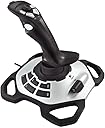
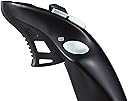
🕹️ Elevate your game with precision that commands respect!
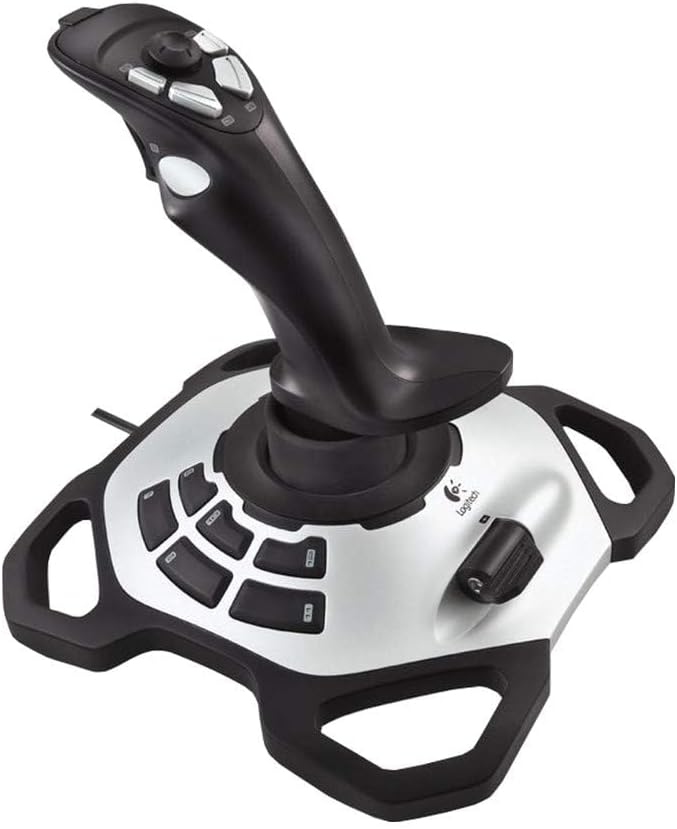
The Logitech Extreme 3D Pro Precision Fightstick is a high-performance joystick designed for PC and Mac gamers seeking precise control and durability. Featuring a 12-button layout, 360° twist rudder control, and 16-bit high-resolution accuracy, it delivers professional-grade responsiveness in a sleek, ergonomic design.
| ASIN | B00CJ5FPTA |
| Additional Features | Ergonomic |
| Best Sellers Rank | #15,412 in Video Games ( See Top 100 in Video Games ) #118 in PC Game Joysticks |
| Brand | Logitech G |
| Brand Name | Logitech G |
| Button Quantity | 12 |
| Color | Black |
| Compatible Devices | PC |
| Connectivity Technology | USB |
| Controller Type | Joystick |
| Customer Reviews | 4.3 out of 5 stars 4,338 Reviews |
| Global Trade Identification Number | 05099206041912 |
| Hardware Platform | pc |
| Item Dimensions | 9.06 x 8.27 x 9.13 inches |
| Item Weight | 2.2 Pounds |
| Manufacturer | Logitech |
| Manufacturer Part Number | 942-000031 |
| Model Name | Extreme 3D Pro |
| Model Number | 942-000031 |
| Package Quantity | 1 |
| Unit Count | 1.0 Count |
J**E
Good Cheap simulator Flight stick
Got this one back in 2020 on a really good discount price. It's been working great since I got it. It might not be the best next to advanced flight sticks but this one does the job right. I used it a lot playing Star Wars Squadrons and it worked fine
C**R
Works nicely
Bought used but works perfectly.
R**N
Great joystick
The joystick changed my always crashing in FS2020 to always landing. That is after I discovered how to change the trim to make the plane stable. That is the weakness - the FS2020 instructions are USELESS for different devices. All they provide is a mini diagram that you cannot read and then many -many-many control instructions. Too hard, but not the fault of the joystick.
J**R
Sensitive, versatile, and durable
I love this thing! At this price point it's incredibly sensitive and versatile. I bought one that lasted 7 years before it failed completely, which is pretty good for an electromechanical device, so I ordered another. I've been using it with X-Plane and it gives me all the controls I need in a single low-cost device.
T**R
Works great but best for right-handed people
I just replaced my new Thrustmaster T-stick joystick with this as that turned out to be defective...the rudder control signals were erratic and after trying everything under the sun (software, hardware calibrations and devices and tweaks), I opted for Logitech...which is cheaper and feels cheaper than the Thurstmaster. However, that doesn't matter much when controls are working perfectly...all signals are perfect and precise, which is crucial for flying simulators I use it for. My only gripe is that all buttons are on the left side of yoke...that means for left-handed folks like me who use left hand for the yoke control, I have to move my right hand over to engage speed brakes, gears, brakes, reverse thrusts and other critical controls. If there was a model where buttons where spread out or one where buttons are on the right side of yoke, I would have given it 5 stars.
R**Y
Works with Mac
I've been in the DOS/Windows world since '85 and, except for my first computer, have built every one I've had. I was dragged kicking and screaming to the iMac world and will never look back. That said, it's a little disheartening that it should be so difficult to find a joystick that is listed as compatible with anything other than a Windows platform. This joystick, at least for me, works perfectly on my new Mac. I bought it simply to use with X-Plane11. The joystick arrived, I plugged in the USB to the Mac and no indication on the desktop screen that it knew it was there. Ugh. Fired up X-Plane, went to the joystick settings and not only did it recognize the joystick, but there was also a representation of the exact model with a handful of the buttons and motions already assigned. A few minutes of calibration (easy) and that's it. I've never had a need for a joystick so I have nothing to compare it to but I can say the controls feel real nice, at least to me.
S**E
ITs ok, but not more then Ok
I was stated as new. It was not but I get it. old hardware. Doesn't work 100% with windows 11
C**L
Review to stop Amazon from spamming my mailbox
Does what it says on the tin. Not five stars because it's not as awesome or covered with buttons as my Winwing Ursa Minor, but is also like 25% the cost. Super good stick for retrogaming flight sims.
J**R
Liegt sehr gut in der Hand
Wirklich eine sehr gute Qualität so wie man es von Logitech nicht anders kennt. Er liegt wirklich gut in der Hand und lässt sich auch schon mit wenigem Kraftaufwand bedienen was das spielen sehr entspannt macht. Außerdem kann man ihn in jedem Spiel sehr gut so einstellen wie man ihn braucht. Sehr gutes Produkt kann ich nur weiter empfehlen!!
G**M
Werkt niet op windows 11
Mooie Joystick maar voor win11 geen drivers beschikbaar en werkt helaqas niet op win11. Win10 weet ik niet, die heb ik niet. Jammer, maar helaas onbruikbaar dus gaat retour
G**S
Windows 11 compatible joystick
Works fine on Windows 11, but make sure you disable core isolation protection. Using for ms flight simulator, great value
R**D
good product delivery and price
O**P
Excellent quality and functionality
I bought this joystick as a replacement of my old logitech attack 3 joystick and after using it a bit I wished I had upgraded earlier. As expected from logitech, the Extreme 3D Pro offers excellent build quality and value for money. Compared to the quality of other joysticks in this price range I can't understand why you would buy anything else. The joystick offers eleven programmable buttons as well as a trigger, hat stick and throttle control. All the buttons very really solid and the sheer number of them means you can keep your hand near the joystick as opposed to the keyboard for longer. The throttle feels really nice and has a large flap that makes it easier to make more precise movements. The stick itself feels very expensive and works perfectly in games. I know lots of people aren't keen on the yaw function being incorporated into joysticks and I was initially sceptical myself, however I have found it to be very useful and easy to use. Beneath all the buttons the joystick has a very large and heavy base making it very stable. The only downside is that it's only really practical for right handed users so left handed people are probably better off opting for an ambidextrous joystick. Overall, I couldn't recommend this joystick enough and would highly advise choosing it over other models in a similar price range.
Trustpilot
1 month ago
1 week ago