Buy anything from 5,000+ international stores. One checkout price. No surprise fees. Join 2M+ shoppers on Desertcart.
Desertcart purchases this item on your behalf and handles shipping, customs, and support to Tunisia.
🔥 Level up your grip, your game, and your workflow with the Redragon M913 Impact Elite!
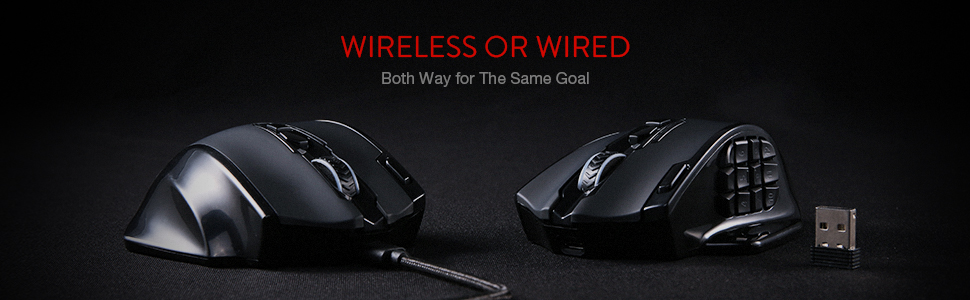
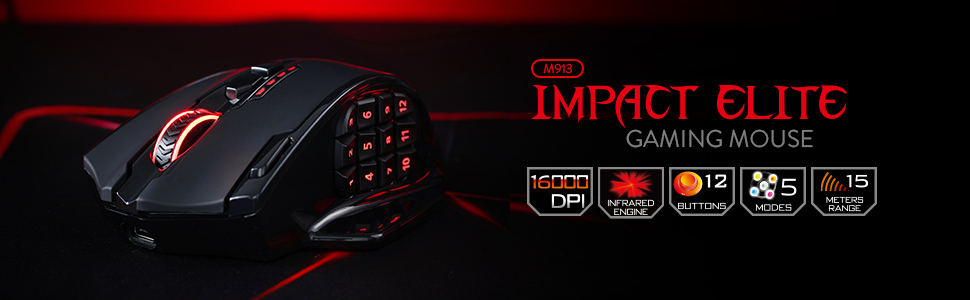
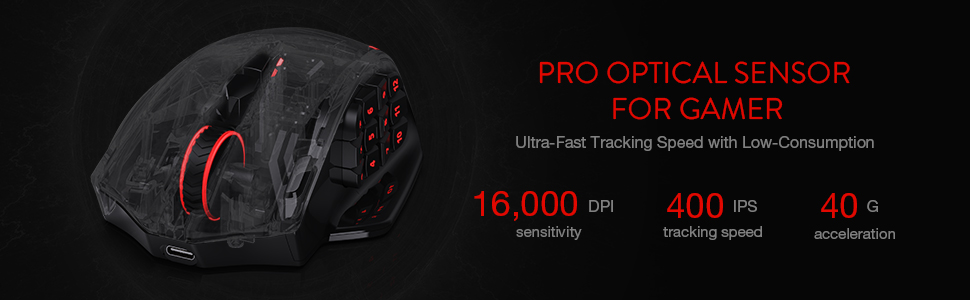
The Redragon M913 Impact Elite is a versatile wireless/wired gaming mouse featuring a high-precision 16000 DPI Pixart 3335 sensor, 16 programmable buttons tailored for MMO and productivity use, and an impressive 45-hour battery life. Its dual-mode connectivity, ergonomic design for larger hands, and customizable RGB lighting make it a powerhouse for gamers and professionals seeking precision, endurance, and personalization in one sleek package.


| ASIN | B088B3ZM76 |
| Antenna Location | Play |
| Are Batteries Included? | No |
| Are Batteries Required | Yes |
| Battery Average Life | 80 Hours |
| Best Sellers Rank | 131 in PC & Video Games ( See Top 100 in PC & Video Games ) 6 in PC Gaming Mice |
| Box Contents | batteries |
| Brand | Redragon |
| Brand Name | Redragon |
| Button Quantity | 16 |
| Colour | Black-M913 |
| Compatible Devices | Notebook, Personal Computer |
| Connectivity technology | Bluetooth, USB |
| Country of Origin | China |
| Customer Reviews | 4.3 out of 5 stars 6,312 Reviews |
| Embellishment Feature | RGB |
| Enclosure Material | Plastic |
| Hand Orientation | Right |
| Hardware Platform | Laptop, Personal computer |
| Item Dimensions L x W | 17.5L x 11.5W centimetres |
| Item Weight | 132 Grams |
| Manufacturer | Redragon |
| Manufacturer Part Number | 507611201 |
| Model Name | Impact Elite Mouse da gioco wireless |
| Model Number | M913 |
| Mouse Maximum Sensitivity | 16000 Dots per Inch |
| Movement Detection | Optical |
| Movement detection technology | Optical |
| Network Connectivity Technology | Bluetooth, USB |
| Number of Batteries | 1 Lithium Polymer batteries required. |
| Number of buttons | 16 |
| Operating System | Windows |
| Power Source | Battery Powered |
| Product Features | Wireless |
| Product Finish Type | Matte |
| Range | 13.72 meters |
| Special feature | Wireless |
| Style Name | Wireless M913 |
| Theme | Gaming |
| Unit Count | 1.0 count |
D**N
2nd time all good...great value
I can't in good conscious reccomend this item as it arrived in a non functional condition. Sometimes you get what you pay for! Edit Decided to give this product a second try and im glad I did. Got same day delivery and product arrived promptly. Mouse is great...easy to set up and program. It's very responsive with plenty of programmable options. Comfortable to use and fast to charge.
A**R
Very versatile while tailored to specific needs
It took me weeks of searching to find something that has all the features I wanted: Mouse for large hands: Absolutely! Tried the logitech and razer ones supposedly for large hands and by and large, no they're not. If you want to palm grip without your thumb/fingers/wrist pinkie rubbing against your surface, this is the one. It's not stupidly big but lets say ages 12+. Works on uneven/upright/"clear" surfaces: Yes again. The only surface it won't work on is clear polished glass. Translucent/frosted glass/plastic works. Also works on carpets, sofas, walls, envelopes, cardboard, sheets. And I do mean, it works properly, not just "functions". Again, this worked better than the logitech and razer ones i'd tried. Wide/ergonomic grip: If you've seen the ergonomic and full palm mice available on the market you know that they're very niche and can be very expensive. This one is the best of both and none of the other big names have something in this middle ground, and Redragon even have a few this kind of shape. No competition. Wired/Wireless/Built-in battery/USB-C/Use While Charging/Decent battery life: Yes to everything. You'd be surprised that those are a difficult combination to find, but it is. Extra buttons: It genuinely has all of those buttons and they're all programmable with the software. The software is fine and easy to use, and easy to find so i'm not sure why there are 2 reviews on here that say otherwise. It's an "MMO" mouse technically, but you can also programs it to use all your keyboard functions (Alt-Tab, Ctrl-Esc, etc.) as well as functions in CAD, Photoshop, Premiere, etc., and even multimedia functions (Vol +, Vol -). Buttons 1-3 are right at the tip of your thumb in a normal grip, so are easily naturally usable. 4-6 also, as the buttons are angled they are easy to find. Buttons 7-12 take a bit more effort with your thumb to get to. Better for rarer used functions (Alt-F4, Ctrl-Alt-Del, etc.) (A sideways scroll wheel would have prevented me from even considering a MX master 3). LED option: If you love LED "gamer" lighting effects, then you can go crazy with this in the software if you want. Having the option to turn this is rarer than you'd expect, but it's there and despite the marketing making it appear like a typical "gamer" mouse, with the LEDs turned off it is still a plausible and respectable office/home friendly looking mouse. Other things: Scroll wheel works great and is barely audible. Proper quality sensor and sensitivity in line with the competition. Decent click switches on the main mouse buttons, and membrane on the side buttons is fine (no crossover clicks).No gaudy or overbearing branding, just a small grey dragon on the black version. You definitely could use this for all types of gaming, but probably not for E-sports FPS just because its got a wide base and it's on the heavier side of "gaming mice". Some apparent issues with click pads on certain batches but top notch customer support direct with Redragon and it is fast, efficient, and customer focused, seriously. (No, I've never worked for the company or received any gifts or funds for writing this). TLDR: A mouse for big hands with such a wide array of features that there's nothing else on the market to even compare it to.
D**S
A Wireless Gaming Mouse That Will Make You Feel Like an Elite
I bought this wireless gaming mouse to improve my performance and comfort in MMO games. I was looking for a mouse that had a lot of buttons, a good battery life, and a reliable wireless connection. I chose the Redragon M913 Impact Elite Wireless Gaming Mouse because it had good ratings and a reasonable price. Here are some of the pros and cons of this mouse: One of the pros of this mouse is that it has 16 programmable buttons, including 12 side buttons that are easy to access and customize. You can assign different functions, macros, or shortcuts to each button using the Redragon software or other compatible software from your game or system. This gives you a lot of flexibility and control over your gameplay. Another pro of this mouse is that it has a long battery life and a low-consumption mode. The mouse comes with a 1000mAh rechargeable battery that can last up to 45 hours with RGB lighting on or up to 80 hours with RGB lighting off. You can also switch to eco mode by pressing the DPI button for three seconds, which reduces the usage of backlit and extends the battery life even more. A third pro of this mouse is that it has a fast and stable wireless connection with low latency. The mouse uses a 2.4GHz wireless nano receiver that plugs into your PC or laptop’s USB port. The wireless click latency is only around 1ms, which is very impressive for a wireless mouse. You can also use the mouse wired with its detachable USB-C cable if you prefer. One of the cons of this mouse is that it is quite heavy and bulky compared to other gaming mice. The mouse weighs 171g without any weights added, which might be too much for some people who prefer lighter mice or have smaller hands. The mouse is also quite large, measuring 123mm long, 92mm wide, and 42mm tall. Another con of this mouse is that it might not be compatible with some older motherboards or BIOS versions, as it requires support for USB-C ports and XMP profiles. You might need to update your BIOS or tweak some settings manually to get the best performance out of this mouse. A third con of this mouse is that it might not work well with some games or software that do not support multiple buttons or customisation options. You might have some issues mapping all the buttons or getting them recognised by your game or system. Overall, I think this is a wireless gaming mouse that will make you feel like an elite if you play MMO games or need a lot of buttons on your mouse. It’s not the lightest or the most compatible option out there, but it’s definitely one of the most versatile and reliable ones. (Sorry if this was a bit geeky) >.< If this product was helpful, please press the helpful button below!
J**H
Decent gaming mouse
This mouse offers exceptional performance, featuring on-the-fly adjustable sensitivity and programmable thumb buttons, which significantly enhance user experience. While there may be a brief adaptation period, the benefits are substantial. My only concern, which may be an isolated experience, pertains to the absence of a clear charging indicator. Despite charging the device for approximately three hours, I have not observed any visual confirmation of its charging status. This may be a unique observation.
E**9
Was really good while it worked
Update: After 1 week of use the mouse is dead. I was noticing that the left click wasn't always registering but put that down to my mis-click, but then an hour or so later the mouse went dead. Can't be the battery running out as it says 45hrs of usage and with it in eco mode, there were no lights in use. I had it on charge for several hours, and none of the charging lights came on; tried resetting it and all the lights turned orange and then nothing. I was actually getting used to it, and while it wasn't going to replace my other mouse for every day use, it was good for games that require multiple buttons. If it was working, this would be 3/4 stars. The mouse is about the same size as my MX Master 3 but has a lower profile, it feels comfortable even after a few hours of use. Movement & General feel: The gliding of the mouse is a bit off, at first I had left the stickers on the pads and they were dragging. But even after removing them, it just seems slow. The DPS setting is slow or hyper speed, the jumps are too significant from one step to another. Click: It's satisfying and not too loud, I don't mind a clicky mousy any way. Extra buttons: The main reason I got it was for the buttons on the side, and these are a bit hit and miss. Each button is sloped so that they are paired for smoother movement from one to the next. So 1-4. 2,5, 3-6 etc. This gradient isn't as pronounced and sometimes I lose track of which button my thumb is on. I would have liked maybe a different texture on alternating pairs. The biggest gripe is that these buttons are set too far back. If you hold the mouse naturally, your thumb sits on an area where the first set of buttons SHOULD have been. Instead the first set are slightly behind and the second set require some bending of the thumb which I don't like. There is a nice resting place for your thumb next to these buttons when you are not using them. Mapping buttons: When mapping the extra buttons in Path of Exile 2, the 1,2 buttons were OK, then button 3 used the same as the middle scroll wheel click, 4 was on the mouse and then 5 onwards used the numbers on the keyboard. So if you want to use the buttons AND the numbers, you might be out of luck. I didn't try any other games. Scroll mouse: It's ok, but I miss the endless scroll from the MX3 Lighting: Not my thing, I put this in "eco" mode right away.
N**E
Good mouse, could be better
So, I bought this mouse and was quite dissapointed in the quality of it. It is lightweight. I prefer my mouse to have a bit more weight to it. It was easy to connect via wired to charge and the wireless was easy to install. I already have reddragon wired mouse and needed another due to the mouse wheel no longer working. I am dissapointed with this mouse as the side buttons are very flimsy, move around a lot and the way I grip the mouse, I was constantly accidentally pressing the side buttons. My previous wired mouse never had these issues and seemed to be built more sturdy. The wireless one just feels flimsy. I have kept hold of the mouse as I needed a wireless mouse for the laptop anyway, but that is my secondary computer that I don't use all the time, so I can put up with it. Redragon's software is easy to use and install. There is a button just below the wheel to change DPI and each setting or option chan be changed within the app. The colours of the mouse can also be changed here. There are loads of different buttons you can re-map and save presets for. Appearance wise, yes it looks like a nice mouse. I do think they are a little on the chunky side and could be more difficult to use if you have smaller hands. I ended up buying a corsair mouse for my main PC and could not be happier.
J**Y
To put the usb dongle in the back
East set up great mouse very very responsive just a all time rounder great product would highly recommend
B**N
Could be worth buying another product.....
The actual mouse is great but the battery certainly isn't as advertised. It's a bit annoying but you can charge the mouse with the provided usb lead at the same time as using it. Overall I can see this company going places with their future mouses. Definitely worth the money. It takes a bit of getting used to size wise, but I'm able to game using it just fine but I'm not able to use all of the buttons accurately. I bought this mouse as a replacement for my Logitech G604 and I wouldn't hesitate to buy from the this company again, overall I'm very happy with my purchase. Update 07/07/25: Okay so I have had this mouse for 1 month and the number 7 button has broken, I have missed the return window by a few days. So annoyed. I have contacted the customer support so I'll see how good they are. Will update this review when I know more. Edit: I figured it out, just don't bother using the RGB function of the mouse, it's a real battery killer which makes me wonder why bother adding it in the first place. Anyway, omit the RGB and it's an awesome mouse. 22/07/25. The issue with the broken button was resolved swiftly and with great care by the customer support. Top notch service.
さ**う
G604からの乗り換え。事務作業やMMO向けコスパマウス。手がでかい人向け
G604の後継機が無く定価1万のG600は在庫切れ。仕方なく値段的に手頃なこちらへ乗り換え。 使用一週間の感想です。 中華メーカーという事で警戒していたが思ったより使える。乾電池式だと思い込んでたが内蔵バッテリー充電式。意外と長く保つので一週間に一度とかで良いかも。G604と違ってボタン数が多く押しづらいが慣れれば問題ない。寧ろボタン数が増えて痒いところに手が届く印象。ホイールの左右チルトが無いがボタンの多さでカバーできる。ボタンは確かにG604より硬いもののこれも慣れる。 事務作業やMMO系に向いてると思う。私はアクションゲーやらなくなったので特段困っていないがそういう人には非推奨。あとマウス自体がお椀型というか横幅があるので持ち上げづらい。微妙な位置調整で持ち上げたい時やや不便。またマウスの電源ON・OFFが無いのでPCのスリープを解除してしまうのは難点か。ただしPC側の設定でこの問題は解決できる。 当たり前だがマウスがでかいので手が小さい方は非推奨。私は手首のラインから中指の先まで18cm程だがこの手で親指の中腹が1~3に当たる感じ。親指を伸ばしきって押す1~3は少々押しづらく、第1関節を曲げて押すことになる4~12は押しやすい(力が入りやすい)。恐らくボタンが硬くて押しづらさを感じてる人は手が少し小さいのかも。 あと日本語版の説明書は同梱の説明書のQRコードを読み取って飛ぶと存在する。私はスマホで飛んでChromeに履歴を残し同アカウントのPCでスマホの履歴を参照してPCで閲覧できた。 追記26/05/23 26/05頃からチャタリング発生。購入日が25/03なので寿命1年ちょいという感じでしょうね。チャタリングはマウスなら避けられない問題なので年1で6000円使い捨てる感じならコスパ良いと思う。他社のやつだと倍くらいするけど保証で交換できるがチャタる頃には交換のやり方忘れてるし。
N**X
Best on the market for wide hands
First impressions, comparing this to my old UtechSmart VENUS Pro (which I had for 2-3 years before the battery started dying) and the Razer Naga Pro. I had initially bought a much more expensive Razer Naga Pro, but found the buttons way too easy to push accidentally, and the mouse overall uncomfortable in the hand. I can safely say that for those with wide hands: this is the MMO mouse for you. The Redragon and the Utech are almost identical (probably from the same factory), however the Redragon is a bit bigger and wider, with a proper thumb rest, and a pinky rest as well. The buttons are a bit easier to push than the Utech, but still hard enough to push that you're not really gonna be accidentally pressing them too often. The software is very similar to the Utech with all the exact same features and the same lack of brightness control for the rainbow RGB mode (tho there is brightness control for all static modes). The main thing I don't like compared to the Utech software is that you can't see what all the buttons are assigned to at once, just one by one. When I was setting the buttons, occasionally one would bug out and disable itself or assign to the wrong button, so not being able to see them all at once meant I didn't realise this for a while sometimes. Overall tho, it gets the job done. Definitely not as nice as other software such as Razer, but you can't expect that at this price point, and you do get the advantage of it being less system heavy because it doesn't need to run in the background. The mouse feels nice in the hand, and while both it and the Naga Pro have a plasticy finish (compared to the Utech which is more texturised), the Redragon feels much nicer in the hand to me. And cooler too! The Naga's material always felt warm, which is just kinda bleh in hot climates such as Australia. Both the thumb/button side, and the finger rests have a glossy finish, which I would prefer not to be there at all, but it is comfortable. The Utech had a small glossy finish area under the palm and I never ran into too many issues with scratching, fingerprints, etc, so hoping for the same here. The Redragon, despite apparently being lighter than the Utech, tends not to glide as easily as far as I can tell depending on the surface. It glides easier on a desk surface or a more slippery mousepad, but a mousepad that's less slippery will lead to it moving more slowly, and strain your wrist a bit more. Increasing the DPI does help make up for this a bit. For Linux users (and Mac too? Don't think the software is on there), you can expect this to work perfectly across all your systems once configured in Windows, as everything is stored onboard in the mouse, just like the Utech. Including the mouse's second profile, which can be accessed by clicking the profile button on the bottom of the mouse. RGB will work, you just won't be able to change it. But there isn't a ton of RGB options anyway so I usually just leave it on rainbow. I had lots of success using my Utech with my Steam Deck, and given that this Redragon mouse is practically the same mouse with small differences, I fully expect to have the same experience here. Will update if that is not the case! It's really amazing the bang for buck you can get with these Chinese mice vs the big name brands. There just isn't any competition for wireless MMO mice atm in my eyes, which is such a shame because there's some awesome wired ones, and most MMOs that will benefit from this style of mouse don't really need the low latency of wires. Also, if there are any FFXIV players reading who're thinking about trying out an MMO mouse, just do it! It's so worth it!
A**I
Above and beyond
One of the best things I've purchased. It has two customizable modes. I customized one for work and one for games, which means I use it all day. One full charge keeps it up for 3 days, which is more than what I expected. The only thing, which is not an issue, is that it doesn't have RGB zones. Still, the RGB is pretty good.
J**N
Upgrade from G600
I like my G600 but hate its wire. Decided to try M913 many because it is cheap and really I did not expect it to work. But it does. This is crazy. I enjoy using mouses with multiple buttons while working and I am really into macros. Talking about macros, M913 is godlike. First of all, M913 stores all your macro "on-the-board". This means the mouse has its own memory and it literally remember the macros. In other words, if you just unplug it and plug into a different PC, macros will work. This is simply crazy. This is a premium feature and for those famous brand it is usually only available on the most expensive models. Consider the price doubled if it is wireless. The second craziness comes from the mouse's driver, which you can download from their website. According to its graphical interface, it seems like a super old framework is used (winform?). But its functionalities are perfect. Similar as other brand's driver, it allows you to record keystokes. The different thing is, it allows to change every single keystroke separately after you have record the macro. The stall time between each keystroke can be customerized as well. Drawbacks: 1. Side buttons' clicking feel is not as good as G600 2. Side button's angles are not as perfect as G600. Can be a problem for MMO mouse rookies (mis-click) 3. DPI buttons cannot be customized 4. RGB can hardly be customerized 5. Does not have shift functionalities like G600's G-shift 6. Wheel cannot be tilt. This make it 2 buttons less. And that two are actually the best kind of buttons: easy use & hardly misclick. 7. Driver's keystroke recording mechanism does not work with 'win' button well. Pretty sure this is a bug. But an easy workaround is to replace the 'win' button with something else (e.g. 'A') while recording, and change that specific key later manually. That is what happen when you actually spend time to build a robust driver, partial functionalities is sufficient to still make things work. Overall: As can be seen the drawbacks are basically tiny issues. This mouse has no critical problem and did what it advertised. I am really surprised by its driver, it does have problem but I feel it is more robust than Logitech G Hub. Ugly thing that work is always better than fancy stuff that does not work. Finally the price, it is simply too cheap. Reddragon built a 50 bucks product that stands the same level as other brands' 150 bucks mouse. I recommend this product. Update: It seems like not only the key stroke recording process has problem with "win", same issue applies to the default profile auto save. If you create a macro with "win" using my workaround and deploy to your mouse, it will work. However, if you restart your driver, the "win" key will disappear in your macro. I think there is something wrong with its save/load functionalities for the default profile (it cannot recognize "win" and decides to ignore it). Fortunately its customer export/import feature does recognize "win", and therefore you can keep your "win" key by creating backup manually.
S**X
Perfekte MMO-Maus auch fürs Videoeditieren
Das Design der Maus ist nicht nur ansprechend, sondern auch äußerst funktional. Mit zahlreichen programmierbaren Tasten und einem ergonomischen Design bietet die Maus eine optimale Unterstützung für komplexe MMO-Spiele. In meinem Fall habe ich diese Maus für das Videoeditieren benötigt und habe Makros auf die einzelnen Tasten gesetzt die mir das Arbeiten erleichtern. Dies geschieht alles sehr intuitiv über die Software von Redragon. Die Präzision und Reaktionsgeschwindigkeit der Maus sind beeindruckend. Dank des hochwertigen Sensors und der individuell einstellbaren DPI-Einstellungen kann man die Maus perfekt an seine Bedürfnisse anpassen und von einer exakten Steuerung profitieren. Die Maus liegt dank ihrer ergonomischen Form angenehm in der Hand und sorgt auch bei langen Sessions für maximalen Komfort. Die hochwertige Verarbeitung und die langlebigen Materialien garantieren eine lange Lebensdauer, selbst bei intensiver Nutzung. Ein weiteres Highlight der Maus ist die individuell anpassbare RGB-Beleuchtung. Insgesamt bin ich von der MMO Gaming Maus von Redragon restlos begeistert und kann sie jedem ambitionierten PC-Nutzer nur wärmstens empfehlen.
Trustpilot
1 week ago
2 weeks ago