Buy anything from 5,000+ international stores. One checkout price. No surprise fees. Join 2M+ shoppers on Desertcart.
Desertcart purchases this item on your behalf and handles shipping, customs, and support to Tunisia.
🚀 Expand your storage, not your headaches!
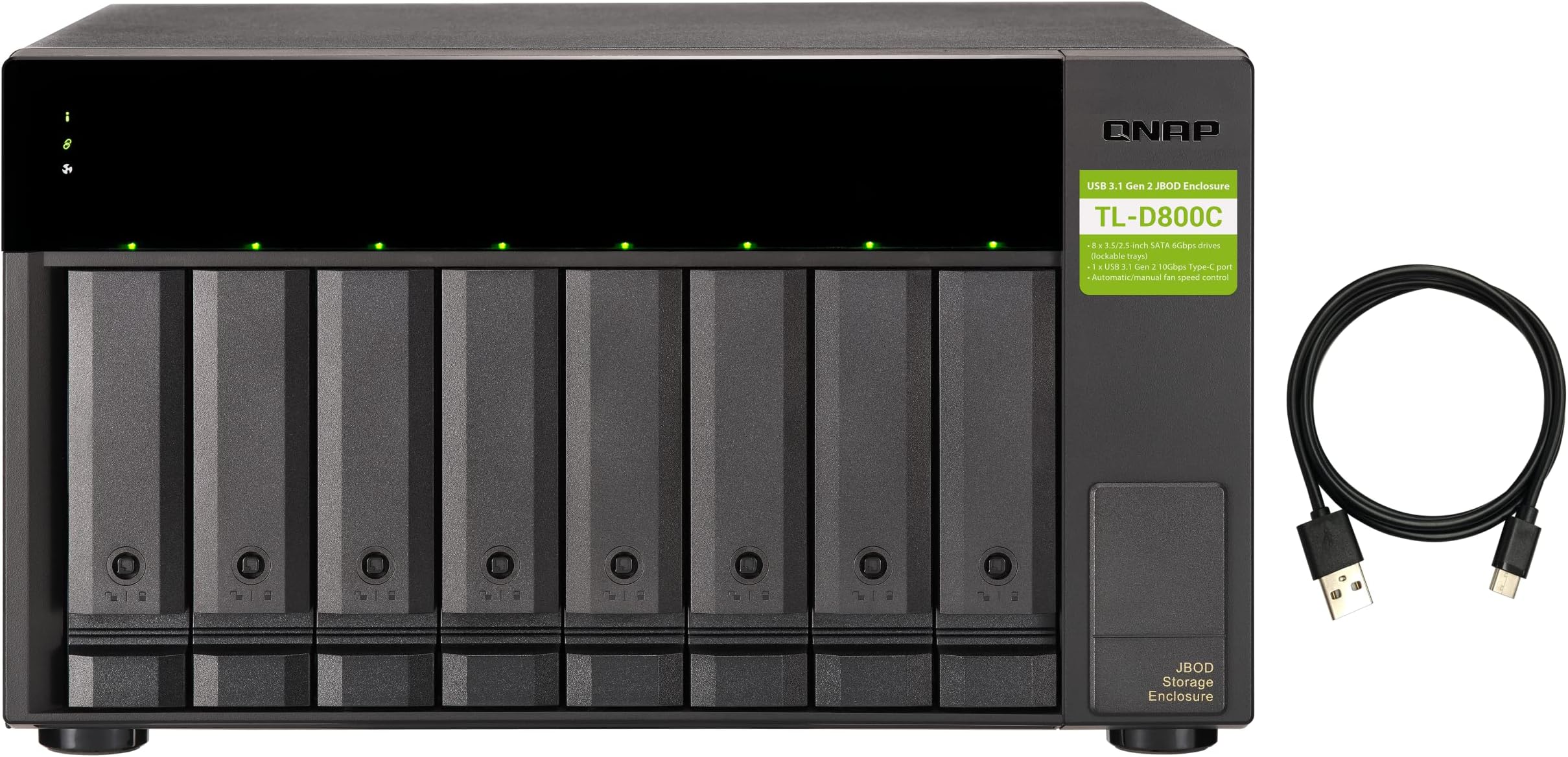
The QNAP TL-D800C is an 8-bay desktop JBOD storage enclosure featuring USB 3.2 Gen 2 Type-C connectivity for fast 10Gbps data transfer. Designed for seamless expansion of QNAP NAS, Windows, and Mac systems, it supports 3.5-inch SATA drives with a robust 250W power supply. This plug-and-play device offers hot-swappable bays, quiet cooling, and reliable performance without the complexity of RAID, making it ideal for professionals seeking scalable, hassle-free storage.


| ASIN | B086WCRFQ3 |
| Best Sellers Rank | #30 in Network Attached Storage (NAS) Enclosures |
| Brand | QNAP |
| Built-In Media | Flat head screw x 24 (for 3. |
| Color | black |
| Compatible Devices | Servers, Laptops, Desktops |
| Customer Reviews | 4.0 out of 5 stars 91 Reviews |
| Is Assembly Required | No |
| Item Dimensions D x W x H | 8.7"D x 5.9"W x 8.7"H |
| Item Weight | 7.62 Kilograms |
| Manufacturer | QNAP |
| Mfr Part Number | TL-D800C |
| Model Number | TL-D800C |
| Mounting Type | Tabletop |
| Product Dimensions | 8.7"D x 5.9"W x 8.7"H |
| Size | 8 Bay |
| UPC | 885022018185 |
| Warranty Description | 2 Years Warranty |
L**K
Works great for adding disks to always-on system!
QNAP did it with their TL-D800C. I just want the most obvious thing! I want some drive bays slapped on a fast USB plug. I don't want backup software, RAID, or anything. I use ZFS which is far better than RAID. And even software RAID is better now than hardware RAID. How hard can that be? Apparently nigh impossible! I tried Sabrient's and Yottamaster's, both total garbage. Sabrient's had no less than 10 soft power switches, which must be tickled after every reboot...I mean, nobody wants to run anything unattended, and everyone wants a lot of extra fiddling to power up, right? 🙄 Hello Captain Obvious! If I didn't want a drive powered on I wouldn't put the drive in! Obviously there was zero thought put into actual user experience. Yottamaster -- also a total failure. At least they didn't add a bunch of stupid power switches, but the drives kept getting checksum errors, retries, and dropping out. I have 8 drives, of various brands, various ages and sizes, all of which worked perfectly after I returned the Yottamster and put them in this QNAP unit. It was two units, so not a matter of a single defect. It was totally impossible to use and corrupted data. Apparently Yottamaster is terrible at testing. Oh, and the drive sleds often got stuck in the cheap chassis. Just throwing junk together hoping people won't return it. So thank you, QNAP! These actually work reliably. 10 Gb USB, screwless insertion, no soft power switches, decent price point, good (and quiet) fans, hot-swappable, no drivers. No extra junk to bypass like RAID logic or soft power switches. Works perfectly on FreeBSD 14 with ZFS.
N**9
Decent Enough
When I bought this, I assumed it had built-in JBOD array capability like the TL-400. It does not. This just serves 8 disks independently over USB. So, in order to use this as an array, you have to use software RAID of some sort. This is my fault for not researching more before buying, but anyone else looking at this should be aware. Regardless, I was able to get all 8 disks to set up as a pool in Unraid using btrfs with different sized drives. I just needed to setup the profile to "single" to get all space allocated. I'm using this as a backup, so I don't need redundancy capability. Write transfer speed bounces somewhere between 150-300 MB/s, which I'm guessing is limited by the drive speeds I put in the array. All drives are mechanical 7200 RPM. USB is on a 3.2 gen 2 port on my server. I really only have two nitpicks with this unit. My old TL-400 worked with a USB-C to USB-C 3.2 cable. This unit will not function with one. You have to use a USB-C to USB-A 3.2 cable. My other gripe is to show the drives are spun down, the light above it flashes fast. This is the same behavior when the drive is actively reading/writing. So, it's difficult to tell if the drive is active or spun down. If the drive is spun up but idle, the light is solid. Beyond that, this box seems to run fine. Automatic fan is quiet and seems to do good enough job.
J**N
One of the few high-quality reliable USB DASes
If you've been trying to find a way to attach a bunch of disks via USB to turn a machine into a NAS, this is the best product in this category and I've tried so many. TERRAMASTER, Yottamaster, Sabrent, OWC, you name it -- this thing is the only product I've found that checks all the checkboxes and is reliable even in the 8-bay size. From a perspective of using this with Proxmox or TrueNAS or Unraid: This is just a generic DAS. It shows up as 2 USB 3.2 generic hubs when it's empty. Each time when you insert a disk, a ASMedia UAS device corresponding to that disk shows up with USB ID 174c:55aa. It works just fine without any Linux UAS quirks. It also supports hot plug / hot un-plug on a per drive basis without disturbing any of the other bays. I've tried disks as big as 24TB and had no issues. You don't really need to run any of the Windows/Ubuntu/Linux tools -- it shipped with the latest firmware and just works out of the box. It also passes through each drive's model/SN correctly, as well as SMART stats via just smartctl. I left the fans at the Auto setting on the rear switch and it was pretty quiet. Of course with 28TB spinning drives you really don't want it in your face, the hard drive seek noise dominates any hint of fan noise from the enclosure. The DAS powers on and off automatically after a power failure. I know all of this doesn't sound like a lot, but trust me, over the course of 2 years I've bought 10 different cheaper DASes from other brands that claim to do these things. They all had deal breaking flaws. They either intermittently had data corruption (ZFS checksum errors), hangs, randomly lost the partition table for the drive until a power cycle, disks disappear off USB, or had an annoying power button per drive bay and no ability to automatically power everything on after power failure. It's refreshing to finally see something that works.
K**S
Critically flawed and in my case completely unusuable.
It seemed like a well made unit at a reasonably price, but I had a terrible experience with it. First, the good: The drive lights are a subdued green and not horrid blue strobes like by MediaSonic ProBoxes have. This may seem silly, but it's not a small matter. The QNAP's drive indicator lights are visible but not distracting. The cooling fans are functional but quiet. Again, my pair of MediaSonic ProBoxes have fans that make too much noise and resonate irritatingly inside their plastic enclosures. The QNAPs sound levels are perfectly acceptable. The bad: First and foremost, my unit has randomly disconnected all 8 drives three times in less than 24 hours. The first time it did so overnight while things were idle. I woke up to an error message. It's done a mass disconnect twice more while I was doing an rsync (data mirroring.) Having drives disconnect while doing prolonged read/writes is catastrophic. I am now tasked with removing the drives from this defective QNAP and migrating them to my old enclosures out of fears of data integrity. Also bad: The enclosure is made of entirely too much plastic. The drive sleds are plastic. The rails that attach to the drives are plastic. The doors that clock the drive sleds in place are plastic. The key that locks the doors closed is plastic and so are the pegs it turns. Everything feels fiddly and fragile. I was quite careful when I installed all 8 drives in the unit and it still felt like one wrong move could lead to a disaster. The cheap MediaSonic enclosures have far more metal in them, especially the bits that actually hold the drives in place. The significantly more expensive OWC enclosure I have is almost entirely made of metal and built like a tank. For the price I paid, I'd be willing to turn a blind eye to the very plastic build quality of the unit if it didn't keep disconnecting the drives. Random disconnects are a complete deal breaker for external storage.
C**R
Good value for money, and it works well
Good value for money, and it works great with TRUENAS SCALE. I slapped eight of my old 2 TB Samsung NAS drives in it, and built a ZFS on it. Performance is decent on my system, and it works reliably. Had to convince the BIOS on my HP ProReliant MicroServer NOT to boot from it, because it really, really wanted to.
D**G
Good Quality and Stable Service
This hard drive enclosure is of excellent quality. Even when IOing all drives simultaneously, there are no instability issues—such as UAS Port Resets, which are often silent and difficult to detect. It is ideal for setting up RAID arrays or using Windows Storage Spaces.
N**E
Linux with UASP brings problems
This JBOD enclosure is detected by Debian Linux 12 and it enables UASP. Unfortunately, Linux's driver has "issues" which lead to timeouts and device resets with intensive usage. A single rsync task onto a 8-drive raidz2 operates normally, but rclone moving 20TB+ will cause the array to fall over. As such, I had to disable UASP and ultimately moved the drives into a more appropriate 12-bay supermicro server.
A**0
Device is excellent but usb is sketchy for software recognition
Works very well for what it is. Throughput is fantastic. Using Windows spaces for software raid is perfect with this. The cord and usb situation isn’t great. I cannot get the QNAP software to see the machine regardless of port or flipping the C end around as recommended by some who get it to work.
E**T
Magnifico equipp
Un equipo eficiente y un precio accesible para la capacidad que tiene y compatibilidad para conectarse con casi cualquier NAS de ir tenga conexión de USB tipo A
ス**ン
対応しているHDD容量は18TBまでです。
こちらの電源を入れっぱなしにしていると、PCの立ち上がり時にすべてのHDDにアクセスしにいくので、起動にすごく時間がかかるようになります。 PCを起動してからこのケースの電源をいれる必要があります。 対応しているHDD容量は18TBまでです。
G**T
Great simple JBOD enclosure that works
Tested with Windows 10, it works great, no issue at all. It give the SMART status of the drives which not very common with external enclosures. Big plus since you can tell before a drive dies and have a chance to salvage data before it's too late. My main con is that the QNAP software does not show what "letters" are on the disks so it takes more steps to know which is which when trying to find a specific disk to remove.
G**K
Bon
Fais le travail
N**A
MacOSでただのHDDケースとして使用、快適です。
ドライブをよく入れ替えて使うのでHDDケースとして使おうとMacSTUDIOにつないで使用してます。導入初日、数時間ごとにHDDがアンマウントされまう事案がありましたが、カスタマーサポートに連絡したらすぐに返事をいただき、即解決しました。ファンが大きいので低速回転で音が静かだし、電源内臓なので机上がすっきりします。 不満はユーティリティソフトの「QNAP JBOD Manager」のMacOS用がないことですね、ぜひ作って欲しいです。 追記:付属のUSBType-A→Type-Cのケーブルで接続する分には問題ないのですが、少しでも速い転送速度にしたくてType-C→Type-Cのケーブルで接続したんですが、数時間におきにHDDが順次アンマウントされるのです。相性の問題かと思って転送速度が高いUSB4対応ケーブルでAnkerとVCOMを3種類試しましたがいずれも結果は同じでした。Type-C→Type-C接続に対応してほしいです。
Trustpilot
1 month ago
3 weeks ago