


Desertcart purchases this item on your behalf and handles shipping, customs, and support to Tunisia.
⚡ Compact power, vibrant style — dominate your desk and your game.
The Razer Huntsman Mini is a sleek 60% gaming keyboard featuring ultra-fast linear optical switches with 1.0mm actuation, an aluminum top frame for durability, and fully customizable Chroma RGB lighting supporting 16.8 million colors. Its compact design maximizes desk space while premium PBT keycaps ensure long-lasting comfort and resistance to grime. With onboard memory and programmable macros, it’s built for gamers and professionals seeking high performance in a portable package.
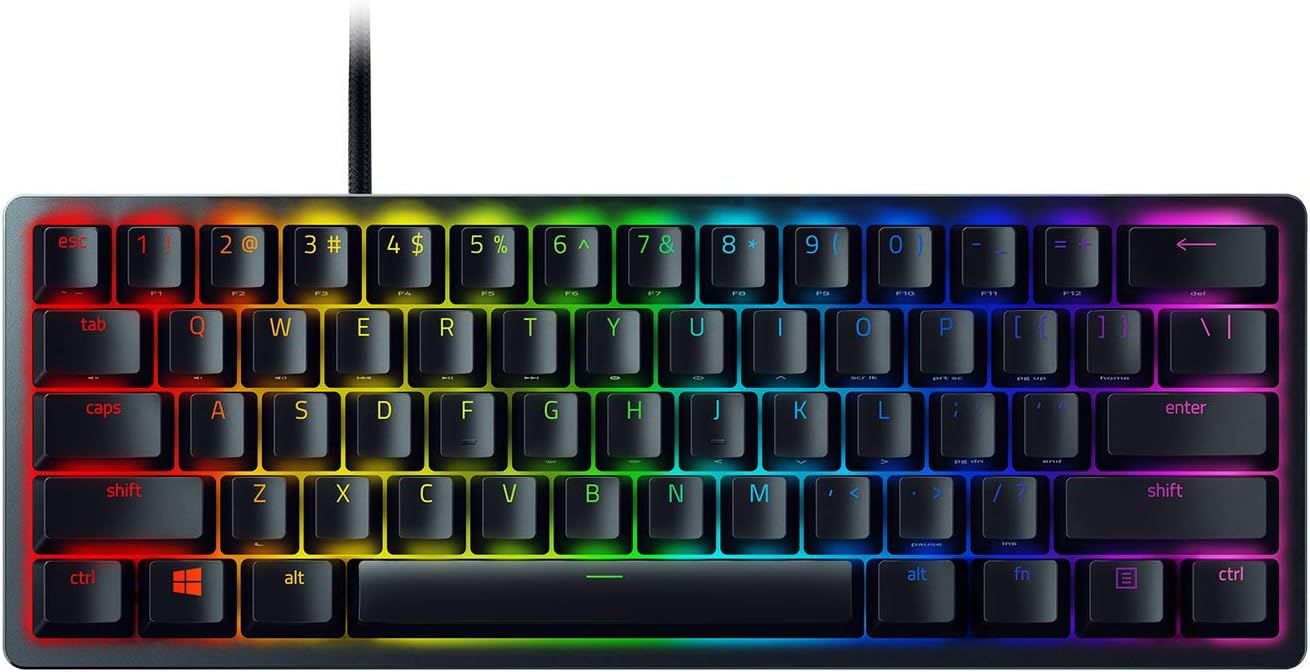


| ASIN | B08B3JSKGR |
| Additional Features | Portable, USB-C Wired, Compact Keyboard, Backlit, Lighting, Detachable |
| Antenna Location | Gaming |
| Best Sellers Rank | #13,201 in Video Games ( See Top 100 in Video Games ) #864 in PC Gaming Keyboards |
| Brand | Razer |
| Built-In Media | Detachable Type C to Type A cable, Razer Huntsman Mini, User Manual |
| Button Quantity | 61 |
| Color | Classic Black |
| Compatible Devices | Laptop |
| Compatible Operating System Family | Windows |
| Connectivity Technology | Micro USB |
| Customer Reviews | 4.6 out of 5 stars 3,075 Reviews |
| Enclosure Material | Aluminum |
| Hand Orientation | Ambidextrous |
| Item Dimensions L x W x H | 11.56"L x 4.07"W x 1.45"H |
| Item Type Name | Gaming Keyboard |
| Item Weight | 1.1 pounds |
| Keyboard Backlighting Color Support | RGB |
| Keyboard Description | Gaming |
| Keyboard Layout | QWERTY |
| Language | English |
| Manufacturer | Razer |
| Mfr Part Number | RZ03-03390200-R3M1 |
| Minimum Required Operating System Version | Windows 10 |
| Model Name | Huntsman |
| Model Number | RZ03-03390200-R3M1 |
| Number of Items | 1 |
| Number of Keys | 61 |
| Number of Packs | 1 |
| Number of Sections | 13 |
| Power Source | Corded Electric |
| Recommended Uses For Product | Gaming |
| Series Number | 3390200 |
| Special Feature | Portable, USB-C Wired, Compact Keyboard, Backlit, Lighting, Detachable |
| Style Name | Huntsman Mini |
| Switch Type | Linear Optical |
| UPC | 811659037596 |
| Unit Count | 1 Count |
| Warranty Description | 2 year manufacturer |
| Water Resistance Level | Not Water Resistant |
S**L
MUST BUY!! one of the be st keyboards on the market
the razer huntsman mini 60% gaming keyboard is pretty awesome. the linear optical switches feel super fast and responsive, which makes gaming and typing really smooth. i love the chroma rgb lighting – it’s super customizable and adds a lot of flair to my setup. the 60% layout is perfect for people who want more desk space, and it’s still really functional even with fewer keys. the pbt keycaps feel high quality, and the onboard memory is a nice touch for saving custom profiles. the snap tap feature is great for a clean, clicky feel with every keypress. if you're into compact keyboards, this one’s a solid choice.
W**N
Very Happy With This Upgrade
This is my first quality keyboard and first 60% keyboard. Previously I only had a red dragon keyboard so I do not have much experience with better options. What I really like about the Razer products is all of the customization. I am able to customizer the color scheme on the keyboard and adjust the speed of color change as well as what color each individual key is. I like the sound of the click on this board as well. It has some clicking but not as much as a lot of other gaming keyboards. It's enough for me to hear but not too much to where it's all my stream will hear through my microphone. The only part of the keyboard that does not feel as high quality is the space bar. I noticed this right away and it was kind of weird to me since the space bar is probably the most used button on a keyboard. If you're looking to get a 60% keyboard I would just make sure you mostly use the keyboard for gaming and not typing. Because of the size you're missing easy access to many buttons. You will have to use the function key in order to use delete, Page up, home, arrow keys etc. Also the layout has taken a minute for me to get used to where my fingers are on the keyboard when I am typing.
A**O
Great 60% keyboard, could've been better though
I really love the feel of it, pretty smooth and almost no noise coming out of it every time I press a key. I used to have the ornata v2 from razer and decided to get an upgrade because I hated the clickly feel of their keys and how much space it took on my desk. I hesitated at first because it was missing the media keys which I really loved plus every other key like prtscrn and ctrl+del, but after trying out the fn keys (hypershift) on the keyboard, all those worries disappeared! Really easy to remap and use. So, the only downsides I saw to this keyboard were some aspects of its quality, not sure if it's just me or the same to everyone else but some keys look like they're missing a little bit of paint where the letters/numbers reside, or at least that's what it looks like to me. Also, the rgb on it isn't bright enough like other mechanical keyboards I've tried (from friends). One other thing is the fact that it doesn't come with a wrist rest, which is a huge downside to me as I really loved it on my ornata v2. Aside from the bad, it's a great keyboard, love its feel and the small amount of space it takes on my desk, would highly recommend to buy.
O**R
very comfortable
Excellent and functional keyboard; its keys are soft and satisfying to press, they don't tire your fingers and you can play for hours without problems.
J**Y
Great 60% keyboard!
First off, this is a great product overall and is a stark difference from a traditional, non-mechanical, wireless keyboard. Very happy with the purchase and the product as a whole. It is very responsive and I have noticed a big improvement while gaming - even typing this review is more enjoyable with the Razer red linear optical switches! That said, I did have a couple of defects with mine and had to request an exchange - I would expect this case was an exception as I have been very happy with my Razer Mamba Wireless mouse and have heard generally favorable things about Razer products. If you came here wondering if you should get it, I would say to go for it if it checks all the boxes for your needs in a mechanical and/or 60% keyboard. For those curious about my issue/experience, read on...after the first time using the keyboard, I noticed the "U" key was lit up white instead of the RGB lighting I customized in Synapse (cycled through a few light settings to check). I was not able to fully isolate the issue, but mainly noticed it while playing Apex Legends. I have all in game lighting affects turned off so it doesn't sync with games so I am not sure what the issue was. After booting/waking up my PC, the keyboard is fine, or when waking the keyboard after it times out (setup for timeout after 5 minutes). I also noticed it while playing Warzone the next day. My other issue was a bit more concerning, but less "severe": 3 keycaps were partially not shining through with the back lighting - a very blatant QA issue that should not happen with a product at this price point. The "e" on the "esc" key, the "b" on the "tab" key and the "p" on the "caps" key all had black spots that were blocking light from shining through. I took off the "esc" keycap and saw some black plastic in the corner stuck beneath the white/clear coating (below the thin, black top of the key is a clear/white layer for the shine through on the letters/numbers/symbols whereas the edges are the thicker black plastic). I have included a picture of the underside of the problem keycaps. I gently tried to nudge the black plastic off as not to break the keycap, but it wouldn't budge. The "tab" and "caps" keys have a square of the clear/white coating completely chipped away. Not sure how that is resulting in the blocked light unless the clear/white coating diffuses the light, but it does look slightly different than the "esc" keycap defect. I ended up chatting with Razer support and was told I needed to open an exchange with the reseller. Not the answer I was hoping for, but I guess I wasn't really sure what to expect in the first place (sending me 3 new keycaps seems cost prohibitive and does not seem as effective of a solution - especially if the lighting on the "U" key persists). Already have the exchange confirmed with Amazon and will send the defective one back ASAP. Overall seemingly minor issues, but disappointing given the price point and overall reputation of this brand.
T**Y
Very well made
What can I say, it’s razer! Well made, exceeded all my expectations, been playing hard on fps games between pc and ps5 for years, close to 350 hours on bf6 and more than 5years on cod and valorant. And still it’s running. Would I buy another the answer would be yes!!!! Yes!!!! and yes!!!!!!! You won’t need another!!! TRUST!!
R**G
Compact with Great Typing Feel
Not a bad keyboard overall! The optical linear switches feel great to type on, with a slightly cushiony, relatively silent feel that I personally prefer. The spacebar stabilizer could use some improvement, but it’s not a dealbreaker. The optical switches are also said to respond faster and last longer than traditional mechanical switches, which is a nice bonus. As with most Razer products, the RGB is vibrant and highly customizable. Its compact design saves desk space and makes it easy to take on the go. I wasn’t a huge fan of how light it feels, it makes the keyboard feel a little less premium—but overall, it’s a solid choice for anyone looking for a light, portable, and reliable keyboard.
O**D
Great Keyboard for any situation
This sleek, great feeling keyboard is perfect for any number of things. It's not easy for a keyboard to check so many boxes, but this one definitely gets the job done. I've been using this keyboard for about a year now, and I haven't had a single issue the entire time. It's smooth, it sounds awesome, and it's so easy to use. The lighting of the keyboard is great, it's not too bright that it's distracting, but it's not too dim that you can't see it. The sleek design and great functionality of this keyboard make it a great option anybody. Even though it's a gaming keyboard, I've been going out of my way to use it when writing. I even wrote this review with this keyboard. I would recommend this keyboard 10/10 times.
E**K
Raro al principio.
Vengo de un teclado 100% (Razer Cynosa Chroma) y al cambiarme a este (mi primer teclado mecánico 60%) me eh encontrado algunas cositas. Pros: 1. Es más silencioso de lo que me esperaba, (switches rojos), incluso me di cuenta que me gusta más los teclados ruidosos. 2. Al ser 60%, es increíble el espacio que tienes para el mouse, en ocasiones en juegos disparaba sin querer por que el teclado 100% chocaba con el mouse y daba clics sin querer. 3. Mucho más fácil de limpiar que un teclado de membrana. 4. Los materiales son buenos. Dan la sensación de calidad de esas marcas top. Contras: 1. Al ser productor, en ableton live si utilizaba las flechas de arriba, abajo, etc. Así que el utilizar la combinación fn+k o cualquier otra combinación para bajar o buscar samples, presets, etc se torna algo cansado, acciones que en teclados tkl o 100% que ocupan combinaciones de 1 o 2 teclas, en este ocupan 3 y se vuelve cansado. 2. Excel o programas de diseño como Autocad, solidworks en los que utilizaba el pad numérico, el no tenerlo se vuelve algo incomodo, en mi caso fueron de las cosas que más me costó adaptarme. 3. Pienso que es cuestión de perspectiva, pero el mío, en comparación al cynosa chroma se nota un poco menos intenso el RGB. En mi experiencia, si no eres gamer al 100%, vienes de un teclado 100% y necesitas más espacio, cambia primero a un TKL para que no sea muy brusco el cambio y veas si en un futuro es conveniente para ti el cambiar a un 60%.
A**E
Final Review of the Razer Huntsman Mini, Linear Optical Switches
I've been using this new keyboard about a week, and while I didn't like it at first, the more I use it, the more I like it. It might not be idea for some but for me, it seems like it's going to be a perfect fit. First off: I'm not really a gamer. The only games I mess with are flight sims, which don't really require super fast keyboards or mice, and occasionally I'll mess with a strategy sim like Command: Modern Operations. I am a professional video editor, though, and spend a lot of time working on a computer. This means one hand all over the keyboard and one hand on a mouse all the time. I was starting to develop pain in my right arm due to the wide angle of the mouse to my right to accommodate the full sized keyboard. I got a 60% keyboard to get my arms more centered and it worked like a charm; pain gone. I also prefer to buy gaming hardware for video editing because it performs better and there is no ghosting, which can create problems when doing very sensitive, heavy power using video editing. The keyboard is well laid out. They keys are very comfortable. I am also a professional writer, and I was surprised to discover I writer faster and with less typos on this keyboard than I did with my previous full keyboard. Honestly, typing on the Huntsman Mini is an absolute pleasure. The Fn layer keys are not changeable with the Synapse 3 software, but any other key is, AND you can designate any non-FN layer key (except the useless Windows and Menu keys) to serve as macros or even alternative Fn keys. I was able to put a Fn key on each side of the keyboard this way, using the left alt button as another Fn key, which allows me to write faster. RAZER: PLEASE PUT Fn KEYS ON BOTH SIDES OF A KEYBOARD. IT HELPS A LOT. The removable USB wire is the best laid out I have seen on any keyboard. It is recessed into a full enclosure so that lateral pressure will damage the USB wire or plug. It has a bunch of RGB profiles, but I really don't care. As far as I am concerned, RGB is a gimmick and the public will soon grow bored with it. I set all keys to glow a muted green so that I can see them in low light when editing. Done. In my perspective, the keyboard has three flaws. It should be heavier. It's competition from HyperX weighs almost twice as much due to an aluminum base plate. Being heavier would make the Huntsman Mini more stable, though, in truth, it doesn't move around on my desk when I type. It's pretty stable as it is. And it is, quite simply, overpriced. In Canada, it was $175 for the black with linear optical switches, while the white version was $15 less and the clicky switch version is a full $45 less. Razer is charging for brand and color. The best/worst part of the keyboard, though, is the Synapse 3 software. You can technically use this keyboard fine without ever installing the software. You can change the RGB (who cares) and create macros (maybe kind of useful), but if you need to customize it (and I do actually really need to for work), you must install Synapse 3. Accessory makers like Razer and Logitech have been moving toward integrated software to run everything, under the delusion this is a great idea. This makes for huge apps simply to run a mouse, keyboard or headphones. Despite angry buyers who keep complaining they hate the resources these massive apps takeup, makers are sticking to this approach. Synapse 3 is about 400 megs and both a memory and compute cycle hog. Despite that, the software is powerful and will let you configure the keyboard in countless ways, changing keys, macros, executing software, emulating mouse functions and moving Fn buttons around. Happily, I found a compromise. I discovered I could setup the keyboard keys to function like I wanted, (which was merely creating an extra set of arrow navigation keys on the Fn layer on the left, turning the annoying and useless Menu key into a second right-side Fn key (bigger Fn key, easier to hit), and setting up a third Fn key on on the left alt button. Then I can setup Synapse 3 not to auto-start on startup, turn off Synapse 3, and the keyboard remembers my settings. No more need of Synapse 3. It is off, out of the way, and not taking up precious RAM and compute cycles. There are three caveats, and they are not mentioned in the user's manual. I had to figure them out for myself.. To leave Synapse 3 off, you cannot setup any alternative profiles, otherwise it demands you run Synapse 3 to use any setup, even the default profile. You must not change the default profile name. And you must not assign anything to the C key or the keyboard will not run the onboard default profile (probably a Synapse 3 bug). I gave a lot of thought to purchasing the closest competition instead, the HyperX 60, which is markedly cheaper and significantly heavier, but in the end decided to stick with the Razer Huntsman Mini. I like the build quality of the HyperX 60 more, but the Razer Huntsman Mini has a far more configurable keyboard, is very quiet, still has great build quality and, most importantly to me since I couldn't really care less about gimmicky RGB profiles, I can setup the keyboard to do what I need it to do. And in the end, that's a what a keyboard is about--being able to do what you need it to do efficiently.
M**D
Good keyboard
I ordered the linear optical switches and i got the clicky one
M**D
The best keyboard ever
I love the keyboard
ي**ن
تقيييمي بعد تجربة شهور
الصراحة والله العظيم من ناحية الألعاب اعطية١٠/١٠ سريييع مره وصغير يعطيك مساحة مريحة فالطاولة وثقيل شوي هاذا يدل انو ماينكسر بسرعة وقاسي بس فيه مشكلة وحدة الي هو الكيبورد انقليزي واذا تكتب عربي حرف ذ مو موجود وبس أنصحكم فيه بصراحة
Trustpilot
2 weeks ago
1 month ago