Desertcart purchases this item on your behalf and handles shipping, customs, and support to Tunisia.
๐ Elevate Your MacBook Setup โ Productivity Meets Power!
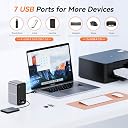
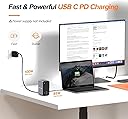
The TobenONE 15-in-2 MacBook Pro Docking Station is a premium, plug-and-play hub designed exclusively for MacBook Pro and Air models with Thunderbolt 3/4/5 ports. It supports dual 4K external monitors, offers 15 versatile ports including HDMI, VGA, USB-C, Ethernet, and audio, and delivers up to 85W fast charging. Its compact design declutters your workspace while boosting productivity for professionals who demand seamless multi-screen workflows.


| ASIN | B088D5436G |
| Best Sellers Rank | #2,259 in Computers & Accessories ( See Top 100 in Computers & Accessories ) #194 in Laptop Docking Stations |
| Brand | Tobenone |
| Color | Grey UDS009 |
| Compatible Devices | 13'' 2020 MacBook Pro/Air M1 chip, 13'' 2021 MacBook Air M1 chip, 13'' 2022 MacBook Pro/Air M2 chip, 13" 2023 M2 Macbook Air M2 chip, 14'' 2023 MacBook Pro M3 chip,15'' 2023 MacBook Air M2 chip, 15" 2024 Macbook Air M3 chip only can extend 1 monitor., MacBook Air Retina 12" (2016, Intel chip), MacBook Air Retina 13" (2018/2019/2020, Intel chip), MacBook Air 13" (2025, M4 chip), MacBook Air 15" (2025, M4 chip) support 2 monitors, MacBook Pro 13" (2016/2017/2018/2019/2020, Intel chip), MacBook Pro 14" (2021, M1 Pro or M1 Max chip), MacBook Pro 14" (2023, M2 Pro or M2 Max chip), MacBook Pro 14" (2023, M3 Pro or M3 Max chip), MacBook Pro 14" (2024, M4/ M4 Pro/ M4 Max chip), MacBook Pro 15" (2016/2017/2018/2019, Intel chip), MacBook Pro 16" (2019, Intel chip), MacBook Pro 16" (2021, M1 Pro or M1 Max chip), MacBook Pro 16" (2023, M2 Pro or M2 Max chip), MacBook Pro 16" (2023, M3 Pro or M3 Max chip), MacBook Pro 16" (2024, M4/ M4 Pro/ M4 Max chip) support 2 monitors Compatible Devices 13'' 2020 MacBook Pro/Air M1 chip, 13'' 2021 MacBook Air M1 chip, 13'' 2022 MacBook Pro/Air M2 chip, 13" 2023 M2 Macbook Air M2 chip, 14'' 2023 MacBook Pro M3 chip,15'' 2023 MacBook Air M2 chip, 15" 2024 Macbook Air M3 chip only can extend 1 monitor., MacBook Air Retina 12" (2016, Intel chip), MacBook Air Retina 13" (2018/2019/2020, Intel chip), MacBook Air 13" (2025, M4 chip), MacBook Air 15" (2025, M4 chip) support 2 monitors, MacBook Pro 13" (2016/2017/2018/2019/2020, Intel chip), MacBook Pro 14" (2021, M1 Pro or M1 Max chip), MacBook Pro 14" (2023, M2 Pro or M2 Max chip), MacBook Pro 14" (2023, M3 Pro or M3 Max chip), MacBook Pro 14" (2024, M4/ M4 Pro/ M4 Max chip), MacBook Pro 15" (2016/2017/2018/2019, Intel chip), MacBook Pro 16" (2019, Intel chip), MacBook Pro 16" (2021, M1 Pro or M1 Max chip), MacBook Pro 16" (2023, M2 Pro or M2 Max chip), MacBook Pro 16" (2023, M3 Pro or M3 Max chip), MacBook Pro 16" (2024, M4/ M4 Pro/ M4 Max chip) support 2 monitors See more |
| Customer Reviews | 4.4 out of 5 stars 1,921 Reviews |
| Hardware Interface | 3.5mm Audio, Ethernet, HDMI , USB 2.0, USB 3.0, USB Type C, VGA |
| Item Dimensions L x W x H | 2.8"L x 2.4"W x 4.7"H |
| Item Highlight | 2 HDMI, VGA, PD 3.0, 7 USB, Ethernet, 3.5mm Audio, MacBook Compatible, Compact, for Home Office & Professional Productivity |
| Item Type Name | USB C docking station dual monitor for MacBook Pro and MacBook Air |
| Item Weight | 1.1 pounds |
| Manufacturer | TobenONE |
| Mfr Part Number | TBN-UDS009 |
| Model Number | UDS009 |
| Number of Items | 1 |
| Number of Ports | 13 |
| Product Dimensions | 2.8"L x 2.4"W x 4.7"H |
| Total Number of HDMI Ports | 2 |
| Total USB Ports | 7 |
| Total Usb Ports | 7 |
| UPC | 682601535954 |
| Warranty Description | 24 Month |
| Wattage | 87 watts |
M**O
Quality product with plug and play functionally and plenty of connectivity and a great price!
The title says it all, I have been using this dock for just under a week. I currently have M1 Max MacBook Pro 16 Inch 2021 running the latest release version at the time of this writing. The dock is smaller than I expected and well built. It feels very solid and a finish similar to my Mac. It worked immediately when I plugged it. I was most concerned about the video. At home I have a single large screen and I use a KVM. I plugged the HDMI output into my KMV and it worked perfectly from the start. Both the KVM and monitor support 4K and there were no issues. I also tried it out by connecting it directly to my monitor and use the Laptop as a second display. Again no issues here, OSX is finicky on arranging screens and no reflection on the dock. I have the same issue at work all the time. Once I have the screens arranged they stay even when the machine goes to sleep. I tested in the office with my dual screens again plug and play. No issues with resolution or performance. I will be getting one of these for the office too. The cable between the Mac and dock is excellent quality. It connects securely and will not fall out. I did not test the USB port speeds and will at some point in the future but I have not noticed any issues either in performance or support. Everything has been plug and play on the first try. I use Fusion 360 and a Space Mouse which is picky on connect and disconnect. Again here no issues, this is a critical acid test in my opinion because other devices have no handled this well. This dock does not come with a power supply. At first this concerned me until I realized its more flexible. Unlike my other more expensive dock this will work with or without power. So when I am at home I can use a dedicated power supply. However when I go on the road I just bring the dock no power brick that only works with the dock. I can use my Mac power adapter that I plug directly in to the Mac or into the dock (USB C port). If the power adapter is connected to the dock the Mac then get power via the Dock this reduces what I have to pack on business trips. Conclusions: Better functionality better flexibility and I can drive two monitors and truly plug and play. Most importantly less expensive than other docks of similar or less functionality. Highly recommended.
J**N
Excellent USB-C/Thunderbolt 3 Dock for MacBook Pro
In summary: Good product, great price, and great MacBook compatible solution for serious home office work utilizing dual monitors, full-size keyboard and mouse/other peripherals all powered by your MacBook. I am very impressed with this dock. Having recently been furnished with a MacBook Pro for work, I was searching for a new docking solution as the USB-C Thunderbolt dock I had on-hand was not compatible with the MacBook (much to my surprise). After searching on Amazon this product was recommended with 5-star reviews. Not only is the form factor nice, this dock has plenty of ports, USB-3, USB-2, 2 HDMI, host adapter, power input, and ethernet, not too mention the USB 3 and headphone jack on the front. The quality is solid and I like the connecting cable that connects the mac, it utilizes both ports for maximum bandwidth and a (physically) secure connection, and it's also got some length which is makes it more accommodating to where I place the MacBook on my desk. Right out of the box it the dock was compatible! All I had to do was power the unit using the MacBook's charger and cord, connect the computer, monitors and peripherals, and by using the amphetamine app on my MacBook, I can close the lid without putting the computer asleep and work solely from the extended monitors. Unfortunately through the years I have not had good luck with these Thunderbolt docks, especially with the last Dell XPS that I had, the connection was always buggy and wonky forcing restarts etc. to keep the unit functioning, but I have to say that I am pleasantly surprised in that "it just works" right out of the box with no software or drivers to install. Additionally the price is excellent. They were offering a 30% coupon and I paid $95.00 for this when in comparison to other offerings is an excellent price. From what I have read of other reviews, the customer service is great. While I hope that I will not need to utilize their services, it's good to know that the product is well supported and that if necessary you wont need to jump through hoops to receive a replacement unit.
S**R
Solid functional docking station for MacBook Pro
Great docking station. Connected my MacBook Pro M4 with two screens and a number of peripheries without an issue. The space requirement is minimal and the ports are more than enough. Customer service is also very good and responsive. I highly recommend this product.
B**K
Does not consistently support dual external monitors - UPDATED
I was contacted by the company and offered a full refund, without question. They said that they were committed to adding the feedback to the next iteration of the product and fixing the issue I have. To-date, I have received the refund and appreciate it very much. I look forward to the next iteration and having the issue fixed. Please note the date of my purchase and compare to the date of the latest version. I'm adding one star to the review to reflect the good customer service. Regarding the dock, it's a good unit if you don't have two external monitors. Plenty of ports and compact design. **** Original Review Below **** This could be a serviceable docking station for MacBook Pro *if* it would consistently hold monitor configurations. Sadly, it does not. Randomly returning from the laptop being asleep, one of the external monitors will simply not connect and the display configuration will set itself to adhere to whichever monitor did not turn on. This happen with the laptop lid open and closed. If I disconnect the laptop from the docking station and return more than one minute later, the same thing happens. I have figured out that if I disconnect the docking station from the laptop AND the power source and wait 10 seconds and reconnect, it will eventually allow both monitors to reconnect, albeit with both external monitors configured out of place and I have to manually change the display settings again each time. This very frustrating but has become a regular part of my day. Not really worth the money, buy another one if you have two externals.
4**C
Great for adding dual monitors to MacBook
I'd searched for a good way to add dual monitors to my 2024 M4 MacBook Pro, and this is an interesting solution. It uses two USB connectors housed in a single unit that plug into the side of the MacBook simultaneously. It also supplies enough power to charge my Macbook. This makes it super easy to connect monitors and peripherals with just one cable. I liked this solution enough that I bought 2, one for the home and one for the office. I've grown to appreciate a smooth framerate, and I'll also note that while the specs showed that it would accommodate a 4K monitor at 60Hz, I was very happy that it also drives my 1440p monitors at 144Hz without any issues. I initially had issues with the connector on one of the units, but I was pleasantly surprised when I contacted their support. They solved the situation very quickly, were extremely responsive, and checked back in after they got me up and running to make sure everything was ok. Anita provided top-notch support, which was extremely welcomed for a brand that I wasn't familiar with.
M**.
Outstanding Customer Service
Great docking station. I had an issue with connectivity to the Macbook Pro that I use for work and TobenOne tech support reached out to me immediately to resolve the issue. I was rather surprised how quick their response was. They gave me multiple troubleshooting items and again were quick to respond to my inquiries. I would definitely recommend this docking station and TobenOne in general.
A**R
Great features but unstable
**FINAL UPDATE** Updated rating to 1 star. After a month of working with Tobenone support, I'm throwing this thing away (too late to return it). I was told by their support team that a 100W power supply isn't sufficient. Literally, their listing says it requires a 100W power supply so that's what I bought. You'd be hard pressed to find a USB-C/PD power supply that can deliver more than 100W through a single USB-C port. So clearly there is a design issue with this device. Connected to a 100W power supply with absolutely no accessories attached to the docking station, it only delivers 80W charging to the laptop. That drops of course once you start connecting accessories. There are better options on the market and I guess this is what I get for trying to go with a "cheaper" ( > $100USD isn't exactly cheap) solution. ----- On paper, this docking station is great. However, the reality is much different. First annoying piece was having to purchase a separate 100W power supply for it that is not included if you want it to charge the laptop. Given that it takes up two USB-C ports, not charging with it would be silly. However, even with a high-power charger connected, it doesn't always charge. Sometimes it's like the MacBook doesn't see that it's getting the proper voltage or it fails to negotiate the charging properly. Worse than the intermittent charging issues however is that the docking station will randomly stop working. More than a couple times now I've been on conference calls and I'll get an error from MacOS telling me a USB device has stopped working. My dual external monitors go blank and all the connected peripherals stop working (Keyboard, Mouse, WebCam, and USB Microphone). There shouldn't be a USB bandwidth issue, again it's using two USB-C ports. But it just fails. Tech support has not been helpful either. I'll probably end up replacing this with a different option. **UPDATE** I was finally able to catch the error that occurs in MacOS. It states that the docking station is drawing too much power and that it's turning it off. This explains why the worst issues occur when I'm on a conference call and have my external mic and webcam running. Clearly instead of charging the MacBook it's actually drawing power off of it despite being plugged into a 100W PD power supply. There is clearly something in the design of this that is flawed such that 100W isn't enough for it to power a reasonable set of USB accessories (Mic, Camera, Mouse, Keyboard). I've reached out to their support for help but as I said before they've been unhelpful thus far.
M**L
Simple Plug & Play
I have a MacBook Pro M4 Pro and needed dual displays with the lid open. I ordered the Tobenone dual monitor docking station and with a few minutes to install and changing a few settings it worked like a charm! I am running two Dell external monitors one is 24" the other is 27" with the lid open on my laptop and have the screen connected to my iPad as well and couldn't be happier!
V**A
Vale muito! Comprem sem medo!
ร realmente um mini computador! Podem comprar sem medo, estou utilizando 2 telas fora a do Mac hahaha... Cumpre perfeitamente com o que promete! รnico ponto que vale citar, ao conectar um fone de ouvido nele, o รกudio nรฃo fica em 100% da qualidade, fica por volta de 80%, vocรช consegue sentir uma diferenรงa entre conectar o fone nele e conectar o fone diretamente no MacBook Pro M4! Nรฃo vou conseguir enviar uma foto do produto agora, mas ele estรก atrรกs do monitor que estรก de pรฉ! E como podem ver, os dois monitores estรฃo conectados no MacBook Pro M4! (vale ressaltar que o monitor que estรก de pรฉ ficou bugado quando conectei a primeira vez, mas รฉ pq essa estaรงรฃo de ancoragem nรฃo aguenta 2 monitores externos a 144hz, entรฃo o monitor principal eu mantive em 144hz mas o secundรกrio eu desci para 120hz e ficou tudo certo!) Vale o custo benefรญcio, dei 5 estrelas pois mesmo com esses 2 pontos que citei eu acho que vale por causa do preรงo!
A**R
Great docking station, exactly what I wanted
Great docking station. Using for a single ultrawide monitor on a MacBook Pro. Great range of ports and looks great. Happy
A**R
recomendado
na
J**U
USB-C dock works perfectly for my M1 MacBook Air
This dock works perfectly for my M1 MacBook Air. I do wish that it had a DisplayPort, instead of two HDMI ports. Otherwise, it is an excellent and reliable dock.
D**R
Incompatible
Incompatible with MacBook Pro (M2)! The build is fine, looks good but the marketing is misleading.
Trustpilot
1 month ago
2 weeks ago