Buy anything from 5,000+ international stores. One checkout price. No surprise fees. Join 2M+ shoppers on Desertcart.
Desertcart purchases this item on your behalf and handles shipping, customs, and support to Tunisia.
🚀 Elevate your office hustle with speed, precision, and smart control!
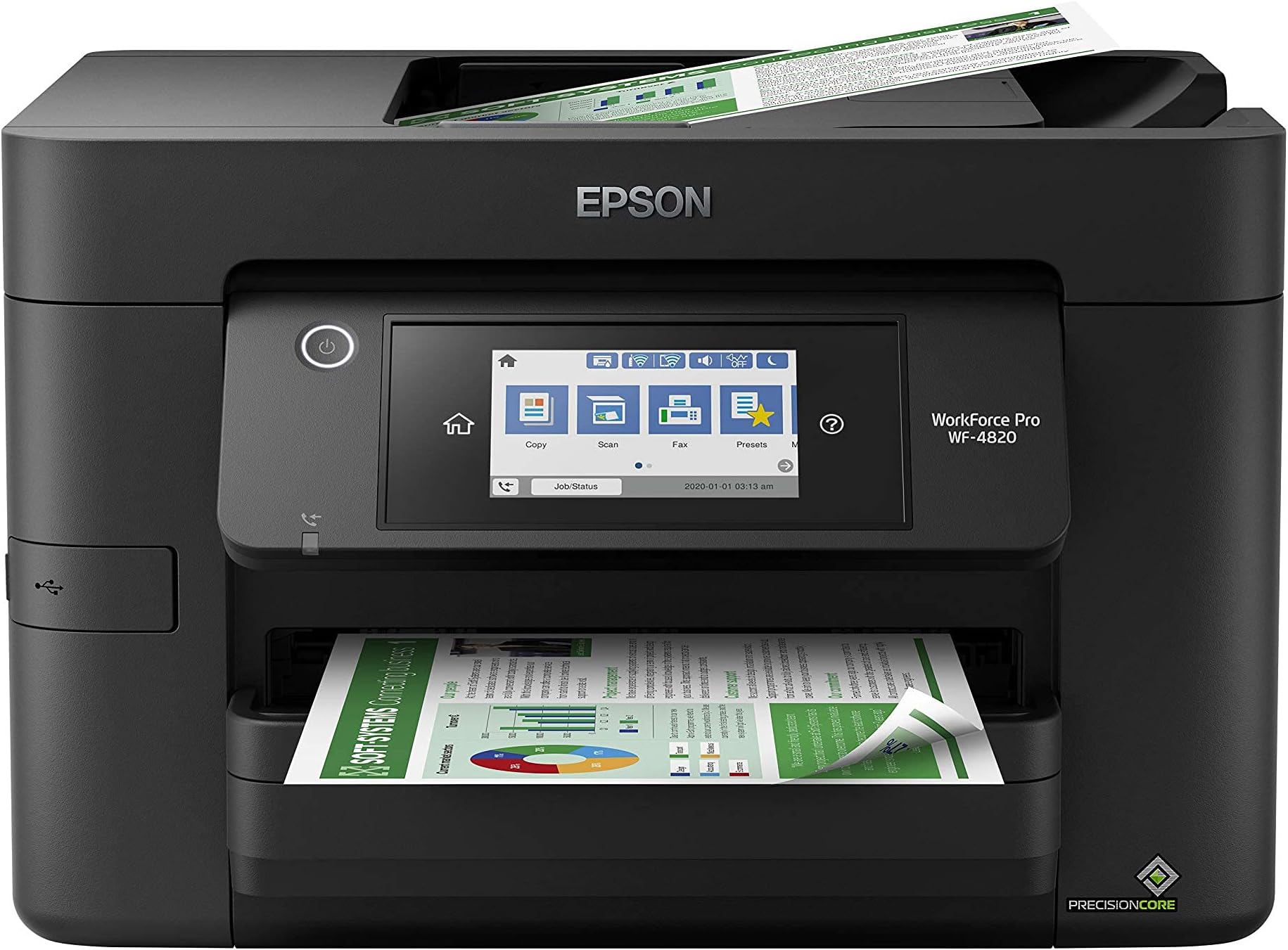
The Epson Workforce Pro WF-4820 is a high-speed wireless color inkjet all-in-one printer designed for busy professionals. It delivers up to 25 black and 12 color pages per minute using PrecisionCore Heat-Free Technology, ensuring fast, reliable, and energy-efficient printing. Featuring a 4.3" color touchscreen and Epson Smart Panel app, it offers seamless mobile control. With a large 250-sheet capacity, automatic duplex printing, and comprehensive connectivity options including Wi-Fi, Bluetooth, and Ethernet, it streamlines high-volume workflows while maintaining professional-quality, instant-dry prints with DURABrite Ultra pigment inks. Enhanced security features safeguard your data, making it a powerhouse for modern office productivity.


| ASIN | B08DXK91SX |
| Additional Printer Functions | Scan |
| B&W Pages per Minute | 25 ppm |
| Best Sellers Rank | #5,295 in Office Products ( See Top 100 in Office Products ) #13 in Ink Tank Printers |
| Brand | Epson |
| Built-In Media | WorkForce Pro WF-4820 printer, quick setup guide, CD-ROM with drivers, power cord, 4x DURABrite Ultra Ink cartridges (1x Black ink cartridge and 3x color ink cartridges: 1x Cyan, 1x Magenta, 1x Yellow) |
| Color | Black |
| Color Depth | 24 bits_per_pixel |
| Color Pages per Minute | 12 ppm |
| Compatible Devices | PC, Smartphones |
| Connectivity Technology | Bluetooth, Ethernet, USB, Wi-Fi |
| Control Method | App |
| Controller Type | Android |
| Customer Reviews | 3.9 out of 5 stars 1,714 Reviews |
| Display Type | LCD |
| Dual-sided printing | Yes |
| Duplex | Automatic |
| Global Trade Identification Number | 00010343940260, 00010343941915 |
| Hardware Interface | Ethernet, USB |
| Ink Color | Black |
| Item Dimensions D x W x H | 19"D x 17"W x 13.5"H |
| Item Type Name | Inkjet Printer |
| Item Weight | 22.5 Pounds |
| Manufacturer | Epson |
| Maximum Copy Resolution Black and White | 4800 dpi |
| Maximum Copy Resolution Color | 2400 dpi |
| Maximum Copy Speed Black and White | 25 ppm |
| Maximum Media Size | 8.5 x 14 inch |
| Maximum Print Resolution Black and White | 4800 x 2400 dpi |
| Maximum Sheet Capacity | 250 |
| Maximum print Resolution Color | 4800 x 2400 dpi |
| Model Name | Workforce Pro |
| Model Number | WF-4820 |
| Model Series | WorkForce Pro |
| Number of Drivers | 1 |
| Number of Trays | 1 |
| Other Special Features of the Product | Auto-Duplex |
| Output sheet capacity | 250 |
| Paper Size | 8.5 x 14 inch |
| Print media | Paper (plain) |
| Printer Connectivity Type | Bluetooth, Ethernet, USB, Wi-Fi |
| Printer Output Type | Color |
| Printer Type | Inkjet |
| Printing Technology | Inkjet |
| Processor Count | 1 |
| Resolution | 4800 x 2400 |
| Scanner Type | Image Scanner |
| Series Number | 1 |
| Special Feature | Auto-Duplex |
| Specific Uses For Product | Office |
| Total Usb Ports | 1 |
| UPC | 010343940260 010343941915 010343954410 |
| Unit Count | 1.0 Count |
| Warranty Description | 1-Year Limited |
| Warranty Type | limited warranty |
| Wattage | 18 watts |
R**E
Beats my HP in every phase for less money
Excellent printer. Scans quickly and quietly. Prints nice quality. Set up was a little problematic but i think mostly from operator error.
6**2
Great printer...I thought
This unit has really great reviews and many from small biz owners who say it works great and lasts. I've had it for a month and I'm really happy with it. It's much better than my last one. If it lasts as so many other reviews say, it's a great purchase. **UPDATE** Loved this printer. Only used it a few times. On the 3rd month, I pushed the button to turn on the printer and there was no response at all. I tried everything. Checked all connections and the outlets. It would not turn on at all. I was out of the return window with Amazon, so I called Epson. They told me they are sending a unit to me and to return mine with the box and label in the shipment. But they said they are NOT SENDING A NEW UNIT, BUT A REFURBISHED UNIT! I am not at all happy about this! I purchased a new printer, not a refurbished printer, and I want a new one! So, I'm really unhappy with Epson right now.
H**D
Not a good choice.
I recently purchased this printer with high hopes of a reliable and efficient printing solution. Unfortunately, my experience with this printer has been nothing short of a nightmare. Connectivity Woes: The most glaring issue is its abysmal Wi-Fi connectivity. Despite being placed right next to the router, the printer consistently displays a "Poor Wi-Fi Connection" message. This is in stark contrast to all other devices in my home, which work seamlessly with the Wi-Fi network. Even my old laser printer, which is placed close to the same location, functions without any connectivity hiccups. It's baffling how a modern printer can struggle so much to maintain a stable Wi-Fi connection. Scanning Nightmares: The scanning functionality of this printer is equally disappointing. The user interface is far from user-friendly, making it a daunting task to set up scanning to email or computer directly from the printer. This is a basic feature that should be intuitive and hassle-free, but instead, it's a convoluted process that requires unnecessary effort and time. Ineffective Customer Service: I reached out to customer service in hopes of resolving these issues. While they guided me through a reset process, the solutions they provided were only temporary fixes. The problems resurfaced shortly after, leaving me back at square one. It's frustrating to invest in a product only to find that the customer service solutions are inadequate and short-lived. Comparative Performance: What's more perplexing is that my older laser printer, which is from a different brand, continues to perform flawlessly in terms of connectivity and scanning capabilities. This stark contrast highlights the subpar quality of the Epson. Final Verdict: I'm deeply disappointed with this printer and regret this purchase immensely. Its inability to maintain a stable Wi-Fi connection, along with the cumbersome scanning setup and unsatisfactory customer service experience, make this printer a headache rather than a helpful device. I strongly advise against considering this printer if you value reliable performance and user-friendly features. Save yourself the frustration and explore more dependable options on the market.
S**V
Easy set up on USB cable. Works as expected on my Windows 11 computer
I got this Epson All-In-One printer for my work. I had been using HP printers for years. I started having problems with paper handling on them. Things like getting a paper jam error when there was not paper jammed in it. I decided to try an Epson for a change. I have had the printer now for three weeks. So far it has worked great. Easy to set up on my Windws 11 computer. Works great for printing and for scanning. I have it set up by USB cable because I don't have reliable wireless internet in that part of the building. No issues with the USB configuration. Ink usage seems good so far. Ink on any printer is expensive, but that was expected. I would recommend this printer.
U**X
Much harder to install than expected - especially if you have a comma in your Wifi password
I found this printer surprisingly hard to install. First, I used the software on the DVD that came with the system. That caused my computer to crash and reboot! After it rebooted, I downloaded the (presumably newer) combo installer from the Epson web site. That ran, but when it came time to connect the printer to the wifi network, I found that there is no way in the Epson network configuration wizard to use a comma in the wifi password. There is a period and many other symbols, but I didn't see a comma. But our system admin used a comma in our wifi password, so I couldn't connect the printer to the wireless network. I had to dig up a LAN cable and plug the printer into a network switch, restart the installation and configure the printer for a LAN connection. That seemed to work, at least according to the installer, but when I tried to print a test page there was a print connection failure. After running the "Epson Printer Connection Checker", it found a printer port error and tried to fix it, but was unable to. So, I removed the printer entirely from the computer using Windows device management and had Windows try to detect the printer. That finally worked, although now the Fax device is missing. But at least now I can print, and the print quality looks good. But I'm still frustrated by the inability to connect to the wifi.
A**T
Great printer
This printer is compatible with my Apple Mi 4 desktop and my Apple Laptop. I didn’t have a dvd player, so I went to the required Epsom website, and downloaded the software. No issues. All of the bells and whistles on the printer works flawless. Follow the directions and enjoy the results .
B**M
Best for Business owners gets the Job done
This Item is outstanding. Why? I've had two HP printers all in ones however, they were okay and did the job the inks are very expensive and not worth the money quite frankly. Now this printer faxes very fast and prints very fast also holds twice the paper in its tray. I like the big readable screen display that's really an asset. The HP always a hard time with big hands to enter numbers into the printer to fax,dial, and configure. This primer comes with the CD ROM if needed. Out of the box set up was indeed a breeze. Ready to go. I was really impressed to say the least. My personal opinion is that I highly recommend this item for small business owners who like to get the job done and quickly. Respectfully Dr. Martin PhD
S**.
Disappointed
The printer worked beautifully until it didn't. After 10 months use in my office (I'm retired, so use isn't heavy) it quit working. The error message advised me to remove and shake the cartridges. The cartridges cannot be removed. I'm so disappointed.
T**S
Super rápida
Ótima impressora.
R**N
They must have for somebody with the home office
Works perfectly.
M**R
Buen producto
Funciona muy bien y rápida Buena calidad de impresión en papel normal y opalinas
D**.
Epson Workforce Pro printer
Fantastic printer scanner. Easy to use. Wireless function is seamless with
A**A
A impressora é boa, mas é díficil encontrar os suprimentos
Não encontro suprimentos no Brasil, já fiz importação dos suprimentos, mas a impressora não reconhece.
Trustpilot
1 month ago
3 weeks ago