Desertcart purchases this item on your behalf and handles shipping, customs, and support to Tunisia.
🚀 Carry Speed, Security & Style Everywhere
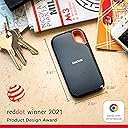
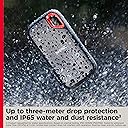
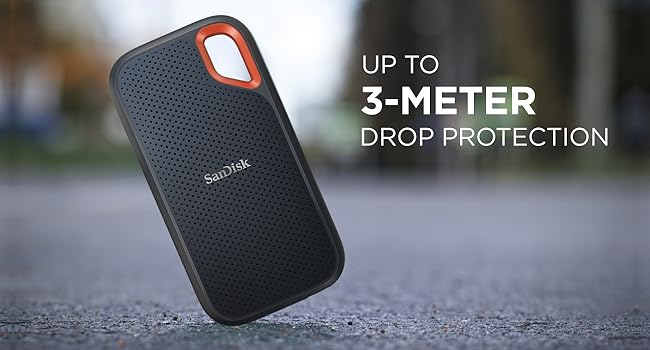
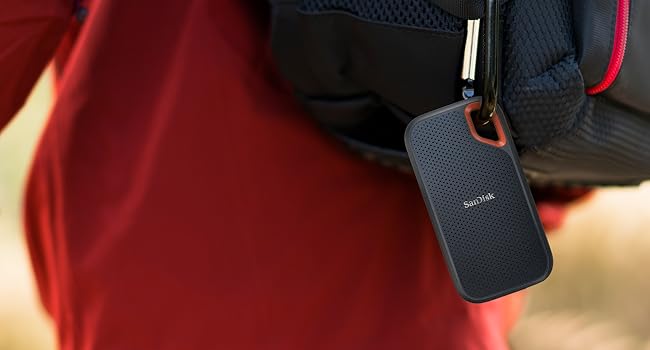
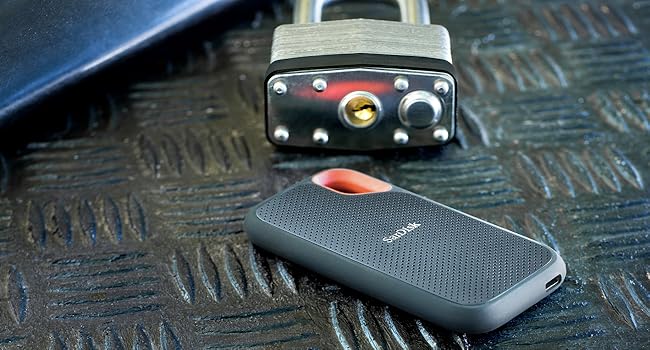
The SanDisk Extreme Portable SSD 500GB delivers NVMe solid-state performance with up to 1050MB/s read speeds in a compact, rugged design. Featuring 3-meter drop protection, IP65 water and dust resistance, and a durable silicone shell with carabiner loop, it’s built for professionals on the move. Universal USB-C connectivity with included USB-A adapter ensures broad compatibility, while 256-bit AES hardware encryption keeps your data secure. Perfect for fast external boot drives, multimedia storage, and gaming consoles.


| ASIN | B08GTXVG9P |
| Best Sellers Rank | 12,909 in Computers & Accessories ( See Top 100 in Computers & Accessories ) 56 in External Solid State Drives |
| Box Contents | 1 piece |
| Brand | SanDisk |
| Brand Name | SanDisk |
| Cache Memory Installed Size | 500 |
| Color | Black |
| Compatible Devices | Gaming Console |
| Compatible Video Game Console Models | Microsoft Xbox SERIES S, Microsoft Xbox SERIES X, Nintendo Switch, Sony PlayStation 4, Sony PlayStation 5 |
| Connectivity technology | USB |
| Customer Package Type | Standard packaging |
| Customer Reviews | 4.6 out of 5 stars 8,212 Reviews |
| Data Transfer Rate | 1050 Megabits Per Second |
| Digital Storage Capacity | 500 GB |
| Digital storage capacity | 500 GB |
| Enclosure Material | Silicone |
| Form Factor | 2.5-inch |
| Hard Disk Description | Solid State Drive |
| Hard Disk Form Factor | 2.5 Inches |
| Hard Disk Interface | USB 3.0 |
| Hard disk form factor | 2.5 Inches |
| Hard disk interface | USB 3.0 |
| Hard-Drive Size | 500 GB |
| Hardware Connectivity | USB Type C |
| Hardware Platform | Mac |
| Installation Type | External Hard Drive |
| Item Dimensions L x W x Thickness | 10.1L x 5.3W x 1Th centimetres |
| Item Weight | 50 g |
| Manufacturer | SanDisk |
| Manufacturer Part Number | SDSSDE61-500G-G25 |
| Media Speed | 1.000 megabytes_per_second |
| Model Name | Extreme 500 |
| Model Number | SDSSDE61-500G-G25 |
| Network Connectivity Technology | USB |
| Number of Items | 1 |
| Product Features | Portable |
| Product Warranty | 2 year manufacturer |
| Read Speed | 1050 Megabytes Per Second |
| Special feature | Portable |
| Specific Uses For Product | Multimedia, Staff, Game |
| Unit Count | 1.0 count |
O**X
Fast and high quality
I have one of these with a bootable version of macOS installed on it for testing and troubleshooting, so obviously running an OS over USB-C means you need a fast SSD. This is comfortably fast enough to do this, so if you’re looking for something to externally boot to then this will do the job. It’s not the fastest in the world, but for the price I certainly won’t complain. It gets slightly warm, but not worryingly so, during use. It feels well built and I really like the rubberised material of the outer case, and the inclusion of a USB-A adapter is a nice touch. Very happy with this and would confidently recommend it to others.
S**V
Perfect
I expected it to be bigger but it was tiny which is a good thing. It also is an NVMe which allows any file size to be sored on, unlike USB flash drives which are limited to 3GBs per file. I also love that it is USB type c on both sides with a USB C to USB A (the common USB) convertor included making it the perfect device. Portable, extremely light weight and durable.
B**R
Fast and neat. Get one,
It’s small and it’s tough. The connector cable is completely detachable and short, but that’s quite an advantage. And it’s read/write speed is ridiculously fast. This product that is so good, I bought another.
J**E
Fast, reliable - and quite cute
This a a small light 500GB backup drive, not much larger than a credit card, light and very portable. It's ideal for a trip because it weighs next to nothing and takes up practically no space. I use two as backup drives for my laptop. With a robocopy script to pick up all changes, it typically taken under 3 minutes to connect the drive and backup everything. I rotate the drives every month. I have other online backups but this means I have an offline copy of everything - just in case. The first time I used it, I had to double check it was working because it was so fast. Nothing to install (on Windows 10/11) so plug it in and it just works. I've been using them now for six months. Absolutely no problems and speed remains the same - but I'm using them for backups, not as daily devices. Recommend if, like me, you really want to a painless backup of large files or a complete laptop.
K**H
Works with iphone and ipad
My main reason for buying this 1TB ssd was for when I travel and and have lots of camera footage to backup from my shoots. Portability was a big factor, and hoping it would work with iphone (since there isn't a lot of info on it) The ssd itself works well however max transfer speed I've seen so far is approx 270 MB/S on magicbook pro using default hardware, nonetheless faster than my other HDD's. I have noticed it heat up a lot in use, more than the 500gb version. In terms of wire / usb-c port connection, it feels a little flimsy and weak. The ssd has a front patterned surface and a rubber back both of which seem to attract dust. Now onto iphone connection...I have tried both the 1TB and 500GB versions (with the supplied usb-c to usb adapter), both work with iphone (12 mini) via a genuine Apple Lightning to USB 3 Camera Adapter (make sure adapter is original as fake / defective wires have given me an unpredictable intermittent connection). In my experience the 1TB ssd loaded faster than 500GB on iphone. Now Iphone allows you to view ssd contents BUT as soon you start saving iphone files onto it or tinkering with the ssd's data you get the infamous 'This accessory requires too much power' sign. Even if you re-connect the ssd, once the sign appears once it keeps coming back. What worked to reverse it for me was actually connecting it to a laptop and deleting the iphone files saved on the ssd or the folders where data was altered. Another option is to scan for errors (whilst plugged into the computer), even if there are no errors I found that often the ssd starts working without needing 'extra power'. Another option to try, this has given mixed results tbh is to connect the ssd to iphone whilst it is switched off then turn it back on and see if the sign reappears. If you definitely want 2-way iphone-ssd use then you will need a power hub to power the hardrive (and also bypass the '...requires too much power' message, or if none of the above options work to get rid of the message). I bought the '...RSHTECH 5 Port USB 3 Hub with 4 USB 3.0 Data Port + 1 Fast Charging Port Portable USB Splitter with 12V/2A...' because it provided more power i.e 24W compared to similarly priced 5-port power hubs - so far so good! As a bonus iphone was able to read both ssds (1TB + 500gb) at once when plugged into the power hub. In terms of folder load time there was no difference for me using a power hub vs none. I didn't notice a difference in performance or predictability between an old iphone lightning cable vs latest lightning to usb-c cable. I have tried iphone (with ssd connected) plugged into a usb wall socket vs plugged into an apple 30w adapter, again no obv difference. Another point to mention, with big folders around 90gb (raw files/4k videos) my iphone struggled to read the content despite loading for 20+ mins? The successful cut off for me has been around 65gb folder size max, anything larger definitely gets divided into smaller folders. I did notice some large 4k videos load slowly and freeze midway, but the ssd did let me save them directly on my iphone despite this so was able to view them better that way. My Sandisk ssd-iphone experience so far (in summary): Option 1 - viewing/saving ssd content on iphone -> no power hub required Option 2 - deleting/altering ssd content and/or saving iphone content onto ssd -> power hub required Hope that helps, I struggled A LOT to find info on iphone sandisk ssd connection so thought I'd share all of my recent findings. On a sep note - the ssds worked absolutely fine with ipad Air 4th gen utilising it's usb-c port so no adapter required. Literally a case of plug and play - and definitely a lot faster than on iphone.
L**S
Works well with BMPCC4K! 📷
It was either this or the T5 I was going to go for however, I picked this one up as it was on sale on prime week. It has performed very well with transfer speeds and works with my BMPCC4K to record onto. I get about 75minutes of 4K DCI 3:1 quality at 24fps and 35 minutes of 4K DCI 3:1 at HFR 60/24 mode for slow motion shots. Definitely a great buy, I probably should’ve gone for the 1TB version however I didn’t wanna have to return it if it hadn’t worked with my camera. So if you do go for this you should go for the 1TB model instead of the 500GB
S**H
Works great with Mac mini m4
Worked fine with no compatibility problems with Mac OS
I**S
Small and fast
Used this as a bootable hard drive for my mid 2015 15" Mac Book Pro. Using the Disk Utility app included on the mac, I re-formated the drive to Extended journaled. I can report that I can boot from the drive and run an OS operating system. I only have USB-3 ports, and the adapter included has worked well. It's as fast as my internal fusion SSD drive on the Mac. I don't have the means to measure so we are talking possibly fractions of a second, if I'm wrong. I love SanDisk, and use their cards exclusively on my Canon 5D MK II SLR.
A**L
Excellent, worth buying, you will not regret it
I am very late in writing the review, as I have been using it for more than three years and it works smoothly and excellently.
M**E
Snabb och stabil
Väldigt snabb och smidig disk.
J**R
Macですぐに、Stress Freeで使える
Mac使用者。つなぐだけですぐ使えます。耐久性についてはSSDの不安、、、はどうにも解決しようがないから、2つ持って備えるくらいですね。安いのでケチらず、データ保全を優先しましょう。
G**N
Un disco duro compacto, de buena velocidad y muy buena calidad.
Dejando a un lado que mi caja llegó un poco maltratada…puedo decir que este disco externo es muy funcional en varios aspectos: 1) Su tamaño lo hace ideal para incluso guardarlo en un bolsillo. En mi caso lo uso solo para el hogar pero no tengo duda de que no me quita espacio en lo absoluto. 2) El tamaño del cable USB-C que tiene, es corto (unos 10 cm aproximadamente), en mi caso no me afectó pero para referencia de los lectores. 3) La calidad que se siente al tocar el disco, es una sensación de una buen material, así que nada más que decir. 4) El tamaño es bastante pequeño, menos que tú palma. Así que en mi caso es otro punto más a favor. 5) Punto NEGATIVO…se calienta bastante. En mi caso uso el ssd para respaldo y contenido de mi MacBook Air M1. Está en formato APFS y si suele calentarse mientras la uso, en este caso lo considero algo negativo ya que la cantidad y tamaño de archivos que muevo no es algo enorme para justificarlo. No he tenido oportunidad de que se me caiga o probar su resistencia al agua (y espero no probarlo) por lo que en ese apartado no sabría decir nada. Ojalá en un futuro expandan el tamaño del SSD pues en relación precio-cantidad, siento que se queda un tanto corto para la versión de 500 GB que compré. Suerte!
P**O
Prędkość zapisu i odczytu zawyżona
Szybki dysk ale nie tak szybki jak w opisie.
Trustpilot
2 months ago
4 days ago