Desertcart purchases this item on your behalf and handles shipping, customs, and support to Tunisia.
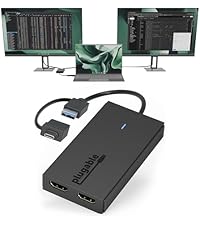
🖥️ Elevate your workspace with dual 4K power — because one screen is never enough!
The Plugable USB-C & USB-A Dual 4K HDMI Adapter leverages the DisplayLink DL-6950 chipset to enable dual 4K 60Hz HDMI displays from virtually any laptop. Compatible with Windows 10/11 and ChromeOS 100+, it offers flexible USB-C or USB-A connectivity without requiring external GPUs or Thunderbolt ports. Designed for professional multitasking, it supports extended or mirrored displays and comes backed by lifetime North American support.


| ASIN | B08F2SZQYX |
| Best Sellers Rank | #250 in Audio & Video Connectors & Adapters #299 in Computer Cable Adapters |
| Brand | Plugable |
| Color | Black |
| Compatible Devices | Windows 10 and 11, and ChromeOS 100.x or later systems |
| Connector Type | DisplayLink HDMI |
| Customer Reviews | 4.5 out of 5 stars 1,186 Reviews |
| Finish | Chrome |
| Global Trade Identification Number | 00819927012337 |
| Item Dimensions | 6.97 x 5.31 x 1.38 inches |
| Item Weight | 7.2 ounces |
| Item dimensions L x W x H | 6.97 x 5.31 x 1.38 inches |
| Manufacturer | Plugable |
| Mfr Part Number | USBC-6950U |
| Model Number | USBC-6950U |
| Number of Items | 1 |
| Number of Ports | 4 |
| Package Quantity | 1 |
| Power Plug Type | No Plug |
| Specific Uses For Product | Monitor |
| UPC | 819927012337 |
| Unit Count | 1 Count |
| Warranty Description | 2 Year Limited Parts and Labor |
| Warranty Type | Limited |
E**G
Excellent performance for dual monitor setups
This Plugable dual monitor adapter is fantastic. It’s incredibly reliable and works exactly as expected, making it a great solution for extending your workspace. The connection is stable, and the image quality is perfect. Highly recommended if you need an easy way to connect two monitors to your machine.
D**S
Great for laptops that dont have capacity for more than 1 monitor
Great, plug and play
T**A
Great customer support
I love this displayport. The cord started malfunctioning after four years, so I contacted Plugable, and they sent me a free replacement, even though it was outside the 2-year warranty window.
S**S
Shockingly Easy Setup, Reliable Performance, and Perfect for Multi‑Monitor Workstations
I bought this adapter because I needed a way to connect my laptop to two additional monitors and build a proper workstation. I was prepared for a complicated setup — I even expected I might have to install drivers or troubleshoot settings. But I plugged everything in, connected both monitors, and it worked instantly. No drivers, no confusion, no delays. I was honestly surprised by how easy it was. The performance has been great. Both monitors run smoothly with no lag, flickering, or random disconnects. It handles multitasking, video calls, and multiple open windows without any issues. For anyone who works with several screens, this adapter makes the whole setup feel seamless. The build quality is solid too. The adapter feels sturdy, the cables fit securely, and nothing feels cheap or flimsy. It’s compact enough to sit neatly on your desk without adding clutter, and it doesn’t overheat or cause any weird behavior. This is the kind of product that just works, and that’s exactly what you want when you’re building a workstation. If you need a reliable way to add two 4K monitors to your laptop — especially if you’re worried about complicated setup — this adapter is a fantastic choice. It made my entire desk setup come together effortlessly.
D**1
It works - Just know what you are getting it for.
Note: as a fan of cable management, the photo I posted with this review brings me no joy... I bought this specifically for my office. An employee was getting a new slim-line office desktop and had three monitors...but for some reason the new desktop only had a 1 DP port and 1 HDMI port. So, saw this and thought - boom, quick solutions. Here is the issue: the Type A USB adapter included with this was not recognized by any of the rear USB ports. So I had to end up plugging into the Type C port on the front (hence the janky photo). Now the three monitors do all work at 1080p and 60hz with no issues. BOTTOM LINE: if you want this as a quick, multi-monitor solution for your laptop or office desktop and have a spare Type C port - then this will work fine. However, the type A adapter may be useless if that is your only option.
F**R
Works with a caldigit thunderport 5 hub on a macbook pro m4
Works great to add an additional external monitor to my MacBook Pro M4 Pro laptop. It natively only supports 2 external plus the laptop display. Adding this allows 3 external displays and the laptop display after connecting the adapter and downloading the displayLink driver for MacOS from the manufacturer's website. NOTE: The shipper sent me a different model number which includes the RJ45 1Gbps ethernet port, the USBC-6950UE not the USBC-6950U. The performance is listed as being the same, just wanted to express that. I am not using the ethernet so I can't comment on the performance. The extra monitor shows up in the native MacOS displays, but you have to adjust the brightness and contrast through the displayLink driver software.
K**N
super easy to figure out and hook up
This works great. I have 4 screens and can get the work done.
S**R
Saves a port, but performance is noticeably awful on a MacBook. Don't buy this.
If I was given the option of going down to only one external monitor or using this to get two monitors? I'd go down to one and use this as a coaster for my drink. I have a late 2019 15-inch Macbook Pro, running macOS 12.4 Monterey, 2.6 GHz 6-Core Intel Core i7. Not the newest computer but it does GREAT for work (internet browsing, a few programs, and emails) I was previously using 2 Apple USB-C AV Multiport Display adapters when I bought this. Each took up a port for my two 32" 4k monitors. I got this to try and reduce to only one port being used for both monitors for no other reason than to minimize and declutter my desk space. I downloaded the latest driver/support software for this after realizing "Plugable" was not the same as "plug and play" where it just works after plugging it in (like all my other adapters) Not a big deal however, and that's my fault for not reading the full description for this and absent-mindedly thinking that was part of their shtick on that name choice. Hey-o! Does it work? Yes. I got both monitors up and running in about 5 minutes. Does it work *well*? NO. Not even remotely well. SIGNIFICANTLY slower performance on both monitors (and the computer itself) than using two Apple adapters. At one point I thought my internet had gone down or was going down because of how poor the experience was. I had to verify on my phone that it wasn't the internet going down. We're talking normal website and email usage; I'm not over here streaming movies or broadcasting on Twitch all day. The mouse chugged and skipped around the screens like it was 1995 all over again and all the display settings were the same and optimized. It severely increased the battery drain: Without plugged into the power source my MacBook usually goes several hours on normal use. With this plugged in? It went from full battery to completely dead in about 30-45 minutes and it was only actively being used for 15 min of that...the rest was idling while I did my morning routine in the house. I had this sitting on my desk for a week before I finally switched over to using it and I had forgot how much I (over)paid for it. Returned immediately. Couldn't work a whole day with this. This may or may not be a good solution for PC people, but the price for this isn't even remotely worth what you get for it on a Mac.
N**S
Stopped working after 3 months
It installed fine at first, then 3 months later suddenly stopped working. Updated drivers and downloaded the recommended software but no luck!
龍**龍
大推薦ものだ
パソコンの値段が上げる時代に、 本当に助かりました。
M**A
المنتج يجعل جهاز الماك بطيء و حركة الماوس بطيئة للغاية
المنتج ليس كما توقعت
F**R
Funciona perfecto! Estoy muy satisfecho
Funciona perfecto, es facil de instalar. Con mi MacBook M1 ahora ya puedo usar 2 monitores externos
I**R
Works flawlessly
The latest crop of M1 and M2 MacBook Air laptops frustratingly only support 1 external monitor. This thing lets you cost-effectively beat that restriction by allowing you to connect your Mac to 2 external monitors. You simply plug your screens into the two HDMI ports (or display ports - it has two of each) on the device, and plug the device's USB-C cable into your Mac. Install what is an unobtrusive DisplayLink driver (from Synaptics, who have been around for donkeys years) and you'll have two external screens which you manage via the built-in MacOS System Settings app. It works a treat. I can't detect any drop-off in picture quality or lag. It also comes with a 2 year guarantee. There are no other ports on the device, so you can't connect other USB devices to it, but it does exactly what to says on the tin at a very attractive price point. My only (slight) criticism is the device comes with a ridiculously short USB cable. I've ended up buying an extension cable to enable me to hide the box under the desk a few feet away from my Mac, just to keep my workspace uncluttered.
Trustpilot
2 weeks ago
1 month ago