Desertcart purchases this item on your behalf and handles shipping, customs, and support to Tunisia.
⚡ Own the Weather. Outsmart the Storm.
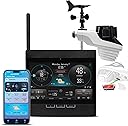
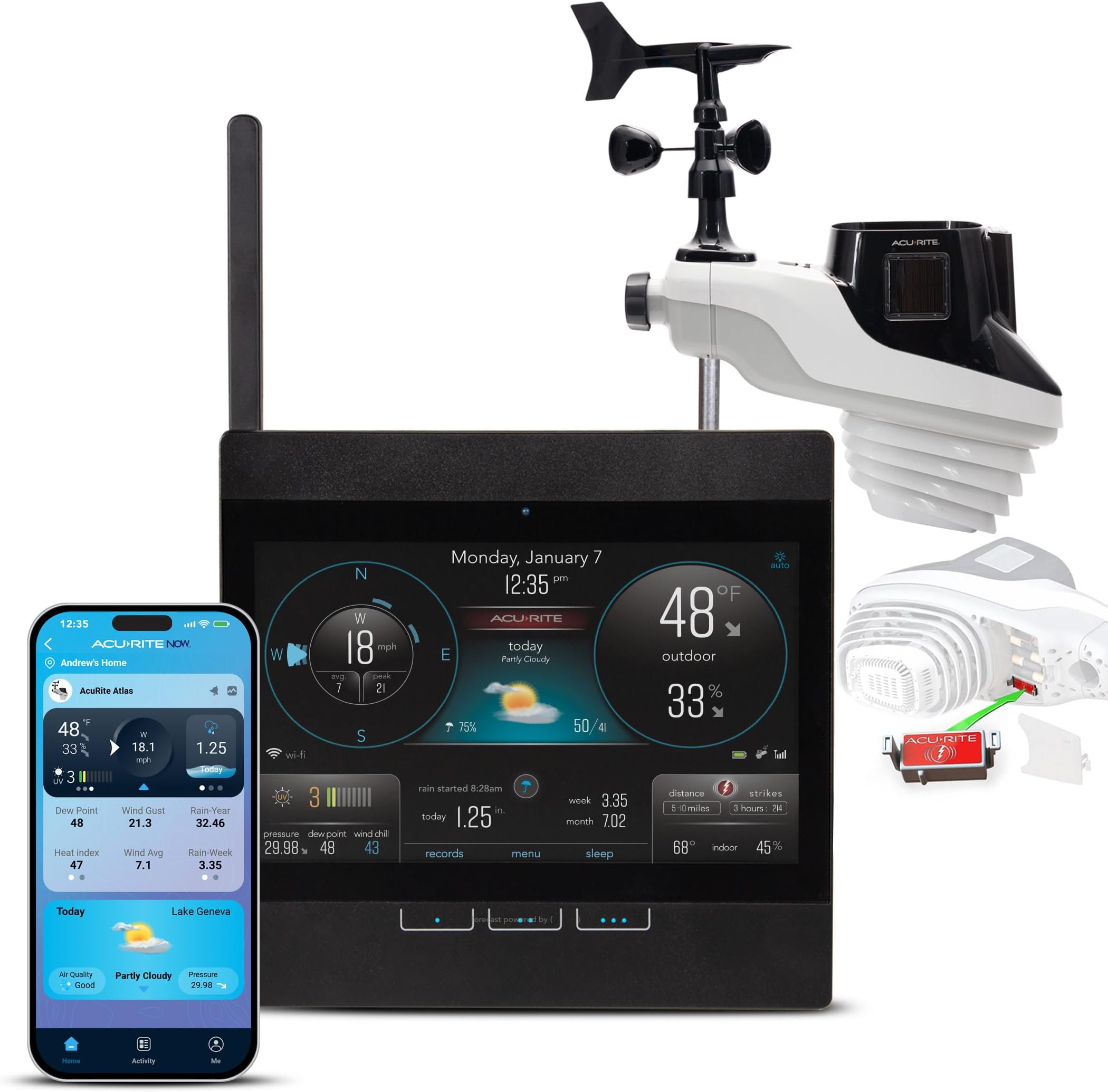
The AcuRite Atlas Professional Weather Station delivers comprehensive, real-time weather monitoring with direct-to-WiFi HD display, lightning detection, and over 20 precise data points including temperature, humidity, wind, rainfall, UV, and barometric pressure. Designed for home or office, it connects to Weather Underground for global data sharing and features a durable, weather-resistant build with easy installation and battery backup to ensure uninterrupted insights.


| ASIN | B08MFSM3KQ |
| Additional Features | Adjustable Brightness, Clock, Pre-Calibrated, Weather Resistant, Wireless |
| Best Sellers Rank | #36,533 in Patio, Lawn & Garden ( See Top 100 in Patio, Lawn & Garden ) #58 in Weather Stations |
| Brand | AcuRite |
| Brand Name | AcuRite |
| Color | Atlas with WiFi Display |
| Connectivity Technology | Wi-Fi |
| Customer Reviews | 3.6 out of 5 stars 907 Reviews |
| Display Type | HD |
| Global Trade Identification Number | 50072397010011 |
| Included Components | Display and AC Adapter, Outdoor Sensor, Lightning Detector, Instruction Manual |
| Is Used Where | Indoor, Outdoor |
| Item Dimensions D x W x H | 6"D x 16"W x 11.5"H |
| Item Type Name | Atlas Weather Station with Direct to Wi-Fi Display and Lightning Detection |
| Item Weight | 4.35 kg |
| Manufacturer | AcuRite |
| Material | Plastic |
| Material Type | Plastic |
| Model | 01001MCB |
| Number of Batteries | 4 AA batteries required. |
| Number of Items | 1 |
| Part Number | 01001 |
| Power Source | Corded Electric |
| Recommended Uses For Product | Home |
| Sensor Technology | Pre-Calibrated Sensors |
| Shape | Rectangular |
| Special Feature | Adjustable Brightness, Clock, Pre-Calibrated, Weather Resistant, Wireless |
| Specific Uses For Product | Humidity |
| Style Name | Atlas with WiFi Display |
| Temperature Accuracy | 0.5 °C |
| Temperature Reading Accuracy | plus_minus_1_degree_celsius |
| Unit Count | 1 Count |
| Upper Temperature Range | 122 °F |
| Warranty Description | Limited One-Year Warranty |
R**Y
Dependable Products but you have to be familiar with them.
I've had Acurite products for close to 20 years. My tabletop forecasters still work and had to replace outside sensor once. I wasn't completely happy with the 5 in 1 device. After multiple support sessions we were never able to connect it to the PC, App or Weather Underground. I used it as a stand-alone and it was fine. After more than a decade on the roof, the Anemometer and Hygrometer had enough and quit. I researched the Atlas device and purchased it as a replacement. At first, I had difficulty connecting it through the PC as recommended. After activating the Wi-Fi on the display unit, I used my Android phone to connect to its Wi-Fi. I entered the IP Address on a browser in my phone and the connection page popped up. Completed page and reconnected to my home Wi-Fi. Voila! Atlas connected to Display, PC App, Phone and Tablets. I would give this device 5 Stars except for the Indoor Temperature and Humidity data does not appear on MyAcurite App. I was expecting that information for when I was away. Update 6/04/2023. Worked great for 3 days and went offline. Wi-Fi full strength, battery level full. No signal from sensor. Nothing was changed or moved. See what support says tomorrow. Update 6/6/2023. Support responded promptly. Replaced brand new lithium batteries with brand new Duracells. Sensor came back online. For 28 hours and went offline. Followed Factory Reset instructions if sensor went offline again. Another set of brand new batteries and reset system. So far so good. If it goes offline again, it's going back. Update 9/07/2023 Customer Support deemed the sensor unit faulty in June because it would drop out and the red light would stop blinking. I had to wait until mid-July until remediated sensors were available, and they sent me a replacement. So far, so good. Had a fluctuating signal strength issue but that was resolved by moving the display unit to a different location. Because of Customer Support, I bumped it up to 5 stars. I'll buy their products again.
K**L
Antiquated Wifi connectivity
Final Update: I would advise to steer clear of this junk. After back and forth with Acurite support, they ended up sending me a new weather station which they said they had tested. The original weather station was reporting the same UV level all day, even into the night, so it was broken somehow. But the main problem continues to be the horrendous display unit. I cannot get the display unit to reliably connect to wifi. Acurite uses a ridiculous antiquated method for Wi-Fi connection. It's hit or miss getting through the initial setup, but if you do manage to get through initial setup, you're then frustrated by it losing connection constantly. I bought this until to try and build weather data over time, and you need connection to WiFi and Weather Underground to do that. This unit fails spectacularly on both counts. Original review: As others have noted, the WiFi display unit has poor connectivity. For me, it has dropped signal about five times in the last three months. When it drops signal, it does not automatically reconnect. You have to manually restart the unit, then it will reconnect. There is no explanation for why it drops the signal. I have not noticed any pattern to it, and my WiFi itself has not had any issues during these periods. When it drops signal, it stops reporting to Weather Underground. The odd thing is that I will get an email that says the display unit lost signal from the sensor. But that's not the signal that dropped. I have never lost signal from the sensor to the display unit, only from the display unit to WiFi. So, their error reporting is not even accurate. The display unit is using ancient technology all over. Almost all the components are dated from 15+ years ago. It uses a micro-USB power adapter when virtually all similar electronics these days are powered with USB-C (even cheap little imported electronics). The screen is using an ancient LED panel that has low resolution, low brightness, poor viewing angles, and uses TFT technology instead of IPS. I've had tablets from ten years ago with vastly better screens. It is not a touchscreen, but uses three capacitive buttons below the screen for selection. These buttons are finicky and don't always register touches. This is supposed to be Acurite's top of the line product. Pathetic. The process to set up WiFi requires you to use another computer to connect to its own network, then log into the IP address of the display unit and input the WiFi credentials of the network you want to connect it to. It uses only 2.4 GHz, so you cannot connect it to any modern router that intelligently uses both 2.4 and 5.0 GHz. This is technology straight out of the 2000s. Nest thermostats have been around for 14 years and used more modern WiFi connectivity than this piece of junk. The downside to using this ancient technology is that it doesn't play nice with newer routers and it isn't nearly as reliable. I did set up a dedicated 2.4 GHz network on my router to connect to the display unit, but most people have no idea how to do that. Acurite sourced these units at a STEEP discount. The entire display unit probably cost $5-10 to make, and they charge $100 retail. Just maintaining support for buyers who have trouble with the WiFi connectivity costs way more than what they're saving on upgrading the units to use modern technology. I reported to them that my display unit had connectivity troubles and they replaced it under warranty. However, it's been replaced with the same unit. I'm counting down the days to the next WiFi signal issue. Update: having the same exact troubles with the replacement display unit as well. It doesn't even broadcast a network to connect to half the time when trying to set it up, and it drops the network just as you're trying to save the settings. I have yet to get it to connect to my Weather Underground account. Of course, I am well past the Amazon return date, so I'm probably out of luck with any recourse. I wish I had never purchased this.
R**R
A year and a half now…..
Replaced my aging iris with the Atlas, and after done initial connectivity hiccups with the WiFi display (which AcuRite support helped with quickly) I’ve been in cruise mode since. Added the solar panel and the kit to separate the anemometer (which I highly recommend) and my atlas does everything I could ask. I am looking forward to AcuRite replacing the aging “my AcuRite” app with the “now” app. Also would love native data transfer to more than just weather underground, but these are small quibbles. My iris btw is still going strong after replacing the anemometer and the temp/humidity sensor. 10 years strong now. I have no reason to think my Atlas won’t last just as long. Ignore the naysayers, if you have a little weather station experience then setup and maintenance is a breeze. Now that the Optimus is out I expect the price on Atlas may drop as well. Wouldn’t hesitate to buy another.
V**7
Long time AcuRite user
I have used Acurite weather stations for many years. I initially used a computer-based program to send weather information to weather underground from my 5-1 station. I was very happy with the range of the station to the display. I was thrilled to go to the access hub because my weather data did not require 24/7 computer and internet access. I recently was having issues with data being sent to WU. It was missing large periods of time. I changed the network cable with no improvement, I swapped out my router, still no improvement. My data to my display were constant and accurate. This led me to look into a new access hub. I decided that due to the cost to replace the access, as well as my interest in improving my station's ability, I decided to purchase the Atlas Weather Station. I like the lightning sensor and am amazed at the number of strikes nearby are in the 100s. I had read the reviews and even with some negatives decided to buy this station. My first impression was that it looked large and the display was colorful, bright but I still would need glasses to read the data. I decided to place it on a pole attached to my fence to get familiar with it and in case it needed any adjustments prior to placing it in its permanent location. I set up the WIFI connection as per instructions then went to my AcuRite to log into and set up my new station. I was able to do that but when I did it stopped the WIFI transmissions direct to WU, I tried to set it up to share/transmit through MyAcuRite.com... For some reason I was unable to transmit this way and the only way to correct the direct WIFI to WU was to delete it from the myacurite account. Being able to see the weather direct from the weather underground site was all I really needed. Initially I thought that the Atlas was under reporting the rainfall, so I compared the reading from my CoCoRaHS approved rain gauge. It was identical, perfect calibration right out of the box. (Many of the neighboring stations were overreporting the rainfall amounts). There are two things that stand out in my mind, one is that the 5in1 stations transmission from sensor to display was exceptionally better than the atlas, The access hub was much better and more reliable connection to the internet. I had to relocate the display to a direct line of sight to the sensor right at the window to get the data even though it was far from the area we desired to have the display. I have a WIFI 6 mesh system so my signal is very good throughout my home... yet the display would show weather data but not able to transmit to WU... strange. Would I buy this again? I am no longer sure! When you look at the cost to buy the access hub and setup, hands down Atlas is easier but it is not as good at transmitting to the display, or sending that information to weather underground!
R**C
Great display, sensor died after 14 months, wind speed was off from the start -Harrumph!
Worked fairly well for 14 months then it locked up. Replacing all batteries together for sensor reset didn't help as the station can't find the sensor now. I say it worked "fairly well". Rain, lightening, temps, pressure and humidity seemed in line with observed conditions. The anemometer has always been another story. I mounted it on a pole away from structures. In Oklahoma we have wind. I would see the cups spinning furiously, heavy trash carts blowing down the street and a displayed speed of 14 mph - the highest it ever showed and only that one time. Branches blow off trees around here in 11 mph winds according to this. So, like the nuts on TV standing in a hurricane to tell us about it I would go outside with a hand held anemometer to get the wind speed when I was seriously curious. With it locked up and now not responding at all, it's time for something new. For the most part I've liked this - the display is good. $240 for 14 months is $17 a month - a bit pricey. I've ordered the sensor without lightening detection and will move the lightening card over to the new one. Alexa says it will work - and there's a return policy if she-it-they is/are wrong. Cheaper than a new station with lightening detection - any brand. Will update after the new sensor is installed. Overall it's a case of "Give the Governor a harrumph!"
K**E
Acurate review !!read!!
I came so close to not purchasing because of all the bad reviews for the product. On top of this the acurite app has like 1.5 stars horible reviews. First off this is only the first day I have had this set up I will update if anything breaks ect. For the price point I am very happy I honestly belive this is the best you can do under 300 to 400$ range. First off from what I can tell online there is an older model display unit that was touch screen looks like that one had some issues. I set this up extremely easy and I use the weather underground app only I did not even try acurite per horrible reviews. Just create a weather underground profile get your username and log in info for your weather underground and input that info in the wifi setting when setting up the display very easy. Then add your weather station on my weather under ground. I use weather underground app go to setting top right scroll down to bottom click on our data tab. Then once that page loads click on the top right drop down tab with the lines. Click on my weather station it will load shows offline but just click the name of your weather and next page loads shows your weather station online with all data you will ever need. That's it I have a working app ,working display unit ,working weather station, lightning strike sensor no issues yet . A few minor complaints the display seems to only store 2 days data but again I can acess as much data as I want on the weather underground app so not big problem. Also i had to purchase the battery pack you see in the photo a little gray box towards the bottom. that is to make it easier to change the batteries so you dont have to bust out a ladder everytime. so now you can change the batteries where ever you mount the pack. I think this should just be included the company should just add 10$ to the price and that's that. Any way for about 250-260 I cant complain yet. time will tell how well it's made the weather is pretty extreme where I am. Its always windy, very intense sun, lightning strikes near my house not uncommon a few times a year, and to top it off pretty extreme temp swings from high to low. I really hope it lasts at least 3 years before I have to replace something. I will update if it starts to have issues.
B**N
Frustrating purchase - I wish I hadn't bought it.
I bought this for my husband for Christmas December 2022. He previously had a AcuRite product that was just for temperature & humidity and it worked great. I wanted to surprise him with an upgrade.At first he was excited. However, that didn't last long. It was a nightmare to get it set up with our wifi. He followed the instructions to the letter, but nothing but problems. I'm not certain how he finally managed it, but eventually he got the display connected and we were ready to go. (Problem #1) We set it up in the back yard off our back deck 16 to 20 feet away from the house, an area we don't use much, about 15 feet above ground. He didn't put the display where he really wanted for fear of too much interference from the walls in the house - the old product he had didn't have this limitation. (Problem #2) Within about a week or so, the display was stuck on the same temperature and didn't change. The sensor had lost connection to the display. We pulled it inside and reset it, took the batteries out, checked them, put them back in, it reconnected, everything seemed fine, so we put it outside thinking this was a fluke. No big deal. Until it happened again about a week or so later. Fresh batteries, reconnected, all is well again. Until about a week later. (You see where this is going, right? - Problem #3). So, after so many lost connections, my husband doesn't even notice the display anymore (he used to look at the old one all the time, every day - the display was on his desk) (Problem #4). I'm the one frustrated with a product I paid so much for that doesn't work and I can't return because it's now way past the 30 days (Problem #5). So, I'm working with support to see if anything can be done to make it work since I'm stuck with it. Right now, the only way the device and display have stayed connected is with the sensor device sitting in a box beside my desk - inside the house - and the display sitting on my desk less than 6 feet away. So, it tells me the temperature and humidity in my home office. But, I am completely unable to connect it to wifi, so I can't get any of the forecast functions to work. It doesn't even stand up on its own, so I can't use it as a weird doorstop.
A**N
Nothing distracting, clean graphics
Out of the box status post set up, I LIKE it! It’s clean, easy to read and has sophisticated graphics. While the screen may not be as large as some others, I could care less because it accurately reports and didn’t take my first born to connect to WiFi like others I’ve owned (long term and briefly). We’re pilots, weather is one thing we have constant eyes on. This gives us what we need in a glance without a bunch of distracting values on the screen. The mounting pole for the sensor didn’t suit us, but that’s literally our only “dislike” so far. Hopefully I don’t have to revise this to a negative tune in time, but will revise if need be
F**A
FALLO A la semana de tenerlo en uso a la pantalla le aparecio una raya azul vertical a todo lo largo
EL PRODUCTO HA FALLADO, LA PANTALLA SE HA AVERIADO POR UN DEFECTO.
E**N
Saknas vindhastigheten i m/s
En liten miss att man inte kan se vindhastigheten i m/s.
P**T
Acurite Atlas
Acurite Atlas, vandaag 5 augustus binnen gekregen via Luna gekocht, ben er zeer blij mee mooi scherm alles werkt naar behoren,ik vindt een aanrader mooi toestel.luna bedankt voor kleurige levering echt top tevens nog contact gehad betreft in voer recht maar alles was prima in orde.top thanks
E**N
interesting weather station, but I miss wind speed in m/s and 24 hour clock.
It's an interesting weather station, but I miss wind speed in m/s and 24 hour clock.
Trustpilot
1 month ago
2 months ago