🚀 Power your build with speed, style, and seamless connectivity!
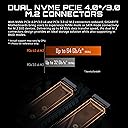
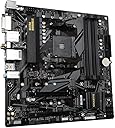
The GIGABYTE B550M DS3H AC is a Micro-ATX motherboard designed for AMD Ryzen 5000 and 3rd Gen processors, featuring dual ultra-fast PCIe 4.0 M.2 slots, a robust 5+3 phase digital VRM, Intel dual-band 802.11ac WiFi with Bluetooth 4.2, and customizable RGB Fusion 2.0 lighting. It supports up to 128GB DDR4 memory across 4 DIMMs and offers comprehensive connectivity options including PCIe 4.0 x16, SATA 6Gb/s, and Realtek GbE LAN, making it a versatile choice for high-performance, stylish PC builds.


| ASIN | B08R5736B3 |
| Best Sellers Rank | #576 in Computer Motherboards |
| Brand | GIGABYTE |
| CPU Model | Ryzen 3 |
| CPU Socket | Socket AM4 |
| Chipset Family | AMD B550 |
| Chipset Type | AMD B550 |
| Compatible Devices | Personal Computer |
| Compatible Processors | AMD 3rd Generation Ryzen |
| Customer Reviews | 4.5 out of 5 stars 1,493 Reviews |
| Graphics Card Interface | PCI Express 4.0 |
| Item Dimensions L x W x H | 10.62"L x 3.14"W x 13.18"H |
| Item Type Name | Gaming Desktop Motherboard |
| Item Weight | 950 g |
| Main Power Connector Type | 24-Pin |
| Manufacturer | GIGABYTE |
| Memory Clock Speed | 4733 MHz |
| Memory Slots Available | 4 |
| Memory Storage Capacity | 128 GB |
| Mfr Part Number | B550M DS3H AC |
| Model Name | B550M DS3H AC |
| Model Number | B550M DS3H AC |
| Number of Ethernet Ports | 1 |
| Number of Items | 1 |
| Number of Packs | 1 |
| Number of Ports | 15 |
| Platform | Windows |
| Processor Socket | Socket AM4 |
| RAM Memory Technology | DDR4 |
| Ram Memory Maximum Size | 128 GB |
| S/PDIF Connector Type | Optical |
| System Bus Standard Supported | Serial ATA/600 |
| Total Number of HDMI Ports | 1 |
| Total PCIe Ports | 2 |
| Total SATA Ports | 4 |
| Total Usb Ports | 8 |
| UPC | 889523024416 |
| USB 2.0 | 2 |
| Unit Count | 1 Count |
| Warranty Description | 3 |
K**.
Reliable Mid-Range Motherboard with Great Value
Plenty of USB ports and expansion slots for a compact board — everything connects cleanly without crowding. The built-in heatsink does a solid job keeping temps down, and overall build quality feels premium for its price range. Sound output is clean, and compatibility with Ryzen parts was smooth from the start. A well-balanced, reliable motherboard that punches above its class.
J**A
perfect for my son to build his computer
B**I
The motherboard that tries very hard to act like a full size board... almost does it! :D
This Micro ATX board shows up looking modest but clearly ready to run the whole house like an overconfident teenager. The design is clean, compact, and packed tightly enough that anyone installing it might mutter to themselves a few times. Still, the layout is mostly intuitive and the labeling is clear enough that nobody has to pull out a magnifying glass. It supports AM4 CPUs effortlessly, snapping them into place like it is welcoming old friends. Performance is where it flexes, offering dual M.2 slots that practically beg users to fill them with fast storage. The built in AC WiFi is a nice touch, even if it sometimes behaves like it is taking a short nap before connecting. The VRMs do their job well for normal to moderate workloads, though no one should expect them to moonlight as cooling champions. It stays stable once set up, which is half the battle with any motherboard. Installation is fairly smooth unless someone's case is a cramped shoebox pretending to be a gaming tower. The SATA ports angle awkwardly for large hands, which might inspire some creative language during cable management. Still, everything locks in securely, and the BIOS is simple enough that it avoids causing emotional damage. Once booted, the board feels reliable and responsive. Some limitations are expected, such as fewer expansion options and a layout that occasionally feels like a puzzle with too many corners. The included WiFi antenna works fine unless it is pointed in a questionable direction... in which case it pretends signals do not exist. Despite these quirks, the board delivers solid value and dependable performance for everyday and gaming builds. :D Excellent Things 👍 Clean layout for a Micro ATX board 👍 Dual M.2 slots for extra speedy storage 👍 Built in AC WiFi that avoids needing add ons Unworthy Things 👎 SATA placement is slightly chaotic 👎 WiFi sometimes feels sleepy 👎 Limited expansion due to its compact size
Q**N
Great Board but may have blue tooth issues.
Set up an installation was easy. Everything works real well without any issues other than the Bluetooth connectivity. It seems to cut out here and there and making it so a controller is jumpy and sometimes not usable at all. I had the same problem with connecting a keyboard and mouse. I figure I may just need to buy a Bluetooth adapter to have better results.
S**N
Booted right away
After mounting an AMD 5600G, 2X8 sticks of Corsair vengeance 3200, and an old "hands me down" A-Data ssd it booted right away. My board came as version 1.4 and it did not need a BIOS update to boot the 5600G. Reading through the gigabyte literature the main differentiator between versions is the wireless wifi card they use. Up to version 1.3 they were using Intel wifi cards, switched to realtek from version 1.4. they are up to version 1.7 now. Biggest issue was that the recycled SSD had on OS installed, had to navigate around this to install WIN 11 from scratch. It has two fan headers for case fans. If you want more case fans you will have to get a fan hub or daisy chain them. A fan hub would be preferable since it would be powered via sata from the PSU. Sound is satisfactory. I would call it a "fair" motherboard, suitable for a basic system. The wifi card seems to be replaceable, and the board has two NVME M2 slots. Biggest issue I see is that modern GPUs cover the pcie slots below the pciex16. However this is more of a limitation of the m-atx form factor.
J**L
Works right out of the box paired with Ryzen 7 5700g
Just finished building my new PC build (my third PC I built so far), it worked right out of the box with the coming with the latest BIOS update that supports my new CPU: Ryzen 7 5700g. I was almost afraid I would have to use my old 3200g from my previous build to flash the BIOS, but no, it booted without any problems. Just got done installing Windows 11 on a 500 GB m.2 SSD, along with all driver updates and everything so far is running smoothly. Re-using my 32 GB of G.SKILL RAM (only 2400mhz, will upgrade or OC later), my old 1660 Super GPU will be put in tomorrow after I dust it off and the old PC will be off to the garage. The B550M is a great motherboard and very affordable. It took me quite a long time to finally find a good mATX board to go with my Ryzen 7 5700g and this is that board. Highly recommended for those of us like me needing a budget friendly workstation (3ds Max, Mudbox, Wondershare Filmora, Photoshop, Unity, Cura (3d prints)) and great for some modern gaming too!
A**R
Seriously...just...DONT.
My wife's daughter's lenovo legion tower 5 went kaput, so I decided I would pull all the parts from the tower and replace all, keeping the tower for matx availability and slightly less expensive build. Original build was as follows: Gigabyte b550m DS3H Rev 1.7 mobo Ryzen 5 5600x CPU GeForce RTX2070 super GPU existent ssd Existent memory Went through every troubleshoot known to man and 6 certified technicians. They all knew gigabyte was a headache for people, and they figured it might be a bios issue (even though Rev 1.7 shouldn't need a bios qflash for the cpu of choice). Then we bought new ram modules and GPU in order to avoid no display bios qflashing. Switched to appropriately sized ram modules and a GeForce RTX 3060. All items confirmed compatible. Then we honed in on the fact that when we turned the computer on after connecting, all fans and lights would start up no problem, but motherboard power went into idle, AND won't shut off with a power button long press and hold. This is a sure sign that the motherboard is already messed up from the beginning. Other reasons not to buy this board or any from their brand... I have been in multiple discord groups, facebook groups, and reddit groups/threads, all with people complaining of the same issue, and nearly all of them fixing it by returning the board due to terrible installation instructions, worse bios flash instructions, and overall headache of boot issues and crashes. I did troubleshooting on this board for 6 hours a day average for nearly 10 days, including all my research time, and if i didn't care about getting my money back for another board, going with MSI, then I would climb to the top of a cell phone tower like I used to do for work and Frisbee this thing as had as I possibly could into the nearest high traffic interstate. Gigabyte is by far the absolute worst board I have ever encountered for being user friendly, instructions friendly, or ANYTHING friendly. Seriously just DONT GET THIS BOARD or ANY of their boards EVER. Pay a bit more money and get the good stuff.
E**X
Great value- good support on website
For a B550 board with wifi, this was a good deal-included every one needs for a build-including 2 m.2 slots-went easily in and out as I had to remove it once when I need to test something. Has Q-Bios so it can be flashed with only a power supply and your own flash drive (after you put bios on stick) which was very helpful as I was using unique components and was unsure about Windows 11 recognizing TPM. Worked great.
S**L
Do not buy this item
Worst item I have ever received in my life. Do not recommend buying since it has crud, bugs and dust all over it!
N**.
Otima Placa
Depois de mais de um ano, posso dizer que essa placa realmente é otima!! Me atende super bem, vou ficar com ela mais uns 2 anos pelo meno.. Melhor Placa da plataforma AM4 para se ter hoje.
S**Y
Mobo works
You gotta keep in mind the form factor and had to adjust your casing standoffs accordingly to fit the micro atx form factor. That said manual isn’t provided and you had to download the manual from the net which imo is a hassle. Bios was quite ez to navigate but you gotta bear in mind on the first boot up that your ram speed will be dialed back to the defaults and you gotta adjust xmp settings. Nvme slots you gotta pull those plastic stuff out before chucking in your nvme disk. Other mobo manufacturers should follow this example instead of using screws. Bios updating is quite ez, nothing outta the ordinary.
M**.
It is cheap and it works.
Okay, you wanna hear about my anecdotal experience? I plucked a 5600G in this and was expecting a full weekend of Windows reinstalls and such BS since I was replacing a 4th gen i5. Well, the freaking motherboard posted on the first boot and Windows drove all drivers after two reboots. I may have to give Microsoft some credit for this bit, hey, whatever. I updated the BIOS in five minutes and then updated to Win11 without a tragic story to tell. It worked. More anecdotal evidence? A bought a Gigabyte board because the last one worked without problems for seven years. So I bought another Gigabyte board. Incredible, heh? Wanna have some more nuanced context? Well the BIOS interface is kinda meh. The app center is awful. Guess what? I use those for a few cumulative minutes each year so I don't care.
J**A
Recomendado
Fue la mejor opción en cuanto a mi presupuesto para un Ryzen 5 5600G.
Trustpilot
3 weeks ago
1 month ago