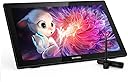
🎨 Elevate your art game—where precision meets passion.
The XP-PEN Artist 22 (2nd Gen) is a 21.5-inch drawing tablet featuring a 1080p display with 86% NTSC color accuracy, a battery-free stylus with 8,192 pressure levels and 60° tilt, and an adjustable stand. It supports Windows, Mac, Linux, and USB-C Android devices, offering seamless connectivity and compatibility with major creative software, making it a powerful tool for professional digital artists and designers.


| Brand | XP-Pen |
| Product Dimensions | 53.8 x 33.2 x 0.1 cm; 8.54 kg |
| Item model number | Artist 22 (2nd Generation) |
| Manufacturer | XP-PEN |
| Series | Artist 22 |
| Colour | Black |
| Standing screen display size | 21.5 Inches |
| Screen Resolution | 1920x1080 |
| Operating System | Chrome OS 88 (or later), Linux, Mac OS X 10.10 (or later), Windows 7 (or later) |
| Are Batteries Included | No |
| Item Weight | 8.54 kg |
| Guaranteed software updates until | unknown |
F**Y
Fantastic drawing tablet. Good colour out of the box.
I have seen a fair few people talking badly about XP-Pen because of their plastic screen protector having poor durability but honestly, with 3 months of ownership, I have yet to have had a problem with it.My cat has even tried scratching it and its fine.As for the performance:Worked pretty much out of the box. Just had to download the drivers from XP-Pen. I am quite surprised they don't register the drivers to ship with windows with how many people use XP-Pen.There is very little parallax to the screen. (cursor to pointer discrepancy) so little in fact you actually have to look for it to notice itThe quality of the screen is very sharp despite being only 1080pThe colour quality is amazing. I hadn't noticed how yellow whites are on my main monitor until I put this one next to it.In otherwords, I am well chuffed with the purchase.
H**H
Amazing gift
Bought this for my nephew as he just started uni and didn’t have enough to buy himself and he loves it. Great for his course and he loves drawing and he said it’s easy for him to travel with and he’s said it’s easy to use!
A**R
Superb
Love my Xp Pen
J**R
Marred by poor design decisions
This is bad, i'm not using this anywhere near as much as i wanted to because of the poor design. Would not recommend it for a few frustrating factors. Most importantly, the stylus is uncomfortable and really, really bad but the tablet works with NO OTHER styluses.Set up was okay, a bit of faff on a mac but was set up within a half hour of cussing, however if you are on a mac i would recommend you troubleshoot online as there are a number of additional permissions you need to provide that are not covered in the 'quick guide'. You will need to google these yourself, there is no immediate healp forthcoming, obviously a frustrationThe stylus, is another matter entirely, and i am currently trying to buy a replacement. At 1.2cm thick at the bottom it is too ungainly for extended use, i have suffered from hand cramps after a half hour of use. The buttons on the stylus are placed dafty right by your fingers, so i have now disabled these to save repeatedly undoing my work. It also has a tendancy to suddenly lose it's place, leading to a sudden straight line.*EDIT* The stylus is the ONLY one that works with the tablet, i have written to XP-Pen directly and they have informed me that there is no other stylus that will operate with their tablet, so i am hamstrung into using the one provided. UTTER GARBAGE*EDIT 2* Despite disabling the buttons on the stylus, they still operate to stop the pen writing when pressed. They are right by the base, right where you grip the thick pen, so this means every now and then your inking is suspended by accidentally putting some pressure on the wrong point. Again, this could be resolved if only i could buy a better stylus elsewhere, but...Weirdly, the screen had two films on it, i suspect one was the screen protector with a tab attached stating 'peel off the film and you're good to go!', which i duly did and now realise this was a mistake. In any case, the reports of this being a textured surface are misleading as i did play around before removing as instructed and it does not give the friction i had hoped. I have now outlaid a further amount to get 'Kent Paper Screen Protector' which is supposed to be much better for a paper like feel.Onto the tablet itself, and my rant is mostly over. There is a bit of a parallax of 1mm-2mm, not ideal but i believe this is fairly common. The pen itself has a tendancy to lag behind where I do any strokes at normal pace, but this could well be resolved by slowly finnessing the pen and app used so i will update this once i have more progress. Screen is very bright, will take some time to adjust to the new style and i hope this will come with practise, there is a lot of glare from the screen but hopefully the new screen protector will resolve this.*EDIT* screen protector did successfully reduce glare, but screen is still too bright. Brightness is set at lowest level, but screen is still very bright for operation and use,Some people complained about the stand, but from my experience this is well made, and the manufacturing quality is top notch.Overall, it works poorly because the sole interface you have with the tablet is through a horrendous stylus, some silly decisions and poor choices have let down an otherwise useful bit of kit. I suspect a Wacom tablet is worth the extra cash
A**.
Product good. Amazon service Crap
Product all fine but not what we wanted .. so went to return as it’s “free returns”.. Amazon told me I hadto return it and they would refund cost .. they supplied courier details too… firstly Amazon didn’t log item as received for about a month then said it’s not free returns !!!!!!! So Amazon lied and stole my money …. All this is on their chat too but they ignore requests to read this
A**R
My conclusion on this tablet
I purchased this tablet on the offer price of around £350, which is very cheap considering some drawing tablet prices.Unlike your graphics tablets, Drawing tablets incorporate their own display, so it's closer to actually drawing on paper and feels more natural than using a glorified mouse pad with a pen.This changed the style of the way I draw and I find a great preference in using this device over a graphics tablet. The colours are pretty good and viewing angles are pretty good. The accessories are a mice bonus too.There are however some gripes, which don't necessarily inhibit use of the tablet.Drivers are the main issue with this Tablet. As others have mentioned, sometimes the pen won't register, which leave you with an expensive monitor and having to hard reset the device.Other times the pen will register but will operate on your default monitor much like a graphics tablet, this issue can be fixed by setting your tablet display as the default monitor in your display settings but means that all apps and tabs open there first.This can be fixed in the xp pen app by selecting the default settings, each time.The pen can sometimes be a little inaccurate leading it to just skew off and make a straight line, this is an issue I have experienced with a previous xp pen tablet before. This one only seems to do it on the right hand side though.Another is the button's on the pen; they're awful. I disable them as by default one is a back button, which you catch while drawing and as you touch the screen, it erases any memory of a line you've just drew. Driver updates sometimes fix this.Despite these issues it isn't a terrible tablet and could just be proprietary driver issues with my PC, overall this tablet is great value for the price and you won't find anything of similar build quality that is cheaper.TL;DRThis is a good tablet for the price, watch out for it being on offer, and once you get it, keep the drivers up to date.Probably worth insuring it to with it not really being cheap to replace or fix.
A**R
A good Affordable choice
This is my second xp pen artist went for larger size because of offer. Suggest always get largest screen you can afford. Works great with my Linux system, easy to install would highly recommend
Trustpilot
1 week ago
2 months ago