


⚡ Power your productivity with the speed that keeps you ahead of the curve!
The Toshiba OCZ RD400 Series is a cutting-edge 1TB M.2 NVMe SSD leveraging PCIe Gen3 x4 technology to deliver up to 2,600 MB/s sequential read and 210,000 IOPS random read speeds. Designed for professionals and enthusiasts, it offers a compact form factor, custom drivers for optimized performance, and a 5-year warranty, making it a future-proof upgrade for desktops, workstations, and mobile systems craving ultra-fast, reliable storage.



| ASIN | B01G4UN7VS |
| Additional Features | Portable |
| Brand | TOSHIBA |
| Built-In Media | SSD and PCIE Add in Adaptor |
| Cache Memory Installed Size | 1 |
| Color | Black |
| Compatible Devices | Desktop |
| Connectivity Technology | SATA |
| Customer Reviews | 4.2 out of 5 stars 45 Reviews |
| Data Transfer Rate | 32 Gigabits Per Second |
| Digital Storage Capacity | 1000 GB |
| Form Factor | notebook |
| Global Trade Identification Number | 00842024037545 |
| Hard Disk Description | Solid State Drive |
| Hard Disk Interface | NVMe |
| Hard-Drive Size | 1 TB |
| Hardware Connectivity | PCIE x 4 |
| Hardware Platform | PC |
| Installation Type | Internal Hard Drive |
| Item Weight | 2.22 ounces |
| Manufacturer | Toshiba America Electronic Components Inc |
| Media Speed | 1550 megabits_per_second |
| Mfr Part Number | RVD400-M22280-1T-A |
| Model Name | RVD400-M22280-1T-A |
| Model Number | RVD400-M22280-1T-A |
| Read Speed | 2600 Megabytes Per Second |
| Special Feature | Portable |
| UPC | 842024037545 |
| Warranty Description | 5 Years Advanced Warranty Program with advanced replacement with no return shipping costs |
M**L
Toshiba OCZ RD400 Series SSD
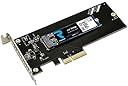
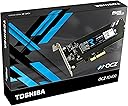
I installed this super -fast OCZ RD400 solid state drive (SSD) which I inserted in a slot on the motherboard of a Windows 10 desktop PC that I want to use as a gateway to access remotely from my laptop. Copying files, downloading software and loading audio and video are tasks that are slow and tie up my laptop so my plan is to off-load them to a fast remote machine which is where this hard drive comes into play. For details of installation read below, but the end result is this SSD exceeded my requirements for a much faster drive. This device comes mounted on a Peripheral Component Interconnect Express (PCIe) card. Unlike a SATA solid state drive, this unit is plugged directly into the system bus through the motherboard. This avoids bottlenecks inherent with the SATA interface. Installation consists of simply inserting the card into place. I tried to install Windows 10 from a DVD onto the SSD as un-allocated space. The installation went smoothly at first then failed when it tried to re-boot. Microsoft can be glitchy, so I repeated the process several times but had the same result. After searching the internet I found a site (tinker try dot com) that suggested the problem was caused by the fact that many SSD drives, like this one, use a newer way of organizing their storage space called GPT (GUID Partition Table -- which stands for Globally Unique Identifier). GPT is superior to the old MBR (master boot record) but it presents some compatibility issues, particularly in older machines. Drives with GPT partitions can be used with most modern 32-bit and 64-bit operating systems, but can only be used as a boot drive in computers with 64-bit operating systems that also support UEFI (unified extensible firmware interface). The Windows installation process recognizes the SSD and automatically sets it up using GPT but then after re-booting it doesn’t recognize it. The site referenced above provided the solution which is to create a USB installation drive that is also partitioned using GPT. After creating the USB installer using the free tool recommended on the site noted above, I booted and then Windows 10 installed in a little over twenty minutes without incident. Afterwards a re-start took only 32 seconds instead of the one minute twelve seconds from the original spinning drive. So now that Windows is installed a Microsoft driver automatically is loaded to access the SSD. But, the instructions that were enclosed with the SSD suggest using the Toshiba driver because it is faster. So, I went to the site (OCZ) noted in the instructions and downloaded and installed the Toshiba driver and it went smoothly. Then I downloaded the SSD utility from the same site and ran it to ensure that the Toshiba driver replaced the Microsoft driver, which it did. As a real world test of the speed of the new drive against the original I created and formatted a 100 GB NTFS partition that took four minutes. Then I created the same size partition on the original drive, and it took 35 minutes to finish. As another test I copied a 1 GB file from a location on to another on the spinning drive and it took 3.43 seconds. Copying the same file from the spinning drive to the SSD took 2.1 seconds. Copying that file from one location to another on the SSD took 1.42 seconds. The benchmark from the SSD utility downloaded from the OCZ site shows sequential read of 1.7 GB/s and sequential write of 721.4 MB/s which is faster than the SATA SSD drive I am using on another computer. Since the manufacturer claims the PCIe interface is much faster than the SATA, I further compared this drive with the SATA by running a free diagnostic tool against both drives. The new SSD got a score of 2411.14 MB/s and the SATA SSD scored 261.3 MB/s. Although I am not using this machine for gaming I loaded Microsoft Flight Simulator X is a pig. It is disk and CPU intensive but it loaded in ten seconds. It took two minutes and forty-five seconds on my computer with the SATA SSD but never played without getting hung-up. With the new drive Missions completed smoothly without the dreaded buffering. For my remote gateway use the improvement in speed has increased the usability of my network.
N**H
VERY VERY FAST but confirm your BIOS is new enough for drive to work as OS.
I already have and older OCZ PCIe drive. This is 2 to 4 times faster and 6 to 8 times faster than a solid state drive hooked up to SATA III. It works fine on high end 2010 and 2012 computers as data drive. However, I could not make work as OS (yet.) Need to make sure your BIOs is new enough.
M**S
Thinking of upgrading from an SATA SSD? Read my review
I am not a member of the Vine program. My reviews are from items I purchased with my own money. Having an X99 motherboard I've been researching an NVMe drive to upgrade from my Samsung 840 Pro. But even with the release of the Samsung 950 Pro the reviews have mostly stated that "for gamers" an NVMe drive doesn't produce a noticeable improvement, except with benchmarks especially for the pricing delta. But here's this new Toshiba OCZ drive and I found a couple of reviews that stated it made performance improvements specifically for gaming. Where this drive didn't provide much in server level performance it seemed to be implied it improved gaming performance. So I bought it. Installed it. Installed their SSD utility and installed Toshiba's specific driver. I then tested. Boot times were slightly longer than my 840. Game loading was the same. No difference. I'll add that I believe Samsung's magician software is more robust and refined. If you are mostly a gamer like me, don't throw your money away. Stick with an SATA SSD and wait!
S**Z
Working fine for me, but others say...
Unfortunately my PC doesn’t support NVMe for booting so I had to use it as a secondary drive. The install was pretty simple in Windows 10. I did opt to use the OCZ driver. It is version 1.2.126.843 and I haven’t experienced any corruption problems with the driver as noted in some other reviews but I also don’t have my OS installed on the drive like those that did. My system is a i5-3570k overclocked to 4.6Ghz. It is running on a Gigabyte G1 Sniper 3 motherboard. The motherboard has a PLX chipset. The only other add in card that I am using is a Nvidia GeForce GTX 1080 Founders Edition. From the Samsung Magician software benchmark utility the numbers I am getting are 2027 MB/s and 801 MB/s Sequential Read and Write and 119634 and 91616 Random Read and Write IOPS. This compares to 539 MB/s and 525 MB/s Sequential Read and Write and 89100 and 87762 Random Read and Write IOPS with with my Samsung 840 EVO 750. Overall from my use I’d say this is a fast drive and I haven’t had any problems with it. I have noted that some other reviews have had a problem with the OCZ drivers and removing the fastening screw from the daughter card to get the stick out. I’ll cross that bridge when I get to it but right now I am happy with the drive. Edit: Since my review I have had the opportunity to remove the screw and I didn't have a problem with mine.
D**H
One Star
Does not work in my HP Z820
R**.
Insane IOPS!
Good, sweet baby hey-Zeus this is one screaming fast SSD! I recently installed this SSD in my custom-PC and after some initial testing and benchmarking (and my eyes popping out of my head) I decided to go ahead and make the RD400 my primary OS drive. 'Installation: You essentially have two options: 1. Use the PCIe interface on the card and an open slot on your motherboard. OR 2. Remove the M.2 SSD from the card and install it on an open M.2 slot on your motherboard. The process for installing an M.2 SSD is very straightforward, you'll just need a Philips screwdriver and a steady hand. Remove the screw from the motherboard's standoff slide the M.2 SSD into place and it will snap in. Gently push down on the SSD and install the screw back on the standoff securing the SSD. That's it! Assuming most folks looking at a piece of technology like this already know how to initialize a disk I'll skip over that part. I'll just say that aside from the physical installation being slightly different simply because of the interface of PCIe or M.2, installing this SSD is exactly like installing any new drive. I had no issues or surprises installing this on my Windows 10 machine. 'Performance: Toshiba claims a sequential read/write of (up to) 2,600/1,600 MB/s respectively. Using ATTO Disk Benchmark (freeware tool) my results were a relatively steady ~1,000+ MB/s write and ~1,600 MB/s read. I've attached a picture of my results to my review. The speed of this drive is just... well, the numbers speak for themselves. After I ran a few benchmark tests I decided to move my OS over to the OCZ SSD. My trusty Samsung 850 Evo has been relegated to other tasks for the time being. 'Notes: If you're considering this SSD for your primary OS and need to move from one disk to this one, note that there is no cloning software included in the package or available via download from the drive's homepage. You'll likely want to have a utility that you've some experience with in order to clone your existing OS disk. EDIT 7/6/2016: Removed section on firmware update. The available update (as of this review) is actually a driver update.
D**Y
Holly Cow This Thing Is Fast!
Up front I received this drive in exchange for an honest and impartial review, and believe me, I take my responsibility to readers very seriously. I’ve been using this Toshiba OCZ RD400 series NVMe M.2 SSD with the included PCIe 4x add adapter for 3 weeks and wow! Where a good quality conventional SSD is capable of transferring data at roughly 500 MB/s, Toshiba advertises this drive’s transfer rate at 2.6GB/s (sequential, 2.1GB/s random) and assures that there no SATA bottlenecks by providing a PCIe 4x adapter. Toshiba provides a nice little SSD (OCZ only) management and benchmark utility so that you can test the drive’s performance in your system. In my 5th generation i5 system the benchmark shows that I’m getting 2.2GB/s reads and 740MB/s writes (see photo). What that means is that my 5th generation i5 desktop goes from power on to a Windows 10 login screen in 10 seconds. This thing is just blazing fast! At first glance, the cost per megabyte may seem a bit high, but you don’t use an SSD like this for data (unless you have the budget for the 1TB version). You use it for the operating system and for critical applications and keep your data on an economical spinner-drive or a large conventional SSD. So bottom line – 5 Stars, just like I could never go back to booting from a spinning drive, after this experience, I don’t think I could go back to booting from an ordinary SSD.
G**Y
This drive is really fast and works great..
This drive is really fast and works great... the only CON for me was that my system did not allow the OS to boot from a PCIe SSD, so I had to use it for my data drive only, but it still made big difference. If your mother board allows OS booting from an SSD installed in a PCIe slot, then it would make your system blazing fast.
Trustpilot
1 month ago
2 months ago