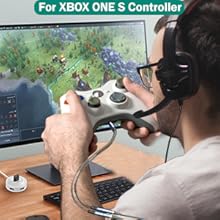
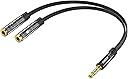
![KINGTOP 3.5mm Headphone Mic Splitter Adapter - [1 Male to 2 Female] Headset Splitter Compatible with PC Gaming Headsets - TRRS Audio & Microphone Y Cable for Laptop, PS4, Xbox One, Android](https://m.media-amazon.com/images/I/51ue+WNBdHL._AC_SL3840_.jpg)


Desertcart purchases this item on your behalf and handles shipping, customs, and support to Tunisia.
🎧 Level up your audio game with KINGTOP’s splitter — because your headset deserves the VIP treatment!
The KINGTOP 3.5mm Headphone Mic Splitter Adapter is a compact, durable Y-cable designed to connect dual-plug gaming headsets to single-port devices. Featuring 24K gold-plated connectors and universal compatibility with major gaming consoles, laptops, and Android devices, it ensures clear audio and microphone separation for immersive gaming, streaming, and online meetings. Not compatible with Apple devices.


| ASIN | B01I3A47I4 |
| Best Sellers Rank | #6,363 in Electronics ( See Top 100 in Electronics ) #138 in Headphone Adapters |
| Brand | KINGTOP |
| Color | Black |
| Compatible Devices | New Version Laptops, Nintendo Switch, PCs, PS4, PS5, Smartphone, Tablet, Xbox One S |
| Connector Type | Auxiliary |
| Customer Reviews | 4.4 out of 5 stars 17,117 Reviews |
| Finish | Metallic |
| Finish Type | Metallic |
| Item Weight | 9.07 g |
| Manufacturer | KINGTOP |
| Mfr Part Number | 2 IN 1 Cable |
| Model Number | 4330104030 |
| Number of Items | 1 |
| Number of Ports | 3 |
| Package Quantity | 1 |
| Power Plug Type | No Plug |
| Specific Uses For Product | Connecting Dual-Plug Gaming Headsets to Single-Port Devices; PC Gaming, VOIP Chat, Online Meetings, Livestreaming Specific Uses For Product Connecting Dual-Plug Gaming Headsets to Single-Port Devices; PC Gaming, VOIP Chat, Online Meetings, Livestreaming See more |
| UPC | 739810252698 |
| Unit Count | 1 Count |
| Warranty Description | 12-month warranty and friendly 24/7 customer service |
| Warranty Type | Extended |
P**O
Works with my Mac but with caveats
Like many people I'm sure you are working from home suddenly and may want better quality audio for your conference calls or interviews. I just wanted to get better audio quality over webex since it seems to handle Bluetooth particularly poorly at least on macOS. Anyway I bought this adapter recently and initially meant to buy a different brand which listed support for macs explicitly but it was out of stock and when looking for an alternative I didn't notice this one said it wouldn't work on a mac. You can tell it is made with good materials but when I initially plugged everything in the headphones worked fine but not the mic. I came to the product page and shook my head... Since I have a minor in music technology I figures I'd see if I could get it working anyway before exchanging it for something else. I'm using a mid 2015 15" MacBook pro, Sennheiser HD 650 headphones, and an antlion Mod MIC V4. The trick to getting the adapter to work for me was so silly I couldn't believe it. Here was the fix for me 1. Plug in a standard pair of headphones with a TRS connection to the headhone jack on your mac (if you're unfamiliar with TRS that is a 3.5mm headphone connection with exactly two colored rings going around it. They are usually black, white or red). 2. Unplug the headphones 3. Plug in your headphones to this adapter then plug in your mic to the mic side of this adapter. 4. Plug the adapter with the headphones and mic already connected on the other end. If you check your sound settings on your mac and everything worked you should now see that it says "External Microphone" and not "internal microphone" I hope that helps some of you out!
E**N
Useful
I bought this for a completely different reason than why I use it now. But I’m so glad I bought it, it works and is very convenient to have
G**L
good item
good
D**M
Doesn't work perfectly for Macbook Pro
So, this is cheap, well-built, and SHOULD be plug and play. I have followed the instructions that another reviewer gave in terms of getting a Macbook Pro to recognize both devices plugged in to the one audio jack (I have a 2016 model). Well, it never really works as expected, and I suspect this has more to do with the Macbook than the product itself. You should be able to just plug your external mic and your headphones or speakers into this adapter, and then plug in the adapter to your computer's audio mini-jack port. ...Except that process doesn't give me the external mic recognition 9.9 times out of 10. And even when I DO get it working and just leave it set up (in a static home office), it will randomly drop my mic connection and I have to try the whole unplug, plug in (in a certain order), twist my nose and cross my fingers charade to HOPE it works again. It's very frustrating. So, due to annoyance, I will be choosing a different product (a USB-C audio adapter) to hopefully get a true plug and play experience and just bypass trying to use one audio port to do two functions (allow for an external mic and external speakers). Otherwise, it's built fine. It might not be especially rugged in terms of long-term use and traveling.
R**K
Share that Music
Definitely the perfect splitter to share those sounds. Versatile, great sound quality, very portable, functions just as you want and the perfect length to not tangle and get in the way.
L**K
Well made. Sized well to fit phones with even heavy protective cases. Flexible, yet strong.
I have a couple of good quality headsets with microphones that I like to use when I make Zoom and GoToMeeting calls with my Android phone. But that requires an adapter since the phone has a single jack and the headsets have two cords--one for the headset and the other for the microphone. There are many adapters available, but my Android has a relatively thick protective case so getting an adapter that works without my having to remove the case during a call was difficult. This adapter is made with very good materials. It is very lightweight and the plugs are of minimum diameter, but the construction appears to be strong, yet flexible so it will not fall apart or case damage to the jack in the phone. I was so impressed that I immediately ordered a second one because even when I don't need a microphone, this adapter will allow me to use just about any headset with my phone. Many headsets, even very good quality ones, have plugs which are of a diameter which is too large to allow me to use them without removing the protective case from the phone.
B**T
It got flaky after maybe 20 cycles and failed completely yesterday
I opted to tear into it, to better understand the failure, rather than return/replace it. I was just too curious about how such a simple cable failed. The polyethylene (not kidding, essentially hot glue) that the contacts are potted in is too soft for the application in the warm weather we are having. In my case the ground contact in the mic connector moved too much. I also discovered that they neglected any shielding---which explains why I was picking up noise depending on how the cables were lying. I'll try a brand-name cable next. Hopefully it will be wired correctly, shielded and reliable. Original review: My use cases: 1) Using my phone to record video with better sound; 2) Using my phone for audio recording 3) voice-over on my laptop; 4) VOIP with my studio headset. As hoped, this has the popular TRRS plug pinning that works well with mobile phones and laptops. That is [stereo out left+, stereo out right+, ground, mono mic+]. The stereo headphone jack is also standard, being a TRS with [left+, right+, ground]. What's odd is that the monaural microphone input is also a stereo TRS [mono mic+, mono mic+, ground]. In other words the tip and ring the the jack are both connected to your devices single mono mic input. The problem is that, electrically, whenever a mono mic or adapter is inserted into this stereo TRS jack, the ring contact inside of the jack touches the grounded sleeve of the microphone plug and there is no sound at all. To make this work with a conventional mono mic plug you will need something like a 3.5 mm TRS stereo plug to 3.5 mm TS mono jack adapter. Those adapters will connect the the tip and ring from this product's jack to your microphone's tip connection. I'm not sure if there exists mono mics with stereo connectors but that should work as well as long as any adapter is also stereo.
M**W
Not so great, issue with buzzing, failed after 10 months
I use these for my Xbox One gaming headset. These look really nice, and have a good quality feel to them. My ModMic 5.0 and AKG K7XX headphones plug in and feel nice and snug, and it plugs into my Elite controller with no xbox headphone adapter. The length of the male end is short enough that it doesn't press against my lap when playing, and the two cords that come out are flat and very pliable. I have had 2 significant issues, however: First, if I touch the housing around the male plug, it creates a very loud buzzing on the mic- I don't hear it, but everyone else I'm in party with can no longer hear anything except the irritating buzz. And second, after 10 months, the mic stopped working all together. When I take this out of the setup, it works fine, so it looks like this cheap part is the issue,
D**R
Excelente
Muy buen articulo de buenos materiales solo un poco delgado el cable, pero funciona muy bien
B**T
Works as expected
Really good chord I use it for my professional studio microphone for Xbox game chat I I can plug my headphones into one plug and my professional microphone plugs into the other one and then it goes into my headset controller that plugs into the controller pretty cool setup sounds great in an Xbox Live party or PlayStation party
O**R
No detecta el microfono.
Quise conectarlo en una MacBook Pro y no detecta el micrófono, lo detecta solo como si fueran auriculares normales sin micrófono.
S**E
Five Stars
Very good adapter
M**L
Pretty good
They get the job done, not super high quality but they aren't broken yet (2 years in) so that's gotta count for something.
Trustpilot
2 weeks ago
2 weeks ago