
Buy anything from 5,000+ international stores. One checkout price. No surprise fees. Join 2M+ shoppers on Desertcart.
Desertcart purchases this item on your behalf and handles shipping, customs, and support to Tunisia.
🔧 Restore your Galaxy Tab A’s touch with pro-level precision and style!
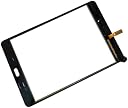
TheCoolCube Touch Screen Digitizer Replacement is a high-quality, OEM-compatible glass digitizer designed exclusively for the Samsung Galaxy Tab A 8.0 SM-T350. It includes professional-grade 3M adhesive and installation tools, enabling a seamless, heat-assisted replacement process. Perfect for DIY enthusiasts and professionals alike, this fragile yet precise component restores touch functionality and screen clarity, backed by strong user reviews and a trusted brand reputation.
| ASIN | B01JMY4QW2 |
| Best Sellers Rank | #133,079 in Electronics ( See Top 100 in Electronics ) #64 in Tablet Digitizers |
| Customer Reviews | 4.4 4.4 out of 5 stars (722) |
| Date First Available | August 3, 2016 |
| Is Discontinued By Manufacturer | No |
| Item Weight | 5.9 ounces |
| Item model number | 8541524447 |
| Manufacturer | TheCoolCube |
| Other display features | Wireless |
| Package Dimensions | 9.88 x 7.99 x 0.94 inches |
S**E
Easy to replace with supplied tools and tape
The screen/digitizer fits and works great. The glass is not as tough as the original screen. I would recommend installing a screen protector and a protective case if it is for a child. My 5 year old granddaughter cracked hers 2 days after I replaced it. If the old screen has many small cracks it helps to place some clear shipping tape on the cracked screen first. It requires heat to remove the old screen. I use a hot air gun, but a hair dryer will do. The back must be pried off first. Just under the top the back presses on to the chassis and you use the supplied pry tool to pry the case back away from the top. The back just presses back on when assembling. Then remove the digitizer connector cable on the back. Next heat around the top of the screen in order to loosen up the adhesive. Heat enough to get the screen pried up. Pry at one corner and place the included wedges under the screen to hold it off the adhesive. Be careful around the home button as there are some small wires that can be damaged. Heat and pry a bit at a time until the screen is completely free from the adhesive. Then remove the screen pulling the connector cable up through the opening in the chassis. Next remove all the adhesive and glass fragments. Failure to remove fragments will make it likely the screen will crack when pressed on. Next remove the supplied adhesive strips from their backing and carefully place them where the old adhesive was. Be careful not to cover the camera lens or other openings with adhesive. Next route the new digitizer connector cable through the chassis. Remove the protective film from the bottom of the screen and then carefully place the screen on the adhesive tape keeping it aligned. Press down to seat the glass on the adhesive. Next connect the digitizer cable to the connector on the main circuit board and make sure it is firmly in place. Turn on the tablet and test the new digitizer for proper function. If it works properly press the back on the chassis. You are done. It helps to place some weight like a book on the digitizer for an hour or more to help seat it on the adhesive. It took me a half hour to do my granddaughter's, with 15 minutes of that taken to remove the glue and adhesive. I cleaned the LCD and used canned air to blow any debris off the LCD and chassis before I placed the new digitizer on it. You can see the whole procedure done on YouTube and this is the best way to familiarize yourself before digging in.
M**E
Fit perfect. Works just fine.
I have replaced digitizer screens on at least 5 tablets for my kids. I have done iPads' and Samsungs' alike. This one is good quality and I could not tell any difference from the OEM one I removed. This comes with all the tools and 3M tape needed to install so NOTHING more is needed. These are fragile glass just like the OEM version so handle it gently! They are easy to break if you "man handle" them like a guerilla when they are out of the packaging. The item arrived in a well packaged box with foam surround. Take your time, clean off all the old adhesive, and take your time installing the new 3M adhesive. A heat gun or hair dryer is a huge help with removing the old screen. The new screen was a snap to install and it worked on the first try. I would buy again.
S**.
Works and looks great
Got this for my older Samsung T350. This replacement is as good as original. Works great, great clarity, no blemishes or other defects, perfect fit. The included tools pretty basic but make the job of removing the old digitizer quite doable (better than use older credit cards). The adhesive strips included and are easy to use, but not very strong adhesion, the digitizer can be removed fairly effortlessly (could be something I did not do right). All-in-all, the degitizet is great and worth every penny plus some.
P**D
All things considered, a great purchase.
This was very easy to install. That being said, I have replaced a few screens on various devices before. Use a hairdryer on the heat setting to warm up the broken screen. The goal is to warm the adhesion enough to remove the old digitizer. If you look up some YouTube videos you will get an understanding of the process. Make sure you clean any areas with the old adhesion. Make sure not to touch the screen or the back of the digitizer as it will leave fingerprints, I used gloves. The adhesion on this screen is suspect. It is not as sticky as other brands I have used, only time will tell. I will update the review accordingly. I saw reviews for broken screens and no adhesion. Peel off the film on the back of the digitizer to reveal the adhesion tape. The screen itself feels very thin. It is still acceptable since I am only using the device to cast to my Chromecast and not for everyday use. Regardless, of the tools and the price, I would recommend and purchase this again. + Responsive touch screen + Easy to install + Adhesion tape already included + Well packaged + Included tools + Price - Adhesion not very sticky - Digitizer felt more fragile than other brands I have used For the price and circumstances of what I intend to use the device, I do not regret this purchase. Hope you find this helpful, thanks.
N**G
non oem ,logo Samsung.
H**W
Worked great! Hardest part was getting the old, broken screen off. Works just like new. Revised: First time I replaced screen it worked great. However, second time I replaced the screen all the touch sensitivity was off. Had to touch below and to the left of icon on screen for it to work. Typing was impossible.
T**I
Did not work, you had to pay for shipping back and refund received
C**N
Screen broke when finishing installation.
Trustpilot
1 month ago
1 month ago