Desertcart purchases this item on your behalf and handles shipping, customs, and support to Tunisia.
⚡ Power your network through your walls—fast, secure, and effortlessly smart.
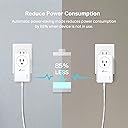
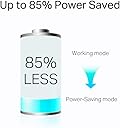
The TP-Link AV1000 Powerline Ethernet Adapter Kit (TL-PA7017P) extends your wired network using your home’s existing electrical wiring, delivering up to 1000 Mbps speeds via a gigabit Ethernet port. Featuring a passthrough power socket, plug-and-play setup, and energy-saving mode, it’s ideal for multi-story homes and hard-to-reach areas where WiFi struggles. Note: requires adapters on the same electrical circuit and direct outlet connection.


| ASIN | B08M13B8B6 |
| Best Sellers Rank | #1 in Powerline Network Adapters |
| Brand | TP-Link |
| Built-In Media | 2 × Ethernet Cable, 2 × TL-PA7017P, Quick Installation Guide |
| Color | white |
| Compatible Devices | Desktop, Game Console, Smart TV |
| Customer Reviews | 4.1 out of 5 stars 3,222 Reviews |
| Data Link Protocol | Ethernet |
| Data Transfer Rate | 1000 megabits_per_second |
| Hardware Interface | Ethernet |
| Item Dimensions L x W x H | 3.7"L x 1.7"W x 2.3"H |
| Item Type Name | Powerline Ethernet Adapter |
| Item Weight | 0.52 kg |
| Manufacturer | TP-Link |
| Mfr Part Number | TL-PA7017P KIT |
| Model Number | TL-PA7017P KIT |
| Number of Items | 1 |
| Number of Packs | 2 |
| Product Dimensions | 3.7"L x 1.7"W x 2.3"H |
| UPC | 840460604734 845973089078 |
| Warranty Description | 2 year manufacturer |
C**.
Great solution for relocating your WiFi router to a better spot
I've been using powerline ethernet adapters for 20 years to extend ethernet in our 2-story house. The office where our broadband comes in is upstairs in a far corner and not ideal for broadcasting WiFi to the rest of the house. I've turned off the broadband router's built-in WiFi and use the powerline adapters to extend the wired connection to a central area downstairs where I have a WiFi router running in access point mode. I highly recommend this setup to anyone who's unhappy with the coverage from their broadband provider's WiFi signal. Even if the location of the router is a good spot for a 3rd party WiFi router, you want to run your additional router in access point mode to keep it from creating a 2nd isolated network behind your broadband router. This results in a condition called "double NAT" which will cause most routers to generate an error message in their setup software. You may have odd connectivity issues and hard-wired devices on your network won't be able to communicate with devices on WiFi. Access point mode turns off all routing features of the router and it simply adds wireless connectivity to the existing wired network. You can also have multiple WiFi routers in access point mode at different locations and if you use identical WiFi network settings (same SSID, password, and authentication type), your mobile devices will seamlessly roam between them, connecting to whichever signal is strongest. This is my current configuration. I've had many powerline ethernet adapters from various brands over the years (Linksys, Trendnet, Netgear, and now TP-Link) with great results and have typically only replaced them when a new higher-speed model becomes available. This time the Netgears I'd been using since 2015 succumbed to old age and started intermittently dropping packets or failing altogether and needing to be power cycled. The leading brands for consumer networking gear tend to change over the years and I've been very happy with the various TP-Link products I've been using over the past 5 years or so. I have a number of their smart plugs, a couple of switches, and a WiFi router. I wasn't at all surprised that these powerline adapters worked flawlessly out of the box. I didn't even have to go through the pairing operation - they immediately connected when I plugged them in. I should be good for another 10 years or so. Keep in mind that both units do need to be on the same electrical circuit, so it's not guaranteed these devices will work for your specific use case. Negative reviews of these units tend to be from people who've discovered their home wiring configuration makes them unusable. It's also important that you plug them directly into the wall outlet and not into a surge protector. Surge protectors are designed to suppress electrical "noise", and the data the powerline adapters send to each other is literally electrical noise. If you need a surge protector plugged into that particular outlet, plug it into the back of the powerline adapter.
G**N
Works great!
Was having WiFi dropouts during work day and the software we use hates blips on connections. Video calls were also stalling constantly. Took me a whole 5 minutes to setup and so far everything is working great! Great value considering the cost to hardwiring. Only drawback is the size of the unit. Was difficult to plug another grounded cable into the same wall plate due to size.
A**R
Easiest network setup ever!
This was the easiest setup ever. Take both of them to the router, plug them into adjoining plugs, (in the same room or along the same wall). Plug one of them into the router with included cord, click pair (don't hold it) power button will blink. Go to the other and click pair. Power button will blink. Wait for all 3 lights to go green. Take second one into room you need an ethernet cord, plug in and boom! If you got 3 lights you are good to go! I had a TV in the basement that had really poor WiFi signal, used this thing and boom full speed 4k and direct cord connection to the TV. The man cave TV is finally alive! I'd give the thing five stars, but it partially blocks the other plug in the socket. You can't plug another grounded socket into it. Yes it has the passthrough, but you are turning a two plug socket into one. Normal two prong cell phone chargers and lamps will fit in the extra, so with a little "Cable management" it was OK. The though put had no problem with a string of neon lights on a grounded powerstrip and a three way non grounded cell phone charger. Was giving me the max amount of MBPS Spectrum gives me in a 30+ year old log cabin with everything on and running that was connected to the plug. I'm sure I'm pushing the 15A max. Awesome product, wish I had know about these things sooner.
M**S
Used to supply wired network connection to Roku TV, solved weak wifi reception issues...
Helped my sister "cut the cord" from cable TV, she has Roku TV's throughout her house, set her up with an outdoor antenna connected to Tablo TV device (look it up, really cool device) to stream local TV channels to all her Roku TV's, unfortunately her bedroom TV was farthest from router and struggled during the evening hours with consistent wifi connection, stream from Tablo TV would stop and start. After exploring mesh network options, etc, I came across this power line adapter to provide wired connectivity to her bedroom TV, worked perfectly and was dead easy to setup, just connect one to outlet near router, plug ethernet cable from router to power line adapter, plug other adapter in outlet in her bedroom, plug ethernet cable from bedroom power line adapter to ethernet port on Roku TV, went to Settings on Roku, it instantly showed wired connection, and her connection issues are gone! I chose this option over a mesh network expander as all her other devices get great wifi connectivity, mesh wireless expanders can slow access to other devices on the network, this power line adapter has no effect on wireless speeds throughout the house.
C**J
Utterly useless
"Extend your network where extenders and boosters cannot go!" OK. So I'm paraphrasing. What they don't tell you is that both units need to be on the same circuit...as in the same circuit breaker...as in the same ROOM! What good is that? I know it says on the same circuit in the depths of the description, but I naively assumed, since wifi in the same room with the router isn't exactly what I'd call a problem, that that meant on the same breaker box. i.e. the whole house circuit. I could understand it not working across breaker boxes...I know some people have more than one... but I mean, give me a break. The main title for the product should be "I am useless for the purpose you think you're buying me for." I set one up in my upstairs office wherein lies the router. Got all my nice little lights. Took the second to the basement for my smart TV, plugged it in...and got a blinking powerlight. I tried pairing, thinking that would get the units talking to each other. Ha! The middle light on the router end went blank...and the power button in the basement just kept blinking. Tried unplugging and plugging. Didn't work. Tried the link button long press to reset. Still nothing. I do not understand how anyone has gotten this thing to work. Heading now to hit the return button.
D**R
Works Perfectly!!
I did not even know this type of adapter kit existed! I was using a WiFi extender for my Vonage phone and got nothing but dropping in and out calls all the time. This thing is awesome. The TP-Link AV1000 Powerline Ethernet Adapter Kit is the way to go. You can put a Cat5 Ethernet internet connection in any room you want. 10+.
M**.
My TV disconnecting from the WiFi headaches are gone !
I kept losing my WiFi signal when streaming on certain channels (eg. Apple TV) It was very aggravating. I did both, the reset router and forget network suggestions that I found online and both worked, but only for short periods of time, before the problem started again. I kept reading about making it a direct connection, via Ethernet, but my router is in my office and my TV is in the living room. There was no way to make the connection, until I found the TP-Link AV1000. I was concerned that since the rooms are not on the same breaker, that it might not work, but I figured it was least worth trying. It was cheaper than buying a new TV and if it didn't work I could return them. I followed the very easy and clear directions and it has worked like a charm. The days of yelling at the TV are over and my headaches are gone too. It really was that simple and I suggest you try these adapters
A**G
Works but not as fast as expected...limited use cases
I had high hopes for this product, and two different use cases. First cases was a gaming computer. Wanted to do some VR gaming, my Wi-Fi signal and speed was good, but some intense VR games were blurry. Some of the software applications I was using recommended an ethernet connection rather than Wi-Fi. I thought maybe this powerline adapter would provide that connection. I was able to get a connection, and got a little bit better graphics presentation, but it was accompanied with stuttering, and I found online multiplayer gaming nearly impossible. Speed test revealed very moderated 50Mbps. My Wi-Fi is well into triple digits, during low traffic times I see upwards of 400Mbps, so back to Wi-Fi. Case 2, my wife's office desktop is ancient and has dated Wi-Fi protocols but it's the machine she knows and doesn't want to change. I thought maybe a powerline adapter ethernet connection would work around her outdated Wi-Fi tech and give her a faster landline connection. Her Wi-Fi typically runs at 40-50Mbps. I figured based on the results from case one, her computer should get at least the same speeds with the adapter and have a more stable connection. Alas, it was not to be. With the adapter connected speed test showed it dropped to 10-20Mbps. Again, our Wi-Fi wins the day. Maybe my Wi-Fi is just amazing or something, I don't know, but the 1000Mbps these adapters are supposed to be able to handle doesn't seem realistically achievable through a powerline connection. They definitely do work. I got acceptable internet connection for most light duty applications. However, they are not the miracle cure I was hoping for. I think the only real use case is for a location where there is little to no Wi-Fi signal and running ethernet cable direct from the modem/gateway is not possible.
P**E
On point
I received my order today, the setup was very straightforward and I'm very happy with my purchase. It arrived two days earlier, quite impressed with the seller. Thank you.
K**3
Bastante eficiente.
Lo conecto a mi Xbox para jugar en línea, y es muy estable. Altamente recomendado, y que tenga el Plug adicional se agradece profundamente. No estas desperdiciando contactos.
N**N
3P→2P変換プラグを使って接続できます
TL-PA4010からの変更。 TL-PA7017では4010より倍の速度が出ました。 回線契約が今となっては遅い部類なのでここまでの速度が出れば当方の使途では十分です。 3Pプラグなので、使用には3P→2P変換プラグTAP-AD8BKを用いました。 本アダプターが重いからなのかコンセントに差し込んだ際傾いてしまいます。 3Pプラグ安全カバーAN-203B(要加工)をかませて、ほこりがかぶらないように保護して使用しています。
B**N
Easy to use, fast speed
Plugged it in, synced automatically, works very well. I'm getting 100% of the speed of my 50/10Mbps connection. Highly recommend this product. I live in a large (200+ unit) highrise built with wiring from the 1960's, so I was very concerned about interference (lots of microwaves, devices, wiring age, etc.), but there is no problem. My unit has its own circuit breaker box, so I assume all the connections go into that common point, so if you're also an urban dweller like me, you don't have to worry about interference so much. It seems to work exceptionally well. I had ethernet cables going through my kitchen floor to my desktop workstation and WiFi was serving my Chromecast and Roku TV. The Chromecast would absolutely have WiFi interference drops with streaming becoming a pain, this resolves that problem. I got an Ethernet adapter and switch and connected the Roku TV, Chromecast, and my desktop via ethernet and gone are the problems I had. No cables across the floor, no WiFi interference. Ping times and response rates are what you'd expect with wireline. Absolutely a great product.
C**R
Glorious!
So far it’s fantastic! So easy to set up - literally 5 minutes. Using it to directly connect my PS5 in a room with no modem. Before this I had to string an Ethernet cable from another room which I hated. I’m in Canada and have Rogers Ignite cable internet. All I needed was a regular wall outlet to plug into from the modem and another outlet near the ps5 to plug into. Wired internet now travels like magic through your existing home electrical system.
Trustpilot
3 weeks ago
3 days ago