Desertcart purchases this item on your behalf and handles shipping, customs, and support to Tunisia.
🎧 Elevate your audio game — because your ears deserve the VIP treatment.
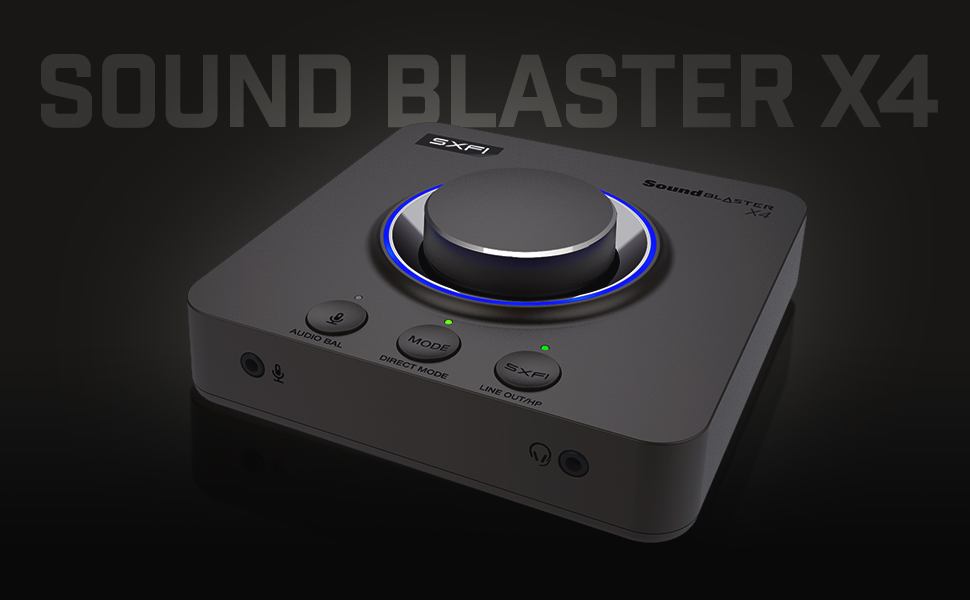
The Sound Blaster X4 is a premium external USB DAC and headphone amplifier delivering 7.1 discrete surround sound with Dolby Digital Live support. It powers high-impedance headphones up to 600Ω and features SmartComms Kit with CrystalVoice for superior voice clarity and noise cancellation. With versatile connectivity including USB-C and optical-in, plus intuitive hardware controls and customizable EQ modes, it’s designed for professionals and gamers seeking immersive, studio-quality audio across multiple devices.


| ASIN | B0953LL5R6 |
| Audio Output Mode | Dolby Digital, Surround Sound |
| Best Sellers Rank | #32 in External Sound Cards |
| Brand | Creative |
| Compatible Devices | Personal Computer, Laptop, Gaming Console, Speaker, Headphone, Amplifier |
| Customer Reviews | 4.0 out of 5 stars 1,593 Reviews |
| Hardware Connectivity | USB |
| Hardware Interface | USB |
| Hardware Platform | USB |
| Item Dimensions L x W x H | 5.16"L x 5.16"W x 1.61"H |
| Item Highlight | External USB Dac, Headphone Amp, 7.1 Surround, Dolby Audio, Multi-Device, Audio Control, USB Audio |
| Item Weight | 620 g |
| Manufacturer | Creative Labs |
| Maximum Sample Rate | 192 KHz |
| Mfr Part Number | SB1815 |
| Model Name | x4 |
| Model Number | X4 |
| Number of Items | 1 |
| Platform | Not Machine Specific |
| Signal-to-Noise Ratio | 114 db |
| Surround Sound Channel Configuration | 7 1 |
| UPC | 054651194731 |
M**L
Creative Sound Blaster X4 | Crazy good
This has pretty mind-blowing audio when you set it up properly. At first, I didn't think very much of it at all and even considered returning it until I started playing with the dials and buttons Here's my pros/cons: + Likely the best sound delivery alteration implementation I've experienced yet + All *hardware* aspects feel extremely premium - Does take some tweaking/getting used to - Many features are not intuitive; you're going to have to fully read the manual and keep it around for reference for a while. -For whatever reason when I got it, I fully expected the LED ring to indicate the volume level in some way such as dimming as volume goes lower or turning them off around the ring as the volume gets lower. It does not. I know that was not an advertised feature in any capacity but to me it would just make sense that it should/would. Seems like a bit of a missed opportunity to just "feel right/satisfying" to have that physical indication of what you're doing on the unit itself at a glance - The apps (yes multiple) suck. There's really no excuse as to why you should have to use Location Data to connect to the unit -- Yes I know you use it for this reason or that reason (likely something to do with low power bluetooth connectivity). I don't care. I never have my location on unless I especially need it to preserve battery life and further, it's aggravating that the entire suite of apps is not compiled into a single one; that's multiple apps for both PC and the Mobile versions. People shouldn't have to have multiple apps/programs to control a single device - I'd very very much like to have some basic passthrough capabilities through the Bluetooth, such as being able to connect the x4 to bluetooth speakers so they can benefit from it using the app as a control to do so. To my knowledge, that is not possible. - Would very much like the microphone output and headphone output on the back or either side of the device instead of the front. Would also be okay with a set on each side of the device. It would be far more flattering on my desk than having my microphone input on the front Overall, despite criticisms, the pros heavily outweigh the cons. I am more than willing to trade ascetics for functionality, and I'm more than willing to spend the time to get the software side doing what I want and boy does the Soundblaster x4 ever deliver function. If I were to upgrade to the x5 down the line though, Creative will have to have a very compelling new feature set, or they'd have to remedy most if not all my cons above (2025 edit) Oh, this is way after the fact but an important note Fully functional on Linux *after* setup, softwareless. That was a very pleasant surprise.
T**K
Great if you don't want a PCIE Sound Card
I have had the Creative Z, Zx, ZxR and AE-9. I have the Logitech Z906 5.1 system and Sony MDR1AM2 headphones and the X4 sounds great with it. It may not be the BEST specs like the AE-9 but the AE-9's breakout box for XLR input is HORRIFYINGLY bad for XLR mics. I bought a Scarlet 4i4 and then moved on to the Wave XLR because I wanted to stream and the Wave XLR has amazing software that replaced Equalizer APO and Voicemeter because the Wave XLR supports VSTs and audio routing. I really wanted this to remove the sound card from my system so all my fans would hit my massive 3090ti and the X4 allowed me to do just that. The X4 has all the features I need, optical out and a great headphone DAC at a way cheaper price than the AE-9. SXFi is a gimmick but it has its uses, just not really for me. To get 5.1 with the Z906, you need to click Playback then click Speakers (line out) and SPDIF Out you need to click "Set Default", then go to Device click Encoder and select Dolby Digital Live. To use heaphones go to Playback and click Headphones and under audio quality click "Set Default" for Speakers, then go to Device, Encoder and turn OFF Dolby Digital Live. I dislike having to click 3 things in different menus to accomplish this when on my AE-9 I literally just had to press one button of push the volume nob on the breakout box for 3 second. The software is also not as intuitive as the Sound Blaster Command Center but this very new so maybe they will fix a few things in the future. What I want to see is when I click the three dots for Speakers (Line Out) give an option to set to toggle the DD encoder and the same for Set Default for SPDIF Out, there should be an option to click use the DD encoder or not. When I click headphones or Set Default on Speakers, I should be given the same DD toggle. If they make those changes I would say this is literally perfect.
E**C
Fantastic when it's working.
The first unit I received stopped working after a few days. The Creative Labs support wasn't very useful on the weekend as they seem to rely on an AI support system when there's no one available. Once I got in contact with someone, they were very helpful and took care of the RMA. The new unit is working properly and I mostly purchased it for the surround sound speaker capabilities. It handles the adjustments for Windows sound settings through the Creative app but there is a bit of a delay when making changes. There's also many options available as enhancements such as adjusting the speaker distance and lowering the volume specifically for each channel. Setup is simple but there's a lot of small controls, mostly when using headphones. The included chart is useful but there's a great review with information on TechPowerUp or more can be looked up online. I did have to purchase a splitter for the Center/Subwoofer output as the subwoofer has to be connected to the Right channel of that specific port. One great feature available is the ability to set a program's output to the SPDIF channel if we're not using it for anything else. This allows you to adjust the Chat volume adjustment for that program and the main volume for everything else. The SXFI feature is also only available using headphones and requires setup with another app. It's exactly what I needed even if Windows surround sound for games is not the greatest. The quality of the sound is also great. I hope the first device was just a dud and I encounter no more issues with this one.
H**.
Great Upgrade for SPDIF Surround Sound
I have an old Logitech THX 500W speaker system that still sounds fantastic, but unfortunately, the analog inputs stopped working. The optical SPDIF connection still functions, but as many know, SPDIF typically only supports stereo, not surround sound. I had been using the Sound Blaster Omni USB, but the software was a bit glitchy on Windows 11. I decided to upgrade to the Sound Blaster X4, and I’m seriously impressed! Right out of the box, the software natively restores surround sound over SPDIF using Dolby encoding—something that most sound cards don’t offer. If you're looking for true surround support over SPDIF, this absolutely delivers. Just make sure to update the firmware, switch to speaker mode (not headphone mode), and enable Dolby encoding in the software settings. Highly recommended if you want to breathe new life into your existing speaker setup!
L**D
Creative Sucks Now
Bad. When it works, it's great. It does a ton of junk nobody really needs but it sounds great... So what's my problem? Pops and crackles. Creative specializes in audio and yet they can't seem to give this thing a driver/firmware that eliminates pops and crackles. I have this on a Win 11 PC. I'm not a newbie. I've had Creative soundcards for many years and never had issue, didn't expect issue with this.. but I'm fed up. I've had the X4 for at least a couple years now. I don't remember what update caused the issue to start, but it has not been resolved for over a year. I know it is something specific to this device and drivers/firmware because this issue doesn't present itself when I use any other audio option, including other USB audio devices. Every day when I start my computer I have to open the Creative App and hit the Repair Device button...and it's a roll of the dice whether the noise comes back throughout the day. If you do a Google search you will find Reddits and other forums of people with the same issue, many suggesting tedious solutions that don't actually solve it. I sent them a support ticket just to see what I would get back. Received the following: "Dear Customer, Thank you for your inquiry regarding your product. Please be advised that this model has officially reached its End of Service Life (EOSL). As a result, our ability to provide support for this product is now limited. Specifically: • We no longer manufacture this model • Spare parts are no longer stocked • Repair services are no longer available Any remaining official support is limited to documentation available in our online knowledge base."
C**Y
So far its working great!
I had recently upgraded to a Sonos Ray soundbar for my PC which only works via SPIDF (Opitcal) output from the PC. My motherboard has a built in SPIDF out, but there were times when switched to my gaming headset for PC sounds and then switching back to soundbar would not play sounds from PC. I would have to restart my entire PC. This led me to believe somehow the onboard audio for the motherboard was having issues when not outputting sound for a few hours. I figured I would then try an external soundcard of some sort. I landed on the X4 from Creative Labs. There seemed to be mixed reviews, but being an external sound card / DAC seemed promising. Everything was easy to connect and it worked straight away after a couple updates. The Sonos Ray soundbar hasn't skipped a beat. More testing will let me know if this will 100% resolve the previous issue I had, but even if it were to happen on this device, I believe being able to unplug the usb-c connection to the device and plugging it back in would resolve such issue. Time will tell for sure, but for now, I can honestly say I highly recommend this if your looking for an external soundcard.
S**L
Long Term Issues : Crackles and Reboots
Two-year review. I have been enjoying this DAC quite awhile. I got it for the big dial on top, and the ability to utilize higher ohm headphones and switch between my main speakers and headphones. At first, It is good and easy to use, nice volume dial on top, feature rich, including an optical cable, then the software is pretty okay, not the best but okay. Audio experience has been great, music and games sound amazing and detailed. It has been flawless for me, especially with my 80 ohm AKG 702. I like being able to switch from my speakers to my headphones, and EQs with a single button. I didn't really utilize any of the SFX or Dolby sound settings, I preferred Direct Connection mode or whatever EQs I had setup. It has some potential. My only main issue is the audio continuously started to randomly crackle when watching videos, playing music or games. You have to reset, or unplug and plug it back in to get rid of the crackling. It randomly rebooted a few times while playing audio in general (Lucky it didn't happen at key moments in games). If it wasn't for the crackling, random reboots and having to restart all the time, I would keep using it. It is a decent DAC but long term I don't know if I could recommend this to a friend due to these issues. For the price there are better DACs out there with a little bit of research.
J**.
It Beat Expectations
My last computer had the 3 inputs for 5.1 speakers. My new one did not. I could not believe a new "premium" MB had only "stereo" outputs. Not only that, it did not have an extra pci-e slot available for a "traditional" sound card. It did have 10 USB ports. I had never bought a "USB" sound card before. I am glad I did. It has not only inputs for 5.1 but it has 7.1 for 2 additional side speakers. It also has gaming modes like SXFI and Scout which can be turned on in your favorite games. Sound will be determined by your speakers - but is the same (or better) than my previous MB's sound. I am not only sold on this model, but a fan.
U**N
c'est pas le moins cher mais c'est excellent.
J'utilisais une Sound blaster XFI titanium PCI (2010) interne sur mon pc fixe qui malheureusement est en panne actuellement et vu le prix des composants PC en ce moment, je vais attendre pour réparer/changer. J'ai donc basculé vers mon PC portable, en attendant, et étant tellement habitué à avoir un super son, je me suis décidé à acheter une carte son USB. J’étais tellement content de mon ancienne carte interne Sound Blaster que naturellement la Creative Sound Blaster X4 s’est imposée, un peu cher mais j'ai pas hésité longtemps. Je n'ai pas testé toutes les fonctionnalités, mais je vais vous expliquer mon installation : - mon PC est central chez moi - il est relié à une tv philips ambilight 3 cotés de 65" (et un 2ème écran inactif en ce moment), l’ambilight j’adore - ma carte son est relié à un ensemble HP 5.1 active de marque Creative, payer 100 euros il y a presque 20 ans, caisson en bois, satellites 2 voies (twitter 2cm+woofer 8cm), un subwoofer de taille conséquente. 20 ans de bonheur, on ne fait plus des kits 5,1 d’aussi bonne qualité aussi peu cher. - J’utilise cette installation pour regarder énormément de films (bluray ou mkv), séries et animés, écouter ma musique en MP3 320kb d’amazon (très très varié en termes de style), jouer via mon PC, pas de console, énormément de YouTube, travail (dont montage de vidéo), réseaux sociaux et TV via Molotov (ou autre) Mon avis est donc dans ce contexte. Les bons : - la qualité perçue, les matériaux et le design, c’est qualitatif (mais secondaire) - Le logiciel fluide, fonctionnel et 2 MAJ du firmware depuis mon achat. Meilleur que l’ancienne interface. - Les fonctionnalités nombreuses et relativement faciles à utiliser - Les fonctionnalités essentielles, pour moi, bien maîtrisées - On trouve un equalizer facile à utiliser, avec des profils qu’on peut mémoriser, une modification du son en quasi temps réel (avec je pense une légère transition fluide) - la possibilité d’amplifier séparément chaque canal de vos HP 5.1. Mon installation est déséquilibrée, les satellites avant et arrière gauche sont beaucoup plus proches que le côté droit, en rajoutant +12db aux satellites avant et arrière doit, je peux recentrer le son. Indispensable ! - La fonctionnalité spécifique à Sound Blaster, le « crystalizer » (je suis plus sûr du nom), c’est un effet destiné à étendre la dynamique sonore, à décompresser le son. En pratique, ça va faire ressorti les instruments secondaires (cymbale par ex), ressortir les chœurs, donner une sensation de meilleur séparations de l’ensemble des instruments, le son s’en trouve bien mieux spatialisé, plus lisible et moins plat, un peu comme si on assistait à un concert pur acoustique. - La fonction d’expansion surround (dont j’ai oublie le nom exact aussi), qui va transformer de la stéréo en surround, parfait pour la musique qui devient spatialisé. Ce n’est pas juste une extension stéréo mais bien un effet surround spatial, le son envoyé sur l’arrière et l’enceinte centrale est différentié. - La qualité et l’expérience sonore après réglage, et juste superbe. - l’installation logicielle et les MAJ firmware sans problèmes - l’ensemble entrées/sorties, un poil radin mais l’essentiel est là - J’oublie tout un tas de fonctionnalité, soit pas testé, soit très complexe et nombreuse, mais il y a de quoi faire - La spatialisation dans les jeux me semble très bonne, mais j’ai juste joué à Elden Ring pour l’instant Le mauvais : - La carte ne semble pas fonctionner sur un HUB USB (conflit ou manque de puissance ?...) - J’ai souvent la source des HP qui change sous Windows au redémarrage, qui passe de « haut parleur via X4 » (spatialisé) à « spidf/out via X4 » (stéréo non spatialisé) - Certains logiciels/applications/streaming ne semble pas accepter une spatialisation du signal stéréo, dommage Les réserves : - Une bonne expérience sonore, c’est une chaîne, la qualité de la chaîne dépend de chaque maillon. Pour vraiment profiter de cette carte, il faut des bonnes enceintes actives 2 voies ou 3 voies (Edifier par ex) ou meilleur, des câbles corrects, une source de qualité (mp3 320kb ou format sans perte, flac par ex, sons 5.1 etc), et des réglages adaptés. La carte seule ne suffit pas. - Il est nécessaire de faire des réglages pour en tirer le maximum, si c’est pas votre truc passez votre chemin - Je n’ai pas testé les fonctionnalités annexes, « smart » micro, le « scouting » sonore pour les jeux vidéos, et autres - D’après les revues que j’ai vu sur PS5/XBOX serie, les réglages sont limités et donc la carte est un peu cher, même si le son sera sûrement un peu meilleur - J’imagine que certains seraient intéressés du fonctionnement avec du streaming vidéo (netflix, amazon prime vidéo, disney+, etc), je n’ai pas testé et je ne suis même pas sûr que ces services diffusent du surround 5.1… Conclusion : Pour un PC, ça marche bien, une fois réglé et sur du bon matos, le son est très bon et très personnalisable, mes aigus sont cristallins, mes mediums sont pleins et clairs, mes basses sont puissantes et rondes, chaque instrument et voix sont bien détachés (effet crystalizer), la spatialisation du son stéréo pour la musique j’adore (expansion surround), en jeu l’immersion est bonne, pour les films l’effet surround est bon et personnalisable (on peut facilement diminuer les basses et augmente la voix si le film est mal mixé), bref je kiffe ! Je la conseille pour les gens cherchant une expérience similaire à la mienne. Je la conseille au mélomane exigeant qui voudrait avoir sur son PC un très bon son personnalisable (avec des enceintes Edifier 3 voies par exemple), il se pourrait qu’il découvre que c’est pas très loin de son équipement à plusieurs milliers d’euro ;) ! Je la déconseille aux gens qui veulent une solution super simple, ça n’a de sens d’acheter cette carte que si on passe un peu de temps à la régler et à exploiter ces fonctionnalités… Pour le gaming, ça m’a l’air très bon, mais je n’ai pas assez testé pour l’instant, les revues que j’ai vu on l’air de présenter cette carte comme l’une des meilleures solutions pour la spatialisation…. Acheter cette carte si vous mettez avec de bonnes enceintes et des sources sonores de qualité, et un peu de temps à la tester et la régler. Je valide complètement cette carte (dans l’usage ci-dessus) !! Si ce commentaire vous a aidé, n'oubliez pas de cliquer sur "utile".
N**O
Diğer Usb Ses Kartlarını Unutun!
Öncelikle 1 yıl boyunca GSX 300 ve belli bir süre GSX 1000 kullanmış birisi olarak bu yorumu yazacağım. Tabiki daha birçok Asus Xonar ve Ugreen gibi daha ucuz ses kartlarınıda denemiş ve zaman zaman ihtiyaca göre kullanmış biri'nin yorumları bunlar. SoundBlaster X4 satın aldığınızda sadece bir ses kartı, ya da daha iyi donanımlı bir ses amp/dac satın almıyorsunuz. Bakın elinize bugün alacağınız neredeyse 600ohm'a kadar tüm headset'leri besleyebilen ve bunu yaparken seste bozulma, netlik kaybı, sahne üzerinde bozulmalar yaşamadan size oyun ya da sahne içinde kullanılan her bir ses efektin kusursuz netlikte sunan bir donanım satın alıyorsunuz. Bu sadece bir ses kartı yada dac değil. GameZero olur ya da GPS 600 serisi veya Arctis Prime gibi Hifi dediğimiz ses sürücüleri'nin nimetlerini verebilen ya da Audio Techica MX50 veya Beyerdynamic 990 gibi stüdyo headset'leriniz var ise sonuna kadar ses ve ses efektleri'nin ne olduğunu anlamanızı sağlıyor. Kesinlikle satın alın, pişman olmazsınız arkadaşlar. Özellikle oyun oynuyorsanız hiç düşünmeyin. Amazon'un kusursuz ve sorunsuz desteği içinde teşekkürler.
S**J
Sound to your ears
Great product..if you have 5.1 or 7.1 system it is very good espacially if you want to connect it to a laptop.. the software installation is bit of a hassle but worth it.. I bought it for less that 13k with discounts and offers etc so keep an eye on it.. it keeps fluctuating
G**I
One of the best
Even though the underlying company is not the same old Creative, but this product is still good when you would like to use an older 5.1 system with a modern computer. The software is not the most intuitive, and has to battle at the beginning to find the 5.1 properly, not just the stereo, but if it starts to work, then it is awesome. The sound quality is great, the power consumption is acceptable, and the heat dissipation is fine. The package is nice (no cable, which is sad...)
A**R
Virtual surround is not a gimmick.
Using this as a DAC. Plugged to my TV via optical and then to my headphone amp. Downloading, installing, and setting up the Creative App took all of maybe 30 seconds. Immediately I was hugely disappointed by how it sounded, but it turns out SXFI was the culprit. Maybe it's because my headphones aren't on the list of SXFI products. I don't know. Turned off SXFI and now they sound perfect. To my knowledge this and the X5 are the only two products on the market that create virtual surround from an optical connection. This is in my opinion vastly superior to just having a regular DAC because it sends some of sound coming from one the channel to the other. This makes everything (movies, music) sound so much more natural since in real life you never hear from just one ear. EQ is also more than welcome since by adding bass and calming the midrange a bit I turned the sound of my high end headphones (ESP-950) into more of a cool IMAX cinema sound. A remote control would have been appreciated but controlling volume with cell phone is fine. I still don't get what the deal with SXFI is, but you don't need it for surround. So, at least as far as using it as a DAC, this is an awesome product. Thanks Creative for decades of cool stuff.
Trustpilot
1 day ago
1 month ago