Buy anything from 5,000+ international stores. One checkout price. No surprise fees. Join 2M+ shoppers on Desertcart.
Desertcart purchases this item on your behalf and handles shipping, customs, and support to Tunisia.
🚀 Print smarter, ship faster, and stand out in the e-commerce race!
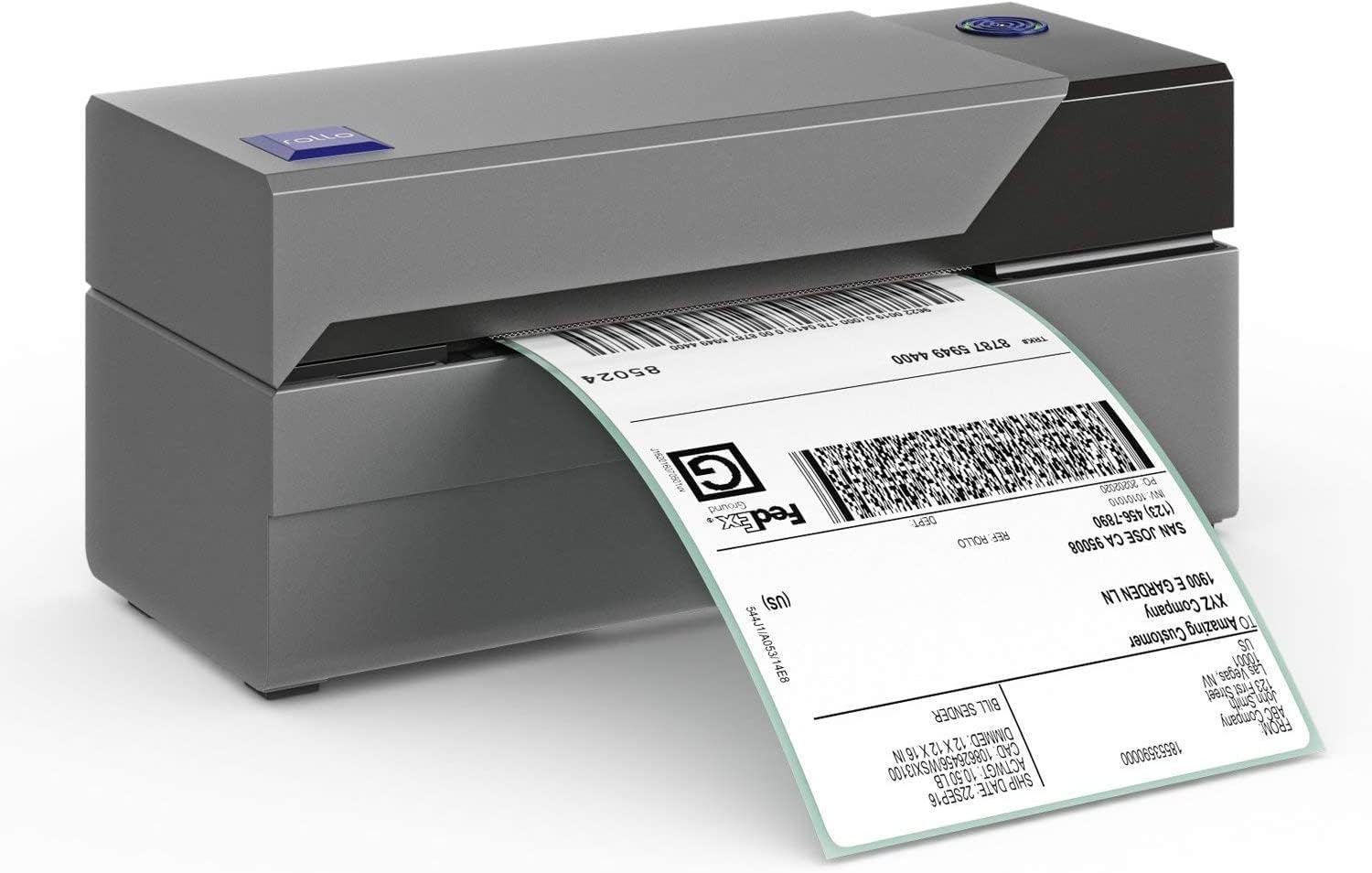
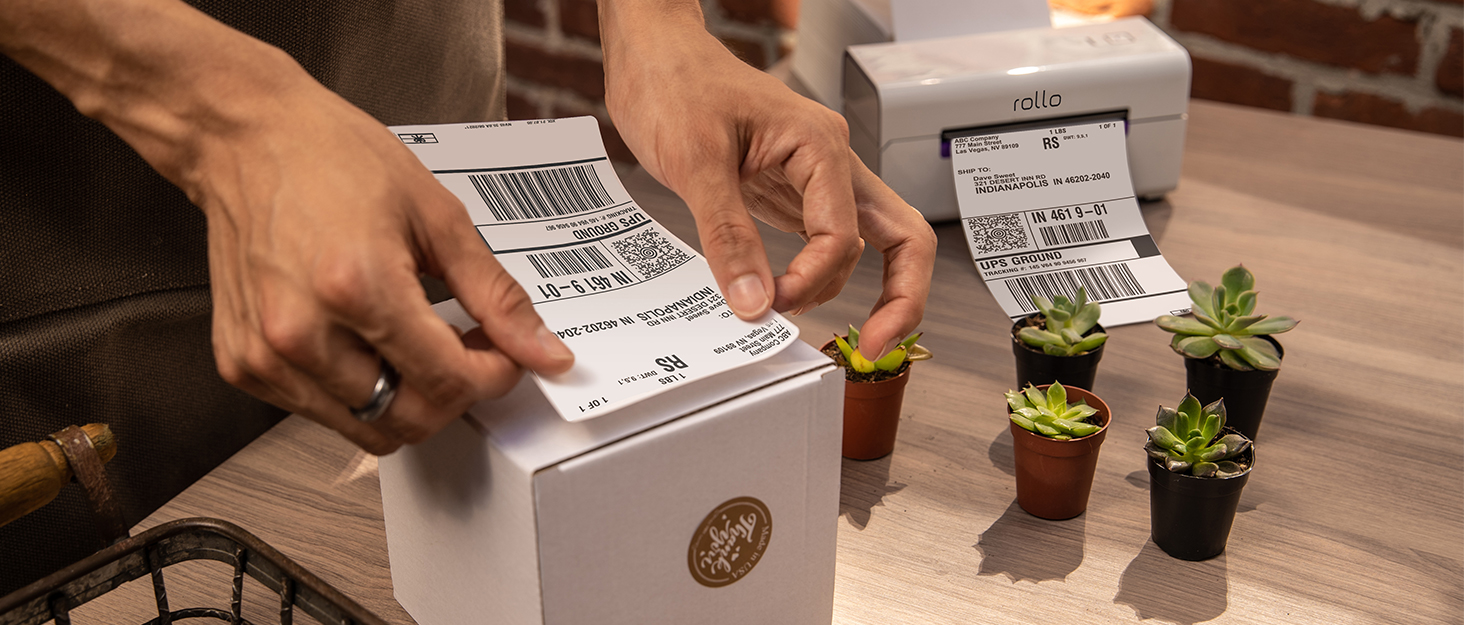
The Rollo USB Shipping Label Printer is a commercial-grade, high-speed thermal printer designed for small businesses. It prints 4x6 labels at 150mm/s with 203 DPI resolution using inkless direct thermal technology. Compatible with Windows and Mac, it supports all major shipping platforms and offers versatile label customization options, making it an essential tool for efficient, professional shipping and branding.


| ASIN | B01MA3EYC5 |
| Additional Printer Functions | Print Only |
| B&W Pages per Minute | 250.00 |
| Best Sellers Rank | #4,974 in Office Products ( See Top 100 in Office Products ) #31 in Desktop Label Printers |
| Brand | Rollo |
| Built-In Media | Power Adapter, Thermal Printer, USB Cable |
| Color | Black / Combined Ash (Gray) |
| Color Depth | 1 bpp |
| Color Pages per Minute | 250 |
| Compatible Devices | Laptops, PCs, Windows, Mac |
| Connectivity Technology | wired |
| Control Method | Remote |
| Controller Type | Mac, Windows |
| Customer Reviews | 4.6 out of 5 stars 16,146 Reviews |
| Display Type | LED |
| Dual-sided printing | No |
| Duplex | Simplex |
| Global Trade Identification Number | 00646791961023 |
| Hardware Interface | USB |
| Initial Page Print Time | 4 seconds |
| Ink Color | Black |
| Item Dimensions D x W x H | 4"D x 8"W x 4"H |
| Item Type Name | Thermal Printer |
| Item Weight | 2.2 Pounds |
| Manufacturer | ROLLO |
| Maximum Copies Per Run | 30 |
| Maximum Copy Resolution Black and White | 203 dpi |
| Maximum Copy Resolution Color | 203 dots_per_inch |
| Maximum Copy Speed Black and White | 1 Pages per second |
| Maximum Media Size | 4.1 Inch Width |
| Maximum Print Resolution Black and White | 203 Dots Per Inch |
| Maximum Sheet Capacity | 30 |
| Maximum print Resolution Color | 203 Dots Per Inch |
| Model Name | X1038 |
| Model Number | X1038 |
| Model Series | X1038 |
| Number of Drivers | 1 |
| Number of Trays | 1 |
| Other Special Features of the Product | Auto Label Detection, Inkless Printer |
| Output sheet capacity | 30 |
| Paper Size | 4 inch x 6 Inches |
| Power Consumption | 50 Watts |
| Print media | Labels |
| Printer Connectivity Type | wired |
| Printer Output Type | Monochrome |
| Printer Type | Thermal |
| Printing Technology | Thermal |
| Processor Count | 1 |
| Resolution | 203 x 203 DPI |
| Series Number | 1038 |
| Special Feature | Auto Label Detection, Inkless Printer |
| Specific Uses For Product | Shipping labels, warehouse labels, FBA labels, barcodes, custom labels (product labels, thank you stickers, QR code stickers, business or name stickers), branding stickers, barcode and ID labels, bulk mailing labels |
| Total USB 2.0 Ports | 1 |
| Total Usb Ports | 1 |
| UPC | 646791961023 |
| Unit Count | 1.0 Count |
| Warranty Description | 1 Year Limited |
| Warranty Type | Limited 1 Year |
| Wattage | 50 watts |
I**A
Love it
The Rollo USB Shipping Label Printer is a game-changer for small businesses. It prints 4x6 labels quickly and clearly, making shipping more efficient and professional. Setup is straightforward, and it works seamlessly with both Windows and Mac. The commercial-grade build feels durable, and the high-speed printing saves a lot of time, especially for bulk shipments. It also supports a variety of label sizes and custom stickers, adding versatility. A reliable, high-quality printer that’s well worth the investment for anyone regularly shipping packages.
J**C
The Perfect Shipping Partner!
The Rollo printer is a game changer to expedite shipping products and personal items. For years I have printed shipping labels on my desktop laser printer on 8-1/2" x 11" paper, trim it out and taping it to the box. I never thought to buy a printer like this. So easy to print, peel the back off and slap it on the box. I was hesitant because of the price, but quickly found IT'S WORTH EVERY PENNY! Set-up was straightforward and easy, no issues with any jams or misprints - this is an excellent product. I also bought the Rollo brand 500 label supply that feeds perfectly from the back. The compact size means it's a small footprint on your desk or shelf. I chose to use the USB cable instead of going wireless, but it's great knowing that it's an option should I want to move the printer to a different location.
J**N
Highly recommend! Outstanding product!
Great product! I was up and running inside 15 minutes and it is extremely easy to use! Highly recommend it
S**Y
GREAT for my Poshmark Labels!
I just got this printer yesterday to replace my failed Dymo 4XL which I'd been using for the past few months to ship items from eBay, Poshmark, Sellercentral, Bonanza, Mercari, and Etsy. As my 5th thermal label printer since 2015 I have a bit of experience using them for my part-time job as a reseller. A short history: I first purchased a Dymo TwinTurbo label printer for use with ebay shipping when I first started selling online. I'd been going to fedex by bicycle every time I sold something, so this was a major upgrade, being able to print labels at home was amazing! However, the set-up time was frustrating, the labels were something like 7.5"x2.5" and I had to get ebay to print shipping at that size. Once I did figure that out it was great, but I hadn't anticipated that a few years later I'd be expanding to other sales platforms which couldn't print at that size. In an effort to maximize space in my then teeny-tiny 360 sq. ft. apartment (with my 6-year-old Daughter, My fiance, my housecat and a 50 Lb german shepherd dog might I add. Times were rough....) I decided to "upgrade to the Dymo labelwriter 450. I still printed the same oddly proportioned labels but was smaller. The twin-turbo has two label roll feeds while the labelwriter 450 has only one. I had mistakenly thought, as a beginner, that I would need to print an address label separate from the postage label, I soon found that to not be the case and that my two-roll twin-turbo was unnecessarily taking up my desk space. Again, this printer was good, but the label specs were weird and incompatible with other platforms. My 3rd label printer was purchased because for *some reason* I had kept trying to load a new roll of labels the wrong way. It hadn't occurred to me to try and put them in facing down until I'd already disassembled the printer, broke the crap out of it in frustration and later received the new replacement.... which included instructions that showed I'd been trying to put the roll in the wrong way... 50 bucks gone... geez. I used this for about a year until I decided I'd like to expand to other platforms to sell on. I'd long since moved into an adequately-sized space and began to greatly expand my inventory. Once I started listing on these I knew it was time to upgrade to the conventional, industry standard, 4x6 labels. So I shelled out just about $200 for a Dymo 4XL & The corresponding labels. I knew when I purchased it that many people had experience problems with this printer specifically and that I might as well. I'd not experienced any with the Twinturbo or 450 but those had many more positive reviews than the 4XL, So I got the extended warranty. Unfortunately, the damn thing started jamming and spurting out test labels just 3 MONTHS after I bought it. This wasn't the only issue I'd had, there were crooked labels and all sorts of crap but this was the final death of the Dymo 4XL. When I contacted my warranty serive, they instructed me to contact the manufacturer so I sent Dymo an email request concerning their manufacturer's warranty service. It's been nearly a week and I still have had NO response from Dymo. As I still have a business to run, and without a reliable printer from Dymo, I decided I'd take my chances here with the ROLLO Printer. I had almost purchased it the first time around but I didn't like that it needed a separate roll-holder or that it was made by a company that was new and unfamiliar to me. I was also concerned with how I would print Poshmark labels, as they only format their labels for 8.5"x11" sheets (So I thought! You can actually change it now, please read on to find out how!). But this time I decided I'd take my chances. After all, a roll holder IS an option, and so are the accordion fold labels, so it's beneficial if you look at it that way. Also, the fact that the company is newer and less established to me means they HAVE to earn my trust if they want to be in the game. So that's actually a benefit as well. A benefit that I hadn't expected is that this prints SO fast and is SO much more quiet than the Dymo! As far as poshmark labels go, at first I tried the workaround that ROLLO suggested, begrudgingly. Dymo had this great software that I could use to screenshot the poshmark label and print but ROLLO suggested I use Adobe reader, another new program to download just for stinking poshmark.... EXCEPT... I googled it again and found that as of March '18 Poshmark has added a way to change your default label size to 4x6"!! So Psyched! all you have to do is Go to: My Seller Tools > Shipping Label Settings and select the 4x6 label option. Now you'll be printing direct from poshmark without any workaround needed! As It's still very early in my ROLLO life I haven't had any issue where I've needed to contact customer service. But I have the feeling that when/If I ever do they'll be more than helpful. Either way, after some time I will update my review here to include any new info and experience I have. Thus far, I'm converted for sure, OUT with Dymo, IN with ROLLO!
N**E
Seriously if you're on the fence - buy this one! A great printer for Small Business Owners
I am not compensated by any means for this review. Honestly, this is how I feel and strangely enough I invested this much time into writing a review that doesn't benefit me.. So I researched thermal printers online for a long time and I am happy I bought this printer. I was originally going to get the Dymo label printer, but after reading the countless horror stories I opted for a safer option than the "mainstream printer." (Dodged that bullet) **This is probably one of the best purchases I have made this entire year. The printer is super easy to use and isn't any hassle at all. It prints beautifully with all the barcodes and words coming out crisp and clear. (Adjust printing density and speed until perfect in printing preferences) With small lettering and fonts, you will see some pixelation. However, I have only had this awesome printer for only a week or so, so there is probably some way to fix it (haven't discovered it yet). As a small business owner, I only have seconds to adjust printer settings or make changes, and this printer makes it sooooooo easy. Make sure to read the setup manual and take the time to learn the functions or the button and what the different flashing lights are. But, you could also do a bit of learning on your own (like how I did) and read up as you go along. The setup took less than half an hour. Be prepared to go through and ruin the first 10-15 labels before you have the process perfect. It's just the name of the game of 'zeroing it in'. I love the fact that I can switch paper sizes extremely quick. All you have to do is move these two sliders within the printer either wider or smaller to fit the paper you want to use. After that, you feed the paper in - close the lid - and run the scan so the printer can recognize the size. *Before you click "Print" on your computer make sure to have your Printer Preferences or Settings set to the correct paper size. ---- EDIT --------- December 3rd, 2018 Printer is still going strong with thousands of labels printed. We do FBA product labels and shipping labels through Shipstation day in and day out. Haven't had one issue at all. Integration is super simple and not an issue as long as you follow the directions. One thing we've learned is to make sure you have a decent PDF editing program so you can crop and print labels on the fly if you need to. This is done by using the snapshot tool to print what you select off of a PDF, which is great for FBA product labels and such. ---- EDIT --------- March 4th, 2019 Still going strong. None of my opinions have changed about this printer. Shipped 1,000's of packages with the thermal printer without any concerns. I still recommend this printer to all small business owners.
T**K
Patience of a saint!
Dear Rolo Team, I wanted to take a moment to recognize the exceptional customer service I recently received from one of your representatives, Kim. I had just purchased one of your USPS stamp printers and ran into an issue during the initial setup and calibration process. The very first stamp label came loose and the adhesive became stuck inside the machine. Since it was Sunday, I called customer service but didn’t expect to reach anyone, and I actually hung up without even leaving a message. To my surprise, my phone rang shortly afterward — and it was Kim. From that moment on, Kim was unbelievably patient, kind, knowledgeable, and professional. She stayed on the phone with me for close to an hour, calmly walking me through the issue step-by-step until everything was resolved. At no point did she sound rushed or frustrated. She genuinely cared about helping me and making sure I was comfortable with the machine. In today’s world, it’s rare to experience customer service at this level. Quite honestly, I don’t think most companies would have gone above and beyond the way Kim and Rolo did. Because of this experience, I’m extremely happy that I chose Rolo. Please pass along my sincere appreciation to Kim. She represents your company exceptionally well and made a lasting positive impression on me. Sincerely, Timothy Mularchuk
P**A
Not perfect, but good enough to help grow our business
I didn't foresee giving a device credit for taking our business to the next level, but it really happened! I thought it was time to graduate from those annoying 8½" x 11" sheets with 2 labels, one of which usually went to waste, while using expensive ink. Wrestling with that always added a minute or two to every package that went out the door. What I thought would be a little more cost efficient and a little faster, turned out to be a big money saver and an even bigger time saver. I just ordered my 2nd box of labels for $20. Safe to say I would've spent more than triple that on those old sheet labels, and the same amount again for printer ink. So after about 1000 labels this printer will have paid for itself! What used to take a few minutes per shipment now takes less than a minute. There is some initial setup, but no more complicated than inkjet printer setup. But because of the super-fast printouts, our online yarn shop that used to sell only 5-10 packs can now sell one skein of yarn and still be profitable. Some other considerations/tips: - The settings interface does have a learning curve with stuff you've never seen for an inkjet; expect testing and wasting a few labels; but mine came with a free starter pack, and labels are relatively cheap. - There will be separate one-time setup for ShipStation and eBay, and probably any other interface; there are good online articles to guide you through. - Unlike many manufacturers, they don't gouge you for buying their own label paper - it's a best seller for a reason. - It does sometimes stop working, but that's pretty rare (like every 100 labels), and is probably a ShipStation Connect problem anyway; feeding label paper is very easy after "training" the printer to recognize your labels. - I also occasionally get a shipping label with a significant printing issue, but again, quite rare and not a crisis when it costs a few pennies per label. - It is working for me on an old, unpowered USB 2.0 hub; It comes with its own power source, and like most printers, a fast connection is unnecessary. I don't remember ever saying this about a PC peripheral device in 40 years of working with computers, but I am a huge fan!
R**S
Fast, Sturdy Label Printer with Learning Curve
First Impression: Overall, I like this printer. It feels sturdy and well made right out of the box. What I Liked: • Prints quickly • Ink stays in place and doesn’t smudge • Solid, sturdy construction • Can also be used as a label maker (very versatile) What Could Be Better: • There is a learning curve when adjusting for landscape vs. portrait printing • You need to understand how to adjust dimensions depending on sticker size • It printed sideways for me initially until I adjusted the settings • Slightly on the pricier side Overall Thoughts: This is a reliable and fast printer once you understand how to use the software properly. I recommend watching YouTube tutorials if you run into orientation or sizing issues. Despite the learning curve and price, it performs well and is a great option for printing labels or stickers.
O**C
Rapid
Amazing , but i Wanted to buy wifi model in EU but couldnt find . Product is so rapid . The rapidest one i can say .
Z**A
Wrong plug
Not sure what I must do with a non Aussie plug?
T**T
Excelente para tus ventas
Excelente producto si estas en el mercadode venta en línea . Yo vendo en Amazon yercadolibre.e ahorraicho tiempo al etiquetar mis productos para envía a las bodegas
J**E
Incompatible in UK
Not happy expensive purchase , not option to speak to supplier , I cant use this due to plug , would like a replacement of UK version
N**U
working perfectly
working perfectly and its great
Trustpilot
2 weeks ago
1 month ago