Buy anything from 5,000+ international stores. One checkout price. No surprise fees. Join 2M+ shoppers on Desertcart.
Desertcart purchases this item on your behalf and handles shipping, customs, and support to Tunisia.
⌨️ Elevate your desk game with the ultra-slim, multi-device Keychron K3 — where style meets unstoppable productivity.
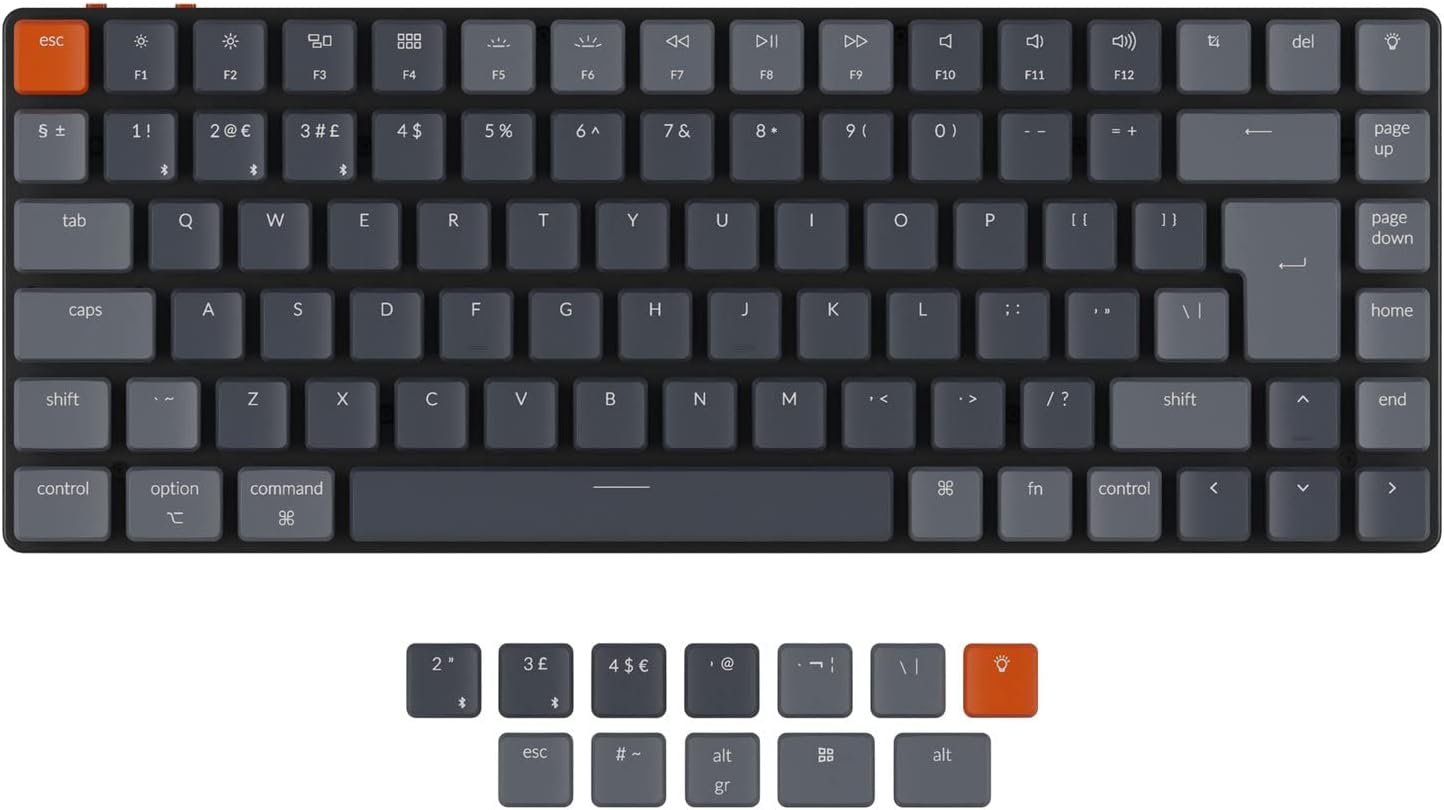
The Keychron K3 is a 2nd generation ultra-slim mechanical keyboard featuring a compact 75% layout with 84 keys. It offers hot-swappable low-profile optical brown switches with a 70 million keystroke lifespan, Bluetooth 5.1 connectivity for up to 3 devices, and wired USB-C mode. Designed for both Mac and Windows users, it includes extra keycaps and dedicated multimedia keys. The reinforced aluminum body ensures durability while maintaining a lightweight profile. Customizable RGB backlighting enhances both aesthetics and usability, making it ideal for professionals seeking a sleek, versatile keyboard for multitasking and long typing sessions.


| ASIN | B09K3LGC5M |
| Antenna Location | Everyday Use |
| Best Sellers Rank | 40,238 in Computers & Accessories ( See Top 100 in Computers & Accessories ) 593 in Keyboards (Computers & Accessories) |
| Box Contents | [USB Cable, Extra Keycaps for Windows and Mac] |
| Brand | Keychron |
| Brand Name | Keychron |
| Button Quantity | 84 |
| Colour | Brown Swich |
| Compatible Devices | Smartphone |
| Compatible Operating System Family | MacOS, Windows |
| Compatible devices | Smartphone |
| Connectivity Technology | Bluetooth, USB |
| Connectivity technology | Bluetooth, USB |
| Country of Origin | China |
| Customer Reviews | 4.3 out of 5 stars 105 Reviews |
| Enclosure Material | Aluminium |
| Generation | 2nd Generation |
| Hand Orientation | Ambidextrous |
| Item Dimensions L x W x H | 30.6L x 11.6W x 2.2H centimetres |
| Keyboard Backlighting Color Support | RGB |
| Keyboard Description | Mechanical |
| Keyboard Layout | QWERTY |
| Keyboard description | Mechanical |
| Manufacturer | Keychron |
| Model Name | Keychron K3 |
| Model Number | BROWN-K3E3 |
| Number of Keys | 84 |
| Number of Sections | 4 |
| Power Source | Battery Powered |
| Product Features | Backlit |
| Recommended uses for product | Everyday Use |
| Special feature | Backlit |
| Style Name | Contemporary |
| Switch Type | Low profile optic |
| Theme | Gaming and Productivity |
| Unit Count | 1.0 count |
J**4
I love it
A very nice keyboard which is compact, well built and lovely to type on. The Gateron brown switches have the perfect balance of clickiness and smoothness while staying silent enough for taking to work. The keys are highly responsive and accurate, and I can type for hours without feeling any strain or discomfort. I love that the keyboard is Mac compatible right out of the box and super easy to switch from mac to windows back and forth. It also has extra keycaps for win/mac and there's a dark grey ESC keycap that matches the other keyboard keycaps if the red one is not your taste. I was looking for a replacement to my Razer huntsman which had silent switches but was too smooth for typing and I am very happy with this keyboard. Overall great value for money and an excellent upgrade for anyone who wants to replace their old keyboard with a modern wireless and compact keyboard to enjoy at home or on the go.
M**.
Great Low-Profile Mechanical Keyboard – Compact and Well Built
I went with the red switches and they feel great, smooth, quiet, and comfortable for long typing sessions. The keyboard feels well built, is nice and compact with the 75% layout, and doesn’t take up much desk space while still keeping the important keys. The low-profile design is a big plus if you don’t like bulky mechanical keyboards. Bluetooth connectivity works well and it’s also handy that it can be used wired via USB when needed. Overall, a solid, high-quality keyboard that I’m very happy with.
T**H
Very quiet for a mechanical keyboard
Good points: 1. Extremely quiet for a mechanical keyboard, not much louder than the Microsoft Sculpt membrane keyboard I had before. Note:I have the version 2 keyboard, some reviews say the version 1 is louder. 2. Nice typing feel. 3. Full size arrow keys - many small keyboards have half size up and down arrows. 4. Keys for minor characters like tilde and carat which some small keyboards leave off and are needed in coding 5. Replaceable keytops - can customise for Windows or Mac. Bad Points: 1. No vendor supplied software to manage keymapping and lighting effects. Logitetech has better software. 2. There is a mechanical switch to select between USB and Bluetooth. You can't do the first PC on USB and the second PC on Bluetooth and switch with the fn+1,2,3. This is really disappointing. 3. The Bluetooth takes a couple of seconds to connect when you switch computers or if you don't type for a while. You lose a couple of words when you start typing. This is annoying and makes the option to share the keyboard between multiple PCs less useful. This doesn't happen when you use USB - but that limits you to one PC. 4. The lights are pretty but not useful. I thought I'd be able to do things like have a mapping for a game where the direction and action keys were illuminated in different colours. No. All it does is moving light effects and constant light. Overall, it scores highly because it is quiet and it has a well thought out key layout and a nice feel but the extras like switching between multiple PCs - I use a Windows PC and a Linux one for work - and lighting are disappointing.
V**Y
Fantastic keyboard
I was after a smaller profile keyboard, and after buying a really rubbish cheap wireless one (in the bin, it was awful!!! Just didn't with!), I decided I need to invest a bit more... I use this regularly, daily, in my work from home office, so need a decent one. I was a bit dubious, as it was a lot more expensive than others, but it was WELL worth the investment (my husband's recommendation of a Keychron were spot on). Sizing is perfect on my reasonably small desk, but I have all the keys I need. It was dead easy to switch over the US keycaps to the UK ones, it gives you the tools to do it + a guide on what should go where (it literally took a couple of minutes). I have mine plugged in via the USB C lead it comes with, but you can have wireless. It is super high quality, precise on typing with good movement and sound on the key strokes (I write a lot of messages and type fast). The light up feature makes it look really pretty, with loads of different settings easily changeable via the 'lights' button (I do sometimes accidentally press this, but it's not a huge deal). I can't recommend Keychron highly enough, and this model is perfect for my smaller space.
B**E
OK but battery life deteriorated
A good looking and satisfying to use keyboard, feels like quality material. RGB settings are fantastic, and the amount of different patterns and brightness settings will likely satisfy every type of user. Also the Bluetooth profiles are super easy to switch between and handy if you use the keyboard for work and gaming and need to switch between frequently. The battery life was great for the first 4 months of use, no complaints, then I noticed it was dying a lot quicker. After 6 months, the keyboard barely managed to last 1.5 hours (and that’s WITHOUT the RGB on), which is crazy compared to the 15(?) hours it’s advertised as. One other small negative is that the keys are incredibly sensitive. Whilst typing, if you slightly brush an adjacent key it registers it, so unless you are conscious of your keystrokes you might see a fair amount of accidental typing. Not a problem for some, but might be quite annoying for others. Good, but for the price and it being wireless, the battery really can’t afford to be bad, especially after only half a years use.
J**M
Well made and adaptable
Bought the K3 with the brown switches having watched lots of youtube reviews and the general advice being 'if you don't know anything about keyboard switches then get brown'. I initially found the keyboard a little disappointing as a continuously made typing errors, hitting the wrong key of two keys and once - I was used to the Macbook Pro keys and even though the K3 is low profile they are still radically more protruding than the mac. After a bit more research I purchased a set of Mint switches and swapped out the Browns - now I'm happy - I think the problem had been the Browns were too soft and too easily activated by casual finger resting on the keys, the Mints require a slightly firmer push but for a heavy fingered typer its more comfortable and less typo producing. Only negative is the RGB lighting - the one setting I want is the always on white, it makes the keyboards more recognisable for a non touch typist who needs to read the letters - but the switch to change the light setting is top right, opposite the Escape, and I push it whenever I pick up the keyboard and have to multiple press to toggle around all the different rainbow light setting until white comes up again. And the on/off switch is very cheap looking but I guess that doesn't really matter - keys themselves feel good and there is a nice thonk sound from the mint switches, especially from the space bar. Good product.
V**O
Nice keyboard
This is not my first mechanical keyboard. I use two notebooks for work (Mac and Windows). From the pros: 1. The keyboard is wireless and the battery lasts me about a week of use. 2. fast switching between devices. No need to mess with wires. 3. Nice sound of the keys 4. You can adjust the backlight to your preference. On the downside: I wish there was a carrying case included.
N**L
Almost faultless
Very happy with the keyboard - I can only recommend it if you’re happy the charge at the end of day hence 4 stars
Trustpilot
2 weeks ago
5 days ago