Desertcart purchases this item on your behalf and handles shipping, customs, and support to Tunisia.
🚀 Elevate your Raspberry Pi game with a touchscreen that’s as smart as you are!
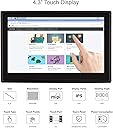
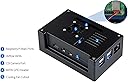
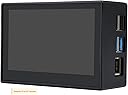
The Waveshare 4.3inch DSI LCD Display is a premium capacitive touchscreen designed for Raspberry Pi 4B and compatible models. Featuring an 800×480 IPS panel with toughened glass and a protective case, it delivers vibrant visuals and wide viewing angles. With a 60Hz refresh rate and MIPI DSI interface, it ensures smooth, lag-free performance. Driver-free support across multiple OS platforms including Raspbian, Ubuntu, Kali, WIN10 IoT, and Retropie makes setup effortless. The included cooling fan and mounting accessories complete a professional-grade package ideal for DIY, educational, and embedded projects.
| ASIN | B09B29T8YF |
| Adaptive Sync | FreeSync |
| Aspect Ratio | 16:9 - 1.66:1 |
| Aspect ratio | 16:9 - 1.66:1 |
| Best Sellers Rank | 47,165 in Computers & Accessories ( See Top 100 in Computers & Accessories ) 830 in Monitors |
| Brand | Waveshare |
| Brand Name | Waveshare |
| Colour | 4.3inch DSI LCD (with case) |
| Compatible Devices | Raspberry Pi 4B |
| Contrast Ratio | 2000:1 |
| Country of Origin | China |
| Customer Reviews | 4.6 out of 5 stars 368 Reviews |
| Display Technology | LCD |
| Display Type | LCD |
| Hardware Connectivity | DSSI |
| Has Color Screen | Yes |
| Image Brightness | 250 nits |
| Image contrast ratio | 2000:1 |
| Item Weight | 0.28 Kilograms |
| Manufacturer | Waveshare |
| Maximum Display Resolution | 800x480 |
| Model Name | 4.3inch DSI LCD (with case) for Rasp Pi |
| Model Number | 4.3pollici DSI LCD (con case) |
| Mounting Type | Panel Mount |
| Native Resolution | 800x480 |
| Network Connectivity Technology | MIPI DSI |
| Picture Quality Enhancement Technology | FreeSync |
| Pixel Pitch | 0.137 |
| Product Features | Touchscreen |
| Refresh Rate | 60. |
| Resolution | 800 x 480 pixels |
| Screen Finish Type | Glossy |
| Screen Size | 4.3 Inches |
| Screen size | 4.3 Inches |
| Screen surface description | Glossy |
| Shape | Rectangular |
| Specific Uses For Product | [INF] Educational projects, DIY projects, embedded systems |
| Total USB 2.0 Ports | 2 |
| Total Video Out Ports | 1 |
| UPC | 755291678055 |
| Unit Count | 1.0 count |
| Viewing Angle | 170 Degrees |
| Voltage | 5 Volts |
M**E
Great screen but no build documentation .. so I added some here
Lots of references here to there being no build documentation, which is true. I have added a step by step guide in pictures here and words as follows: Contents: screen kit came with 3 ribbon connectors, screw driver, baggy with fan kit, baggy with standoffs & countersunk screws (for screen mounting), baggy with short & long standoffs with pan head screws (for Pi mounting), screen and enclosure. IMPORTANT - make sure to load your microSD card with the OS of your choice (I used the Raspberry Pi Imager to configure and load Raspberry Pi OS 64bit. When done I installed to the back of the pi. Now you're ready to install 1) Fit short standoffs (4) to the back of the Pi. 2) attach Pi to back of screen using pan head screws. 3) & 4) fit the short ribbon cable to the Pi and Screen - NOTE: one side of the ribbon has exposed metal connection strips, these face in to the board, the headers have a clip that needs to be raised and then pushed back to secure the ribbon. 5) Fit the long standoffs to the screen. 6) Fit fan as shown with the screws and nuts provided (nuts on outside of enclosure)and feed connector through the slot per image 7). 8) & 9) Fit the connector to pins 4 & 6 on the GPIO - first row, second pin in for red (5V) third pin in for black (GND). 10) Gently assemble screen to the enclosure and secure with the countersunk screws. 11) this is what you should be left with. I connected a USB mouse and Keyboard initially to assist in updating and configuring my Pi. After all the updates the touch screen functioned and all was rosy.
T**U
Great screen, responsive touch input, good case
The display is great, touch is very responsive on Raspbian, the fan has quite a bit coil whine and is pretty much covered when the case is placed with the screen up. The box has plenty of useful standoffs and a few spares, as well as a couple of spare MIPI-DSI cables.
M**S
Works but no documentation
Part of the fun of the Raspberry Pi ecosystem is learning, and you'll definitely be learning and experimenting with this screen because it comes with absolutely zero documentation (there is some online but it is next to useless). I got it all to work in the end after much experimentation with different combinations of screws and pillars and reassembling it probably 10 times. The screen and case are very pleasant, bright, readable even though tiny, and the touchscreen works fine as far as a tiny touchscreen could work with fat fingers. So no problems in the end but definitely a journey to get there.
R**S
Excellent product ......but can't rotate screen in Kodi and Libreelec
This is a carefully crafted unit, easy to install for those familiar with electronic interface sockets. No documentation for setting up was provided, but then again it's not needed. No driver is needed for it for Raspbian on RPi4, and certainly no driver is available for Kodi and libreelec and hence the screen is upside down if fixed in suitable enclosure compared to the intended position of the enclosure . Touch functionality works, but a little slow at times, but not a real issue. Screen is clear and bright when viewed from above.
M**.
Great quality
Excellent quality screen and case, touchscreen is responsive and works well with Moode audio. I did however have an issue with the touchscreen initially which was cured by changing the cable, fortunately I just happened to have one from another screen otherwise it would have been a big issue.
J**J
Very good quality but be warned - no instructions!
Very nice piece of kit and needs zero config on a Raspberry Pi - very bright clear screen - the fan is quite quiet - but be warned there are no instructions, so unless you know your way around a Raspberry Pi it could be tricky to get set up, especially for beginners!
A**Y
Perfect for small hobbyist use on a Rpi
Using mine for klipperscreen on an Rpi 3a+ & together they work very well. I like the difference between this & the 7" being that this one does not need an extra cable for power & takes it all from the DSI cable on the Pi. It fits very nicely into a 3d printed holder, but should you wish it comes complete with mounting screws etc to put the Pi on the back. As you can see from the video, the touch response is a tad slow, hence the 4 not 5 stars, but for what I am using it for it's just right. Some people complain that it's not bright enough but that can be fixed from diving into the settings on your Rpi if you want to. For me, I plugged it in & it worked straight out the box, no extra drivers or programming on the Pi needed.
M**N
Great RPi addition
Easy to set up on the RPi4 touchscreen works well, good picture. Documentation is easily found online along with technical drawings for incorporation with 3D printing projects.
G**O
Monitor per raspberry
Buona la qualità ma non sempre compatibile con i vari firmware che si usano su raspberry!
S**K
Werkte gemeen
Geweldige display . Deze word gebruikt om de Victron venus os te draaien op een Raspberry pi4b. Werkt gelijk zonder probleem. Let op als je dit gaat gebruiken er voor. Venus os geeft alleen bij op start de logo Victron. Je moet inloggen en de unit activeren aangezien de venus os van uit gaat geen Display aanwezig is. (Je heb beeld met de Victron logo)
K**Z
Bez szalu, ale ok.
Ekran na raspbianie dziala od razu po podlaczeniu, nic nie trzeba ustawiac. Wentylator na zdjeciu jest podpiety do zlych pinow, prawidlowo w dolnej linii 2 i 3. Koniecznie trzeba dodac radiator do procesora, inaczej wentylatorek nic nie pomoze. Obudowa moglaby byc aluminiowa, wtedy warto by bylo nawet doplacic, ogolnie spasowanie 7/10.
L**4
Très bon boîtier, bel écran, seul défaut aucune notice
Avis pour le 4.3" DSi LCD (with case) Super boîtier qui fait très bien son travail. Il est en plastique mais ce n'est pas un plastique dur et cheap, c'est du plastique assez qualitatif. Il s'ajuste parfaitement à mon RPi4b dans la mesure ou j'ai réussi à le monter sans trop de difficultés et sans aucune notice fournie (il suffit de réfléchir un peu contrairement à d'autres qui ont fait un vrai Picasso avec ce boitier...) l'écran est de très bonne qualité, suffisante pour afficher une image plus que correcte. Dans mon cas il fait tourner mon serveur Home Assistant et l'écran n'est pas vraiment utile, il est vrai. J'ai mis des photos selon les étapes de montage si ça peut en aiguiller certains. ATTENTION le ventilateur ne se branche pas sur les 2 bornes sur lesquelles il est branché sur ma photo et sur les photos d'Amazon, il se branche sur les 2 autres en face sur la 2ème ligne de picots (voir schéma joint).
L**S
Funciona bem
Funciona bem foi só ligar ao raspberry apareceu logo imagem 5*
Trustpilot
2 days ago
3 weeks ago