Buy anything from 5,000+ international stores. One checkout price. No surprise fees. Join 2M+ shoppers on Desertcart.
Desertcart purchases this item on your behalf and handles shipping, customs, and support to Tunisia.
⌨️ Elevate your workspace: comfort, speed, and precision in one sleek keyboard!
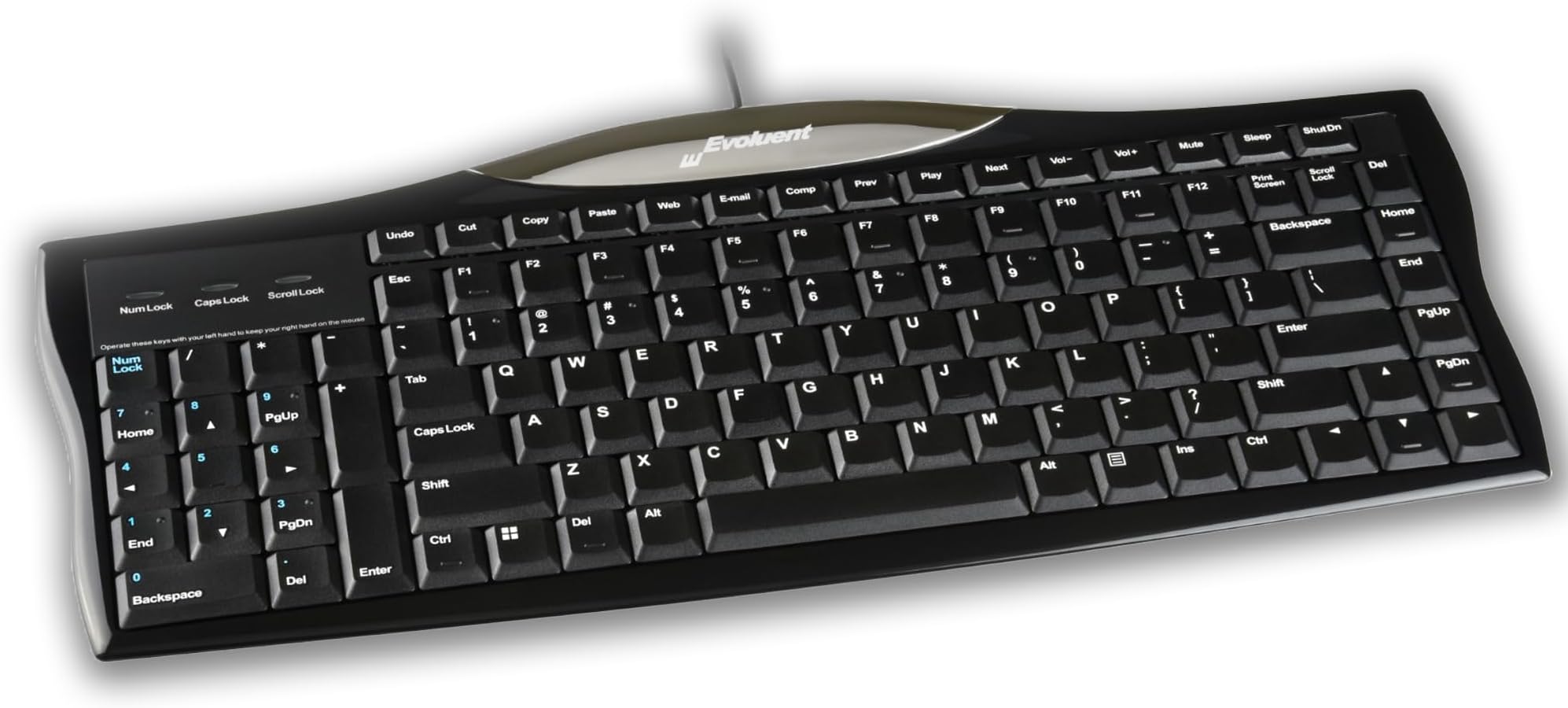
The EvoluentR3K is a wired USB ergonomic keyboard designed to reduce wrist and arm strain by relocating the numeric pad to the left, bringing your mouse closer. Featuring premium scissor keys for precise typing, dedicated one-touch shortcut keys for enhanced productivity, and full-size function keys with tactile bumps, it offers a comfortable and efficient typing experience. Compatible with Windows, Unix, and Linux systems, this plug-and-play keyboard is perfect for professionals seeking ergonomic comfort and streamlined workflow.


| ASIN | B01NBMR61A |
| Additional Features | Ergonomic |
| Antenna Location | Office |
| Best Sellers Rank | #746 in Computer Keyboards |
| Brand | Evoluent |
| Built-In Media | USB Cable |
| Button Quantity | 104 |
| Color | Black |
| Compatible Devices | Laptop, PC |
| Compatible Operating System Family | Linux, Windows |
| Connectivity Technology | Wired |
| Customer Reviews | 4.2 out of 5 stars 154 Reviews |
| Enclosure Material | Plastic |
| Global Trade Identification Number | 00852153000181 |
| Hand Orientation | Right |
| Item Dimensions L x W x H | 15.9"L x 15.9"W x 0.8"H |
| Item Weight | 704 Grams |
| Keyboard Backlighting Color Support | Single Color |
| Keyboard Description | Ergonomic |
| Keyboard Layout | QWERTY |
| Manufacturer | Evoluent LLC |
| Mfr Part Number | R3K |
| Minimum Required Operating System Version | Windows 1 |
| Model Name | R3K |
| Model Number | R3K |
| Number of Keys | 118 |
| Number of Sections | 3 |
| Power Source | Corded Electric |
| Recommended Uses For Product | Office |
| Series Number | 3 |
| Special Feature | Ergonomic |
| Style Name | Classic |
| Switch Type | Scissor |
| Theme | ergonomic or computing |
| UPC | 852153000181 |
| Unit Count | 1.0 Count |
| Water Resistance Level | Not Water Resistant |
'**D
Compact Size; Positive Keys(Not Spongy); Centers Alignment w/Monitor
'Very Happy' with this Evoluent R3K Reduced Reach Right-Hand Keyboard. As noted in its 'Description', using the Mouse is more convenient, but more importantly, am now able to 'Center myself on Monitor/Screen' for ease of reading/viewing same 😊 Also love the 'Feel of Keys' due to them not being 'Spongy'. Cons: Bit too expensive; wish 'Shift Keys' were a bit bigger/wider, but using 'Home Key Method' is very easy and 'Shift Key' use not a problem; wish the keyboard was a bit 'Wider' allowing more 'Separation' between 'Numeric Keypad/Alpha Keys', as well as between PgUp/Dn, End, Home, Del, keys, as well as 'Arrow Keys'.
J**W
Newer model, and it's less expensive and sturdier!
I've had 3 of the evoluent ergo keyboards for work. Our ergo manager noticed my right hand was 180 degrees from the key board creating neck and shoulder issues. This allows you to keep the mouse close to the right hand side of the keyboard to prevent stiff shoulder and migraines. This version replaced the older one with the silver plastic trim. It's the same keyboard, but sturdier materials, better supported typing keys (the older version would pop off if I struck the keys to hard.) This all around a great keyboard for right-handed folks.
M**C
Great keyboard but may need gap between numpad for touch typing
The reviews seem to be combined of this new scissor mechanism keyboard and an older one that is using thicker switches and has numpad on the right side. My review is for the newer one with thin scissor mechanism and numpad on the left. Pros. 1. Typing feel 5/5: This is the best typing experience on any scissor mechanism keyboard I have tried. It is better than the current ThinkPad keyboards. It feels solid, no wiggle, smooth, and as close to mechanical switch feel as possible on a scissor switch. 2. Price 5/5: Great quality for the price. 3. Ergonomic 4/5: Great for shortening the distance if it is good for the shoulder. This doesn't help those with wrist or forearm problems though. 4. Size 5/5: Very compact for all the buttons it has. 5. Layout 5/5: It has extra buttons on the top row that could be useful in addition to the F1-F12 and numpad. Cons: 1. Touch Typing 4/5: It is great except there is no gap between the numpad and the rest of the keyboard. Didn't realize it till I used this keyboard, but I definitely use the edge to determine where ctrl, tab, and delete keys are. There is a bump on the ctrl button but it is at the bottom of the button and I usually only push the top part. 2. Not height adjustable 1/5: You cannot adjust the height at all. There is no leg in the back to change it. At first I was disappointed but the completely flat position actually wasn't that bad. 3. Chrome accent 3/5: Although it looks pretty good, it can reflect light into your eyes depending on your set up. Wasn't an issue for me but can see it being a problem for others. 4: Lack of usb hub 1/5: Since it is hardwired, it would be easy to add in usb hub into the keyboard 5: No backlit 1/5: The white print still stands out pretty well so you should be able to see what the keys are even in low light. It would still be nice to have backlight though.
D**L
Great keyboard for RTS gaming
I'm not sure why but there seem to be only a few keyboards with left-handed keypads. I play a bit of Age of Empires IV and I wanted my numbers near my left hand, without a gap between the numberpad and the rest of the keyboard. I use my right hand for my mouse and I can't change from the mouse to the righthand keypad. This keyboard is perfect for this and I really think the company should try to market its products to people who play RTS games. The only downside is that shipping to Europe was expensive, and there are no ergonomic settings to adjust the angle of the keyboard. Otherwise, though, this was the perfect keyboard I was looking for.
B**S
Good for small hands. Not good value for money—doesn’t adjustable feet.
For $55 dollars, I expect a keyboard to have feet. This one does not. So I chose to spend another $10 to buy feet. Not good value for the money. I purchased this to replace a num-pad on the left DSI mechanical keyboard with cherry mx red switches. The switch on the spacebar was defective, making the spacebar stick often. I was hoping for something with the feel of cheery mx blue switches. This one doesn’t have that feel but it is serviceable. The best part of the design, fo me, is the compact key placement and the num pad on the left side. I have very small hands, so it works for me. For those with larger fingers, I think this thing might be a disaster (typos, pressing two keys at once etc). Also, so keys a placed in non-traditional locations. The insert key, for example, is located where the right hand side windows key is usually found on windows keyboards.
S**W
Durable, good feel, ergo benefits
Wanted a keyboard with num pad in the left so my mouse is more towards the front of me and my arm isn't splayed out at so much of an angle. Takes some getting used to if you are a skilled 10 keyer on the right. But worth it for my arm health. Also nice to not have to continuously move my hand from mouse to keyboard and back. Product holds up well to long term use. First one lasted several years until I dropped my laptop on it (more than once) and eventually popped off the A key.
D**G
A better design for keyboard and mouse
Great design! I've been wishing for a keyboard like this for years but didn't know one actually existed. My right shoulder would get sore from holding my mouse arm out to the right because the numeric keypad was forcing the mouse far to the right. I've taken a picture comparing the new Evoluent keyboard with the one I was using; you can see how much difference it makes in my mouse placement and arm position. You might notice that I bought an Evoluent Vertical Mouse as well. I love it! It reduces forearm rotation and has been very easy to get used to. Both the mouse and the keyboard have an excellent build quality and I'm very happy with the purchase.
D**R
Spacebar malfuntions zero input after 5 months
The keyboard was purchased for CAD work. To allow closer mouse positioning but more so using my left hand for numerical input. The SPACE bar was used ONLY for occasional typing messages/letters. As shown: the CHERRY MX RED mechanical keyboard switch WITHOUT O-rings are used for gaming... but the poor design of the stabilizer bar makes it stick. (switches either work or don't so def design flaw; in my opionion. Good price for the money HAD it continued to work for. I'd suggest adding o-rings underneath for quiet operation.
A**E
Guter Service, sehr zu empfehlen
Lieferung hat super schnell geklappt, leider ist die Tastatur für unsere Zwecke nicht geeignet. Rücksendung erfolgt zeitnah.
D**B
Very Good but could be better
It's a nice slimline keyboard, with dedicated 1-click shortcut buttons for cut, copy & paste that I need. These would have been better placed at the left side of the KB. Also. the number pad is on the left, and as it is a right-hand KB, and I am right-handed, I am much slower with numbers using my left hand. Move them to the right and all would be perfect.
T**Y
Excellent product! Brings mouse closer for right handed people!
Persistent problem with conventional 105-key keyboards is that they displace the mouse too far to the right to be in an ergonomic position. Translating the NumPad to left hand side of the layout solves this issue for people who don't want to mouse with their left hand, but are comfortable with using the NumPad with their left! Love it!
あ**ー
使いこなせない
うまく使いこなせない
A**T
I love this keyboard
For me, having the number pad on the right side makes my arm hurt after a while. I'm not sure why, but it does. This keyboard paired with a small mouse is much better. (I'm a short woman with small hands).
Trustpilot
2 days ago
3 weeks ago