Desertcart purchases this item on your behalf and handles shipping, customs, and support to Tunisia.
🖨️ Print Smart, Print Long, Print Green — The Future of Home Printing is Here!
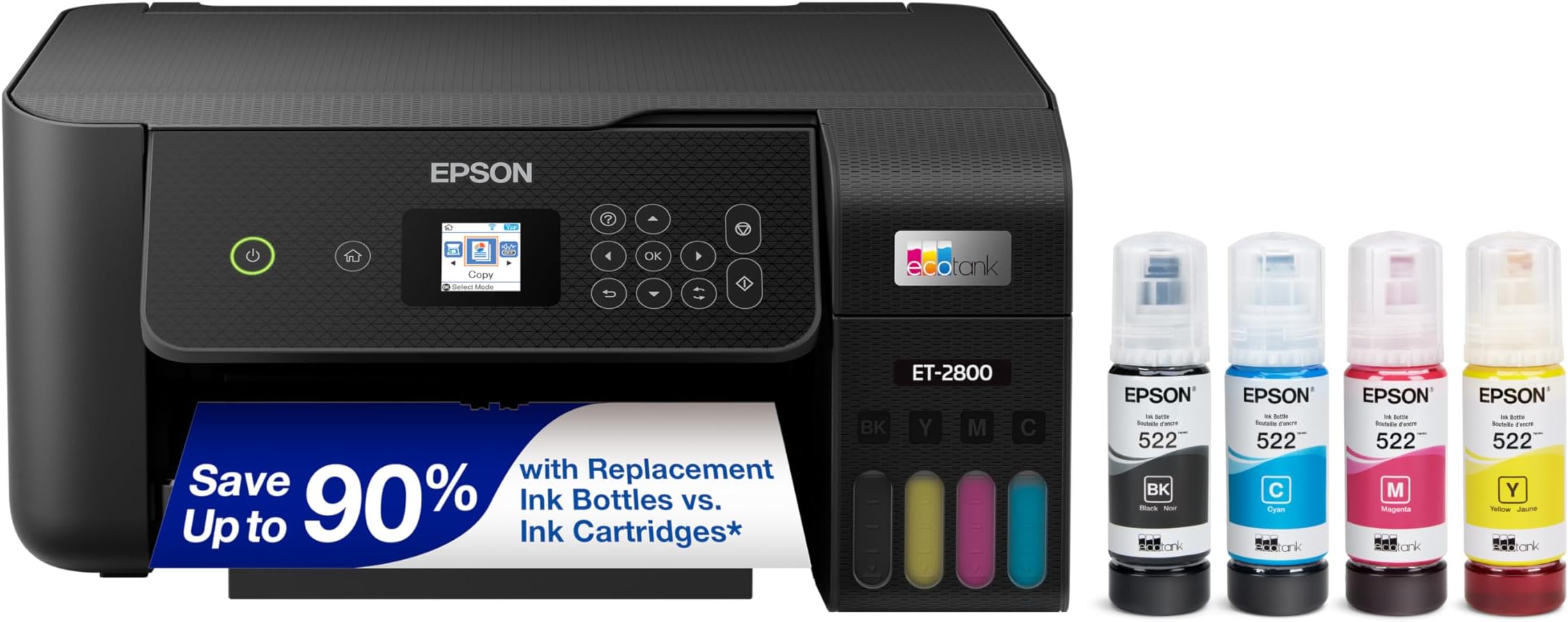
The Epson EcoTank ET-2800 is a wireless all-in-one color printer designed for home use, featuring cartridge-free refillable ink tanks that deliver up to 7,500 color pages per refill. It offers fast black-and-white printing at 10 pages per minute, high-resolution output up to 5760 x 1440 dpi, and eco-conscious zero cartridge waste. With wireless connectivity, voice-activated printing, and a compact footprint, it combines convenience, quality, and sustainability for the modern home office.


| ASIN | B096N8DN2H |
| Additional Printer Functions | All In One |
| B&W Pages per Minute | 10 |
| Best Sellers Rank | #2,010 in Office Products ( See Top 100 in Office Products ) #6 in Ink Tank Printers |
| Brand | Epson |
| Built-In Media | Ink Bottles, Manuals, Power Cord, Software |
| Color | Black |
| Color Depth | 24 bits_per_pixel |
| Color Pages per Minute | 5 pages_per_minute |
| Connectivity Technology | USB, Wi-Fi |
| Control Method | App |
| Controller Type | Android |
| Customer Reviews | 4.0 out of 5 stars 8,140 Reviews |
| Display Type | LCD |
| Duplex | Simplex |
| EU Spare Part Availability Duration | 1 years |
| Hardware Interface | USB |
| Ink Color | Black, Cyan, Magenta, Yellow |
| Item Dimensions D x W x H | 14.8"D x 22.8"W x 10"H |
| Item Type Name | Inkjet Printer |
| Item Weight | 11.4 pounds |
| Manufacturer | Epson |
| Maximum Copy Resolution Black and White | 300 x 600 dpi |
| Maximum Copy Resolution Color | 720 x 720 dpi |
| Maximum Copy Speed Black and White | 10 pages_per_minute |
| Maximum Media Size | 8.5 x 14 inch |
| Maximum Print Resolution Black and White | 5760 dpi |
| Maximum Sheet Capacity | 100 |
| Maximum print Resolution Color | 5760 x 1440 dpi |
| Model Name | ET(EcoTank) ET-2800 |
| Model Number | ET-2800 Black |
| Model Series | EcoTank |
| Number of Trays | 1 |
| Other Special Features of the Product | Mobile Printing Capability, Refillable Ink Tank |
| Output sheet capacity | 100 |
| Paper Size | 4x6 inches,5x7 inches |
| Power Consumption | 12 watts |
| Print media | Envelopes, Glossy photo paper, Paper (plain) |
| Printer Connectivity Type | USB, Wi-Fi |
| Printer Output Type | Color |
| Printer Type | Inkjet |
| Printing Technology | Inkjet |
| Resolution | 5760 x 1440 |
| Scanner Type | Flatbed |
| Series Number | 2800 |
| Special Feature | Mobile Printing Capability , Refillable Ink Tank |
| Specific Uses For Product | Home |
| Total Usb Ports | 1 |
| UPC | 010343957886 |
| Unit Count | 1 Count |
| Warranty Description | 1-year limited warranty |
| Warranty Type | limited warranty |
| Wattage | 12 watts |
L**E
WOW! This printer has been VERY impressive thus far *UPDATE*
My old printer broke (sooner than I would have liked) so I did A LOT of research before deciding to buy this Epson EcoTank printer for home office use. This is my honest review of it this far and I will definitely update my review if I run into any issues. So far, this printer has been pretty impressive (I've been using it for about a month). The price was pretty average for a printer... but I personally think all printers are overpriced so it was a bit more than I would have liked to spend. It is smaller and more lightweight than I was expecting which is a plus because it takes up less desk space than my previous HP printer. It is very easy to set up, comes with step-by-step easy instructions and guided instructions through the app. It only took me about 10 minutes (Mostly just waiting for the printer to initialize on its own). It is very easy and surprisingly satisfying to fill the ink tank. I like the idea that this ink might last longer than traditional cartridges and won't have as much plastic waste that went along with my old HP Inkjet. I have printed plain black and white documents as well as photos. I print all my photos at home, which is most of the printing that I do, so quality was important to me. The photos came out with pretty good quality! No ink smudges or off colors, colors are bright/vivid, and it is easy to modify what paper you're using with automatic prompts on the printer. Now for the negatives and the reason I'm giving this 4 stars... app to printer connection issues. This was a big issue with my old printer as well. I'm pretty tech savvy and I just have no idea why this is still always an issue for me. There is an extra Epson app that you are supposed to download for printing. Sometimes it can find my printer, sometimes it can't. Sometimes it gives me printer errors or won't let me print documents. And now every time I go to print something it says the paper being used doesn't match the paper settings so I have to bypass that error message (even though it does match in settings and the app, and this happens for both regular paper and photo paper). I've turned everything off and back on again, but the issues with consistent connection and error messages are still an issue. Usually with some fiddling around, I can get the documents/pictures to print but sometimes it feels like I'm jumping through unnecessary hoops. I'm still working out the kinks so if I find some magic solution I'll update my review. Considering this is an issue with most home printers I've used, it's not a deal breaker. All in all, if you are looking for a new home printer, I would definitely recommend this one. The quality has been great for me and I am pleased with my purchase (so far). Hope this helps! *UPDATE*: I have now printed HUNDREDS of photos, they are all excellent quality, and my ink tanks are still mostly full. This is WAY better than my HP printer as far as ink longevity. Changing my review to 5 stars just based on how long this ink lasts. User interface is still a tad annoying but so worth it regardless.
S**M
Almost a year after purchase and this printer has not let me down!
I wanted to wait to write a review on this printer to see how it held up over time. Happy to report, after almost a year, it is still working perfectly! I was very nervous about purchasing a printer since it was my first time having to shop for one and almost every printer I looked at had something negative to say about the product. After extensive research, I decided to take a leap with the Epson EcoTank 2800. I was looking for a printer to use for recreational use. Something with decent print quality and longevity as well as something on a reasonable budget. I normally print full pages of color and have been using it regularly for around a year and I have about half of the ink that came with the printer left. Safe to say, the ink lasts a while. The quality may not be the top of the line quality you can get with a more expensive printer, but for the price and just everyday use, the quality is satisfactory. It was easy to set up and walked you through the instructions to connect to devices and configure it. The screen is a little small but if you can overlook that, it really is a nice printer. I have used regular printer paper, card stock, and sticker paper with this printer and I try to load only a few sheets at a time to avoid a jam but I haven't had any issues with it so far. Overall, I am extremely happy with my purchase. It can be extremely difficult to find a decent printer and some reviews can be misleading or leave you with questions on if the product is for you. If you are looking for something for printing everyday with decent quality and ink consumption that won't cost you a fortune, this printer is definitely worth taking a chance on!
J**Y
0 STARS!! DO NOT BUY!! HORRIBLE!!
DO NOT BUY! 0 STARS -I would give 0 stars if I could. This EPSON ET-2800 is the worst printer I have ever owned. -I work from home where I need to do small print jobs throughout the month. I didn’t need a printer that is super fast or had a lot of bells and whistles. I searched many, many, many reviews and this Epson ET-2800 kept coming up as a really good option for my purposes. It had great reviews and it supposedly uses less ink. -I went ahead and bought it and it was delivered Dec. 28. -Throughout the month of January I did a few print jobs here and there. Everything seemed ok. Toward the end of January I noticed that there was black shadowing behind a whole horizontal line on one of my print jobs. The shadow went the whole width of the paper. Thought it was a one-off and didn’t think about it too much since I had so much going on at the time. I also never dreamed that I would need to clean my printer since I hadn’t even owned it for a month at this point. -February 2 I started printing some things for work again and the lettering had lines through the center of the page. Even though I had just had the printer for a month and hadn’t printed that much stuff so I really shouldn’t have to clean it already, I used the “clean nozzle” tool on the printer. **I had to do the cleaning cycle 8 times before it was printing correctly meaning there were no missing segments on the sheet that is printed after the cleaning. ** This was a huge waste of my time and ink and paper!!! -February 16 I attempted to print some pages and again there were lines throughout the papers!! -February 17 I called Amazon to try to get a refund and they said I was outside of the return window. So -I called Epson. I explained what was happening and the lady told me before they would do anything I had to go through some “detailed instructions” on how to clean the printer. Only AFTER I completed all the steps would they even think about helping me. -So first step is to perform a nozzle cleaning per the instructions. Did this. -Instructions say to wait 12 hours before doing anything else. So I waited 12 hours and did another cleaning. Did this twice. The printer showed no broken/missing segments. -So I printed some pages and several of the pages had black smudges/lines/dots on the tops of the pages and most of them had black ink all over the bottom right corners of the papers. -Did the print nozzle cleaning and had broken/missing segments again. -Instructions say to do a head cleaning. Did head cleaning twice I think, and no broken/missing segments. -Printed a few pages and several of the pages had the shadows behind the whole horizontal line again and also some random black dots sprinkled throughout several pages. -Ran a Power Cleaning which is the last step of this process. This process by the way uses up A LOT of ink! My black ink is now less than half!! All the colors are down by ¼! They were full obviously when I started using the printer and the black was only down a smidge at the beginning of this whole cleaning process. -Now I have to wait 12 hours to see if the quality improves. -This is absolutely ridiculous!!! This whole process has wasted my time (each cleaning takes at least 3 minutes to do. The Power Cleaning takes 12 minutes). This whole process has used up a TON of my ink! This whole process has used up a ton of paper!! I shouldn’t have to clean my printer head or nozzle every single time I need to print! I have only had this printer for 7 weeks!!! DO NOT BUY THIS PRINTER! It is junk! I only hope I can get a refund after all this...
B**Y
Easy to use
I’ve had this printer for a while now and it works great! I have an APP on my phone that I can send documents to the printer and it prints them. So far the printing is great! Colors are good and no blurs. The size is perfect for me anyway. Doesn’t take up much room. I thought that having to fill with ink instead of changing cartridges would be a problem but it is easy as pie! Compatibility great! Alignment great! Ink usage great! Since the first fill up on ink I haven’t had to add any yet and my girls use it quite often for school. Wireless. Great! Features not really sure. I’m no guru when it comes to technology but it prints, scans and copies really well!
C**N
If you print 2 sided, skip this printer
I love this printer for a few reasons, it is easy to set up, the wifi ability allows quick connections to multiple devices and the ink lasts. I also find the print quality acceptable for my at home use. I may think differently if this was for a business. However, I cannot give it 5 stars because in order to print 2-sided, you must be present so that you can flip the paper and add it back to the paper tray. I find that very old school and very inconvenient. If I had done my research, I would not have bought this for that reason. I have had this printer for 4 months. No other issues.
P**T
Easy to set up and program
I am going to really enjoy this printer. I had no problems setting it up and programming it to my laptop. Adding the ink was simple and hopefully it will last a long time as advertised. Very happy to be away from ink cartridges! It does make more noise when printing than my old Epson, but not a concern for me. Print quality is excellent and can be adjusted from light to darker if necessary. Print speed is excellent and scanning is easy. The only negative I can come up with is the paper feed. I feel feeding the paper from the top is a step backward. I would prefer to have it internal, but it works so no complaint other than inconvenience of loading it. Hopefully that will prevent future paper jams.
N**L
Works great for sublimation
My original package was taken by a porch pirate and the seller promptly refunded me. Customer service is prompt and excellent. I couldn't wait for another to be shipped because I needed it right away, so I had to physically go to the store to get one. I almost got a different model from Best Buy, but I was able to find the same model that I originally wanted (the 2800) from my local Office Depot store. I don't need double sided printing because I got my ecotank specifically for converting into a sublimation printer. I am fully aware that converting to sublimation voids any and all of the warranties of my printer and I shouldn't be broadcasting that I did it... but here we are. I used Tounker brand sublimation ink to fill my tanks and have been getting clean, crisp, beautiful prints. Because sublimation ink is thicker and more prone to clogging it is recommended to print at least once a week, so I have been trying to print at least once every three days at the longest in between uses. I have some pattern sheets that I use for earrings etc that are great time filler prints. I feed my sublimation paper into the tray one sheet at a time and I have not had any jams this way. The ink lasts seemingly forever, and the details of my prints are crisp. I want to buy another ecotank specifically for normal printing jobs, probably in white so it is easier to tell them apart and not accidentally print on the wrong machine before I've had coffee to jump-start my brain. The printer was super easy to set up with easy to follow prompts on the display. I didn't have any trouble connecting it to the wifi. I love my printer and will be buying another one when I can afford it, and I will be buying it from this seller again because they were very kind and understanding to work with when I bought my first one. 5 enthusiastic stars
B**.
Read the review, please!
I waited over a year to write this review because I wanted to make sure it was as honest as possible. Pros *For the price, this printer is not bad. *Ink lasts a long time, even with lots of photo quality printing, I haven't had to spend a lot on ink at all *Speaking of ink, the printer does work well with cheaper ink alternatives, so you don't have to buy the more expensive Epson ink refills *Has a quiet mode, so the printing is much quieter. *Wasn't too hard to set-up. I used the app and was able to set it up wirelessly in about 30 minutes. *Copier works well, does color and black and white copies *It's not a huge, bulky printer, and I like that a lot. *Prints well on a variety of paper thicknesses and glossy/matte/sticker sheets Cons *The printer can be hard to cut on with the power button sometimes. *If I cancel a print job, I usually have to go to the print queue and clear out everything before the printer will continue to print. *Sometimes ink gets on the corner edges of the printed pages. Not too big of a deal for me, but some may not like that. *I cannot get the printer to scan to my laptop, unless I have the usb cable plugged in, and it takes a lot of time to get it to scan. * Replacing the waste ink pad was easy, BUT BUT BUT resetting the waste ink counter back to 0 is such a hassle to do. I almost threw the printer away and purchased a different one. There is no button to press to reset it, I had to use a 3rd party company and purchase a key to get the counter reset and it took me HOURS (using windows 11). I have heard that it is easier on older windows. * I initially purchased this printer because it came up when I searched borderless printer, BUT this printer will only borderless print 4x6 pages. Settings will not allow you to borderless print letter or other size sheets. *I don't know if it's my computer or if it is the printer, BUT if I am in the middle of a print job and I cut my computer off, the printing stops. It's only noticeable because none of my other printers do that. *Glossy paper can tend to jam more often than I would like, but that is not a super huge issue for me.
E**H
Epson Eco-Tank ET-2800 Review - About 19,000 sheets printed and mine is end of life.
This is my second ET-2800. I bought it for printing an advertising campaign for a small business. I used it for high-volume printing and managed to run it to end of life in about two months. So, I am reviewing a printer that I have owned for only a few months that is now non-functional (end of life). My experience with the ET-2800 has been generally good. It provided a reasonably low-cost option for printing the project I was making. With the cost of the printer and ink together, considering the printer to be a consumable for the task, it was well worth purchasing, in my opinion. Some issues arose, such as the printer stated that it was end of life after it printed about 19,000 sheets, normal printing mode was loud enough to bother someone in an adjacent room, normal and quiet printing modes were both too loud to tolerate for long periods for me being in the same room, and the printer was unable to print batches of more than 25 copies without printing an infinite quantity (would print forever). Unlike the laser printer it replaced, this printer did not make any odors in operation. Even when running for hours and hours and hours on end, there was no noticeable smell from the printer. During my time using the printer from new to end of life in only a few months, I had three paper jams in total. Misprinting occurred every 500 or so pages at the start, but I started doing a print head cleaning every 200 to 400 pages which stopped this issue. End of life occurred during a printing session, where it printed the first two copies and then stopped. It indicated that it was end of life and would not print. Before this, the printer was functioning perfectly well. The sudden cessation of function was surprising. I was unaware that it would cease function like this. I had recently replaced the ink waste tank, as the original was full. This was not the cause of end of life. I am unsure as to why my printer, after about 19,000 sheets printed, has stopped working. Regarding print quality, it has been generally excellent. Black and white has been great in both normal and high-quality modes. Colour printing in normal mode is adequate, however in high-quality mode is excellent. Combine high-quality colour printing with glossy paper and the results are amazing! Overall, for the projects (small business flyer, small business booklet, some colouring books, etc...) I used this printer for, the finished products were all extremely professionally done and look impressive. The booklets produced by this printer are the main way that the small business I made these for is now obtaining new customers! Many compliments about how professional the booklet is have been received so far. I am disappointed that my black ET-2800 is end of life (after about 19,000 sheets printed). I am currently using a white ET-2800 that I purchased about ten months ago for my father’s office as my main printer now. Being aware that there seems to be a defined end of life for these printers, I will be reserving high-volume printing for a laser printer more likely able to handle the task, and use my white ET-2800 mostly for it’s tremendous ability to do very professional-looking colour printing and for normal every day printing in my office. Pros: * No smell during operation. * An inexpensive printer to run (purchase cost and cost of ink). * Able to reliably print various weights of paper in quantity (20, 24, and 65 lb paper) with only the occasional paper jam and misprinting. * Easy to refill with genuine Epson ink. * Able to handle severe use with few malfunctions. * Excellent print quality in both black and white, and when printing in colour. * High-quality colour printing on glossy paper makes for amazing results! * High-quality black and white printing is very professional looking! * Works easily and no set-up is needed on Mac and Linux (Ubuntu 25.04). Plug in the USB cable and computer would recognize it without any drama. Cons: * Not able to print a batch of more than 25 of one item. If you try to print more than 25 copies, it will print continuously until you cancel printing (running forever)! * Not meant for high-volume printing, as it is too slow to finish jobs in a timely manner. * Seems to have a defined end of life that happened at about 19,000 sheets for my printer. * Single-sided printing only. If you need double-sided printing, please buy one that does this. Manual duplex printing is time-consuming. * Normal printing mode is too loud to use when people are sleeping in adjacent rooms. * Normal and quiet printing modes are both too loud for sustained printing. Hearing protection may be wise if you plan on printing more than 100 pages at a time. * Set-up on Windows 10 took about an hour.
ر**ء
رائعة
جربتها في الطباعة الحرارية فقط ، و تعجبني الجودة و الألوان و السرعة
R**S
Revolutionizing My Crafting Business with the Epson EcoTank ET-2800
As a passionate crafting business owner and jeweler, I'm constantly on the lookout for tools that can streamline my workflow and elevate the quality of my creations. The Epson EcoTank ET-2800 Wireless Color All-in-One Printer has truly been a game-changer for me, and I'm thrilled to share my overwhelmingly positive experience with this remarkable device. First and foremost, the EcoTank technology is an absolute game-changer. Gone are the days of constantly worrying about running out of ink at the most inconvenient times. With the EcoTank system, I can print to my heart's content without ever having to stress about replacing cartridges. The large ink tanks hold a substantial amount of ink, and the refill process is quick, mess-free, and incredibly cost-effective. This not only saves me valuable time but also significantly reduces my printing costs, allowing me to allocate more resources to other aspects of my business. Furthermore, the print quality of the Epson EcoTank ET-2800 is absolutely outstanding. Whether I'm printing vibrant color labels for my jewelry packaging or high-resolution images for marketing materials, the results are consistently crisp, clear, and true to life. The color accuracy and detail reproduction are second to none, ensuring that my designs are presented in the best possible light. In addition to its impressive printing capabilities, the Epson EcoTank ET-2800 is also a versatile all-in-one device that meets all of my scanning and copying needs. The built-in scanner delivers sharp and accurate scans, while the intuitive copying function allows me to effortlessly replicate documents and images with just the touch of a button. This multi-functionality is incredibly convenient and eliminates the need for separate scanning and copying devices, saving both space and money in my small home office. Another standout feature of the Epson EcoTank ET-2800 is its seamless wireless connectivity. With built-in Wi-Fi, I can easily print from my laptop, tablet, or smartphone without having to deal with cumbersome cables or complicated setup processes. The Epson iPrint app makes it a breeze to print and scan directly from my mobile devices, allowing me to stay productive even when I'm away from my desk. Overall, I can't speak highly enough about the Epson EcoTank ET-2800 Wireless Color All-in-One Printer. It has truly revolutionized the way I run my crafting business, providing me with reliable, high-quality printing, scanning, and copying capabilities without breaking the bank. If you're in the market for a basic home printer that delivers exceptional performance and value, look no further than the Epson EcoTank ET-2800. It's a game-changer that will take your crafting business to the next level.
F**K
Quality and value
This is a good basic printer. Print quality is average but decent enough for basic printing needs. Setup is very easy and well documented. There are no cables to fuss with except of course for the power cord. Filing ink tanks is a breeze and no messy spills due to the tank to filler design. The only reason I deducted one star is there is no double sided printing capability. Overall this printer is very good value for the average household.
G**P
Refillable Printer that works, really works
Bought this printer several months ago and have used it every day. It prints cleanly, is fast and easy to use. The ink appears to last forever, and being refillable makes it easy to save huge amounts of money. The paper cartridge holds a good wad of paper with the result that I only visit the printer to pick up my printouts. On the rare occasion I need to add paper, or the rarer occasion I need to fill the ink, I can do it quickly. I love this printer so much i bought a separate one for the wifes shop.
Trustpilot
1 month ago
5 days ago