Buy anything from 5,000+ international stores. One checkout price. No surprise fees. Join 2M+ shoppers on Desertcart.
Desertcart purchases this item on your behalf and handles shipping, customs, and support to Tunisia.
⌨️ Split, Tent, and Conquer Your Workday with Ultimate Comfort!
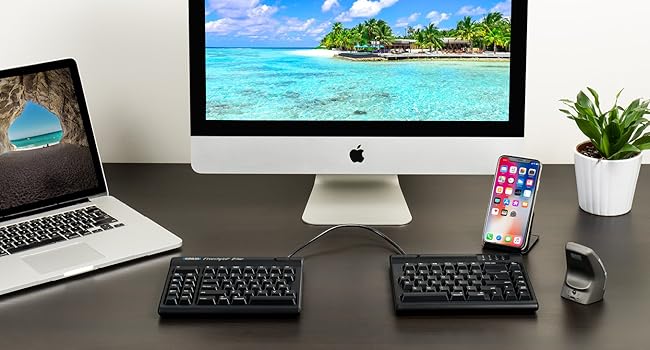
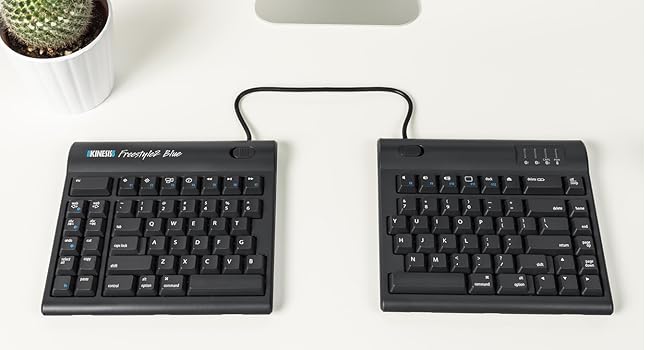
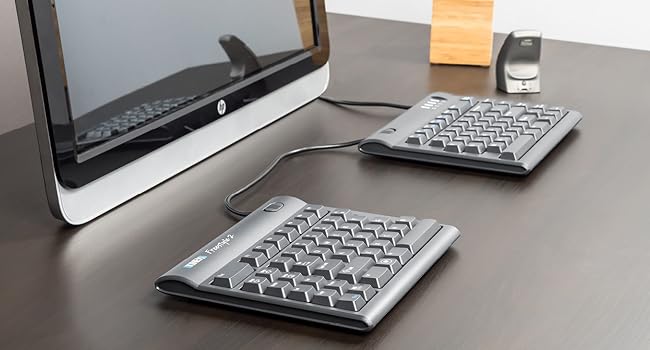
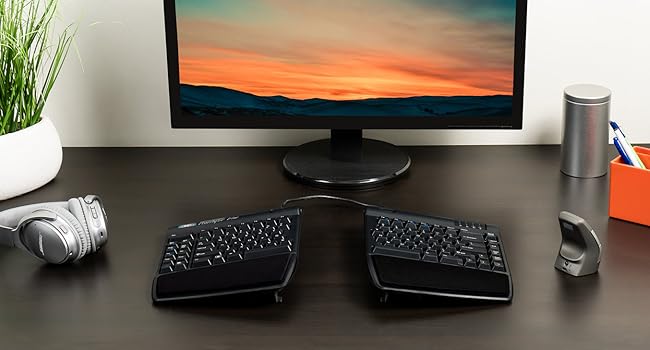
The KINESIS Freestyle2 USB-A Ergonomic Keyboard features an award-winning split design with up to 9" adjustable separation and VIP3 lifters offering 3 tenting angles (5°, 10°, 15°) for optimal wrist and forearm posture. Its low-force membrane keys reduce finger fatigue, while a standard Windows layout with dedicated hotkeys boosts productivity without the need for extra software. Designed for professionals seeking customizable ergonomic solutions, this keyboard comes fully equipped with palm supports and adjustable accessories to transform your typing experience.


| ASIN | B0089ZLENA |
| Additional Features | Ergonomic |
| Antenna Location | Office |
| Best Sellers Rank | #148 in Computer Keyboards |
| Brand | KINESIS |
| Built-In Media | adhesive cushioned palm pads, detachable pivot tether, 2 x Ergonomic Keycaps |
| Button Quantity | 94 |
| Color | Black |
| Compatible Devices | Windows 7, 8, 10, Linux |
| Compatible Operating System Family | Linux, Windows |
| Connectivity Technology | USB |
| Customer Reviews | 4.2 out of 5 stars 889 Reviews |
| Enclosure Material | Plastic |
| Global Trade Identification Number | 00607998820025 |
| Hand Orientation | Ambidextrous |
| Item Dimensions L x W x H | 19"L x 12.5"W x 3.5"H |
| Item Weight | 2 Pounds |
| Keyboard Backlighting Color Support | Single Color |
| Keyboard Description | Ergonomic, Multimedia, Membrane |
| Keyboard Layout | QWERTY |
| Manufacturer | Kinesis Corporation |
| Mfr Part Number | KB820PB-US |
| Minimum Required Operating System Version | Mac OS 14 Sonoma, Windows 11 |
| Model Name | Freestyle2 for PC with VIP3 Lifters Pre-Installed |
| Model Number | KB820PB-US |
| Number of Keys | 94 |
| Number of Sections | 2 |
| Power Source | USB Powered |
| Recommended Uses For Product | Office |
| Series Number | 820 |
| Special Feature | Ergonomic |
| Style Name | PC Layout |
| Switch Type | Membrane |
| UPC | 607998820025 607998882009 |
| Unit Count | 1.0 Count |
| Warranty Description | Limited Warranty |
A**N
A great ergonomic keyboard
It took a little bit of time to get used to this layout, but this is a very good keyboard for those looking for ergonomic equipment. It takes a bit of time to get used to the design, but practice and regular use will make it easy to adjust. The keys feel great and my fingers have never ached after prolonged use. Changing width and tenting angles are both great for adjusting the keyboard for optimizing comfort. I also really like that this keyboard has separate keys for Cut, Copy, Paste, and Undo. They make those actions much easier. I haven't used the web home, back, or forward keys very much since my mouse already has back and forward buttons. My main disagreement about the design is that the B key is on the left section. I strongly think it should be on the right. The Fn key can be confusing because it stays active after pressing it. I'm used to Fn only being active while the key is held down. The Delete key can also take some getting used to because it's the same size as the Backspace key and the keys are very close to each other. I've had a few experiences where I've tried to use Backspace but ended up hitting the Delete key instead. These issues haven't been enough to hinder my experience, and overall I'm very satisfied with this keyboard.
R**K
An Outstanding Keyboard!!!
An outstanding keyboard!!! I recently broke my wrist but needed to continue working so went looking for a keyboard that would accommodate not being able to rotate, tilt or flex my left wrist. This keyboard was exactly what I was looking for! The construction is as good as the best out there, except maybe the old IBM Model M mechanical keyboards. Mine arrived with the wrist rest and left-right tilt accessory kit installed. I wouldn't buy this keyboard without it. I tilted the left section full (15 degrees) and fiddled with it's rotation until they home keys were under my fingers without having to tilt, rotate or twist my wrist. After a few minutes getting used to the slight variation in the location of some of the lesser used keys I was able to work as quickly as if I hadn't had a titanium T plate and half a dozen screws recently installed in my distal radius bone. I definitely recommend this keyboard to anyone needing a keyboard to adjust to your hand(s) position. I also found it more comfortable for my uninjured hand versus the typical square layout or even the Microsoft Natural keyboard I normally use. After a week's use I can find only two things that might improve it. The first is if there was a way to adjust the tilt of each half from front to back. I did this by stacking 3x5 cards under it but a front to back tilt adjustment would be well worth it to go along with the left to right tilt that is built into the accessory kit. The other improvement might not be enjoyed by all, but I really like the tactile feel of the old IBM Model M mechanical keyboards. If Kinesis offered this keyboard with front to back tilt (in addition to the current left to right tilt) and mechanical keys I'd have to rate it a 10 out of 5!!! But even with these potential improvements left off, this is an excellent keyboard for the wrist movement challenged at a fair price. I'd buy it again and recommend it highly.
T**N
Very Good Overall
I have been using this keyboard 8+ hours per day, 5+ days per week, for almost 2 years now (I am a full time web developer). I originally bought this because 2 months into my job I was having intense wrist and finger pain, as well as hand cramping. After using this keyboard for a little while my pain pretty much disappeared. I will say that it was difficult to get used to at first; my typing speed went way down for awhile as I got used to it, but using it consistently helped. I also had a lot of trouble initially if I used a different keyboard (such as temporarily using my laptop keyboard) because my brain and fingers would have to readjust. I can say though that nowadays I don’t have this issue and can switch between them just fine. Some points to note: - I do not really use the shortcut buttons on the left side. - I really dislike that the Delete button and the Backspace buttons are the same size. Even after 2 years I have not gotten used to this and often use the wrong key because they are the same size and almost the same amount of reach. - I use the “medium” tenting setting without the padding and it feels great. It matches the natural angle of my wrists very well. - I do not have the halves separated very far, but I do angle them a bit away from each other because it feels most comfortable for me. I like the amount of flexibility it provides. - I really wish there was a keypad included. I find using the Function key to trigger the “keypad” in the middle of the keyboard to be very unintuitive and using the number row is awkward. I know they offer a detached 10-key pad, but $40 feels so overpriced and it requires an extra USB port. - I’m very happy that this didn’t require any additional software to work, as my job is very strict about this. If I remember correctly, I just plugged it in and it worked like any other keyboard. Overall I love this keyboard. It’s hard not to when it saved my wrists and hands. I also love how versatile it is with how you can physically configure it. If the Delete and Backspace keys were different sizes I would probably give it 5 stars, even without the keypad.
A**R
Instant relief for wrist and shoulder pain!
I switched to the Kinesis Freestyle2 after experiencing constant forearm strain, and the difference is night and day. The split design is a lifesaver—being able to position the modules at shoulder width immediately fixed my posture and stopped me from "hunching" over my desk. The keys are quiet and have a low-force feel that reduces finger fatigue, while the flat profile keeps my wrists in a neutral position. I also love the dedicated hotkeys for Copy/Paste on the left side. If you spend all day typing, do your body a favor and get this keyboard. It’s easily the best ergonomic investment I’ve made!
A**A
OMG, the best keyboard EVE!
It seems I type all day, and have gone through keyboards, have broken keys, and have particular criteria I need in a keyboard, and specific things I don't want. Important to me: ergonomic is #1. And part of that includes NOT having a numeric keypad attached. It means I have to over-reach and take my hands off the keyboard to use my mouse which slows me down. I've used the Microsoft Sculpt and loved it -- that is, until the doggle (?, the USB thing you plug into your computer) stopped communicating to the keyboard. So I bought another one. Except the new one had the same problem the old one developed after several years of great use. So I returned it. And the search was one. I got another one which had the same problem (the lag time between hitting the keys and it typing was either terribly slow, or the keys I typed never showed up. And then I started reviewing the reviews much more thoroughly, and it seemed NONE of the reviews of the ergonomic keyboards without numeric keypads had unanimously positive reviews. Except 2: one of them was about $200 + an additional $150 or $200 for the lifters. Well, if this thing works best with the lifters (which all reviews say it does), why would that not be included? Plus, it had features I didn't like and didn't really want, including bright red, blue and green lights on the keys, and keys you could program (largely for programmers, which I am not). Another feature I want is for the caps lock key to be backlit so I can tell at a glance if it's on or not. And then a friend sent me the link to this keyboard. It had all the features I wanted, none of the features I didn't want . . . at a fraction of the price. And the reviews were ALL positive. It's still costs more than the average run-of-the mill keyboard. But, when my friend compared it to when he buys a guitar.... he doesn't mind spending the money on a Les Paul. Well, my keyboard is how I make music!, and so I decided to go for it. It's my Les Paul! It was instant plug-and-play, I have the lifters in the halfway position, and am totally in love with it. It took zero time to get used to. So what that it has a cord. This keyboard is a dream. I'm so grateful to have found it!!!!!! You won't be disappointed. Oh, one more little thing. I use the little bumps that remind my fingers when they're on the home keys (or not!). These little bumps were rather little, and hard to sense. So I just added a little thing (a textured tape) to make the bumps bigger, and now my fingers find the home keys without my having to look!
R**D
Very pricey, cool concept but lacks in execution
The idea behind it is pretty good, however it's overall a pricey keyboard that requires a bit more set up for the price. For starters let's look at the concept: it offers a very interesting concept to completely move two halves of the keyboard around to whatever distance you need it to separate. The default is around 9 inches where the deluxe is 20. Truth be told, you generally don't need the 20. The info page doesn't really show the differences too much but be VERY careful in reading the item descriptions and make sure you understand EXACTLY WHAT YOU ARE GETTING. I personally got the Kinesis Freestyle2 VIP one. That is the most expensive one with ALL the accessories: the V lifters and the palm rests. In order to receive the palm rests, you MUST buy the VIP. They come with so many different types that you need to make sure you get exactly what you're looking for, I stress again. They don't always make it too clear in the descriptions but if you want only the V-lifters, you'll only get those, the keyboard will not be included. To be safe, if you buy the VIP one, it'll get you everything that's in the advertised pictures. Now with the basics out of the way: for the price, I really didn't like the fact that I had to put the adhesive foam cushions onto the palm rests. I believe they should've been installed already. When you look at the cushions, they look very cheap, like they're just some arts and crafts foam that you buy at Michael's. The V-lifters are an interesting concept which can angle your keyboard vertically. Cool concept, but they should have an option to lock them in place. You only have the option to lock it in place once on the initial tilt setting, while if you want the maximum tilt, the lifters simply just hang limply out if you lift the keyboard up to re-position. It makes it kinda annoying to carry around and a bit unstable feeling if you want to move it around, etc. That little pivot tether thing in the middle, feels extremely cheap and like it will snap off as you tilt the keyboard and angle it. The overall plastic doesn't feel very durable in general. The lack of a number pad is manageable and it's good in the event that you don't have to reach too far out for the mouse, which is a cool concept. All in all, the keyboard concept is very cool and it's pretty customizable which makes it great for your experience as an individual, but for the price, it just feels kinda unstable and cheaply made. The biggest complaints I had were sticking the adhesive foam palm rests on, and that there aren't too many options to 'lock' the keyboard in place if you find a comfortable setting. When transporting the keyboard or moving it around in general, all the accessories just hang around limply like dead fish instead of a solid unit like most keyboards.
F**G
Finally! Comfort, relaxation, and flexibility in a keyboard!
A week ago I ordered an "ergonomic" wireless mouse by Anker. I was so happy with it I decided to splurge and try the Kinesis Freestyle2 PC Keyboard & VIP3 which arrived today and I set up less than 30 minutes ago. None of the reviews mentioned the immediate shoulder relaxation achieved with the use of the Freestyle 2 and VIP3. Before, my shoulders were constantly hunched up around my ears and no amount of reminding myself worked for but a few minutes then it was right back to tension-ville! After having plugged in the new keyboard and toying with it for a couple of minutes, I suddenly realized my shoulders naturally assumed a relaxed position! This could be the single best benefit of all for me. I have the world's best masseuse but at $120 a session, I can enjoy the sessions rather than be forced into them! The heels of my hands don't even rest on the palm pads while typing anymore – I am holding my hands while typing in a way that would make any piano teacher proud! This is terrific! Furthermore, what terrific Left hot keys!!! I ordered a separate numeric keypad I hope will be delivered in the next day or so however, until then, I am going to try the embedded numeric pad - never liked them but must give it a go given how terrific everything else is! I am thrilled with my new found comfort and improved posture. I am certain, should I (correction, WHEN I) face another marathon computer session, I won’t need to see my massage therapist or my chiropractor, nor will I need a refill on my prescription narcotic pain pills. This is practically miraculous and all because someone had the common sense to say “Wait a minute! That’s not natural” and then to look at what is. Thank you, thank you, thank you!!!
B**H
Bulky, loud and made of cheap plastic
I'm sorry for giving a bad review. My parents taught me that if you can't say something nice don't say it at all. But I also rely on Amazon reviews for my purchasing decisions, so I feel this is warranted. From the moment I took the keyboard out of the box I was surprised at the low quality. First, it was packed with no padding, but no biggie, good to protect the environment and save on waste, but made me wonder if it had been previously used. Wouldn't a quality product warrant protection and be packed with care? When I lifted it out of the box I expected it to have some heft and feel solid, but it felt flimsy, like cheap lightweight plastic. The tenting risers were already attached but one kept falling off. It is basically plug and play, so it's easy to set up, and the split keyboard was quick to adapt to. I liked that part of it. What I did not like, and what is causing me to return it is the following: its bulky size was like switching to a maxi pad from the panty liner-size Mac keyboard I'm used to. My hands are not particularly small, but I had to extend my fingers so far and so high that it was causing a whole new set of physical issues, adding to the ones that prompted me to invest in this split keyboard in the first place (and not a cheap investment compared to other ergonomic keyboards out there). Also, the keys, besides being big and high and spaced too far apart for my female fingers, are not quiet. The clickety-clack was driving me nuts. I'm returning it and for now will keep using my Mac keyboard, my wrist brace, and the J-Tech vertical mouse I just bought, which was well worth the money.
V**P
Great product in use since 2014 and still working fine
I've been using this keyboard at work (software testing) since 2014. It pretty much cured severe forearm and wrist pains. During the pandemic lock-down brought it home and used it since for work and personal computers. Now that I'm spending more and more time at the office again, started noticing discomfort while using a conventional keyboard there. So, bought a second one to keep there. In 11 years that I'm using the first one, gave it a couple of complete clean-ups, removing all keys, and putting them back. No noticeable wear on key labels. Easy to change keyboard inclination and rotation, if someone else needs to use it. Very pleased with this product.
N**N
Keyboard perfection
I've had a Kinesis Freestyle Pro split keyboard for years but managed to spill half a cup of tea over it and it completely failed, which was disappointing. To save a bit of money I went for the Freestyle2, it's great, I actually prefer it to the Pro, it has a really great feel, is quieter though still has good feedback and the build in raisers are great.
M**C
Great for my carpal tunnel and tendonitis
Fantastic! have high sensitivity in my tendons from past carpal tunnel and bilateral tendonitis injuries.
J**N
Great product but takes getting used to, which cannot be helped
Works perfectly and easy to set up. There is a minor modifier key problem since I use it for Windows, Mac and Linux machines regularly, via KVM switch, but not a big deal. I have used a split keyboard ( Microsoft natural economic) for years but the tent configuration of the Kinesis keyboard takes getting used to. I kept missing the “n” key, but not so much now. The Kinesis doesn’t seem to strain my wrist and elbows as much, and that is the main thing. The keys feel good to use and the keyboard is stable enough that it doesn’t slide and the tent position stays up.
H**R
están fuera de serie
No tiene límites para usarlo a la medida de nuestras manos
Trustpilot
2 days ago
1 month ago