Buy anything from 5,000+ international stores. One checkout price. No surprise fees. Join 2M+ shoppers on Desertcart.
Desertcart purchases this item on your behalf and handles shipping, customs, and support to Tunisia.
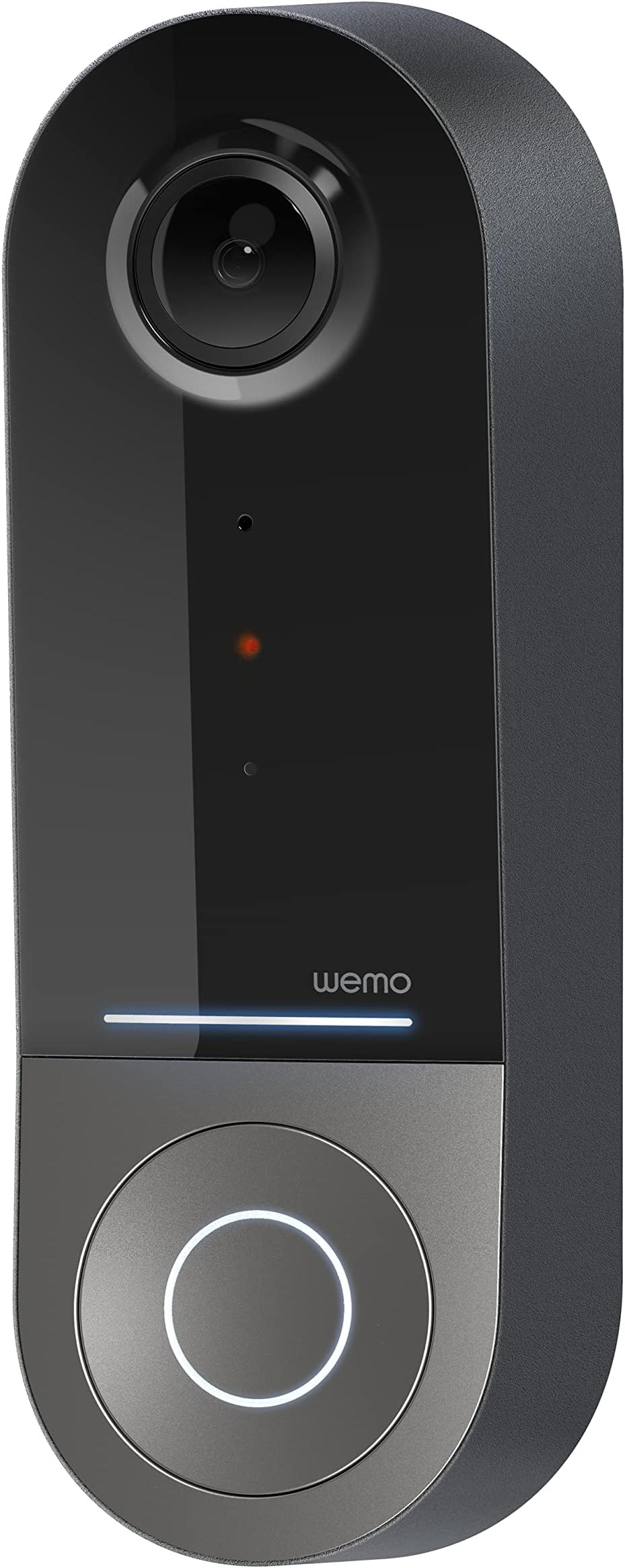
🔔 Elevate your doorstep security with Wemo’s ultra-wide smart video doorbell—because your home deserves the best view.
The Wemo Smart Video Doorbell is a wired, Apple HomeKit Secure Video-compatible device featuring a 223° diagonal HDR camera with infrared night vision, dual-band WiFi connectivity, and 10-day motion-based iCloud video storage. Designed for professional-grade home security, it integrates seamlessly with iOS devices to provide real-time alerts and two-way audio, ensuring you never miss a visitor or package.


| ASIN | B09RYVNG55 |
| Alert Type | Motion Only |
| Antenna Location | Doorbell |
| Are Batteries Required | No |
| Best Sellers Rank | #234,670 in Tools & Home Improvement ( See Top 100 in Tools & Home Improvement ) #300 in Video Doorbells |
| Brand | WeMo |
| Built-In Media | Smart Video Doorbell, Setup Guide, Bracket, Left/Right Wedge, Screws and Screwdriver, Power Kit with Connectors |
| Color | Black |
| Compatible Devices | HomePod, iPad, iPhone |
| Connectivity Protocol | Wi-Fi |
| Connectivity Technology | Wired |
| Control Method | App |
| Controller Type | Apple HomeKit, Nest, Ring, WeMo |
| Customer Reviews | 2.8 out of 5 stars 316 Reviews |
| Indoor Outdoor Usage | Outdoor |
| Indoor/Outdoor Usage | Outdoor |
| Installation Type | Screw In |
| Item Dimensions | 2.1 x 1.8 x 5 inches |
| Item Type Name | Video Doorbell |
| Light Source | Infrared |
| Manufacturer | Wemo |
| Model Name | Wemo Doorbell |
| Model Number | WDC010 |
| Mount Type | Wall Mount |
| Night Vision | Night Color |
| Number of Channels | 2 |
| Number of Items | 1 |
| Other Special Features of the Product | HD Resolution, Image Sensor, Night Vision |
| Power Source | Corded Electric |
| Recommended Uses For Product | Doorbell |
| Room Type | Classroom, Kitchen, Living Room, Office |
| Special Feature | HD Resolution, Image Sensor, Night Vision |
| UPC | 745883820092 |
| Unit Count | 1.0 Count |
| Video Capture Format | MP4 |
| Video Capture Resolution | 1080p |
| Voltage | 24 Volts |
| Waterproof Rating | IP65 |
| Wattage | 6 watts |
| Wireless Technology | Wi-Fi |
R**O
A Complete Disaster!
I have used plenty of smart home products, and I usually have a decent experience, but the Wemo Smart Doorbell is hands down one of the worst products I’ve ever dealt with. This thing is a trainwreck from start to finish, and if you’re considering buying it, do yourself a favor and run the other way. Power Kit Nightmare: It Just Doesn’t Work One of the biggest selling points of this doorbell is that it’s supposed to work with your existing chime via a “power kit.” In reality, the power kit is a complete failure. No matter what you do—whether you follow the instructions to the letter, hire an electrician, or sacrifice a goat under a full moon—it simply will not work properly. The chime either doesn’t ring at all, or it makes a faint buzzing noise like it’s dying a slow and painful death. Sometimes, the doorbell completely cuts power to the chime, leaving you with a doorbell that doesn’t actually notify you when someone is at the door. That defeats the entire purpose of a wired doorbell. Unreliable Performance Even if you somehow get past the power kit catastrophe, the doorbell itself is one of the least reliable smart home devices I’ve ever used. The motion detection is wildly inconsistent, sometimes missing people entirely while sending alerts for cars driving down the street. The video feed frequently cuts out, and on multiple occasions, the doorbell just went completely offline for no reason—requiring a full reset to even get it working again. Apple HomeKit Integration? Barely Functional Wemo loves to market this as a premium Apple HomeKit doorbell. In reality, the HomeKit integration is as unstable as the rest of the device. The camera randomly stops responding in the Home app, the chime issues persist, and there are long delays when trying to view the live feed. If you’re an Apple user hoping for a seamless smart home experience, this doorbell will make you regret your decision immediately. Terrible Customer Support You might think, “Well, maybe I can just contact support and get this fixed.” Wrong! Wemo’s support is practically nonexistent. If you somehow get a response, they’ll just tell you to reset the device, check your wiring, or reinstall the app—all things you’ve already done ten times. They have no real solutions for the power kit issue because it’s clearly a fundamental design flaw, not a user error. Overpriced Garbage Considering how expensive this thing is, there is no excuse for it to be this bad. There are plenty of better, cheaper, and actually functional alternatives from brands that actually know how to make a smart doorbell. Wemo completely dropped the ball on this product—it’s unreliable, poorly designed, and an absolute nightmare to install and use. Final Verdict: Avoid at All Costs If you want a smart doorbell that actually works, this is NOT IT. Between the broken power kit, unreliable performance, and abysmal customer support, this product is an absolute waste of money. Do yourself a favor and get literally anything else.
J**M
Best HKSV option available.
Coming over from the Circle View and this is 1000 times better. First, the chime connector is smaller and fits inside the chime box instead of having to go outside on the wall. Second (and most important), it doesn't disconnect in mildly warm temperatures. The Circle View disconnected anytime temps got over 70 degrees and then essentially wouldn't work all summer. It was never in direct sunlight. I've had zero disconnections with this item so far and I'm so grateful I don't have to think about it. The video quality is slightly worse than the Circle View but I don't even care at all as long as it stays connected. The FOV is better than the Circle View and I can see packages right up against the door. This is the best option available for HKSV. I will note that I upgraded my transformer to 24V 40A. People who may be having connection issues either don't have a wifi point close enough or the wrong transformer IMO.
J**S
Double check your voltage!
This replaced a first gen Ring doorbell, as I wanted Apple HomeKit integration and better picture quality. Initially, I was very disappointed with this doorbell - it was constantly reseting, locking up, and the hardwire door chime stopped working. Unfortunately, I waited too long to return it to Amazon, so I decided to request a replacement from Wemo and started checking their support site. It was at this point I noticed the voltage requirement and decided to double check my system. I had assumed my voltage was fine as the Ring doorbell worked reasonable well for many years, but to my surprise I only had a 5v transformer. This doorbell requires 16-24v. I upgraded the transformer about three week ago, and the doorbell has been functioning perfectly since. No more resets and lockups, and the chime works again. I really like the Apple integration. Whenever someone arrives, a photo is sent to my watch. If we are watching AppleTV, a live video will automatically pop up. It also has facial recognition support, although that is a bit spotty. The daytime picture and motion detection are fine for my needs, but I would have to say that the night picture is not the greatest. Installation was pretty easy. I knocked off one start because you have to install an extra piece of wiring in the chime; I did not need to do that with the Ring doorbell. The doorbell is typically pretty responsive when trying to do realtime operations, like starting a live feed. However, it does still fail to connect from time to time. One tip that may help with that issue: After installing the doorbell, go to your router DHCP settings and make sure the modem always assigns the same IP address to the doorbell. Possibly do the same for your Home Hub device (typically AppleTV or iPad).
T**1
Disappointed, Poor Value Overall
I will be returning this doorbell because it is flat out useless. I can't believe how incredibly unreliable this doorbell is, and even when it works it is barely better than doorbells that are a fraction of the price. When you open the Home app, the video preview is always blurry, and it has to be opened full size to view a clear video. According to Belkin this is intentional. The flat mount is aluminum and fairly sturdy, but the angle mount consists of attaching a piece of plastic to the aluminum base using the smallest screws invented by mankind. While neither could be considered theft-proof, the plastic bracket could yanked off the wall by by a five-year old. Should be much better considering the steep price. Motion detection is horrible. It will not detect anything unless it is within 1-2 feet of the camera. Anything further is invisible. My other HomeKit cameras detect people and vehicles that are hundreds of feet away. It overheats in direct sunlight, resulting in it going offline and randomly disconnecting. It's only March, so clearly this will not work at all during the summer. This is a dealbreaker even if it was perfect in every other way. I didn't research this when I bought it because I assumed that this type of product would be designed to work outdoors, but Belkin's specs state max temp of 45° C (113° F). While this seems adequate, exposure to direct sunlight will increase temperature by 20-30° beyond the ambient air temperature. It is also lower than the max temp for Ring and other cameras. Even when it is not overheated, it goes offline for no apparent reason, day or night. There is no way to easily "reboot" or reset it, but a day or two later it decides to start working on its own. There is no way to configure anything via a separate app or even in HomeKit. You cannot turn off night vision, for example (and no, this is not a HomeKit limitation). Extremely expensive. This is the most expensive video doorbell by a large margin, and you basically get nothing beyond what other video doorbells offer (aside from HomeKit integration). Other doorbells offer better video quality, configurable options, sturdier mounting, and better security. The warranty fiasco. Was three years when I bought it, but it turned out to be a "typo." In sum, this is a very poorly designed, unreliable, and extremely expensive video doorbell. Whoever greenlit this for release at Belkin should be ashamed of themselves.
X**6
After all I did to fix the camera in the review what helped was to open up the firewall ports.
Open up all the firewall ports in the router to allow inbound and outbound connections to this specific device only with a static ip address in the router. Most routers have some connections closed but this WEMO doorbell camera functions but not as responsive as without the firewall ports configured correctly .A more reliable firmware update is needed and over due by now since it is needed to be adjusted to be more sensitive to become more sensitive to motion.Might also be the isp is dropping the camera feed connection because of heavy network traffic. To get the best connection use the 1 channel of the 2.4 GHZ band and 20 MHZ width manually instead of auto scan band selection on the router because auto scan band selection will disconnect all devices. If your router supports IoT dedicated band turn this on and add the camera to HomeKit while your iPhone is connected to the IoT band. Make sure on your iPhone in the Wi-Fi settings you set auto-join Wi-Fi networks to off while you setup the camera to HomeKit if you’re setting up on the IoT band or else you’ll get an error The motion sensor on this camera only activates if it detects near by motion even though movement in the camera can be seen in the live stream. So it will not always actually film left to right or right to left movement unless the person is actually coming to the doorbell camera itself. The camera will always work if it likely knows the person is actually coming up to the camera. It’s a smart camera so even if you don’t trust it it will work as intended. Belkin says the camera has a hardware problem but I think a better firmware software update can fix it so I have a replacement and the second camera has the same issue.As long as the camera is always recording even an Apple homekit server side update in the Apple’s end can improve this cameras communication handshake issue. Some people also may have issues with the camera disconnecting after rebooting their router so don’t reboot your router so often. If you do reboot your router and the camera does not connect you may have to unscrew the camera and reset it with a pen for 1 to 2 seconds to connect it back to the Wi-Fi. If you still have problems with the camera disconnecting after sometime you may need to set the Wi-Fi channel manually in your router to a certain channel that’s not being used by your neighbors. Because when the Wi-Fi channels change because of overcrowding it will disconnect the camera and a reset with a pen on the camera for 1 to 2 seconds will need to be performed. You will need a good router with good coverage. If you have a Fios quantum gateway router those only do about 325 sq ft range so an upgraded router that has more coverage than that will be more reliable.
G**O
HomeKit Connection Set Up is Terrible
Purchased the Wemo back in December after closing on my house, however, didn’t try to install it until March. Set up was relatively easy until you get to connecting to HomeKit. Followed the included instructions AND the YouTube video but no matter what I did I would get unable to connect to accessory. Then when I try to go back it says it’s already added. So I’d have to do a hard reset to start over. I eventually contacted Belkin Customer Support and did every troubleshooting method. Nothing worked and was sent a replacement. I got the replacement today and same thing I spent a few hours researching this issue, watched another YouTube video that was going through the same thing and read the comments. After trying all the suggestions I found ONE that worked for me. I changed my wifi password so there was NO special characters. Once I did that I was able to fully connect the doorbell with no issues. No where did it say that in the instructions that special characters were not allowed. After some use I may come back and update my review. But if you decide to get this and come across the same issue check your WiFi password and if there’s special characters. Update: As of July 17, 2023, my unit stopped detecting motion and sending notifications. Have not been able to fix. Update: As of August 27, 2023, my unit is detecting motion and sending notifications as it should. However there have been many times it says the doorbell is not responding and I have to restart it. That is kind of a hassle. I would say I love the idea of this product BUT it needs major improvements.
E**C
My Experience with WeMo Doorbell
I initially purchased the WeMo video doorbell when it first came out January 2022 directly from Belkin. The install was much easier than Ring. The video quality was satisfactory but the motion detection works correctly most of the time but is definitely subpar compared to Ring. I also did not like that it did not have color night vision like Ring. Like others, I notice the WeMo would go off-line but only every 6 to 8 months or so for me. I installed it with the wedge to angle it which does improve the motion detection but still could be better. Few weeks ago when I cleaned the surface with alcohol it did leave a white film that I was able to wipe off with tissue. However, it suddenly went dead an hour later. Tried to re-install it a couple times but it didn't work. I ended ordering a new unit from Amazon because I noticed the price had dropped to $89 compared to the initial $250 few years ago. On the day that it shipped from 3rd party with Amazon, I decided to try to reinstall my old unit and somehow it started working again. I suspect the 70% alcohol I used for cleaning likely dripped to the back and did something. The unit continues to work almost two weeks out now. I did finally upgrade the doorbell transformer from 16 VAC/10 VA to 16 VAC/ 30 VA and now it's very responsive and quick loading the video and ringing our mechanical chime has no delay now. I suspect this should also solve the wifi connection going off-line too hopefully. I returned the new unit that I bought from Amazon.
E**L
Disappointing Performance and Unreliable HomeKit Integration
Unfortunately, this has been the worst digital doorbell I’ve owned. The biggest issue is how poorly it operates with Apple HomeKit. While Wemo advertises itself as a premium Apple partner, the HomeKit integration is extremely unstable. We frequently encounter “No Response” errors, making the doorbell unreliable for daily use. Network connectivity is not the problem. We have a dedicated IoT wireless access point located right by the front door, and all other smart devices on the same network perform without issue. Power is also not a concern, our home is new, and we have never experienced any electrical problems supplying the doorbell. Customer service is another weak point. Support interactions were not particularly helpful and did little to resolve the ongoing issues. I originally purchased this doorbell when it retailed for $200, and even at its current price of around $92, it still does not offer good value. Given the instability, lack of reliability, and subpar support, I cannot recommend this product, especially to users who rely heavily on Apple HomeKit.
A**R
Good video door camera.
Clear video pictures, easy to set up. Had to get special transform for it, but worth the effort.
M**A
Deconnecte tout le temps
Je ne recommande pas car il se déconnecte tout le temps. Pas fiable
R**K
Terrible quality never works
The worst camera bell you could buy. Skip it It has only ever gave us a headache
Trustpilot
2 months ago
2 weeks ago