Desertcart purchases this item on your behalf and handles shipping, customs, and support to Tunisia.
🔥 Stay cool, save green, and own your comfort like a pro! 📲
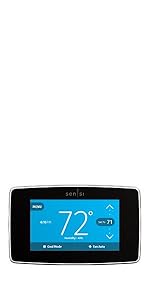
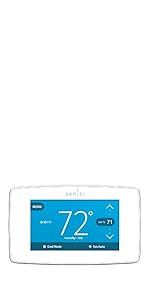
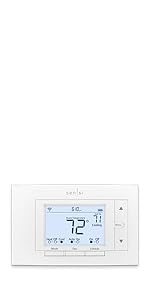
The Sensi Smart Thermostat ST55 combines Energy Star-certified efficiency with advanced Wi-Fi connectivity and a user-friendly app, enabling professional-grade HVAC control without complicated wiring. Designed for privacy-conscious millennials, it offers flexible scheduling, smart maintenance alerts, and seamless voice assistant compatibility—all backed by Emerson’s century-long HVAC expertise.






| ASIN | B01NB1OB0I |
| Additional Features | Data Privacy, Easy DIY Install, Energy Savings, Filter Indicator, Programmable |
| Best Sellers Rank | #2,408 in Tools & Home Improvement ( See Top 100 in Tools & Home Improvement ) #10 in Home Programmable Thermostats |
| Brand | Sensi |
| Brand Name | Sensi |
| Color | White |
| Connectivity Protocol | Wi-Fi |
| Connectivity Technology | Wi-Fi |
| Control Method | App, Touch, Voice |
| Control Type | Button Control |
| Controller Type | Amazon Alexa, Apple HomeKit, Google Assistant, SmartThings, Vera |
| Customer Reviews | 4.4 out of 5 stars 23,047 Reviews |
| Display Type | LED |
| Finish Types | Glossy |
| Global Trade Identification Number | 00786710554827 |
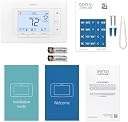
| Included Components | Thermostat, free mobile app, 2 AA batteries, mounting hardware, wire stickers, installation guide, welcome guide with Sensi code, warranty booklet |
| Item Dimensions D x W x H | 1"D x 5.88"W x 3.75"H |
| Item Type Name | , Works with Alexa, Energy Star Certified |
| Manufacturer | Copeland |
| Manufacturer Part Number | ST55 |
| Manufacturer Warranty Description | 3 years. |
| Material Type | Plastic |
| Model Name | ST55 |
| Model Number | ST55 |
| Mounting Type | Wall Mount |
| Number of Batteries | 2 AA batteries required. (included) |
| Number of Items | 1 |
| Power Source | Corded Electric |
| Product Dimensions | 1"D x 5.88"W x 3.75"H |
| Product Style | DIY |
| Screen Size | 5 inches |
| Shape | Rectangular |
| Special Feature | Data Privacy, Easy DIY Install, Energy Savings, Filter Indicator, Programmable |
| Specific Uses For Product | Air Conditioner, Boiler, Furnace, Heat Pump |
| Temperature Control Type | Programmable, Smart/Remote |
| UPC | 786710554827 |
| Unit Count | 1 Count |
| Voltage | 24 volts_of_alternating_current |
L**O
Super easy to install and to interface with app!!
This is a must buy!! This was super easy to install!! Note: I think you are supposed to set up the app FIRST and THEN install the device!! But it worked just fine. I think it would have walked you thru the installation if we set up the app before installing the device. We removed the old thermostat’s cover plate then held up this thermostat w/o the cover plate. Then we took a quick pic of the old thermostat’s wiring with this thermostat’s inner panel. We removed the wiring in the order of this thermostat’s wiring diagram, too to bottom and removed the old plate. When we slipped this thermostat over the wires, they were all aligned an in order. Easy peasy to insert each one in order, top to bottom or bottom to top. Press down the wires, pop on the cover plate. Then we had to download the app, Sensi, and go thru the process to create a profile, select the wires inside our thermostat, and then zip thru the set up. So later, we were messing around with the app, setting up the schedules for when to cool/heat and at what temperatures to change and when. The app interface was SO VERY EASY!! It allows you to copy previous schedules or to create new based on existing schedules. It was really intuitive how to schedules and click thru everything. You can set schedules for when you only have heat on. And you can set schedules for when you only have the A/C on. AND you can set other schedules for when you have it on auto and it switches between heat and cool. Additionally, you can set any type of schedule combo for the week. So if you work from home, set a 7 day schedule. If you work M-F, set a 5 day schedule and weekend schedule. If you work 4-10s, easily set one schedule for your work week and a second for your 3-day weekend! Best yet! If you are a fireman or nurse and work a couple days on and a few days off , set up a schedule or two, call one long week and one short week or call it MTFSa/WThSu to show which days you are at work/home. I have never had one where I could schedule each day independently and was so easy to make multiple schedules. I can create one schedule for the days I work/am home, and then create a copy of that and just swap the days that I’m at work/home without having to schedule each and every day all over again. This is the easiest interface EVER!! ( I know my explanation doesn’t do it justice, but it is nice. I’m about to schedule another one for when I work nights. Then I just toggle between them at work if I find out I need to pull a double shift I hate new technology… but this was a dream… even for me!! Sensi, I tip my hat to thee for your user friendly product!! THANK YOU!!
P**T
I Am Impressed!
Emerson did an amazing job with this product! I finally broke down and bought a wifi thermostat because I was tired of having to continually run over to my manual thermostat to adjust it. When going from summer to winter, or winter to spring, there are many days where you need heating on one day, and cooling the next... or heating during the morning... cooling during the day... and heating again during later that night. This makes the wifi thermostat the only logical choice. My initial concern was the infamous "c-wire," and whether that would be an issue, but Emerson has developed a system that is as foolproof as you can find. You download their app, and simply follow the step-by-step instructions, and voila! If necessary, you can go back a page or two, or you can go through the entire app a page at a time, to familiarize yourself, then go back to the first page and begin. I can't speak highly enough of their app and how well it is done. I only wish other companies would follow suit, and include such an easy to follow instruction app! As to the thermostat itself, it is not too difficult to figure out, and I was most pleased with how quick and simple it was to setup the daily schedule. That was the one area where it was not as intuitive as it could have been, and a few extra instructions explaining it could have helped. But I still managed to figure it out in just a few minutes of trial & error, since the screen would tell me that I was doing it wrong, and would not let me go to the next step. But again... all in all, it was a surprisingly simple process from start to finish. I was also pleased with how easy it was to setup the daily schedule. On my 7-day programmable manual thermostat, each day had to be set individually. On the Sensi, you can simply select select the days that you want programmed, and apply the temperature settings to that entire range of days. So rather than having to program 7 individual days, I simply set a schedule for 5 work days, and another schedule for my two days off. The one thing I would caution everyone about is AA batteries! The batteries in the package were about 70% when I installed them into the thermostat. Fortunately, I keep plenty of rechargeable batteries on hand, so I was able to charge up a set. When I installed those, the battery meter showed a full 100%. I will monitor to see how long the batteries last, but with rechargeable batteries... it's actually no big deal one way or the other. The unit works fine, and it took no time to install. The mounting bracket uses the exact same holes as the unit I was replacing, and you will probably need the super tiny philips head screwdriver and a pair of needle nosed pliers to push the copper wires back into the wall after you have them inserted & screwed down on the thermostat wall mount. If you leave them extending out, they will block you from being able to snap the face-plate onto the wall mount. I highly recommend this unit. The cost is excellent... it works excellent... and installation was a breeze! A+ & 5-Stars!
K**N
Great Thermostat
This is a great thermostat! I did have issues getting the wifi to connect at first but Sensi's troubleshooting steps worked. Another thing I want to mention, so I have the set up to be able to not have to have a c-wire, however after researching why that is, I found out it does a thing called power stealing, typically from the fans wire, that can cause issues with your system. So I called my HVAC guy who confirmed that it is better to have the c-wire because of the issues with power stealing. Yes, the self install instructions for this thermostat are straight forward but I still had my HVAC guy hook up the C-wire (I am lucky enough to have had a spare, unused wire behind my thermostat) and install the thermostat for me. The app is very straightforward and it works like a dream.
D**K
Easy and accurate
This thermostat was incredibly easy to install and has already saved us a ton in just the first month or so. We purchased a new home in Minnesota but could not be there permanently for the first few months through March and April. In late March I installed this thermostat while at the house. The old dumb thermostat simply was running at a low temp while away which could have put the house at risk for cold weather. First off - Installation was simple. It took me about 10 minutes to install and it connected easily to our Wifi. I was able to set a couple different schedules and able to monitor them from our home in Colorado. I could see actual in home temps. See when the furnace was running and see outside temps forecast in the area. Upon return to our new home, I was able to use schedule which changed temps throughout the day based on our needs. I recommend this to our son and he installed one as well and loves it. A nice bonus was our local electrical company provide a nice rebate. I highly recommend.
S**R
So far not bad, feature rich for the price.
So fareorking just fine. Setup wasa breeze, have a 4 wire system without the "C" wire and worked fine. But can be setup to work with that system too = a 5 / plus wire system. Can run 2 separate HVAC systems, can do heat pump plus other. WIFI setup quick / easy and spp shows installation steps. I'll though this is somewhat buggy, you still get the gist. Not for a Novice, might confuse them. Someone who is electrically, WIFI and mechanically inclined, no problem
A**L
Top-Notch Build Quality with Unmatched Convenience.
"Out of all the thermostats I’ve used—including Amazon’s—this one easily takes the crown. Right out of the box, the quality is obvious: the body, display, and buttons are exceptionally well-coordinated to match most home decor. Beyond its sleek looks, installation is seamless and the functionality is incredibly flexible. Even though the companion app could use a slight UI refresh, its performance is rock-solid. The Alexa integration is a standout feature, giving me total control over timers and temperature settings even when I'm away at work. If you're looking to upgrade your home's thermostat, this is definitely the one to get."
J**T
Buyers Should Proceed with Caution
After 3 hours trying to get the wifi to connect and subsequently waiting 40 minutes for support to answer the phone, the Agent sent this to try and rectify the issue: Thank you for contacting Sensi Technical Support. I apologize for this issue that you're having, but I can definitely assist you with a solution. It looks like your thermostat is having some trouble communicating through your router. Below are some router settings you can change to optimize connectivity. You may have to call your router's technical support service if you do not know how to make these changes. If your router is provided by your Internet Service Provider, contact them and they can remotely make these changes for you. • Update the firmware. Check to see if your router is running the latest firmware version available. o If you don’t see any firmware updates available on your router utility, make sure to check the manufacturer’s website for your specific model. They may have a firmware update available on their website. o If no updates have been available for the last couple of years, or if your hardware was manufactured prior to 2010, it may not comply with 802.11n standards. o If your hardware is provided by your Internet Service Provider, you may have to contact them to have your firmware updated. If no update is available from them, try resetting the router to factory defaults (see below).If that does not resolve the issue, ask to be provided with different hardware. • Reset your router to the factory default settings. It could be that some settings were corrupted over time because of electrical storms or power outages. Reference your router manufacturer’s instructions for assistance. *Please note, if you use a different SSID or passphrase after the factory reset, you will need to reconnect other devices to the network. • o Take note of your SSID (network name) and passphrase to reset after the factory default. o Set the security to WPA2 with AES encryption. o Set the 2.4GHz band to the 20MHz channel width. o Test to see if Sensi connects to your router. If it does, try adding back any custom settings to your router configuration. • Temporarily disable the 5 GHZ network, if you have a dual-band or mesh Wi-Fi network. This option typically can be found in the advanced settings of your router’s mobile app. Once Sensi is successfully registered and connected to Wi-Fi, you can re-enable the 5 GHz network. If you are still experiencing Wi-Fi issues, it may be necessary to separate your dual-band network. • Configure dual bands (2.4GHz and 5GHz) with different SSIDs/network names and passwords. This will allow you to connect the faster, higher data rate (streaming) devices on the 5GHz and keep the lower data rate devices (printers, thermostats, home automation, etc.) on the 2.4GHz. • Disable “MAC Address Filtering.” • Make sure your security is set to WPA2 with AES (CCMP) encryption. • Set the 2.4GHz band to the 20MHz channel width. • Consider using a Wi-Fi Analyzer app to see which channel (1, 6, or 11) has the least amount of traffic, and configure your router to a specific channel instead of "Auto." • Make sure the router is compatible with IEEE (Legacy) Power Save Polling. This is what the thermostat uses to stay connected to your network. • Sensi smart thermostat and Sensi Touch send TCP traffic on ports 80, 8091 and UDP traffic on port 8092. Sensi Touch 2 and Sensi Lite send TCP traffic on ports 8883 and 443. To receive over-the-air firmware updates, please make sure UDP traffic to port 8092 (34.233.82.197) and TCP traffic to port 80 (52.55.206.183) is open. For Sensi Touch 2, also make sure that TCP traffic to port 8883 (54.210.127.220) is open. This traffic needs to be able to navigate any network firewalls, proxies, or filter devices. This is insanity. All my other devices work fine off the gateway & router. The Agent gave up and told me to return the product - which will be done. How
N**A
A smart thermostats that does what you ask!
We use our smart thermostat to remotely control the heat and A/C at a lake cabin. We had a first gen Nest which worked great, but google stopped supporting the remote access. We bought a 4th gen Nest through google (at discounted price) which was working fine until a power surge blew it out as well as the control board of our furnace! Our furnace repair guy replaced the thermostat and we never saw the Nest again. Not wanting to spend $200+ on another Nest, I started looking around and found the Sensi. It was priced right, easy to install and works great. Much simpler than the Nest which tries to be too smart. I just want my smart thermostat to work remotely and achieve the temperature I ask for. It doesn’t need to read my mind or try to decide if I’m at home or not. I love the Sensi.
Trustpilot
2 weeks ago
2 weeks ago