Desertcart purchases this item on your behalf and handles shipping, customs, and support to Tunisia.
🎨 Elevate your creative edge with color-perfect clarity and Mac-ready power.
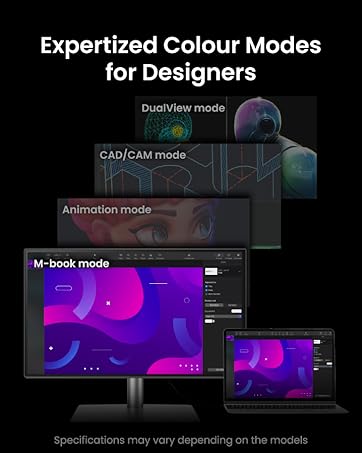
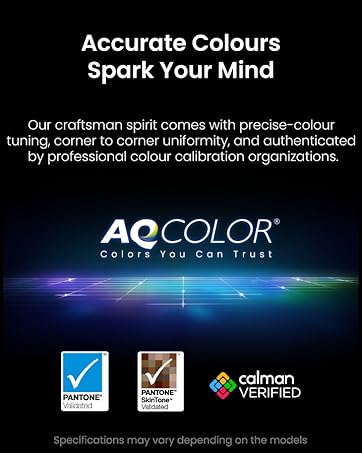
The BenQ Creative Pro PD3205U is a 32-inch 4K UHD IPS monitor designed for professional creatives, offering 99% sRGB and Rec.709 color accuracy with factory calibration and AQCOLOR technology. It features a 90W USB-C port for seamless MacBook connectivity, a built-in KVM switch for controlling two systems with one keyboard and mouse, and eye-care technologies to reduce strain. Specialized display modes and intuitive controls make it ideal for graphic design, video editing, and 3D modeling, delivering consistent, true-to-life visuals in a sleek, adjustable form factor.


| ASIN | B09QLH5JZ8 |
| Adaptive Sync | FreeSync |
| Aspect Ratio | 16:9 |
| Aspect ratio | 16:9 |
| Best Sellers Rank | 6,265 in Computers & Accessories ( See Top 100 in Computers & Accessories ) 147 in Monitors |
| Box Contents | 1 year technical support, BenQ PD3205U 31.5” 4K Monitor for Mac UHD sRGB Rec.709 HDR10 IPS AQCOLOR Technology USB-C Factory-Calibrated Color Mode Darkroom mode Animation Mode CAD/CAM Mode Hotkey Puck G2 KVM, Hotkey puck can set preferred color modes and features as shortcuts to widely used settings, USB-C cable |
| Brand | BenQ |
| Brand Name | BenQ |
| Cable Length | 1 Yards |
| Colour | Black |
| Colour Gamut Value | 99.0 |
| Compatible Devices | USB-C Compatible Devices |
| Contrast Ratio | 1000:1 |
| Country of Origin | China |
| Customer Reviews | 4.3 out of 5 stars 371 Reviews |
| Display Technology | LED |
| Display Type | IPS |
| Global Trade Identification Number | 04718755086601 |
| Hardware Connectivity | USB, USB Type C |
| Has Color Screen | Yes |
| Image Brightness | 35 cd/m2 |
| Image contrast ratio | 1000:1 |
| Item Dimensions D x W x H | 58.9D x 71.5W x 25.7H centimetres |
| Item Type Name | Monitor |
| Item Weight | 7 Kilograms |
| Manufacturer | BenQ |
| Maximum Display Resolution | 3840 x 2160 Pixels |
| Model Name | PD3205U |
| Model Number | PD3205U |
| Mounting Type | Wall Mount |
| Native Resolution | 3840x2160 |
| Network Connectivity Technology | HDMI, USB Type C |
| Picture Quality Enhancement Technology | AQCOLOR Technology, Eye-Care Technology |
| Pixel Pitch | 0.19 |
| Power Consumption Size | 168 Watts |
| Processor Count | 4 |
| Product Features | Anti Glare Screen, Blue Light Filter, Flicker-Free |
| Product Warranty | 2 year manufacturer |
| Refresh Rate | 60 Hz |
| Resolution | 4K UHD 2160p |
| Response Time | 5 Milliseconds |
| Screen Finish Type | Matte |
| Screen Size | 31.5 Inches |
| Screen size | 31.5 Inches |
| Screen surface description | Matte |
| Shape | Flat |
| Specific Uses For Product | Photo Video Editing |
| Total HDMI Port | 1 |
| Total USB 2.0 Ports | 2 |
| Total USB 3.0 Ports | 2 |
| Total USB Ports | 1 |
| Total Video Out Ports | 1 |
| Unit Count | 1.0 count |
| Viewing Angle | 178 Degrees |
| Voltage | 240 Volts |
| Warranty Type | limited warranty |
N**D
A superb 32-inch companion for Mac Mini M4 and creative work
After several years of daily use, my old 27-inch iMac finally gave up the ghost, which pushed me towards a Mac Mini M4. Tempting as Apple’s Studio Display is, the price is eye-watering, so I went hunting for something more sensible that would still handle photo editing and music production without compromise and wouldn’t break the bank. After a fair number of on-line reviews and vids, I settled on the BenQ PD3205U and I'm so glad I did - it's superb. The 32-inch panel is wonderfully huge without being overwhelming, and the 4K resolution gives everything a crisp, finely detailed look. For photography and design work, the colour accuracy is excellent, with natural tones and a reassuring consistency across the screen. Blacks have a pleasing depth, and brightness is more than adequate, addressing the slightly muted feel some earlier models were known for. Setup is straightforward, and the accompanying software integrates neatly with macOS. Paired with the Mac mini M4 over USB-C, it has been entirely dependable, with the added bonus of keeping cable clutter to a minimum. The KVM feature is also handy if you are juggling more than one machine. For music production, it serves just as well. A large, clear workspace makes arranging and editing in a DAW such a pleasure, there’s plenty of room for plugins and mixer views without feeling cramped. The built-in speakers are nothing to write home about, but that hardly matters in my case as I use headphones or my studio monitors. It feels like a minor compromise given everything else the display offers. What stands out most is the value. You are getting a large, sharp, colour-accurate display with well designed features with a height adjustable stand at a price that feels far more reasonable than some of the obvious alternatives. For anyone with a Mac Mini M4 looking for a serious but sensibly priced monitor for creative work, this is a very good choice.
C**S
Good monitor
Very good monitor with natural color. Wide enough to give plenty of working space. The usbc cable can also charge the laptop, so save a space for the laptop’s charger.
C**N
Great monitor …but with one drawback
This is great monitor and works really well with my MacBook Air. As a graphic designer colour accuracy was really important to me and on this you can always trust BenQ to deliver. Coming from a 27 inch monitor to this 32 inch makes a significant difference if you work with multiple applications at the same time and need a bit of extra screen real estate. Yes, it’s not retina level in terms of pixels per inch so won’t be as razor sharp as Apple’s displays but it’s still a very clear, crisp image and - crucially, colour accurate. The adjustable stand is also very sturdy and enables you to rotate the screen into portrait mode which is great for web design and/or coding. The only, quite frustrating, issue I have with this monitor is its brightness - or lack of. This monitor really isn’t very bright at all in its standard mode at just 250 nits - a far cry from the 500-600 nits you’d typically find in Apple displays. I didn’t think it would be a problem but I constantly find myself trying to turn the brightness up when it’s at maximum. I can live with it (for now) but if you work in a reasonably bright room you might struggle with this monitor. Other than that, it’s a great monitor.
M**O
Great quality great screen expensive for what it is
Its ok
L**D
Excellent
Better than I expected
S**E
Love!
love the size, love the compatibility, great price, easy to install and start. I'm using this screen as the main monitor, connected to my laptop and a third vertical monitor. the resolution and colours and bang-on! great designers tools
I**N
unusable
I can't express how much I'm disappointed in this display. There's no way I could do any work on this Really poor quality, it's like stepping back in time. Noticeable pixelation in text. Blurry vector graphics and text in Adobe Illustrator colours are not convincing
A**T
Amazing picture quality.
Amazing picture quality. Very well made. Works for me
M**E
Der perfekte 4K Monitor für Kreative ohne 144 Hz Marketing Hype
Der BenQ PD3205U 32 Zoll 4K Monitor ist für mich wirklich ein absoluter Knaller, auch wenn er „nur“ 99 % sRGB abdeckt. In der Praxis bedeutet das für mich, dass Farben klar, präzise und sehr angenehm wirken – und das ist genau das, was zählt, wenn ich am Foto-Workflow sitze und plane. Vorher hatte ich den BenQ PD3226G 32” 4K UHD 3840, der zwar technisch solide war, aber preislich für mich überhaupt nicht mehr gerechtfertigt. Der PD3205U schlägt sich hier in allen relevanten Punkten besser und kommt ohne großes Schnickschnack-Upgrade aus, das man am Ende auch nicht wirklich braucht. Ein weiterer entscheidender Punkt: Im 4K-Bereich schafft man mit gängigen Grafikkarten meist nur rund 60 fps. Da macht ein teurer 4K-Monitor mit 144 Hz einfach wenig Sinn. Der PD3205U spielt seine Stärken genau dort aus, wo sie wirklich gebraucht werden – stabile, detailreiche Darstellung ohne überzogene Anforderungen an die Hardware. Kurz gesagt: Tolle Bildqualität, keine unnötigen Features und ein Preis-Leistungs-Verhältnis, das mich echt überzeugt hat.
S**A
Best in its class and features + colour reproduction
Brilliant screen for the price colours are just awesome and replicates. The Apple Mac colours. I prefer the SRGB version because it’s a little warm compared to a book which is a little on the brighter white side, but that said the most interesting thing is since I have multiple monitors, it helps in switching to Mac and windows for my work works like a charm. The hot key puck
T**K
Renkler çok iyi büyüklük harika
İlk deneyimlerime göre harika. Sadece 2 gündür kullanıyorum. Renkler ve genel olarak büyüklüküğü çalışmamı oldukça kolaylaştırdı. Görüntü netliği de harika. Ps5 Pro ile oyun performansı ve renkler çok iyi. Genel olarak çok beğendim. Asus’un hemen hemen aynı olan ProArt modelinden yaklaşık 8 bin tl daha ucuz. Kesinlikle tavsiye ederim.
A**A
Cumple
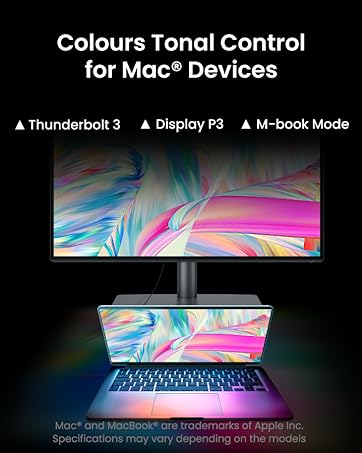
Lo conecté a un iMac por un cable Thunderbolt 2-DisplyPort 4.1 (no venía incluido ese cable) y en una MacBook Pro por USB C. Al principio lo vi algo opaco, quizá por la costumbre de trabajar con monitores de Apple de 5K q son muy brillantes, pero tiene una función llamada “M-book” q emula los colores de Mac y “casi” se ve igual q los monitores de Apple. Después de tres días de uso, ya no notas las diferencias. No se puede controlar el volumen con el teclado si usas las bocinas incluidas. El sonido de las bocinas es malo. La velocidad de los puertos usb es buena cuando usas USB C. Si sólo tienes pensado usarlo como monitor auxiliar, por su relación Calidad-Precio, si lo recomiendo.
K**R
Not for me
On my new Macbook Pro, having tried every setting possible, this monitor gave me migraines and mild seizures which I have never had before - product returned after 2 days. I lost a lot of money buying this since the refund was only partial.
Trustpilot
3 weeks ago
2 months ago