


Desertcart purchases this item on your behalf and handles shipping, customs, and support to Tunisia.
🔌 Power your hustle with confidence—never miss a beat!
The VNYUNQWE 33YDH Laptop Battery Replacement offers a robust 56WH lithium polymer power source with 15.2V output, designed specifically for a wide range of Dell Inspiron, Latitude, G Series, and Vostro laptops. Engineered with 4-cell multi-protection circuitry, it guarantees safety and durability, supporting up to 1000 recharge cycles. The package includes essential tools for easy installation and is backed by responsive 24/7 customer support, making it the smart choice for professionals seeking reliable, long-lasting laptop power.


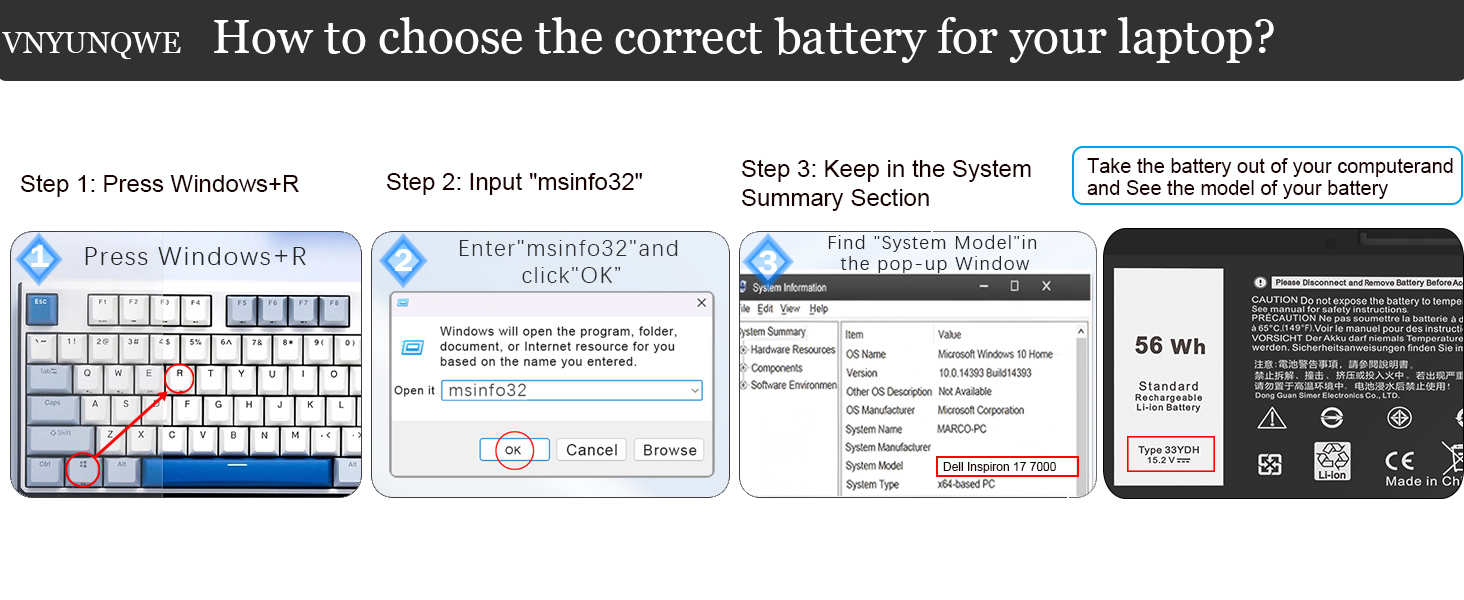

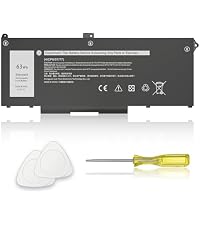


| ASIN | B09VZDLB21 |
| Antenna Location | Laptop |
| Battery Capacity | 56 watt-hours |
| Battery Cell Composition | Lithium Polymer |
| Battery Cell Type | Lithium Polymer |
| Battery Weight | 11.49 ounces |
| Best Sellers Rank | #489 in Computers & Accessories ( See Top 100 in Computers & Accessories ) #10 in Laptop Batteries |
| Brand | VNYUNQWE |
| Compatible Phone Models | Compatible with Dell Inspiron 17 7779 battery, Compatible with Dell Inspiron 17 7000 series 7773 7778 7786 7779 2-in-1, Inspiron 15 Gaming 7577 Series, Compatible with Dell G3 15 3579, Compatible with Dell G5 5587,G5 15 5587, Compatible with Dell G7 15 7588, G7 7588, G3 17 3779 Series, Latitude 13 3000 3380, Latitude 15 3590, Latitude 15 3580, Latitude 14 3490 Series, Vostro 15 7580, Vostro 15 757… |
| Customer Reviews | 4.4 out of 5 stars 1,600 Reviews |
| Included Components | Battery, Two Free Screwdrivers |
| Item Dimensions | 9.53 x 4.4 x 0.23 inches |
| Manufacturer | DongGuan Simer Electronics Co LTD |
| Model Name | 33YDH |
| Model Number | 33YDH |
| Number of Batteries | 1 Lithium Ion batteries required. |
| Recommended Uses For Product | Laptop |
| Reusability | Rechargeable |
| UPC | 794094161470 |
| Unit Count | 1 Count |
| Voltage | 15.2 volts |
| Warranty Description | 1 year |
G**E
Power Your Dell Inspiron, Latitude & Vostro with 54Wh V6W33 Battery Replacement
I’m a college student, and I use my Dell Latitude 3420 for hours of online classes and studying. The 54Wh V6W33 replacement battery has made a huge difference. It lasts through back-to-back lectures and several hours of note-taking without needing to plug in. The installation was simple, and the battery feels like the original one that came with my laptop. It holds charge really well, which is perfect for when I study in the library or campus cafe where power outlets aren’t always available. Definitely a worthwhile upgrade if you need longer battery life for school. Like many laptop batteries, ours inflated/swollen. So much that it push the keyboard out, bulging it up. No safety issues, we just had a warped laptop that will not close. This battery was a perfect fit. Mid rating on Easy to Install is not the manufacture's issue. It just takes time and you should take it easy with wires, many small screws. It takes a few charging cycles to give you full battery range. I was a bit nervous about replacing my Dell Latitude 3420 battery myself, but this V6W33 replacement made it hassle-free. The battery clicked right into place with no issues, and my laptop instantly recognized it without needing additional drivers or BIOS updates. The compatibility across multiple Dell models means you don’t have to worry about fitment problems. This V6W33 battery replacement is exactly what my Dell Latitude 3320 needed. Installation was straightforward, and the battery holds charge much better than the original one after years of use. It’s reliable and gives me peace of mind for long meetings and travel. Affordable yet efficient, this 54Wh battery replacement works seamlessly with my Dell Vostro 3515. It restored my laptop's battery life to near-new levels. No overheating or rapid battery drain issues. Definitely a cost-effective upgrade for older Dell laptops. I bought this battery for my Dell Inspiron 5515, and it’s been performing flawlessly. The compatibility with multiple Dell models is a huge plus. It holds a steady charge, and the build quality feels solid. A dependable power source for everyday tasks. If you need a battery that lasts through the day, the 54Wh V6W33 is a great choice. I use it with my Dell 5635, and it easily supports long hours of work and entertainment. Installation was easy, and the battery life exceeds my expectations. A must have for anyone with compatible Dell laptops. the battery replacement works perfectly and is easy to install, with one mentioning it comes with installation tools. Moreover, the product fits well in Dell Inspiron models and serves as an excellent replacement for the original battery. Additionally, they appreciate its value for money, with one customer noting it saved the purchase of a new computer. However, the battery life receives mixed feedback while some say it holds great charge, others report it stops holding a charge after two months. Once installed, the battery was recognized by the system, but the CMOS system has been disturbed during the replacement, so the laptop had to re-create its configuration file and reboot. This was somewhat alarming as the screen was blank for a few minutes with no indication that anything was happening. Be patient if this happens to your system. It does not happen to all systems and is neither harmful nor concerning if it does. After a full calibration cycle (charge to 100%, discharge, then recharge), it held a stable charge. In everyday use web browsing, document editing, and video streaming the runtime felt close to what I remember from the laptop when it was newer. I didn’t experience sudden drops in percentage or charging irregularities. My issue (and many others having same, if you read the Dell Knowledge forum) is the original battery heats, expands, etc. and in the process the KEYBOARD ribbon cable pressed under the battery sticks to the old battery. Mine seemed glued on, it is not glued on. In my effort to unstick the keyboard cable (wide cable) it had pulled loose of the connector (white with black bar marked "KB" on the main board) and the end slipped under the board. It appeared to originate from under the board after I got the old battery out, so I didn't notice the problem. I put everything back together (not the KB cable) and had no working keyboard to log-in to Windows! Note that the KB cable is just a ribbon without a connector, so to reinsert it lift the black bar, make sure the ribbon is inserted straight and fully (mine wanted to seat at an angle) then press the black bar down to secure the ribbon.
D**0
Easy installation
Fast shipping, perfect fit. Easy Installation on my Dell Latitude 7320
A**R
devolucion
no me gusto quiero mi dinero para atras
M**P
easy install
Easy install fit perfect
A**R
Swelling issue after short use
After only about two months of normal use, I noticed the battery area started to bulge and the laptop bottom case was no longer flat. The screws could not be tightened properly afterward. I expected better quality and durability from this replacement battery.
R**S
Product is a good, sound, and inexpensive replacement. Recommended. 4.5 Stars I give it.
My laptop is a Dell Latitude E5570. The product works fine if you know what you are doing, have the manual, and pay attention to detail. I now have a working battery in my laptop again. Installation takes 15-20 minutes. My original battery was no longer charging and I found out why. The original battery had almost exploded. It was probably pretty close. One cell had expanded to the point where the heat shields had popped off. It was ballooning. Anyway, step one for battery removal and installation is download the Owners Manual for the Latitude E5570 Laptop from Dell if you don't have it already. My laptop is refurbished and didn't come with a manual. It gives explicit instructions on how to remove the old battery and install a new one. The instructions are really good. This battery comes with NO INSTRUCTIONS. Use the Dell instructions. You won't need the star screwdriver, just the small Phillips head. The kit comes with a white guitar pick thing. Discharge the old battery down to 5% by disconnecting the a/c and letting it discharge to almost nothing. Flipping the laptop over so the top is facing down and with the back facing you, after unscrewing all the back plate screws, use that guitar pick thing to pry between the cover groove starting at the back right corner, where it's easiest. The cover snaps on, so you have to break it out off the back. Just do it slowly with even pressure. Then once you've got the back cover off, simply follow the Manual instructions to remove the old battery. Once you remove the old battery, I recommend doing a hard reset by pressing the power button for 45 seconds to remove all static electricity in the laptop and it does other things that will let your laptop recognize the new battery. Install the new battery per the manual and put it back together. Make sure you take the green film off of the battery heat shields before installing. Also make sure that the battery cable is fit into the battery connector fully, and also the end of the battery cable that goes to the circuit board connector. I failed to properly seat the cable into the circuit board connector the first time and thought I had a bad replacement battery. Snake the cable between the cells. Hook up the a/c and charge to 100%. Then disconnect a/c and let it discharge to 5%. You might want to do that at least twice. It's sets the battery and increases battery life, just like a phone battery (same thing actually). My battery is charging to 100% as I write this. It had 46% charge when installed. So for the product, I recommend it. I only gave it four stars because there were no instructions of any kind. They could have at least provided a link to a video on YouTube or something. Not everyone is an electronics technician. I recommend this product. There IS some information you should read in the product information on Amazon. One last thing, it might not be a bad idea to take off the back cover before you order to make sure that the replacement battery is exactly the same specification's as the original. They vary. The replacement battery should have all the same specs as the original (as written on the battery). Update: After charging to 100% the battery life is showing as just under 11 hours at current power settings. The old battery before it started taking a dump would only give me two hours at best. I'm happy. Now I need to let the battery run down to 5% and fully charge it again.
.**.
Replaced the battery, Tools were not included
I ordered this item to replace the failing battery on my Dell laptop. The battery is a direct replacement and solved my problem. I will edit this review to attest to the longevity of the battery's life in a few months. However, I have to buy the tools to take apart the laptop to replace the part. The description and pictures of this product show that they include the tools. The did not. False advertising. The items received does not match the description presented on Amazon.
B**P
No screws
Battery came fast and in good shape. But it did not come with the required “captured” screws
J**W
Goed product
Blijft goed op pijl
A**H
Prima Ware ... Empfehlung
Gute Ware, Passgenauigkeit und funktioniert bestens
D**6
Preislich super
Passt und erfüllt voll und ganz seinen Zweck. Notebook hat endlich wieder ausreichend Akkulaufzeit. Preislich einfach super
D**A
Excelente presentacion
Recién puesta y en función. Se ve de muy buena calidad.
D**J
I got a goood battery
Works well in my Dell G5 15 5587 laptop. Before I changed to this battery, my laptop could not charge past 8%, but now it can fully charge and I can use it on battery without any issue.
Trustpilot
2 weeks ago
2 days ago