🔑 Unlock effortless style and security with your Fusion’s perfect match!
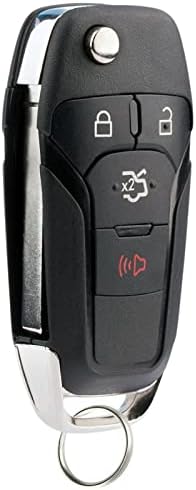
This aftermarket flip key remote fob is a direct replacement for Ford Fusion models from 2013 to 2016, featuring a complete electronic assembly with battery included. Designed to fit precisely, it requires professional programming and key cutting, offering a cost-effective and reliable alternative to dealer options.
| ASIN | B07MRZWWGV |
| Customer Reviews | 4.3 4.3 out of 5 stars (658) |
| Date First Available | 3 January 2019 |
| Item Weight | 50 g |
| Item part number | f-fus-flip P |
| Manufacturer | USARemote |
| Manufacturer Part Number | f-fus-flip P |
| Number of Buttons | 1 |
| Package Dimensions | 17.2 x 11.61 x 2.01 cm; 50 g |
| Special Features | Lightweight |
A**R
After some glitches with the ordering process, I got my 2 replacement keys for my F150 at a great price. They even arrived sooner than expected which was fantastic.
I**7
It was easy to program, the hard part was to find a locksmith with the proper routing machine tool to replicate the original key pattern. Once done, all great!!! And for the 1/3 of the price if done at the Ford agency.
H**Y
Took the fob to my local Ford dealer and it is NOT compatible with a 2013 Ford Fusion Titanium. I had to pay them to find that out.
L**A
Purchased for Ranger Rover it's not programmed for my model
J**L
Worked 1st time as expected on my 2013 Ford Fusion . Took this new FOB to "old fashioned hardware store" and they cut the metal blank to match my existing key for $21.49 and then I tested in door, (cannot test in ignition since it is not programmed yet) . For DIY programming, you must have 2 pre-existing programmed remote keys and follow these specific online instructions for 2013 Ford Fusion: 1. Insert an existing (working) key into the ignition cylinder. 2. Turn the ignition cylinder ON just shy of starting the car Without cranking the engine) and back to OFF. Ignition should stay in ON position for at least 3 seconds. 3. Remove the existing key and WITHIN TEN SECONDS, insert a second working key and turn to ON, and then back to OFF. Ignition must be on for at least 3 seconds but no more than ten seconds. Remove key. 4. Insert the New (unprogrammed) key before10 seconds have elapsed and turn it to ON. Leave it in the ON position for at least 6 seconds and turn back to OFF. 5. Remove the key and test it. 5. If programming was not successful, wait 10 seconds and repeat the above steps
Trustpilot
2 months ago
2 days ago