Buy anything from 5,000+ international stores. One checkout price. No surprise fees. Join 2M+ shoppers on Desertcart.
Desertcart purchases this item on your behalf and handles shipping, customs, and support to Tunisia.
🚀 Triple your screens, not your clutter — power, productivity, and compatibility in one sleek dock!
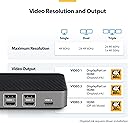
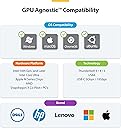
The StarTech.com USB-C Triple Monitor Docking Station delivers seamless multi-display support with three independent 4K monitors via HDMI and DisplayPort, while providing 100W power delivery to charge your laptop. Compatible across all major operating systems and hardware platforms, it’s engineered for professional-grade reliability and future-proof IT setups, making it the ultimate productivity hub for MacBook Pro/Air M1-M4 and Windows laptops.


| ASIN | B0B2FBSCJW |
| Best Sellers Rank | #22,849 in Electronics ( See Top 100 in Electronics ) #316 in Laptop Docking Stations |
| Brand | StarTech.com |
| Color | Space Gray |
| Compatible Devices | Apple MacBook Air M1/M2/M3/M4, Apple MacBook Pro 13 M1/M2/M3, Apple MacBook Pro 14 M1 Pro/M2 Pro/M3 Pro, Apple MacBook Pro 16 M1 Pro/M2 Pro/M1 Max/M2 Max/M3 Pro, Apple MacBook Pro 15 2019/2018/2017/2016, Apple MacBook Pro 13 2020 Intel/M1, Apple MacBook Pro 13 2021 M1 Pro/M1 Max, Apple MacBook Air 2022 M2, Apple MacBook Pro 14 2021 M1 Pro/M1 Max, Apple MacBook Pro 16 2021 M1 Pro/M1 Max, HP Spectre x360 13-aw0000/13-df0000/13-af0000/13-ap0000/13-ba0000/14-ea0000/14-df0000/14-cd0000/14-bc0000/14-bd0000/15-df0000/15-eb0000/15-bl0000/15-ds0000/15-ch0000, HP Elite Dragonfly G2 2B5G1AV/2B5G2AV/2B5G3AV, HP Elite Dragonfly G3 3B5G1AV/3B5G2AV, HP EliteBook 830 G7 Intel/AMD, HP EliteBook 830 G8 Intel/AMD, HP EliteBook 840 G7 Intel/AMD, HP EliteBook 840 G8 Intel/AMD, HP EliteBook 850 G7 Intel/AMD, HP EliteBook 850 G8 Intel/AMD, HP Envy 13-ba0000/13-df0000/13-ap0000/14-eb0000/14-df0000/15-df0000/15-cd0000/15-bc0000, HP Envy x360 13-bd0000/13-dq0000/13-cb0000/14-bd0000/14-ce000 Compatible Devices Apple MacBook Air M1/M2/M3/M4, Apple MacBook Pro 13 M1/M2/M3, Apple MacBook Pro 14 M1 Pro/M2 Pro/M3 Pro, Apple MacBook Pro 16 M1 Pro/M2 Pro/M1 Max/M2 Max/M3 Pro, Apple MacBook Pro 15 2019/2018/2017/2016, Apple MacBook Pro 13 2020 Intel/M1, Apple MacBook Pro 13 2021 M1 Pro/M1 Max, Apple MacBook Air 2022 M2, Apple MacBook Pro 14 2021 M1 Pro/M1 Max, Apple MacBook Pro 16 2021 M1 Pro/M1 Max, HP Spectre x360 13-aw0000/13-df0000/13-af0000/13-ap0000/13-ba0000/14-ea0000/14-df0000/14-cd0000/14-bc0000/14-bd0000/15-df0000/15-eb0000/15-bl0000/15-ds0000/15-ch0000, HP Elite Dragonfly G2 2B5G1AV/2B5G2AV/2B5G3AV, HP Elite Dragonfly G3 3B5G1AV/3B5G2AV, HP EliteBook 830 G7 Intel/AMD, HP EliteBook 830 G8 Intel/AMD, HP EliteBook 840 G7 Intel/AMD, HP EliteBook 840 G8 Intel/AMD, HP EliteBook 850 G7 Intel/AMD, HP EliteBook 850 G8 Intel/AMD, HP Envy 13-ba0000/13-df0000/13-ap0000/14-eb0000/14-df0000/15-df0000/15-cd0000/15-bc0000, HP Envy x360 13-bd0000/13-dq0000/13-cb0000/14-bd0000/14-ce000 See more |
| Customer Reviews | 4.1 out of 5 stars 102 Reviews |
| Hardware Interface | DisplayPort , HDMI , USB 3.0, USB Type C |
| Item Dimensions L x W x H | 7.5"L x 3.3"W x 1.2"H |
| Item Weight | 0.77 Pounds |
| Manufacturer | StarTech.com |
| Mfr Part Number | 116N-USBC-DOCK |
| Model Number | 116N-USBC-DOCK |
| Number of Ports | 12 |
| Product Dimensions | 7.5"L x 3.3"W x 1.2"H |
| Total Number of HDMI Ports | 3 |
| Total USB Ports | 7 |
| Total Usb Ports | 7 |
| UPC | 065030896061 |
| Unit Count | 1.0 Count |
| Warranty Description | 3-Year |
| Wattage | 100 watts |
P**T
Great for 3 monitor setup!
I purchased this docking station almost a year ago thinking I was going to need it. Turns out my old one worked fine with my monitor setup, so this sat for a while. I recently purchased 3 @ 32" 4K monitors (60Hz) and needed to break this out. I have to say that setup was a breeze. I have 2 32" 4k monitors connected DP and a 3rd connected HDMI. It's so nice to have only 2 devices support 4 monitors vs 3 additional pieces of equipment sitting on my desk. Super easy to get the drivers from the website. Unfortunately the power output is too low for my laptop. I do like the number of video output ports and USB ports. I find this to be very functional for my needs both from a business standpoint (Word, Excel, Sheets, etc) and from a development standpoint (portrait mode for more access to see code).
A**Y
Easy set up
Excellent - more than pleased! Easy to set up without any problems! Absolutely plus and play. Fool proof!
M**S
Not 2.5 Gigabit Ethernet as picture shows.
Picture shows 2.5 Gigabit Ethernet, but it does not have 2.5 Gigabit Ethernet just 1 Gigabit. Also one monitor keeps disconnecting.
K**.
Works great for both Dell and Macbook
This dock station works great with both my Dell and Macbook! The Dell automatically recognized the dock and all attached accessories; the Macbook just required a simple driver install to recognize the attached monitor.
M**2
Buyer Beware - Needs DisplayLink Manager to work
Buried in the text is the requirement for the DisplayLink manager software. If you are on a Mac and are trying to connect to an external monitor, this will prevent you from watching video content on many platforms. The suggestions are not really practical or are pointless ("Unplug the display"????). This is unique to DisplayLink: if you plug that same monitor directly into the Mac's HDMI port, you can view the content. Shameful that it's hidden. This is very misleading.
S**Z
Great
Great quality, I use it to connect my MacBook Air to three screens with one connection. Works perfect.
M**E
Smooth operation
Working perfectly with 3 displays and switching between an M2 MacBook Pro and desktop Windows NUC, just moving the cable.
M**9
Works great for my THREE monitors!
Finally found the right hub for THREE monitors! Works great. Very happy
S**R
Great dock for USBC/ Thunderbolt devices
Was looking for a USBC dock that could output dual 1440p, and this works great! The power button is a plus as well as all the usb ports. It is expensive but works great. As an added plus the usbc cable is removable resulting in a clean desk when not in use! Would definitely recommend this dock
D**L
Répond aux attentes
Répond très bien aux attentes. Est connecté à 3 écrans 27po QHD et fonctionne même avec l’écran du portable en plus.
K**R
Unreliable Product and Frustrating Warranty Experience 👎
I’ve had a disappointing experience with StarTech 116N-USBC-DOCK. After just about a year of use, one of the DisplayPort outputs stopped working. Considering this product comes with a 3-year warranty, I expected better reliability and support. Unfortunately, customer service hasn’t been very helpful. While they did offer an RMA, I’m required to send back the faulty unit first before they ship a replacement. This leaves me without a working device in the meantime, which is quite inconvenient. For a product that cost around $300, I expected better durability and a smoother warranty process. Based on this experience, I’m hesitant to trust this brand for future purchases.
D**S
Just works
Bought this to replace an older StarTech dock. I was up and running in less than a minute on Win11.
W**!
Great solution with only minor issues on one monitor (for my application).
Great little hub from a decent reputable company. Not quite 5 stars, only because I have occasional glitches with one of my connected monitors. To be fair, I have a similar issue at work with a higher level brand. The screen will occasionally flicker or completely fail to turn on. A simple connect/reconnect of the monitor cable brings it back online. For the rest, all the ports work great, the USB speeds are great, and it's been a reliable hub after 3-4 months of almost daily use. The included power supply is a great perk too; it works very well and lets me keep my laptop power supply in my travel bag.
Trustpilot
1 month ago
2 weeks ago