Desertcart purchases this item on your behalf and handles shipping, customs, and support to Tunisia.
⚡ Unlock pro-level productivity with every keystroke!
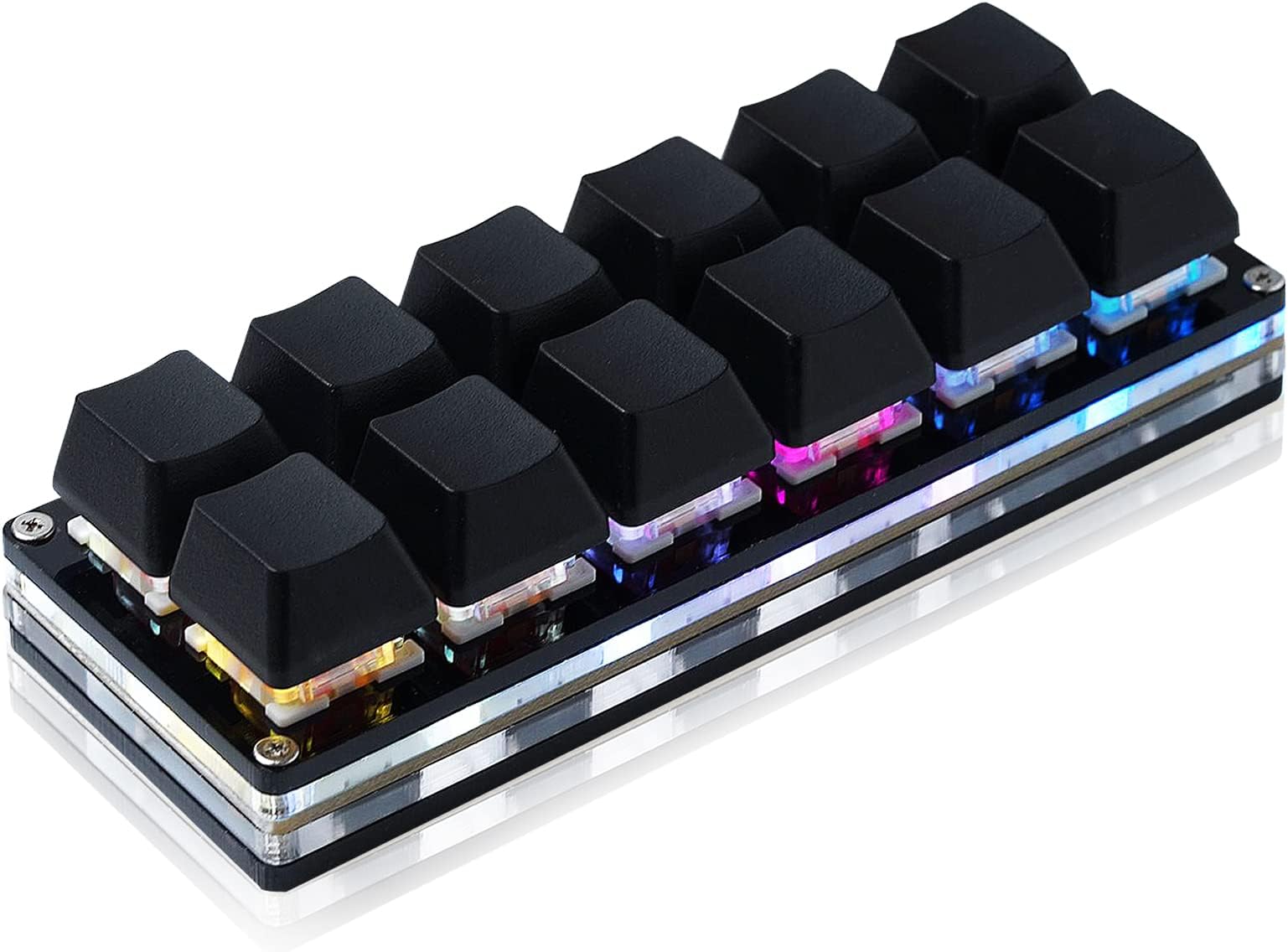
The BTXETUEL Sayodevice OSU Keypad is a compact 12-key mechanical keyboard featuring Otuemu Red speed switches for rapid, precise input. It supports plug-and-play USB-C connectivity with HID standard compliance, ensuring broad compatibility across Windows, MacOS, Linux, Android, and Raspberry Pi systems. Each key is fully programmable for custom macros, multi-step commands, and media controls, making it an essential tool for gamers, creatives, and professionals seeking streamlined workflows in a sleek, foldable design.
| ASIN | B0BBS3D3JV |
| Additional Features | Foldable |
| Antenna Location | Gaming |
| Best Sellers Rank | #4,031 in Video Games ( See Top 100 in Video Games ) #352 in PC Gaming Keyboards #514 in Computer Keyboards |
| Brand | BTXETUEL |
| Built-In Media | USB Cable |
| Button Quantity | 12 |
| Color | black |
| Compatible Devices | PC |
| Compatible Operating System Family | Linux, MacOS, Windows |
| Connectivity Technology | USB-C |
| Customer Reviews | 3.9 out of 5 stars 578 Reviews |
| Enclosure Material | Acrylonitrile Butadiene Styrene |
| Hand Orientation | Ambidextrous |
| Item Dimensions L x W x H | 4.6"L x 1.7"W x 1.1"H |
| Item Weight | 4 ounces |
| Keyboard Backlighting Color Support | RGB |
| Keyboard Description | Multi Functional |
| Keyboard Layout | QWERTY |
| Manufacturer | N\\C |
| Mechanical Keyboard Switch Model | Otuemu Red |
| Model Name | Black 12-Key Keyboard |
| Model Number | Black 12-Key Keyboard |
| Number of Items | 1 |
| Number of Keys | 12 |
| Number of Packs | 1 |
| Recommended Uses For Product | Gaming |
| Special Feature | Foldable |
| Style Name | Contemporary |
| Switch Type | Mechanical Red Switches |
| Theme | gaming |
| Unit Count | 1 Count |
| Warranty Description | 2 |
| Water Resistance Level | Not Water Resistant |
T**D
DJ’s little helper
amazing! great documentation, super flexible customization, easy to connect, does exactly what i need it to do—work with Farrago on a Mac. wish there was a three row version. wish it came with (or had the option to come with) clear key caps—the colors come through much better. wish the colors were more accurate, had to compensate for the difference in LEDs performance in some keys. but i still give it five stars because it does what no other device in its price range can.
A**A
Nice item, but not recognized as a keyboard by my KVM
Pretty cool feature-wise. I can program it to do a lot of things. I like the script record for playback. I must say the software is not very intuitive and has no option to refer to scripts and strings by name instead of the rather ominous "User Script 1". A lot of the software is in Chinese, but I was able to easily navigate anyway. I won't be able to use it for the intended purpose because it isn't recognized as a keyboard by my KVM. It doesn't show as a standard USB keyboard so USB input ports designed specifically for keyboards probably won't work. Mine didn't. My plan was to use it to play a sequence of keystrokes to my KVM to allow one button access to functions that normally require several inconvenient keystrokes. Seemed simple enough, instead of Ctrl+Ctrl+1+u+enter, I press one key. So, I programmed the keys and verified it worked without the KVM, the KVM didn't recognize anything I had programmed. In fact, it didn't work at all from the USB keyboard only port even simple key-presses, but it worked fine from a general USB port. Of course, the keyboard only port works with any normal USB keyboard so I know it isn't the port. I did notice that the keyboard only port will ONLY work with a keyboard so, it is likely that this little keyboard doesn't register as a regular keyboard.
B**B
works great
I am glad I purchased this. The online Chrome-based programmer was definitely better than using an installed program. (I had to use it on a Windows laptop with Chrome. Chromebook and Linux would recognize the device but didn't seem to work well enough to program it. Perhaps some settings would fix that, but I couldn't easily see how. Notice I use Linux - so I am pretty good with computers. I have a Mac but didn't try that one). I was able to replace keys with ones I have from some gaming keyboards which was awesome (otherwise they wouldn't be easy to label and with 12 keys, this matters). They are Red keys, if you know what that means (so not loud and clicky like the Blue ones but still have a good tactile feel without the noise). This thing does what it says and that is what I needed. Super-fast shipping too.
A**R
Software is so absolutely abysmal i want to cry
As much as i love its physical profile its software is absolutely abysmal. Its slow, laggy, clunky, and browser based. Constantly keeps erasing the settings and when i try to restore from a back up it gives me an error like half the time and have to go through and painfully set it up again. The other day it just stopped working with chrome and just shows a black page with "running..." In small print... Im so fed up with it. Don't waste your time, money, or hair...
A**Y
So fun and cool and beautiful
Perfect as macro keys for my cyber deck. I'm honestly considering getting a second one to use as macro keys for my daily PC, too. Really gorgeous, high quality, and would be a deal at twice the price.
S**.
Ordered both colors, one came DOA - NOT hot swappable like advertised
Just got two of these macropads today. I ordered both the black and white versions. The black one arrived DOA. It would connect to my PC and light up for around ten seconds and then make the disconnect noise, and the lights and switches stop working until you pull the cable and reconnect. Hopefully the replacement works better. The white one works though so I'll focus on that. There is another con. Despite the listing title stating "hot swappable" (12 Key Mechanical Gaming Keyboard One Handed Keypad USB-C Wired OSU Keypad Programmable and Hot Swappable Keyboard) this macropad is NOT hot swappable. The switches are soldered reds that are not my thing. I had planned to use tactile switches so finding this is disappointing. They'll likely become gifts after I make sure they can take a little use. The software is a little frustrating. I visit a dozen links regularly for work and bought this specifically to keep them easily accessible. After a little googling I was able to figure out how to get everything loaded. Will update as I put some time in with these. Aside from that, I'll be back looking into RGB settings. I needed a break. I'm sure I'll figure it out and be able to accomplish what I want. While this frustration is a big con, it's not the worst software I've used, and it's hopefully a "set it and forget it" situation so it's forgivable. Not everything can be as polished as VIA. If you're still reading, the pad itself feels really nice. It's lightweight but feels nice overall. The transparent middle is a nice touch, and the RGBs get bright. The pads on the bottom are really grippy! It gives me enough confidence that it's not going to move around under general use. I am not a gamer so I can't compare it in that regard, but I imagine it would handle a fair amount of abuse. As I get some time in with these I'll update my review to better reflect the product as a working item than an unfortunate failure. -----------------UPDATE----------------- After some time with the pads, I can give an update. The configuration software works if you use it how it's designed, but it's not at all intuitive, and there's zero help available without youtube. My new biggest pet peeve comes with the strings section of the app. You have 128 strings (where you save the output from a button press) available, but with five layers and twelve keys, there are only 60 possible keys that can be assigned total. This wouldn't be a negative if not for the fact that you have 68 pointless strings (if you'd even use 60), and each string is limited to 59 characters. I bought these to save URLs to common paths, and I've had several I couldn't set because of the length restriction. It would be smarter to limit the string count to 60 and allow more characters per string.
A**L
Bargain, decent features!
LOVE IT! These folks rock and I am so grateful they made this board. Its perfect to replace the prior keyboard model I had and I was able to pop on the cherry switch keys. I might even epoxy this to the keyboard, but its just super helpful and I can't say enough positive things about it. I wish I spoke Chinese but its pretty easy to follow the few missing items. Even the lighting has a very large number of options for a product of this price point. I just got the board a few hours ago and sorted some remaps with AHK and for the record for anyone interested, I was able to use mostly off keyboard keys, and avoided almost all of the F13-F24s (as you may want to reserve them for other purposes). After a few scancode remaps in AutoHotkey, it stepped into the place of my no longer made keyboard nicely. I think I am about to buy a few more. Updated review 5-6-2023 to add proof that multiple devices are usable!
J**L
A very handy productivity tool! But, you'll need to take some time to program it
I've been on the hunt for a less expensive alternative to the X-Keys XK-24 macropad, which is an outstanding product but costs $150+. Based on the generally favorable reviews, I decided to give this one a try. The 6x2 key layout is a bit odd; I would think a 4x3 key layout would be more ergonomic and easier to use on-the-fly, considering that most of us have four fingers and a thumb on each hand. The build quality and materials used are decent, albeit a bit lightweight with the frame mostly made of acrylic and plastic. The flat rubberized feet on the bottom help ensure it doesn't slide across my desk. I wish they had put flippy feet or some other way for this keypad to rest at an angle. It came pre-installed with unbranded linear mechanical switches, which are quiet and generally inoffensive, but I swapped in some EPOMAKER Crystal Tactile Silent switches to better suit my preferences for a tactile bump. The plain black keycaps that come with this keypad are functional but a bit disappointing, considering that BTXETUEL sells two-piece relegendable keycaps separately (the base is a standard looking Cherry MX keycap, the top is a snap-on clear acrylic cap between which you can place labels). They could have included a couple of these relegendable keycaps with this keypad, along with a QR code to purchase a full set. Missed marketing opportunity for a better user experience. The "Sayo Device" web-based software for programming macros and assigning key combinations is decent. It isn't as intuitive as VIA or as feature-complete as the X-Keys proprietary software, but it works. I was especially impressed to discover you can program a total of five layers of key bindings. I'm going to try explaining how I configured mine, but this probably calls for a video (that I'll post later). For the sake of easy visual identification, I set the LEDs to a static color that corresponds to the active layer selected. Blue for layer 0, red for layer 1, green for layer 2, purple for layer 3, and white for layer 4. I chose to assign the lower-right key as "Set Fn Layer: 1", which effectively serves as a "Shift" key to quickly access the 2nd layer of bindings; I use my left thumb to hold this key down and press the desired key with my left index finger. To access the 3rd, 4th, and 5th layers, I chose to assign the upper-rightmost key to switch between layers in sequence. It's very straightforward to apply keyboard shortcuts to specific keys and modify the LED color scheme for each layer and key. The Text and Scripts functions aren't intuitive, but I also haven't dug into the instructions yet. For $29 (purchased in April 2026), this keypad scratches the X-Keys itch nicely for a fraction of the price.
D**I
Funktioniert
Erwartungen wurden erfüllt. Mann muss allerdings nicht den Software download benutzen, sondern den normalen Homepage link. Darüber kan man die Tastatur nach eigenen Wünschen einstellen
R**S
Works well
Works well and easy to program.
F**M
キー割り当てソフトが日本語未対応
キーに機能を割付けするブラウザソフトが日本語に対応しておらず、設定方法がわかりづらいが、割付け完了できれば快適。キーの反応も良い。この手のゲーミングキーボードはピカピカ光って困るが、本品は常時消灯できるのでビジネス用途でも利用できる。USB切り替え機を経由して、個人用PCと業務用PCの両方で活用している。
M**S
Fantastic device that works great in Linux Mint 22 under WINE
I got this device to be an alternative to my logitech g600 since they've been discontinued, and because in Linux (Mint), the custom buttons can only store a single key press and not a macro, since the macros are logictech G hub specific. I was surprised to find that Sayo offered not only a web configuration app but a download as well. I'm sure i'm not the only one that ins't comfortable with a website being the only way to configure my device. because sites are notorious for going down without warning. So i initially downloaded the Linux application and found that it doesn't work very well, as the connection it establishes with the device is a really janky pseudo network connection to the usb device and then provides you with a local ip address to connect to in a browser. The main problem is the connection is spotty to the device and doesn't stay connected long enough to make any kind of usable changes. It also has a bad habbit of seg faulting so its nigh unusable. what did work to my surprise is the windows application, as it ran flawlessly under WINE. I was able to make macros and set button colours without issue. I set the 6 buttons on the left side to be SW Fn buttons to switch function layers. On all other layers i set the lower left most button to be a SW Fn0 button to return to the main layer. the macros are easy to make, only took a minute to understand how to set a key press then release, each a different command. otherwise the key is never un-pressed. I tested the macros in the respective Steam games i made them for and they work flawlessly. I even connected the board to another system and they continued to work as everything is stored on the device itself. all in all i'm very happy with this purchase and would recommend if you're looking for a low cost macropad solution that isn't hard to get working in Linux, provided you're fine with using WINE.
R**C
Fantastic Addition to My Gaming Setup.
I’m loving the 12 Key Mechanical Keyboard! The build quality is top-notch, and the mechanical keys feel super responsive, perfect for my gaming sessions. The compact design saves space on my desk, and the per key RGB adds a nice touch of style. It’s been a game-changer for quick commands and macros. Highly recommend this to any gamer looking for a reliable, high-performance keypad!
Trustpilot
3 weeks ago
1 month ago