Desertcart purchases this item on your behalf and handles shipping, customs, and support to Tunisia.
🚀 Boost Your WiFi, Boost Your Life!
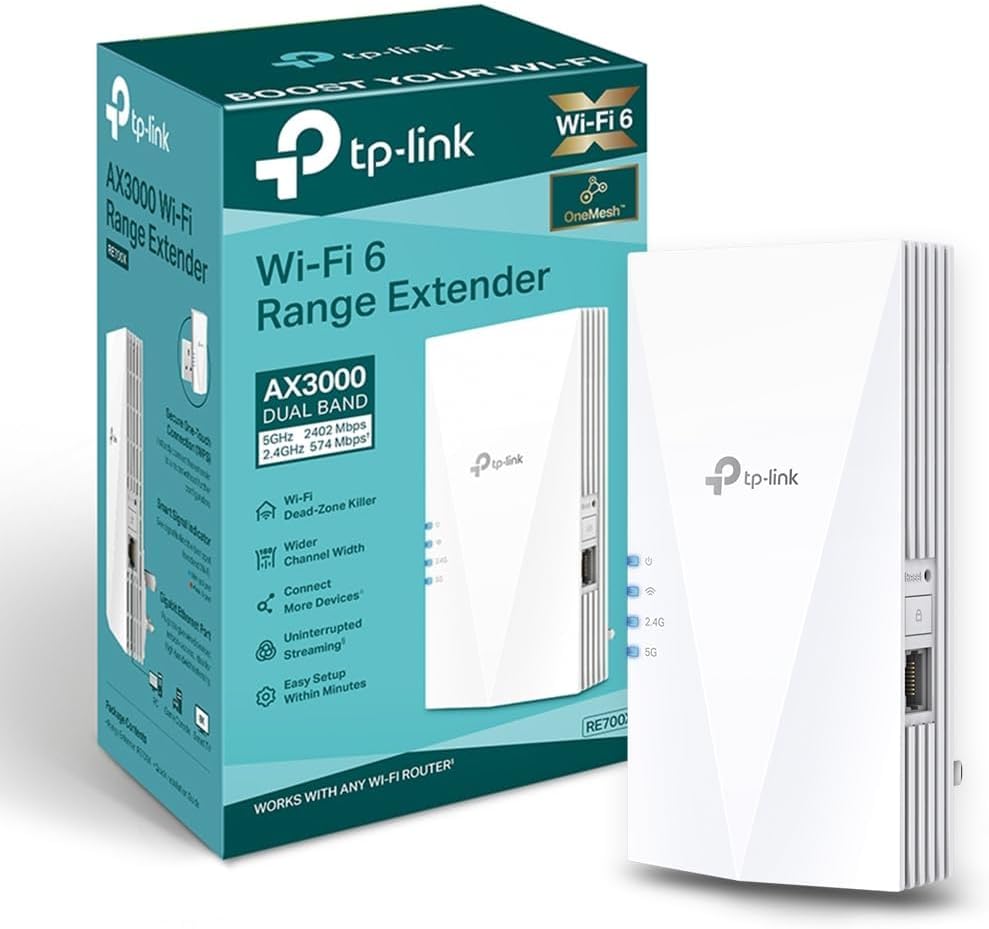
The TP-Link RE700X AX3000 WiFi 6 Extender delivers next-gen dual-band speeds up to 3000 Mbps, expanding your home network with EasyMesh compatibility and a Gigabit Ethernet port. Its smart adaptive path selection optimizes connection routes, while the user-friendly Tether app ensures quick setup and seamless control. Ideal for professionals seeking reliable, high-speed coverage that keeps every device connected without compromise.


| ASIN | B0B649T4TZ |
| Best Sellers Rank | 542 in Computers & Accessories ( See Top 100 in Computers & Accessories ) 8 in Network Repeaters |
| Box Contents | Quick Installation Guide, Wi-Fi Range Extender RE700X |
| Brand | TP-Link |
| Brand Name | TP-Link |
| Colour | black |
| Compatible Devices | TP-Link OneMesh routers, WiFi-enabled smartphones, tablets, wired devices, various router brands and models |
| Connector Type | RJ45 |
| Country of Origin | China |
| Customer Reviews | 4.2 out of 5 stars 24,771 Reviews |
| Data Transfer Rate | 574 Megabits Per Second |
| Data transfer rate | 574 Megabits Per Second |
| Frequency Band Class | Dual-Band |
| Frequency Bands Supported | 2.4 GHz, 5 GHz |
| Frequency band class | Dual-Band |
| Item Dimensions D x W x H | 7.3D x 7.8W x 15.9H centimetres |
| Item Weight | 400 Grams |
| Manufacturer | TP-Link |
| Manufacturer Part Number | RE700X |
| Model Number | RE700X |
| Range | Varia, dependiendo del estándar inalámbrico y la frecuencia específicos utilizados, típicamente en el orden de decenas a cientos de metros meters |
| Special Features | Built-in access point mode |
| Special feature | Built-in access point mode |
| Unit Count | 1.0 count |
| Wireless Compability | 2.4 GHz Radio Frequency, 5 GHz Radio Frequency |
| Wireless communication standard | 2.4 GHz Radio Frequency , 5 GHz Radio Frequency |
K**S
Excellent coverage
Excellent coverage and wireless, just plugs into socket! Best money spent. All upstairs devices are bow connected to this and no lagging wifi
4**E
Easy to use, acceptable boost to coverage
I recently acquired the TP-Link RE700X Mesh WiFi 6 Booster to address limited Wi-Fi coverage in certain areas of my home. While not a revolutionary solution, it has demonstrably improved overall network performance. The setup process proved remarkably straightforward. The accompanying app provided clear instructions, making installation a breeze. Since implementation, the Wi-Fi signal strength has improved considerably within the house. This has resulted in a more consistent and reliable internet experience, particularly for bandwidth-intensive tasks like streaming high-definition content. It's important to note, however, that the range extension isn't flawless. While sufficient for most indoor applications, I've encountered occasional connection weaknesses with my outdoor security cameras. This suggests the booster might not be ideal for expansive properties with significant outdoor coverage requirements or thick walls. In conclusion, the TP-Link RE700X offers a dependable solution for bolstering Wi-Fi coverage within a typical home environment. For users seeking to eliminate dead zones and enhance overall network stability, this is a worthy consideration. However, those with extensive outdoor areas requiring strong connectivity may want to explore alternative solutions.
F**X
Works well as a WiFi extender
Pretty good. Device needs a host name so you don't have to hunt the IP address it is using. Sometimes gets corrupted and even after reset does not pair well with the Vodafone Powerhub (WPS) thus need to resort to an ethernet cable. Does not mesh with the Vodafone Powerhub, but works well as an extneder sharing the same SSID. Good Power O/P and RF coupling to the Powerhub.
I**R
Powerful and easy to setup
Fantastic little unit from TP_LINK, an absolute steal at sub £50. I have mine toggled into its Access Point Mode and paired with a Powerline Adapter in my garden room. This facilitates a 200mbs+ wifi network as a branch of Virgin Media household broadband. More than enough for work, games and 4K streaming. Setup, firmware upgrades and tuning are all available using either the TP-LINK tether app or web interface served by the unit itself. You do have to first configure it as a WiFi extender first, then toggle into AP Mode once the Setup Wizard has completed, but that's a minor gripe. The unit runs cool and is indescreet. Highly recommended.
J**S
No WiFi? Problem solved!
Does exactly what it says. Brilliant bit of kit. Very old Victorian cottage with double skinned brick walls throughout. No WiFi between rooms. Plugged the TP-Link RE700X into the wall and followed instructions and now we have WiFi in the dining room and upstairs in bedrooms above that. Really strong signal strength with stable fast connection. Pages load instantly and videos now play without losing connection or timing out. Brilliant bit of kit for the house!
A**R
Very Disappointing
I bought this extender to improve the Wi-Fi signal in my small flat, but unfortunately it hasn’t worked as expected. The connection is very unstable and keeps disconnecting and reconnecting, even when the extender is placed close to the main router. The TP-Link app also reported “Lost Connection” several times. Although all the indicator lights eventually showed a good connection, the internet still kept dropping and webpages often needed to be refreshed before they would load. This made it unreliable for Zoom meetings and online exams, which was my main reason for buying it. Overall, I’m very disappointed and wouldn’t recommend it based on my experience.
A**N
Does the job!
Easy to set up and so far it just works and works well. Happy to give 5 stars.
S**E
Not perfect but have their advantages
I have 5 of these over two homes. These are not perfect but compared to other extenders I've used, less problematic. The good points, pretty simple to set using the 'Tether' app (more on that later). Separating the 2.4 & 5 bands was also no issue as was allocating the SSID to be extended. The app is better than the utterly awful Netgear/Nighthawk one. Tether does have issues seeing 5ghz networks - my holiday home has a Teltonika RUTX50 5G router and despite every other device seeing the 5Ghz band, the Tether app just stopped seeing it. This means these can't extend the 5GHz band - extremely frustrating. At my main home the 5GHz on my ASUS RT-BE92 (WiFi 7 - 1Gb FTTP) router is seen, no problem. The next issue is the random drop outs of the signal. No rhyme or reason, it just drops out, sometimes momentarily, but less often for a minute or so. It seems to just lose its handshake with the router. Transmit speeds are decent enough - 5GHz average 300 - 400 Mbps & 2.4GHz up to 100 -150Mbps. Both measured about 10ft away from the extender, in another room. I initially set these up as mesh but found it easier to manage/monitor as separate extenders with their own IDs. With the app, these can be managed remotely via the cloud which is really great. I have a few wireless cameras that use the extenders so if there is a connectivity issue I can sort via my phone.
B**U
Très bon achat
Suite à la panne du dernier répétiteur et après beaucoup de recherches, j'ai finalement opté pour ce produit qui doit améliorer la réception, la communication. Les achats précédents, d'autres marques et moins chers amplifiaient le signal sans donner entière satisfaction. Le dernier achat m'a surpris par ses performances et sa facilité de mise en service, un signal puissant et de qualité dans toute la maison, même dans des zones où les autres modèles ne permettaient pas d'utiliser le wifi. Plus de baisse de signal, plus de coupure rien que du plaisir ☺️. Un investissement qui se justifie.
N**N
REPETIDOR / O / PUNTO DE ACCESO MUY BUENO WPA 3 = WIFI 6 NUEVO ESTANDAR AX
Es un aparato muy potente y de gran calidad, no hay más que mirar las especificaciones. Se puede usar como "repetidor", es decir que coge una señal floja del router principal y te la extiende allí donde la del router no llega bien, o bien como yo lo he configurado: como un "punto de acceso" (AP) mediante un cable Ethernet de categoría 8 (de lo mejor) y 15 metros desde el router en mi casa. De esta forma es como si tuviera otro router en realidad, con las mismos nombres de Wifi que el router principal (sistema Mesh) o bien otras dos Wifis independientes, con el mismo nombre y clave (o diferentes, como se quiera) pero añadiendo -Ext al nombre para distinguirlas. Trabaja en WiFi 6 (encriptación WPA3, el WPA2 tiene ya 15 años y está obsoleto y es facilmente hackeable en Wifi) un nuevo estándar de seguridad muy sólido pero que no todos los aparatos antiguos de tu casa pueden ser compatibles. No hay problema porque en lugar de establecer encriptación "WPA 3 personal" de forma exclusiva, te da la opción : WPA2/WPA3, un mix, los aparatos antiguos irán con WPA2 y los modernos que admiten WPA3 trabajaran con esta otra. Tengo un Ipad 4 de hace 10 años que no se entiende con esta opción (los de Apple siempre tan exclusivos con sus cosas), el resto de las cosas marchan sin problema y lo más importante: A CAÑON. El router del ISP (proveedor de Internet) por lo general es bastante inferior (nada que ver con el Tp-Link) de calidad y no suelen ser WPA3 (Wifi 6), suelen tener anomalías con bastante frecuencia, por lo que si el operador te lo cambia tienes la gran ventaja de que toda tu configuración y control está en tu router y repetidor TP-link. El router del ISP solo lo uso para la señal de internet que viene de la calle, de éste por cable directo al Router TP-Link es el que uso router de servicio, split de cables Ethernet al resto de la casa y señal WiFi. Tengo una larga experiencia con esta marca y son productos muy fiables, de gran calidad y muy fáciles de configurar, que puedes hacer a través del navegador o mejor aun con la App Tether. Si vives en un núcleo de población de gran densidad (torres de pisos, como en mi caso) tu señal Wifi puede llegar hasta 300 y 500 metros a la redonda, a través de ventanas principalmente y nunca sabes quien puede captar tu señal y como hackearla. Te conviene pasar en Router y Extensor a WiFi 6 (WPA3) un nuevo estándar de encriptación muy dificil de hackear tras 15 años con la WPA2. Piensatelo, no es tanto dinero y te quitas de sustos. Mi combination es: TP-Link Archer AX53 - Router WiFi 6 AX3000, Doble Banda y Extensor RE700X WiFi 6 AX3000 de doble banda.
M**L
Działa
Wzmacniacz działa poprawnie. Ma czuły odbiornik. Długo wstaje, szczególnie przy pierwszym uruchomieniu.
F**H
Sinal de qualidade
Aumentou bem a cobertura e a qualidade do sinal.
A**R
Quality fast WiFi extender
Very easy to pair with the router Wi-Fi. Excellent speed and signal strength. No dead spots in the apartment now! Supports dual 2.5g and 5g.
Trustpilot
2 weeks ago
3 weeks ago