

โก Power your smart home with real-time energy mastery!
The Sense Energy Monitor delivers real-time electricity usage tracking with multi-platform app support, enabling users to optimize energy consumption and save money. It features custom alerts for critical devices and supports time-of-use rate plans. Designed for safe installation inside electrical panels, it meets rigorous ETL/Intertek safety standards, making it a trusted choice for modern, energy-conscious homes in the US and Canada.





| ASIN | B075K6PHJ9 |
| Batteries Included? | No |
| Batteries Required? | No |
| Best Sellers Rank | #392,790 in Tools & Home Improvement ( See Top 100 in Tools & Home Improvement ) #437 in Home Automation Devices |
| Color | Orange |
| Customer Reviews | 4.0 4.0 out of 5 stars (2,964) |
| Date First Available | September 11, 2017 |
| Included Components | Sense monitor |
| Is Discontinued By Manufacturer | No |
| Item Package Quantity | 1 |
| Item Weight | 1.7 pounds |
| Item model number | 12000 |
| Manufacturer | Sense |
| Part Number | 12000 |
| Pattern | Monitor |
| Product Dimensions | 7.9 x 7.6 x 7.4 inches |
| Style | Sense |
| Voltage | 110120 Volts |
B**.
Great overall energy monitor to learn big picture and help save
I have had a Sense for over 4 years now and I still enjoy it very much. I have used it to reduce overall energy consumption in my home by helping raise awareness of "Always On". More on Always On in a moment. My one warning - its not a "Buyer Beware", but more "Buyer be aware". Sense's ability to live up to its marketing hype with device detection is affected by many variables. Some homes have good results. Others don't. I've had reliable detections that work great for a while, and then stop working when the seasons change. Another thing to keep in mind. We tend to think of appliances in their whole. "The Fridge". "The Washer". Sense uses Machine learning algorithms to detect devices. Notice I said devices, not appliances. Your Fridge is actually a whole bunch of different parts that do different things at different times. Sense may detect your "Fridge" but it has actually only detected the compressor. It may not detect the defroster, or the ice maker. Or it may detect those things, but not necessarily as "Fridge". There are tools to allow you to merge detected devices. So if it finds "Fridge" and then it finds "Light" and you know that "Light" is actually the Fridge Light, you can merge them together so it all gets tracked together. This leads me to the next item. Sense doesn't always know what its detected. It knows it found something, and it can generally put a category to it (Motor, Heating Device, Light etc..) but the leg work on finding out which motor, or which light may be on you. Sometimes this is really easy. You turn on your bathroom vanity lights and see "Light" turn on in Sense, and you know and can then rename "Light" to "Bathroom Vanity". Other times, its harder to track down, especially when the device detected is a part of an appliance. This is where the active community forums comes in. Sense's Machine Learning is good, but at times, a human is better. Frequently people will post the graphic of the device that was detected, and other community members can chime in with suggestions. "I have a Garbage Disposal that has a waveform like that. Do you have a Garbage Disposal?" While I say a human eye is sometimes better, this is another item to mention. Training Sense is NOT something you can do. People always ask "can I train it". The short answer is no. Sense's ML system will do its work and find devices on its own. There is no training mode. Turning something on and off a bunch of times to try to "help" Sense see it is not always useful. Now, back to Always On. While my device detection has been so so, the Always On feature is what has really saved me the most money. After running Sense for about 48 hours, it will come up with an Always On number. This is basically the "low water" mark for electric usage in your home. At any given point in time, you are always using around xxx Watts. If you have an always on of 100w, using the average US rate of electric of 13.28c/kWh, that is $9.70/month or $116/year on your electric bill. While Sense cannot help you identify the Always On devices, just the awareness of the always on is enough to help you start making changes (if you want) to your home. Seeing my always on power of 600w (~$700/year) made me start looking for things that didn't turn off. I had a fan in my basement that ran 24/7 that I had never thought about. Now that fan is on a timer and only runs 12 hours a day. My TV stereo system which was always on is now on a power switch. Savings of 15w of Always On power. And the list can go on. Without too much effort, and more importantly, without impacting the comfort of the home, I have cut that always on number down to 300w. A last benefit of Always On. Once you learn your homes baseline, if that always on changes significantly in one direction or another, it can help to notify you that something is amiss. Always on goes down? Maybe a failed pool recirculating pump. Always On goes up a lot? Someone left the fan in the guest bedroom on. And so on. So all in all, I highly recommend a Sense. Whether it detects many of your home devices, or you just use it as a live instant power meter, it can bring savings and knowledge to your electric consumption in your home.
A**R
Can be use in Thailand 1-phase, 220 Volt ! Great product !
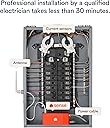
I'm Thailand customer who want to try this cool gadget. Of course, the warranty will automatically voided. And i'm fully awared my risk and acknowledged. I hope my review could provided valuable information for other international customer. And you may use it at your own risk. My electrical system. (In Thailand, which is common in EU-standard.) Is 1 Phase (Non-split like US), 220 Volt, 50 Hertz Which means... i have 2 wire goes to my house. One is LINE, another one is NEUTRAL. And voltage across Line-Neutral is 220 Volt. I'm am Mechanical Engineer and have some basic knowledge about electrical system. So, i'm doing this on my own (With my Dad's help) without certified electrician. We use extremely caution, and use probe to double check which wire is Live (Always have electricity) and which line is Neutral. Installation step : (Find the picture) I detach the main-panel and on the left side. You will see main circuit-breaker with two big black-wire (That coming from power-line) connected to it. Black wire on the LEFT pass thought breaker and connected to upper uninsulated Bus-bar. (This is Neutral zero Volt) Black wire on the RIGHT pass through breaker and distribute electricity through all of Circuit-breaker on the right. (This is Line 220 Volt) For electrical wiring, i have two breaker empty (the 6th and the 7th) So, the Black-wire (Power supply & voltage sensing to SENSE) goes to 6th breaker. And White-wire obviously goes to upper busbar (Neutral) For the Current sensing (The clamp), just attached only one to the Line. Setup : When i switch on the power. The app show that something wrong with the installation :) I just continue and go to the main screen. And yes, its showing Power consumption for only one phase. Testing : I do initial testing, like turn on the light. Use the Induction hobs, oven. The app show the power consumption very accurate. Problem : Yes, i use this in Thailand. So, after 3 hour of data-sampling. The main menu indicate warning say about "Sense detected an installation problem and unable to fix automatically. Support team will take a look." Because i use only one phase with abnormal 220 Volt. And SENSE probably cannot analyse my current and voltage data to map electronic devices in my house. I'll try to contact SENSE team... if they could make my account as an exception. And analyst my data... Another problem is, when SENSE was running for a while. The real time data of Power (Watt) indicate the app seem to be shift. and its getting larger by the time passed. For example, on the 10:45 its showing live feed of data on 10:40. I thought this might be internet connection or bug. So, i reset my router and SENSE. Its still happening and three hour passed. The gap was larger. Like.. on 13:50, SENSE live-feed time showing data from 13.35 ! Conclusion : Regardless to problems (exclude i cause by using it in Thailand). I'm satisfy with the futuristic concept of tracking power consumption in household. The setup was quite simple, If you have electrical knowledge. If you don't, just call professional guy to take care that for ya. I can't try this AI-feature yet. But still love it ! Update : 2/2/2020 Day 0 After SENSE detected installation problem and cannot analyse electrical signal to map my house appliance. I've sent an email to support team to unlock or by-pass. And at the end of day, App show that installation diagnosis is OK and start listening now. Day 1 My Pressure booster water pump was detected. (Brand : Grundfos) App saying that most user voted this might be 97% match to the "Pump" I do some verification, on the pump on.. see if SENSE detect this pump. And yep, this is definitely the pump. Day 2 Sense notify that two new device detected. Heater & Motor... Identify the "heater" was a little bit difficult. Because i have... Water heater, Rice cooker, Induction stove ? But after i click at the usage data. I can see that this Heater was active around 6 p.m. At that time, i was't shower or use the stove ! So, 100% this is rice-cooker. (Electrolux-brand) App suggest Coffee maker 50% & Rice cooker with 40% confidence, Good guess ! For motor, i just click and see the activity. This one was active on 11:00 p.m. until 8:00 in the morning. Also, it keep cycling ON-OFF for 50-70 times during night App suggest this one was A/C with 97% confidence !
C**N
Updated March 2021 - Cool Device with improved features
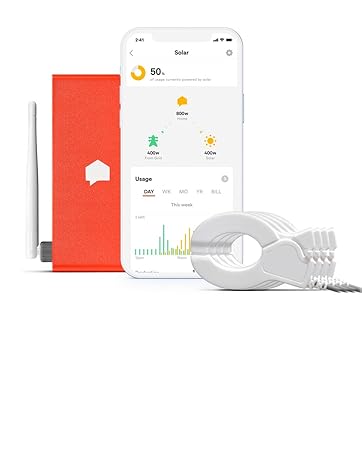
Original Review 4-4-2018 ( Several Updates below original review): Cool device and very accurate at detecting overall energy usage but individual device detection is hit & miss at best. I have had it for 3 months and it helps me monitor my overall home electricity usage in real time. It does an ok job detecting some appliances but a poor job detecting others (more on that below). The Good: -It is 99.5% accurate for what my utility company is measuring and billing me for, so it is very accurate -Detects amperage and voltage on each 120V leg (hidden in the app menu; go to: Settings->My Home -> Sense Monitor), which is great when you need to see if one leg of your panel has more usage or voltage issues. -Does data collection about once a second - Can quickly identify resistance loads (space heater, toaster, etc) and induction motors (older furnaces, older pool pumps, exhaust fans) within a week or so if used regularly. Most of these items were identified correctly but dont always get detected between cycles -Devices with single speed compressors take a little longer to identify but eventually get identified correctly (fridges, traditional AC unit, dehumidifier) The Bad: -Install is not for the average homeowner (but not much can be done about that from the Manufacturer's prospective). Having a pro install the component will be around $100 but there is not very good documentation to give a pro for install. The manufacturer has no real documentation meant for professional electricians (no electrical diagrams or requirements), so a pro who is not familiar with the product may struggle to get it wired into the panel quickly without going to the support website or calling technical support. -For those with a panel with no room to add a new 2 pole breaker, your electrician will have to make room by adding at least 2 tandem breakers (at an additional cost) -Wifi antenna extension cable needs to be longer. Installing the sense inside a metal electrical panel is dooming the device to have a poor wifi signal and the short extension cable for the wifi antenna is not very long, which made it a challenge to find a way to get the antenna mounted outside my flush mounted panel - Device discoveries are usually "guesses" that require the user to verify it but many of the guesses were not accurate for me. The guesses have become more wild over time (ex. a 10 watt load had a 88% chance of being a clothes dryer even though my clothes dryer wasnt on at all). -Device will use a decent amount of network bandwidth, especially when it is first started because it is "phoning home" to help identify usage patterns. (for those who have metered internet, especially Satellite Internet or those who use cellular data as the only means for internet). -Will not detect variable speed motors (new pool pumps, modern HVAC equipment, HE washing machines) - Will not detect lights on dimmers -Struggles to find computers (I have a high performance desktop PC that stays on 24/7 and it has not been found in 3 months despite using the same amount of energy. My home office equipment in particular uses about 160KWH/month (but I know that thanks to the Kill-A-Watt, not the Sense monitor). Suggestions for the Manufacturer: -Create a device similar to the Kill-A-Watt that pairs with the Sense monitor to quickly "train" sense on some of the most common appliances like computers, toasters, etc. This would greatly speed up the device discovery process and eliminate the guesswork for the user. I would love to walk around the house in a matter of hours and train the Sense monitor to detect most of my most commonly used objects. This would eliminate the months long process of guesswork involved. - Create a "training mode" that essentially lets a homeowner turn things on one at a time to help quickly (and more accurately) identify the most commonly used appliances and lights. Information provided to the homeowner will be much more accurate after the device is trained. - Partner with a wifi extender company or offer one that easily extend a home's wifi to the sense device. Most electrical panels are located outside of the living space of the home (building exterior, garages, or basements). Most wifi equipment is not going to be close to these locations and I would imagine that it would be needed often. My device in the garage is on the fringe of my wifi (50% signal strength) but my house is only 2000sqft with the wifi centrally located in the house. If my house was any bigger, I doubt the sense device would be able to stay connected to my wifi reliably. - Technical documentation in PDF format for electricians. The website is great but an electrician needs a set of technical instructions that can be printed out by the homeowner. Also define whether it is ok to connect to a breaker that is designed to accept 2 conductors per circuit (like the Square D breakers). -Web interface from a computer is incomplete. The web interface for Sense does not have the power meter function available, forcing the user to use the phone app. This is a great meter but I would not install it in a customer's home to help break down their usage by category. It is very cool to see usage realtime and what it does when you turn things on and off. I also think this device would be fantastic for someone wanting to get an idea of their home's peak load so a backup generator could be properly sized for a home. I do not think the appliance identification is ready for prime time because most of the "suggestions" were wrong. My house is fairly high tech with modern appliances (variable speed pool pump & Mitsubishi variable speed HVAC system) and the Sense device has not been able to identify any of them because their power usage constantly varies. I expected more accuracy of detected devices for a $300 product plus the $200 I had to pay an electrician to put this in. I have a very expensive device that tells me how much total electricity my house uses each day (my power company lets me see the same reports on their website). Update: 12-10-2018: So my original review still stands (read that first) but here is an addendum. More good: -Web interface now has live power usage, which is great to view in a web interface. - They now let you setup your billing cycle so you can view your billing cycle usage each month (as of this review, this could only be viewed from the phone/tablet app). - Usage alerts - I can setup alerts to inform me if monthly usage is trending above a certain threshold. Ex. my first 1000KWH is dirt cheap but everything after that is more expensive. I usually use less than 1000KWH except in the Summer. Sense will alert me if things are trending towards going over my 1000KWH limit that I setup. I usually will get alerts fairly early in the billing cycle to help make sure I try to reduce my usage. This has allowed me to reduce my electricity bill by staying under 1000KWH for 7 months of the year so far (a 1000KWH usage bill is only $65 total) The Bad - -Things have not gotten any more accurate. In fact, the only accurate appliances that get identified on their own are: AC condenser (16 year old single speed outdoor unit), refrigerator, portable dehumidifier & mini fridge. I do have a generic 500 watt resistance (heat) load that I eventually created because the app sees it whenever I run one of the two small burners on my stove or my radiator space heater in my master bedroom (on low). -My pool pump runs daily from 8am-5pm but is variable speed (Pentair Intelliflo -consuming 200-250 watts per hour usually). In the 10 months I have owned the Sense unit, it has never identified the pool pump as anything (not even a guess). -The same goes for my computer. I have tried to turn the computer off at night but the Sense unit hasnt even attempted to guess what this daily ~225watt load is. -One other appliance that I was surprised that the Sense unit could not identify is our dishwasher. We run it about 3x a week on the same setting every time. It is an older dishwasher from 2007, so it would be nice to see how much energy each cycle uses. -From time to time, I log into the app and see that it thinks that appliances are running when they arent. I "report" the errors and the app just says "we will use the info to make things more accurate". The problem with group machine learning is that the data has to be accurate (to become useful information). I dont feel there are many homeowners out there that are willing or able to accurately confirm all their appliances as running (they are more apt to just confirm the app's suggestion that an appliance is what it really is). Garbage data input equals garbage data output. For example: a group of non-observant homeowners using this device could confirm the Sense guess that an appliance is their clothes dryer when it really is their oven (because they both have similar electric resistance loads). The machine learning becomes flawed and could start to predict other homes the same way. Again, this device is very accurate at detecting overall energy usage and does a great job keeping track of overall energy usage BUT do not expect it to accurately figure out everything in your home on a granular level (ex. Dishwasher, Clothes Dryer, Iron, Clothes washer, living room lights, Coffee Maker, Toaster, Oven, TV, Cable Box, Cable Modem, Computer, Garage Lights, Vacuum Cleaner, Air Purifier, Pool Pump, etc). If those are your expectations, then you will be pretty pleased with the product. It still has great features but know it's limitations based on on my (and other's) real-world experiences and I think you will be happy. Update Sept. 22, 2019 Device is still unable to detect anything accurately in my home except the garage lights, garage door opener, and a 500 watt heating element load. It occasionally gets my pool cleaner pump (not my main pool pump) but it also says its on during the day when it is clearly not, so the usage statistics are not accurate (such as percentage of daily usage). No matter how many times I report the device as not on, it eventually gets detected as falsely on after a few days. It does see my mini fridge and regular fridge but confuses the two back and forth on a regular basis, so again usage statistics for each device is wrong. It sometimes is able to nail my AC condenser but not always, so again, usage statistics are inaccurate. This is a very good overall usage meter as it is accurate within a half a percent of what my utility company says I use and when I use electricity, but I stand by my statement that the appliance learning is a crapshoot at best. I have had the device for 18 months and it is unable to "learn" my home appliances, so i have a glorified live energy monitor, which is useful, however I would never trust the appliance usage statistics. Update: March 5, 2021 Upgraded to a solid 4.25 stars! I installed a 6 panel solar array (enphase system) in Spring 2020 and this Sense monitor is my go-to for live production statistics. Rarely a day goes by that I dont check my solar statistics using this app. The enphase enlighten portal is great but it only reports individual panel production and house power consumption in 15 minute increments. The sense monitor can tell me second by second my solar production vs. grid usage. Since I have a small array, I dont export much to the grid but I plan to install additional panels when I can afford it (the majority of the costs of phase 1 was the design with expansion in mind, equipment install, the electrical wiring and conduit that had to be installed in a tight attic; luckily phase 2 will not require any house wiring changes this time). The Great new features I am using: - Solar section of the app is great (it is my go-to page) - I am also very happy with the Sense Labs portion of the app. The best part of sense labs is the electrical fault detection. It is constantly monitoring the power quality and lets you download a 30 day history of any voltage dips and spikes into a csv spreadsheet format. Why is that important? If you have a electrical feeder or floating neutral with an intermittent connection problem like I did (ours was a bad connection on one of the two 125v power feeders at the transformer). Having this information can help you provide information to your power company or electrician when they are trying to troubleshoot an intermittent problem like flickering lights. Labs also looks at motor stalls, which is great, especially for AC units. It may alert you to the fact that a capacitor on an induction compressor or blower motor is failing or has failed (this will cause winding damage and eventual failure if left untreated). - Integration with thermostats and smart wifi plugs & switches. Now the devices it can identify are more accurate and you can see usage stats on the individual TP-Link wifi switches. - Expansion port is not just for solar anymore. It can now be configured a few different ways, which is helpful for those with 400 amp service panels (two 200 amp panels in the home). I still wish there was a way to do 400 amp service and still monitor solar (this is not a problem for me, but some larger houses with solar may not be able to take full advantage of a sense monitor unless they roll out a version with multiple sensor ports or they find a way to parallel two monitors on the same account). The rest - Most of what I said in my past reviews still stand but accuracy is decently better. I do think it is worth it now for most homeowners to get one. It helps shed light on our usage and it provides some monitoring and alerts for things like power quality and motor stalls that a homeowner may not be aware of until it gets a lot worse. It is also very obvious that they are constantly improving features and accuracy. They have a great forum that their staff looks at (including asking for feature improvements). Even though this product is not perfect, you can tell that they are continuing to innovate and add new useful features (and so far the price point has not changed since I purchased it).
W**Y
Really great product for landlords, much cheaper alternative to sub-metering
Wow, this is a simple way to solve splitting up utility costs for multiple rental units all under the same meter. Rather than getting a whole new sub meter system set up, which will costs thousands and require city permitting, and interacting with the utility company, just get this devise installed. My electriton installed it in about 3 hours. I have this measuring the entire amount of electricity that gets used by an adu on my property. I occupy the main house, and have a tenant in my detached ADU (second unit). This devise measures how much electricity is being used by only the ADU and not the main house. I am sure this could work for house hackers as well because it can be installed to measure individual bedrooms and what not if you set it up to do so. Each month I send my tenant a screenshot of the energy usage. This devise also allows me to input the cost of a KWH and calculates the cost for me! One screenshot is all I need to do to inform my tenant of how much to send me for this months utility bill, I dont even have to think about it. I rarely write reviews, but I went down a very very long rabbit hole of trying to figure out how I can accurately bill the utility costs to the tenant in the second unit, and want to help others out. It was actually my electrician who lead me in this direction. While this devise isn't advertised to be something landlords and house hackers can take advantage of, it absolutely solves a problem and I am very satisfied. Upon discovering this devise I learned there are similar types of devises that measure water use-age as well. Overall this is a gem for those looking for a cheaper and simpler alternative to sub-metering.
E**C
Seems cool, but a worthless product
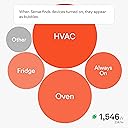
I know someone who uses this and it seemed to be cool and might help reduce and track some power draw at my house. Install wasn't too bad, really just came down to were I could fit everything (clamps were a tight fit and I had to route cables outside of my box) but that's no problem of the product. The app setup itself was super easy and quick. Unfortunately that's where the good ends. It sometimes finds a device and will mark it. 95% of them are incorrect, or the 1 device is actually 3-4 different ones. I use a lot of electricity in my house and it's very standard stuff and I was hoping for sense to at LEAST find 25% of them in the 2 months I have been using it. For reference I am way above the top electrical users in my area, state, and all of sense it reports. air fryers oven\stove Fan and or light above oven 2 ceiling fans 3 computer monitors 2 TVs Soundbar 1 desktop 2 laptops 3 servers Sonicwall firewall Cisco switch Netgear switch Aruba switch 2x KVMs 5 cell phone chargers Washer Dryer Dishwasher Kureg Thermostat 3x space heaters (used as only heat source) bathroom fan IP camera (not PoE) Electric blanket All LED lighting (23 different fixtures) 2 shop lights As you can see I have a ton of devices this think could eat up. It found the water heater, and days after found the second heating element and I was able to merge the devices. It learned my microwave that I almost never use It leaned a some cycles of my clothes washer It knows the vent fan in my dishwasher, but not the unit itself It learned 1 of airfriyers. It found 1 of my air friers, and it merged it with 1 of my space heaters. I asked support what could be done and they just said if it's wrong delete it so I did. It has not learned the 1 air fryer or heater in question again. That's it, nothing else. Not even attempts. I have 2 space heaters, 1 I run at night in the master bedroom, and it will run until it's warm then cycle off. It's a Vornado, not that it should matter, and another space heater in the living room during the day, same thing. It never has attempted to identify any piece of electronics such as a desktop, laptop charger, phone charger, server, switch. You know the stuff you would like to know how much is pulling? I tried to use the community forums but I as a paying member not allowed to even post my own threads, just respond to other peoples, what crap is that? People have all these pictures of bubbles of what their home had\uses and all I ever get are 2 bubbles. Always on, and Other. Not very useful. Ironically the "other" is mostly always on. I have 2 servers running 24/7 that pull more constant wats then the always on so they can't even get that right. There is a section where they detail always on devices, and it just lists the sense device itself at 3 wats, out of my 465 of always on. I am curious how some people are having any luck with the device. I understand my environment is rather complex but this device was not advertised as a device in alpha, this is not even beta quality software, it just doesn't work and there is no way to troubleshoot, or even let the developers know something is wrong. I will continue using this until mid January and then I am going to rip it out and return it back to Amazon. This is not even worth $25 to me in it's current state. a Killawat meter provides way more accurate information then this. I thought it was much more matured and would make attempts to learn anything I have. Update: I reached out to support for a second time and they reported that my device needs to be within 10-15 feet of my wireless accounts points. I stated it was 50 feet away (has perfect signal) and they are just going down some random notepad of ways to essentially deny looking at your support request. Not once has my device lost signal except for when I turned my main power off to do some electrical work.
D**E
Track Utility Usage
Sense is an excellent whole house power consumption tool. Real time power monitoring makes it simple to view current power consumption and determine which devices draw excessive power. After weeks or months, machine learning devices identification will take place and your whole house power consumption profile will start to emerge. Machine learning takes time so be patient. Start by taking a whole house tour. Upon entering a room turn on and off individual switches and watch the power meter increase and decrease. Incandescent lighting is a power hog and the power meter will increase between 60w (watts) and 400w depending on the number of bulbs and their power rating; not good. Replace incandescent lighting with LED bulbs. LED lighting has a much lower operating cost; more efficient and will outlast an incandescent bulb. The annual operating cost of ten (20) sixty (60) watt bulbs operated for an average of six hours per day at 15 cents per kilowatt-hour is $395. Compared to equivalent LED lighting the annual operating cost is $52.00 a $342 annual savings. In the early morning hours when everyone is sleeping analyze your always on usage. Many devices demand power at rest or powered off; for example, furnace, garage door opener, refrigerator, router, washer, etc... Garage door openers are a good example of always on power usage; while at rest they may demand 20w of continuous power to be ready for the next time you open and close the garage door. A Keurig brewer use the most power during initial startup and after brewing. If the power is kept on, the brewer continues to use 200 to 400 watts of power in short bursts to heat water when the Keurig is not in use. Set the Keurig energy saving mode or auto off timer to conserve power when not in use. There is little you can do about always on power usage until the next time you must replace an item. Look for Energy Start appliances, electronics, heating & cooling, lighting and fans. Other usage will decrease over time as machine learning starts to identify devices and distributes power between each device; for example, washer, dryer fridge, circulator pump, microwave, etc.โฆ Again, machine learning takes time so be patient and help the Sense community identify when prompted. For example, a heater was identified by Sense and it took some time to identify the source. The heater was a ceiling light/vent/heater combination in the guest bathroom. I have noticed that Sense machine learning identified Incandescent lighting but has not identified LED lighting as of now. FYI โ after replacing incandescent lighting, turning off a 2nd refrigerator in the bar, turning off the garage door openers, replacing an old TV, setting the hot water heater to 120 degrees, turning on the refrigerator economy mode and using spot lighting the electrical bill dropped 50%. As a power consumption tool Sense is invaluable. In closing Sense has other practical applications. No need for a home freeze alarm in the north, set a custom alarm to alert you when the furnace does is off for a period (days, hours or minutes). Tell when you kids turned off the TV and go to bed. Would I recommend a Sense unit to my friends; YES.
C**X
Interesting tech, nice app, poor vision.
I have been using the product for about 4 months now. What I would say, from a fairly tech savvy view of point, very interesting idea and squandered opportunity by the company. They created something that has very interesting tech behind it, an extremely easy way to install, a nicely designed app, a nice oo and ahh moment when it first starts to work and then really no reason to open the app back up after about a month of use. The โAiโ is some type of crowd-sourcing where it looks at the device energy draw signatures of its user base and per the information entered by the user base it will update you with recommendations of what it thinks could be a device on your end. You still need to confirm it and name it on your end, IF you know what the device is. Here are the problems with the device recognition and naming process: If the device is new and is not in the database and you donโt know what it being triggered on and off, then there is no way to know what the device is. For example, the HVAC system I use has different cooling phases. I suspect the system is reading this as different devices, but I canโt be for sure. You can merge multiple devices into one, like if it is different phases from the same unit, which product different energy draw signatures, but that only works if you can physically hear or feel the device that is turning off and on to confirm it is part of previously named device. You canโt manually register a device, you must only rely on the โintelligentโ system to acknowledge the device and then it prompts you with what it thinks it could be, and you have to confirm and name it. I still have many devices after 4 months that have not been acknowledged by the system. I have found that it takes many repeat uses of a device over time for it to acknowledge and prompt about a โdiscovered device.โ From plug in of new device to time the system acknowledges could be weeks or more. Why you canโt prompt the system that you are about to plug in a new device, the system take a baseline reading, prompt you back that it acknowledged the new device and then ask you to confirm and name the device is beyond me. That would be sooo much more difficult than having the user wait a month to see the โdiscovered deviceโฆโ Before installing the device I had thought that the entire house would be setup in a week or less. I was wrong. I still have some devices that have not been โdiscovered.โ I also still have some devices that are named the generic names provided by the system because I cannot figure out what the device is. As said above, I suspect are different phases of known systems within the home. For example, there is a device called โheat 4โ that triggers on and off every day three times and then stops. This must be some type of maintenance testing of a device in the house, that I assume is named, but I cannot determine what is triggering the quick, small draws of current because there is no way for me to track down what device is doing this. Here is the major fails for me: One of the smallest but biggest things for me is that sense is not tapped into the utility companies. If I enter in my address, it should provide me with a list of utility companies in my area and then I select which I use and then it will update the cost per kwh. Sure I can do this, but if they are in sync with the utility companies then they are in sync with increase in cost over time and if the utility does things like time-variant electricity pricing. If they are setup on varied pricing per time of day or time of year, this has an impact on my costs. If the system knows that a specific time of day costs more and it sees me running my washing machine at this time, it could recommend that a shift in habits could translate to cost savings. The metrics and analysis are not all that valuable. After a couple months of looking at the bar charts of stats, I donโt really know where to go from here. There is a lot of research in this field that I donโt think sense has investigated. There is evidence that utility companies have decreased user base usage over time by providing them with how they are performing as compared to their neighbors. Smiley faces were used to provide users with feedback and over time this changed their usage habits. Look it up. Or maybe provide feedback on device usage. Say you have an HVAC unit that uses 50% more electricity than other ones in your area or per your brand / unit, it could potentially urge you to look into why this is the case. Now it could just be that you have a bigger home, thus more output, or it could be that you have an issue with the current system or it needs to be upgraded. And then the system could propose your savings over time if you addressed this issue. There are a ton of things sense could do like this. I assumed the point of the system was to help the user understand their usage and potentially change it with the new insight gained. I don't know how much this will do with that at this point. After 4 months I can't even get a lock down of what devices are in my house. The main reason I purchased this was to determine vampire draws of electricity in my home and shut down leaks in the system. Hmmm...
C**N
Geeky Fun - Makes a Closet Data Scientist Out of Us All :)
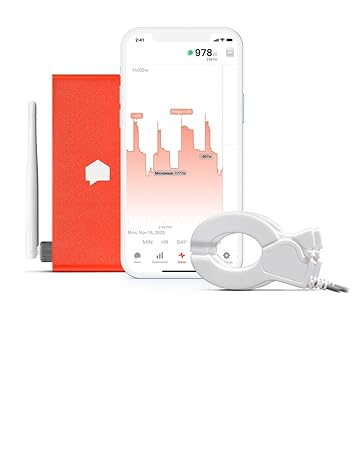
It's hard to argue you ever "need" such a device, but if you love to geek out on IoT and everything having a bit of a "brain" of sorts that you can peer into, then this is one of those things to be sure. After all, you can have a smart thermostat that'll tell you you turned on the furnace but this will actually tell you it's "really" on, how much power it's sucking, and estimate (at a per-second resolution!) how much money you're burning based on the rate data you give it. The data scientist in me loves honestly how they take a data lake of "noise" that comes for all the on/off cycles and the "quality" of the electrical data harvested to begin to piece together a story of what each thing is. It takes a week or two for the first item to be "found" and sometimes it's a treasure hunt when you verify what it is. For example, It would find lights and you had to double-check what they were and then you can properly label them. The most fun to find ended up at first I thought the refrigerator light (yes, on the inside) since I could verify it went on/off when I tested it. But then why did it come on in the middle of the night too? And no, nobody was out having a midnight snack. I deduced it was the internal door heater all fridges have to prevent frost. Made sense that circuit looked similar to the system but it was detecting an aggregate of like 63W, which seemed high for even an older fridge. Voila! The big stuff will then come next typically... electric ranges, dishwasher, A/C compressor. I'm still waiting on the fridge compressor itself and just got a new washer/dryer so will be interesting to see those get tagged. The support is excellent I'd say. It's mostly via email of what I've used but responses are very fast - usually same-day. And setting this up was a piece of cake *IF* you're comfy around electricity and respect your panel's ability to do harm. Lots of amperage in there and yes, you'll have to shut down the house to either hook this up to a new 240V breaker or piggyback off another (like an electric range/dryer circuit)... but the mains that come into the box are always live from the street and that's usually hundreds of amps. Two "loops" get clipped around each branch of those mains but there's typically plenty of room so long as you have a nice neat box. From there it's standard IoT-type setup. Turn on the power, it'll boot up, light up, and after perhaps 10-15 seconds give you a friendly beep that all is well. You'll then see it broadcast a SSID. Pair to the device which temporarily turns into a hotspot, give it your home LAN's SSID/PW, hand it off to the home LAN, and then finish any security you do on your network side. Log into the app and you should be going from that point on. Be aware if you have a really stingy ISP that this device is logging your electrical reality again on a 1-second pulse basis snapshot. That turns into roughly 300MB per DAY that it'll shoot up to the cloud for analysis in the data lake. Not a big deal even with today's caps honestly unless you're an absolute pig but for awareness! I think that's all from me. Have fun~!
M**Y
Easy to install, Crazy Accurate
On a full month, it's as close as 0.5kwh from the utility meter, this is quite incredible. After 6 weeks it's continually detecting new devices in my home. Still, have a lot to detection to do but it's a very useful tool to reduce your electricity bill. I've reduced my consumption by about 25% since I have it. Great tool, can't recommend it enough.
M**Y
Excelente
Excelente producto, si se lleva casi un mes en empezar a detectar los equipos, pero en general es muy bueno
M**A
Great product, works magic and gives you great insight into your electrical use
This product is quite amazing, but you will need patience (like at least 1 month) to see the results (detection of devices is slow). However, it gives you great information about your electrical use which in turn allows you to make changes to your devices/habits to spend less on electricity. For example I can tell if the stove was left on, if the garage door was turned on, etc and set notifications to let me know what's going on.
A**O
No comprar producto usado
El dรญa de hoy 10 de junio del 2023 me acaba de llegar mi Sense y oh sorpresa tenรญa durex puesto (el sello de ambos lados estaba roto) la caja por obvias razones estaba golpeada y el producto mal colocado por obvias razones es usado es mejor no comprar este producto
S**L
Awful product. Confirmed by Support that this does not work for driers and baseboard heaters.
Just got the device in order to track electricity consumption at home, and first impressions are not that great. I know it takes take to sense devices, but we're one week in and besides itself it only detected one more thing as my stove but the readings are completely off and it claims the stove is going on and off all day and night (which I verified it is not). Will continue monitoring for now, but if it remains this inaccurate after 2-3 weeks I'll have no choice but to send it back. A device this expensive should be more reliable. --- Update 2: 8 days after installation, and Sense has only detected that single device - supposedly my Stove. This was wrong, and was actually three separate baseboard heaters being detected as a single device. Power consumption appeared to be correct when only one was turned on, but did not increase when 2 or 3 baseboards were running at the same time. Per Support chat, this cannot be fixed and needs to be deleted so Sense can try to detect it properly down the road. --- Two months in, and the device is flaky and unreliable. It has only correctly identified one baseboard heater so far. It also picked up the drier a few days ago, but that only worked for a couple of days and now no longer tracks the device when it's on. Seriously unimpressed. --- After several exchanges with their support department, they've now confirmed that this does not work with driers and baseboard heaters, as they are unable to differentiate between their signatures. Completely disappointed by this, as this was not listed as a limitation in their product description. Will be returning it ASAP. --- One year report - return was no longer possible, and after a year this piece of garbage has been proven completely useless. It's identified a handful of devices, consistently mixed them up with others, and is a complete failure when it comes to baseboard heaters. It can't tell any of them apart, and even mixes them up with the stove burners. Complete trash.
Trustpilot
2 weeks ago
3 weeks ago