Buy anything from 5,000+ international stores. One checkout price. No surprise fees. Join 2M+ shoppers on Desertcart.
Desertcart purchases this item on your behalf and handles shipping, customs, and support to Tunisia.
🎶 Compact power, endless beats—your studio’s new MVP.
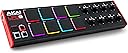
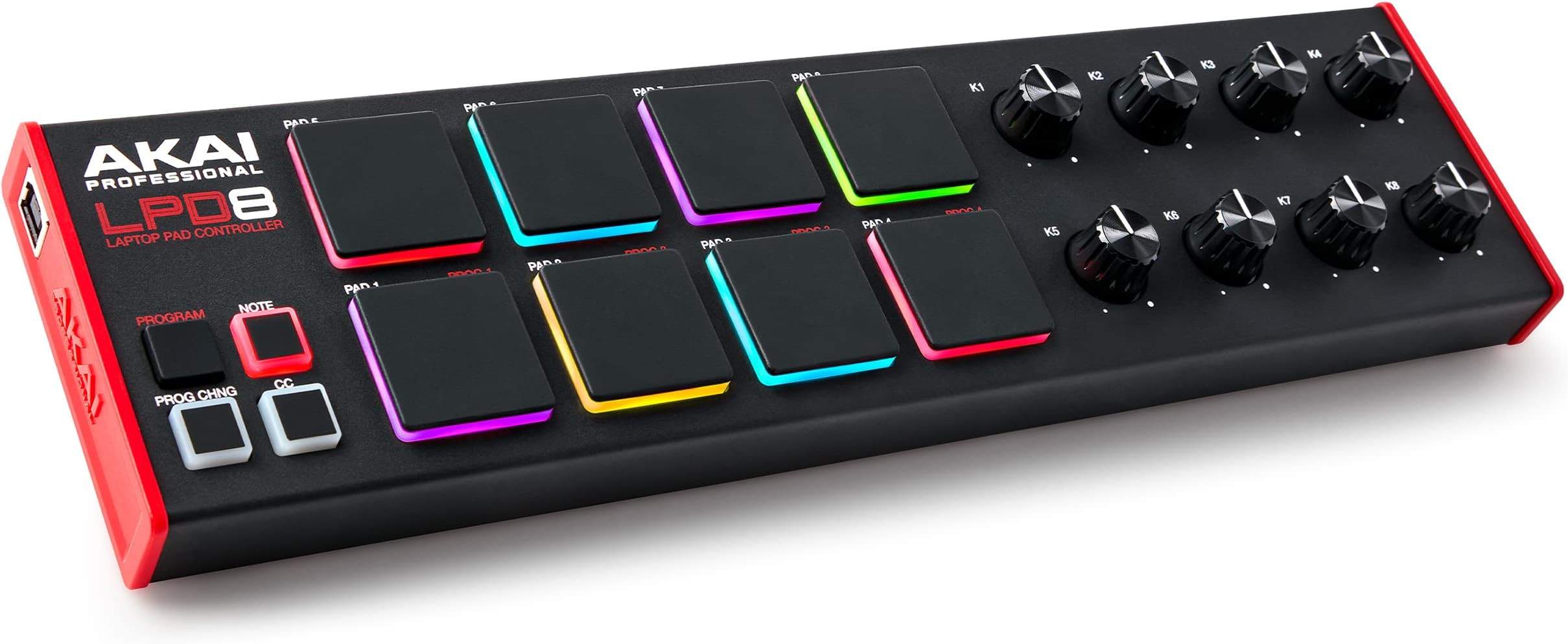
The Akai Professional LPD8 is a compact USB MIDI controller featuring 8 velocity-sensitive RGB MPC drum pads and 8 assignable Q-Link knobs, designed for seamless music production on Mac and PC. With 4 programmable preset slots and a rugged, portable design, it offers versatile control and universal DAW compatibility, making it an essential tool for producers, DJs, and musicians on the go.


| ASIN | B0BF9MN8R2 |
| Additional Features | Backlit Drum Pad, Compact, Portable, Programmable, Touch Sensitive Pad |
| Best Sellers Rank | #1,137 in Musical Instruments ( See Top 100 in Musical Instruments ) #6 in Computer Recording MIDI Controllers |
| Brand | Akai Professional |
| Brand Name | Akai Professional |
| Color | Black |
| Compatible Devices | Laptop |
| Connectivity Technology | USB |
| Connector Type | USB |
| Control Method | Touch |
| Control Type | Drum Pad Controller |
| Customer Reviews | 4.4 out of 5 stars 680 Reviews |
| Global Trade Identification Number | 00694318025567 |
| Hardware Interface | USB |
| Hardware Platform | PC/Mac |
| Human Interface Input | Buttons, Dial |
| Included Components | LPD8 MK2, Quickstart Guide, USB Cable, Safety and Warranty Manual, Software download card |
| Instrument | Drum |
| Instrument Key | Any |
| Item Dimensions D x W x H | 3.24"D x 12.12"W x 1.32"H |
| Item Type Name | USB MIDI Controller with 8 Responsive MPC Drum Pads for Mac and PC, 8 Assignable Knobs and Music Production Software |
| Item Weight | 0.4 Kilograms |
| Manufacturer | inMusic Brands Inc. |
| Manufacturer Part Number | LPD8MK2 |
| Material Type | Metal, Plastic |
| Model Name | LPD8MK2 |
| Model Number | LPD8 MK2 |
| Model Year | 2022 |
| Number of Keys | 8 |
| Platform | Mac, Windows |
| Product Dimensions | 3.24"D x 12.12"W x 1.32"H |
| Product Style | LPD8 |
| Size | Compact |
| Special Feature | Backlit Drum Pad, Compact, Portable, Programmable, Touch Sensitive Pad |
| Supported Software | Ableton Live |
| UPC | 694318025567 |
| Unit Count | 1.0 Count |
| Warranty Description | 1 year manufacturer. |
J**E
Great Akai product
It’s a typical Akai product. Durable, responsive, compatible, and comes with loads of bonus software. The pads are a little stiff. I gotta smack em purdy hard but they just need to be broken in. It’s compact and looks dope. Doesn’t feel too light and cheap or too heavy and out dated. Very durable. Connects via usb. Plug and play all day. If you travel bring it with you on the plane and plug it up to your laptop and you’re back at it. If you’re looking to run it as your main drum pad tho in a home studio setup drop the additional $100 and buy the studio MPD. This is definitely for travel purposes
N**R
High Quality -- Engineered Solid -- Works With Everything
Amazing Price Extreme High Quality --this has a full back and side cap piece, there are no seams or gaps. The materials are amazing quality built to extreme detail. Works plug n play with everything I've hooked up to it. Linux, Android, Roland S1 Synth, Korg Volca Beats Synth. HARD TO BEAT.
A**X
READ FOR INSTRUCTIONS TO SETUP IN MPC BEATS!
As a beginner, it was a nightmare getting this thing setup. The auto setup in MPC Beats is for the WIRELESS version, so it tries to use it, but its all wonky. To set your pads colors how you want, you need to use the lpd8 mk2 program editor it comes with. That's easy to use and setup. Close it when you're done, it won't be able to run at same time the lpd8 is in actual use. Make sure your lpd8 is plugged/powered up. Open MPC Beats and open one of the demos for this, since that will have sounds already assigned to the pads, you can quickly confirm this method works for you. Next, click up on the top left corner icon to get to the edit menu. Go to Preferences. Under MIDI/Sync, confirm LPD8 MK2 is present in the Input Ports at top of the page. THIS IS IMPORTANT : MAKE SURE THAT CONTROL AND TRACK ARE SELECTED under Input Ports for the LPD8 MK2. Exit Preferences, go back to the main screen where you can see the 16 pads and knobs. Go to the bottom of the screen towards the left, the icon to the right of the smiley face should be the MIDI Learn icon. Click the MIDI Learn icon. A box on the right side of the screen will show Global and Project tabs at the top. If it's not already selected, select the Global tab. There will be a drop down box on the right in the top of the Global tab. This is where MPC Beats wants to assign this wired LPD8, which there is no preset for, to the wireless one, which causes problems. In this drop down menu, select New MIDI Mapping. Then select the ENABLE AND LEARN buttons to the left of the drop down box. This will light up all the assignable parameters you see on screen in yellow. Click on the pad you want to trigger on MPC Beats FIRST. It will highlight a brighter color yellow to indicate it is ready for you to hit what pad you want triggered on your LPD8. Now hit the pad you want triggered with your LPD8. You can also select the knobs in MPC Beats and assign the knobs on the LPD8 by turning the knob when you are in LEARN/ENABLE mode. Feel free to assign the pads how you see fit. You can only use 8 at a time of course, but you are free to orient them as you see fit. You should now have fully customized colored pads and customizable pads. Figuring out MPC Beats is another adventure. I got so frustrated, I almost returned this and I am a persistent person. I found ONE video on YouTube that even came close to explaining this. There was zero ability to figure out Akai's unaccessible forums. Seriously, wtf. You log in to some other website and company for Akai stuff. It's weird and unintuitive. I got the free plug-ins and software with my LPD8, but getting the licenses registered for the Hybrid 3 and pianos is just icing on the frustration cake. Could you guys make it more complicated? All in all, I got it now and the satisfaction of barely figuring out how to use this thing is worth the price of admission.
V**S
Just what I needed
The pads are a little hard, but the whole thing feels solid and works perfectly.
I**V
Great Item
The pads feel great and work flawlessly. Product is solid with good weight. Doesnt move around when used. Great for use with Logic software.
L**.
Enjoying this winner.
Compact and portable joy. Pads can take a beating.
W**S
Solid, responsive, easy to use
I've had issues with inexpensive Akai gear in the past, so I bought this LPD8 with a bit of trepidation. But after several months of use, I am super pleased with its performance. Though the software available to program it is quite basic and not well documented, it isn't really hard to figure out. The controls are consistent and operate smoothly. Construction quality is very good overall. The small size fits very nicely above the keys on a StudioLogic SL73 and allows me to toggle patches and channels on and off and adjust synth params while I perform with Mainstage. The only missing feature that would make this unit perfect is Bluetooth MIDI and a rechargable battery inside, so that it could be operated without a cable.
J**C
Fantastically great feeling pads for an unbelievably low price
I have a bunch of MIDI controllers, including some rather high-end ones (Ableton Push2, I'm looking at you!) The playability, sensitivity, and reliability of these pads are -- and I'm not exaggerating -- the best of the lot! How Akai does this at such an inexpensive price point is really remarkable. The utility for configuring the controls is also quite useful, although many people will be able to use this right out of the box. Seriously peeps, when I'm sitting in the middle of my Push2, Arturia Minilab3 and Keylab mkii, and Novation LaunchKey it's my LPD8 that I go to for doing my drum loops. Crazy! The control knobs are icing on the cake. I'd give this thing 10 stars if I could!
A**R
Adelante con la compra
Increíble, los materiales son de buena calidad, muy portátil y plug & play
M**Y
Not good as a drum pad
The pads would not fire unless pressed hard, repeat notes were difficult. The velocity curve was fixed so either have to use full velocity and manually tweak or unreliable button presses. Might be ok for launching clips but not as a drum pad. Returned it.
V**A
noce
noce
J**N
Kompakt, stabil, hochwertig – idealer MIDI-Controller für unterwegs und zuhause
Der AKAI Professional LPD8 hat mich auf ganzer Linie überzeugt. Für seine kompakte Größe wirkt der Controller erstaunlich wertig – nichts klappert, alles sitzt fest, und die Pads sind angenehm druckempfindlich und reaktionsschnell. Besonders positiv: Trotz des kleinen Formats bringt der LPD8 ein angenehmes Eigengewicht mit, das ihm einen stabilen Stand auf dem Tisch verleiht – kein Verrutschen, kein Wackeln. Die acht zuweisbaren Drehregler sind super praktisch für Live-Parameter oder DAW-Kontrolle, und die Einrichtung am Rechner (Mac oder PC) ist unkompliziert. Zusammen mit der mitgelieferten Musikproduktionssoftware ergibt sich ein rundes Gesamtpaket. Fazit: Wer einen zuverlässigen, transportablen MIDI-Controller mit solider Verarbeitung und richtig gutem Preis-Leistungs-Verhältnis sucht, ist mit dem LPD8 bestens beraten. Perfekt für Beatmaker, Live-Performer und Homestudio-Einsätze!
A**T
Akai kalitesi
Padler çok rahat, hassas. Potans başlıkları daha büyük olabilirmiş tutması zor.
Trustpilot
2 weeks ago
1 month ago