Desertcart purchases this item on your behalf and handles shipping, customs, and support to Tunisia.
๐ท๏ธ Label like a pro, organize like a boss!
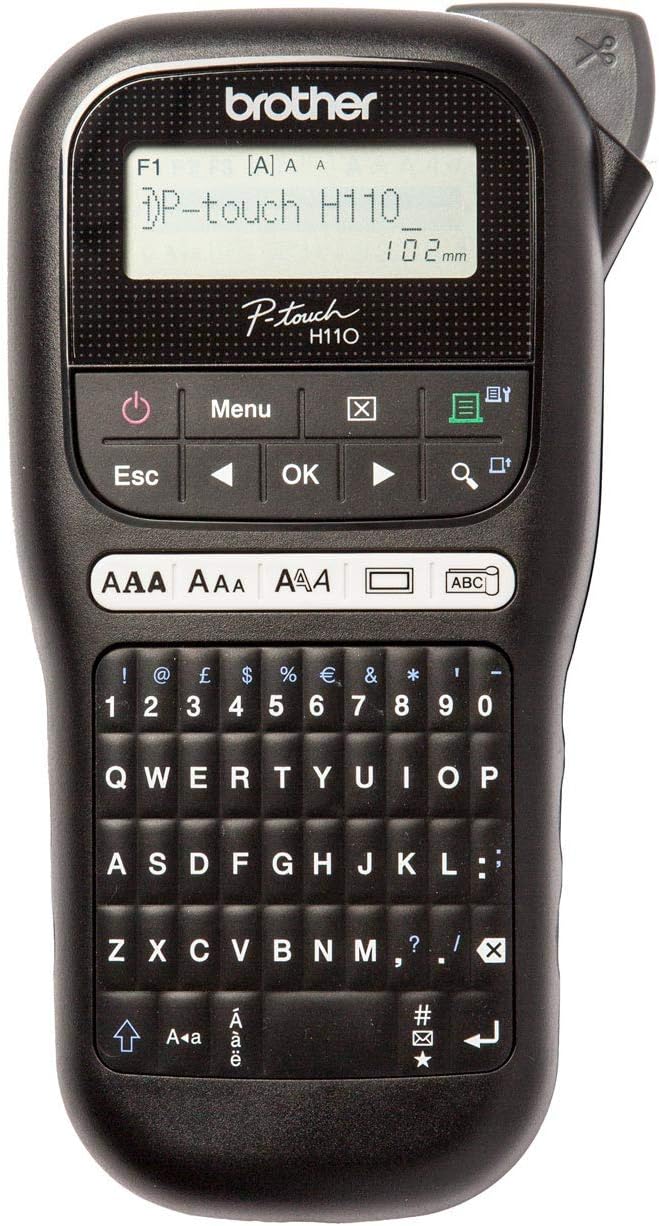
The Brother PT-H110 is a compact handheld thermal label printer featuring a QWERTY keyboard and a 16-character LCD display. It prints durable, laminated labels up to 12mm wide, customizable with multiple fonts, styles, frames, and over 250 symbols. Designed for office and home use, it excels at cable marking with flag labels and withstands harsh conditions, making it ideal for professional organization and asset management.


| ASIN | B01N5ID8FR |
| Additional Printer Functions | Print Only |
| Best Sellers Rank | 367 in Business, Industry & Science ( See Top 100 in Business, Industry & Science ) 7 in Label Makers 9 in Labels & Labelling Equipment |
| Box Contents | 12mm Black on White Tape Cassette |
| Brand | Brother |
| Brand Name | Brother |
| Color Depth | 1 bpp |
| Colour | Black |
| Compatible Cartridge | TZe-Tape Cassettes |
| Compatible Devices | PT-H110 |
| Connectivity technology | N,N,Data not available |
| Control Method | Touch |
| Country of Origin | Philippines |
| Customer Reviews | 4.7 out of 5 stars 2,640 Reviews |
| Display Type | LCD |
| Dual-sided printing | No |
| Duplex | Manual |
| Global Trade Identification Number | 04977766760645 |
| Hardware Interface | USB |
| Ink Colour | Black |
| Item Dimensions D x W x H | 19D x 10.5W x 28.5H centimetres |
| Item Type Name | Label printer |
| Item Weight | 477 Grams |
| Manufacturer | Brother |
| Maximum Copy Resolution Black and White | 468,9 dpi |
| Maximum Copy Speed Black and White | 10 ppm |
| Maximum Print Resolution Black and White | 468,9 dpi |
| Maximum Sheet Capacity | 100 |
| Maximum Supported Paper Size | 12 millimetri |
| Maximum print Resolution Color | 468,9 dpi |
| Model Name | PT-H110 |
| Model Number | PTH110TA1 |
| Model Series | PT-H |
| Model name | PT-H110 |
| Network Connectivity Technology | N,N,Data not available |
| Number of Trays | 1 |
| Other Special Features of the Product | Display Screen |
| Output sheet capacity | 2 |
| Paper Size | 12 millimeters |
| Print media | Labels |
| Printer Output Type | Colour |
| Printer Type | Thermal |
| Printing technology | Thermal |
| Processor Count | 1 |
| Product Warranty | 3 Years |
| Resolution | 468.9 x 468.9 dpi |
| Series Number | 110 |
| Special feature | Display Screen |
| Specific Uses For Product | office use, cable identification, signage, mail room, notice board, shelving, telephone extension number identification |
| Total USB Ports | 1 |
| Warranty Type | limited |
| Wattage | 3600 kilowatt hours |
I**N
Good label printers .
Easy enough to use straight out of the box . Only time will tell if the rubber keys will last as long as the keys did on my last ( obsolete ) one. It lasted for over 10 years . Not sure if I prefer the qwerty keyboard and I suppose the garden one is designed for me but this was cheaper and prints the same labels.
J**.
Great printer
Good hand held printer. Easy and quick, good value for money.
M**!
Excellent
My work shop is so organised, I cant find anything!! All those neat little organisers and boxes all look the same. Time for a label machine! The Brother label printers are all pretty much the same, differing mostly in the pre-defined labels and things like emoticons, fonts and graphics. You can set up a special label on any of the printers but itโs handy to have the most common labels you might use on a button. In particular, this one offered a button for flag printing (for labelling cables) which was rather handy for me. The labels (or ribbons) are plastic, so water resistant and scuff resistant. The sticky is very good. Itโs sticky but not too sticky. A certain amount of re-positioning is possible. Sticks on glass but will come off without too much trouble. Peeling the backing off is really easy. They do tend to curl when you do that, though. I havenโt tried sticking them on a wet surface, like you can with vinyl for accurate positioning. One negative point about these printers is that the blade is some distance from the print head. It limits the margin at the start of the print to 3cm. This is rather large and there is no option to reduce it, like I said, itโs limited by the distance between the blade and the print head. You can reduce the margin at the other end, but this seems rather pointless since you probably want an even tab at the start and end. The blade is manual so you can print a single label or ribbon of any length. The printer always shows the length of each label, so this is easy to calculate. The blade is very effective and only requires light pressure. The power supply is a 9V 2A 5.5mm x 2.1mm centre negative. The โcentre negativeโ is important and means that most off-the-shelf power supplies will not work because they are โcentre positiveโ. Better get one that is specifically for the Brother printer. Anyway, it's great fun and great quality. It just leaves you wanting to label everything. My workshop looks like the Bat Cave now. Everything in it's place, everything with a label on it. Recommended.
J**E
Good but a lot of wastage on tape....
I replace my older Dymo label printer for a new brother P-touch H110 mostly because I had gotten fed up with the wastage and poor printing of the Dymo (despite using branded and unbranded tape) the carbon piece occasionally separated or the print was not solid in places. This was the main reason I decided to switch to the Brother version hoping it would be better. I am still getting used to the different settings and all has been fine so far, but the thing the annoys me is the amount of wastage of tape before and after the printed text - see attached picture. You waster more tape on the space before and after the text than the amount of tape used for the text itself. I can't finds a setting that will reduce this.... But I imagine replacement tapes is where they make their money. I have paid extra for the plug in option as both my old and this new unit seem to require 6 batteries! So whilst it is a little annoying not just carrying the unit around with you when you are doing things it isn't too much of a problem to just plug it in and got to the device. The keys have a nice touch to them and the display is much easier to read (better contrast) than the Dymo.
A**L
TS
A good label printer
D**D
Good buy
Really easy to use and great labels. Love it! Not too expensive either.
K**N
Works well
Works well, very sticky, print quality is good, itโs easy to use, seems very durable however I will say it does waste a lot of tape when printing
W**Y
Good product
Does what it is supposed to.
B**Y
Etiquetas rรกpidas y de calidad
Puedes comenzar a colocar etiquetas nada mรกs sacarla de la caja. Se agradece que trae una cinta de muestra para probarla. El aprendizaje es rรกpido y sencillo. Habrรก que comprobar la durabilidad de las etiquetas, pero por el momento estoy contento. Como punto negativo, lo mismo que comentan otros usuarios, el desperdicio inicial en cada impresiรณn es de algo mรกs de 1 cm de cinta. Es asumible.
A**E
Super!!!!
Funktioniert super keine Probleme mit dem Band und auch leicht zu bedienen.
C**R
Facile d'utilisation
Prise en main rapide.
D**D
Labelmaking Perfection
I got this label maker to print labels on some plastic dividers for my vinyl collection. It's extremely easy to use, has different fonts, and different sized fonts, that you can use. It's got a lot of flexibility for your needs, but is extremely simplistic to use. Very user friendly. And, very clean, professional-looking printing.
S**.
Ottimo prodotto.
Facile e intuitivo da usare. Fedele alla descrizione. L' ho comprato per creare etichette per citofono e cassetta postale. Ci sono anche le cornici e varie dimensioni e caratteri. Ma si puรฒ ovviamente usare per etichettare anche i contenitori del cibo e altro ancora. Sono soddisfatta dell' acquisto.
Trustpilot
1 month ago
2 months ago