Desertcart purchases this item on your behalf and handles shipping, customs, and support to Tunisia.
🚪 Unlock the future of access—anywhere, anytime, effortlessly.
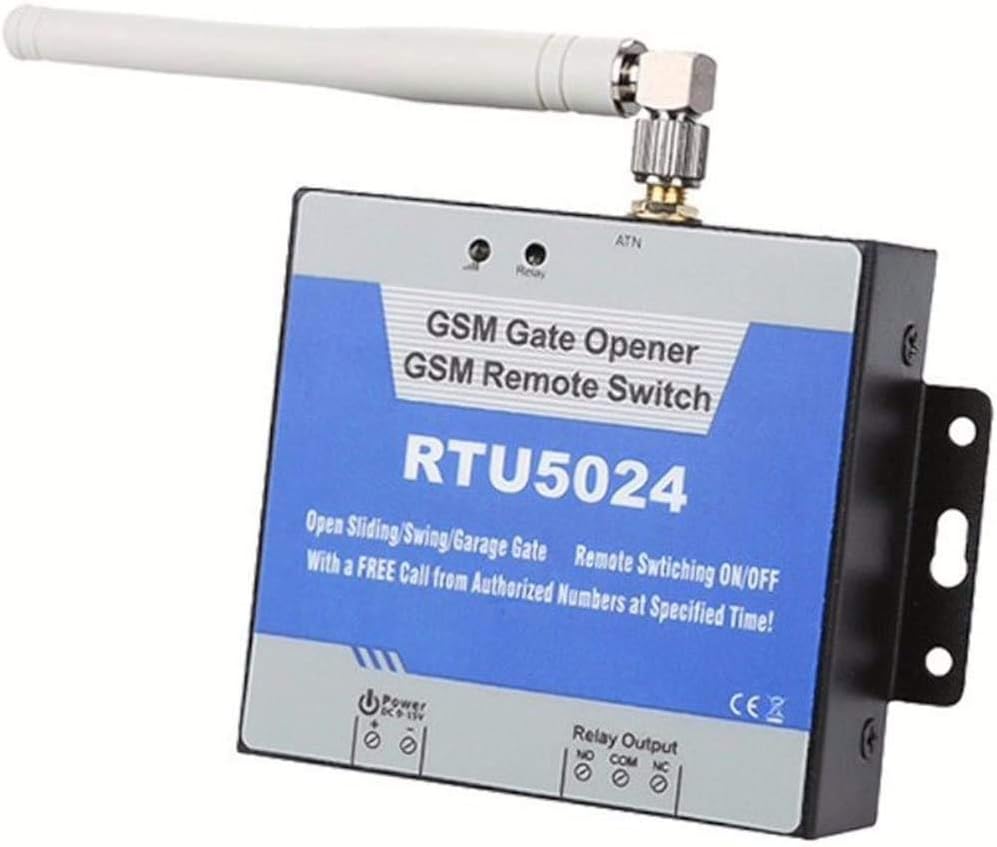
The Senders 2G GSM Gate Opener (RTU5024) is a robust, quad-band GSM remote switch designed for secure, remote control of gates, doors, and equipment. It uses caller ID for user authentication, supports up to 200 authorized numbers, and requires no call charges by disconnecting after the first ring. With SMS and app-based configuration, programmable relay timing, and DIN rail mounting, it offers a versatile, cost-effective solution for modern access management.
| ASIN | B01CKXSJRU |
| Best Sellers Rank | 44,099 in DIY & Tools ( See Top 100 in DIY & Tools ) 44 in Garage Door Hardware |
| Brand | Senders |
| Coil Voltage | 240 Volts |
| Connector Type | Screw |
| Connector type | Screw |
| Contact Current Rating | 3 Amps |
| Contact Material | Copper |
| Contact Type | Normally Closed |
| Contact material | Copper |
| Contact type | Normally Closed |
| Current Rating | 3 Amps |
| Current rating | 3 Amps |
| Customer Reviews | 4.4 out of 5 stars 930 Reviews |
| Manufacturer | RU |
| Manufacturer Part Number | SRTU |
| Model Number | SRTU |
| Mounting Type | DIN Rail Mount |
| Mounting type | DIN Rail Mount |
| Number of Items | 1 |
| Number of Terminals | 1 |
| Operation Mode | Automatic |
| Specification Met | CE |
| UPC | 880034275922 742920592257 |
| Wattage | 72 watts |
A**R
Wonderful piece of kit
Wonderful piece of kit. Works brilliantly connected to an automated driveway gate motor. Connection simple, even a non-electrician like me was able to hook it up no problems. It actually works on the 2g network, not 3g as advertised so in the UK a Three PAYG sim won't work as I found out as it does not support 2g. Put a small amount of credit on the SIM card, register the phone numbers you wish to allow access via the app (it can be done via text though is a little time consuming). By default it will automatically text you to let you know that the gate has been opened/closed but you can disarm this otherwise you'll run out of credit pretty quickly! No credit used when calls made to open gate as it recognises number, and disconnects. Working without fault so far, can highly recommend as this is only a fraction of the cost of other similar units. Saves having to keep track of remotes/keyfobs etc and you could also program it so that a tradesman for example could have access for a day or however long without having to leave gate open all day. Good luck!
M**H
Great remote actuator - recommended
This is a great product. My tips: 1. It doesn't work without setup; after the obvious wiring, go to page 5 of the manual and program the SIM number, then go to 5.3 Relay setting. 2. It doesn't work the Three because of the G3 version being USA style. I used Tesco, O2 and Giffgaff all OK. 3. It will not act on non-command incoming texts. This can be a pain if the Network wants you to respond to a text, (like Tesco does for Login). It would be nice if it would forward non-command texts to another mobile, or just be available to query. 4. I loved the detachable connectors and good quality screw downs. The quality throughout is great. 5, Its a bit funny the antenna is fixed at 90 degrees. The antenna needs to be vertical for UK GSM, means the label is read sideways. Anyway, buy it! Its easy to use and very functional.
J**E
Great quality and price
Great quality for the price. It is 2G but perfect for gate opening devices.
M**N
Fantastic Unit for the price
Got this to replace a much more expensive unit that had failed. This works great: I needed to be able to remotely open our electric gates and this is fantastic. I popped a PAYG Vodafone SIM in it, topped it up with £10 and it works a treat. Easy to set up via SMS, add users securely and programme the duration of the activation (I used 3 seconds). Wired this in to the gate control button in parallel and it works no problem at all. You can turn off activation notifications to avoid using text messages and so keep your SIM credit. I set it up to confirm every 45 days, just to keep the SIM alive. I used to have to let the previous unit ring for 4 times before it activated; this unit hangs up the call as soon as it is made and activates immediately. No complaints, it's great!!
D**T
GARBAGE WASTE OF MONEY!!!
Delivery absolutely fine from seller but product is garbage! It works when set up then all of a sudden after it opens/closes relay once it stops working and doesn’t acknowledge texts or calls until you de-energise then put power back on it’ll work again then stop working!! GARBAGE!!
M**Y
Works perfectly
Used it to remotely open a gate via an SMS. Very easy to setup and works well. Used an ASDA sim card which you can top up for just a few pounds. I setup a shortcut on my iphone and when I say "open the gate" Siri sends a text to the gate. As you need to use the SIM once every six months to ensure it doesn't expire you can send a text to the device to enquiry on the status so the device will send you a text message (4p) with ASDA. Do this every 5 or so months and the SIM should never expire. There is also an ios App which makes it easy to setup. The instructions regarding this could have been easier to be honest but the App make it so easy. I just send 1234CC to the SIM to open the gate. The 1234 is the password (which can be changed) as no-one knows my SIM's phone number and I have set the unit to only recognise our phones I didn't need to change it. Great device and would recommend.
W**P
Great value GSM gate controller
Great device other that the fact that it keeps deleting my gate profile from the app.
B**Y
Easy set up, works perfectly.
Easy to set up. Works perfectly.
J**J
Info manquante dans la notice
Attention, ne pas oublier de mettre l’option “Pin code Off” dans la carte Sim avec un Smartphone AVANT de la mettre dans le boitier RTU. Sans cela le boitier ne trouve pas le réseau. J’ai failli le retourner car je pensais qu’il était en panne.
J**N
Bra med extern antenn
Komplettera med extern antenn så funkar den bättre
S**O
Efficiente e tutto sommato facile da configurare, se si legge bene il manuale.
Prime impressioni, da prove a banco. Consegna puntuale in stile Amazon Inserita scheda Vodafone (ricordarsi di disattivare il PIN!) Alimentato con 12Vdc (alimentatorino di recupero trovato nel cassetto) Caricata app RTU5024 da store android Fatte la prima configurazione del tempo di apertura 2s. Ricevuta SMS di conferma da RTU. Fatta la prima chiamata, il relè scatta normalmente e RTU manda due SMS, uno di contatto chiuso, uno di contatto aperto dopo 2s Cambiata la password con successo, ma l'app non memorizza la nuova pwd e continua a preparare gli SMS con la pwd di default (1234) Per le configurazioni successive dovevo ogni volta correggere la pwd dell'SMS. Visto che in pratica l'APP non fa altro che preparare degli SMS da spedire mi sono studiato il manualetto e le configurazioni successive le ho fatte scrivendo a mano gli SMS. Funziona tutto alla perfezione, ho deciso di disinstallare l'APP e di tenere sotto mano il manualetto. Il manualetto è in inglese, il che può essere un problema per qualcuno. Non l'ho cercato in italiano. Ho definito il numero a cui mandare i messaggi di conferma Per il resto non ho fatto grandi configurazioni. Per ora, a banco, l'oggetto va alla grande, quindi ***** 5 stelle. Poi vedremo.
M**T
çalışmadı
çalışmadı çünkü imei kaydı olmadığı için sim kartı çalışmıyor
S**Z
Funktioniert und lässt sich per App konfigurieren
Glücklicherweise hatte ich schon vor dem Erhalt nach einer App gesucht. Für iOS habe ich "GateOpener RTU5024/5034" vom Entwickler "chaoshan ma" installiert. Das Programm ist nicht wirklich "gut", aber tut was es soll. Für manche Klone des Geräts soll es ggfs. nicht funktionieren. Schritte [Beispiel Tel-Nr. der SIM: +49-(0)111-222222] [Die App bereitet die nötigen SMS ans Gerät vor, diese müssen dann jeweils per Messages.app nur noch verschickt werden] - SIM besorgen (ich habe DiscoTel genommen, da hier das Guthaben auch bei rein passiver Nutzung nicht verfällt). Es muss auch Guthaben auf der SIM sein, da zumindest anfangs SMS geschickt werden müssen! - SIM aktivieren und dann mit einem Handy die SIM-PIN deaktivieren (wichtig, das Gerät kann keine SIM-PIN) - SIM in Gerät einbauen, Antenne anschrauben, Gerät anschalten - Nach einiger Zeit sollte die eine LED alle 2 Sekunden blinken. Dann ist die SIM im Netz registriert - Dann die App öffnen, ein neues Gerät anlegen, Telefonnummer der SIM im Gerät eingeben (immer 0049-xxx voranstellen!), default PIN des Geräts ist 1234. [1234TEL0049111222222#] - Nach dem Absenden kommt nach 1-2 Minuten eine Bestätigungs-SMS zurück - Dann muss man zuerst eine autorisierte Nummer hinterlegen. Dazu das Gerät in der App wählen und auf dem zweiten (!) Options-Screen "Authorized Numbers +" (2. Knopf) drücken. Da dann zuerst die gewünschte Listenposition der Nummer im Gerät (Tel SN) eingeben, dann die Telefonnummer (auch hier immer 0049 - oder wie auch immer die Landesvorwahl ist - voranstellen!). Erlaubten Zeitraum habe ich auch "immer" gesetzt [1234A001#0049111222222#]. Dann kommt auch wieder eine Bestätigung. - Danach reagiert das Gerät auf Anrufe mit kurzem An- und dann wieder Ausschalten [0,5 Sekunden]. Und zwei Bestätigungs-SMS - Ob und wann und wer die SMS bekommt, Einschaltzeiten, usw. kann man alles einstellen. An 10V zieht das Gerät bei ausgeschaltetem Relais 0,16 Watt. Angeschaltet knapp 0,9 Watt. Empfang ist eher mau (19 von 31 hier, ab 14 ist es wohl "schlecht"), die Antenne wirkt wie eine klassische WiFi-Antenne, vermutlich kann man mit einer geeigneteren Antenne mehr erreichen.
Trustpilot
1 day ago
4 days ago