Desertcart purchases this item on your behalf and handles shipping, customs, and support to Tunisia.
🔀 Switch Smarter, Work Faster — Your Desk’s Ultimate USB Command Center!
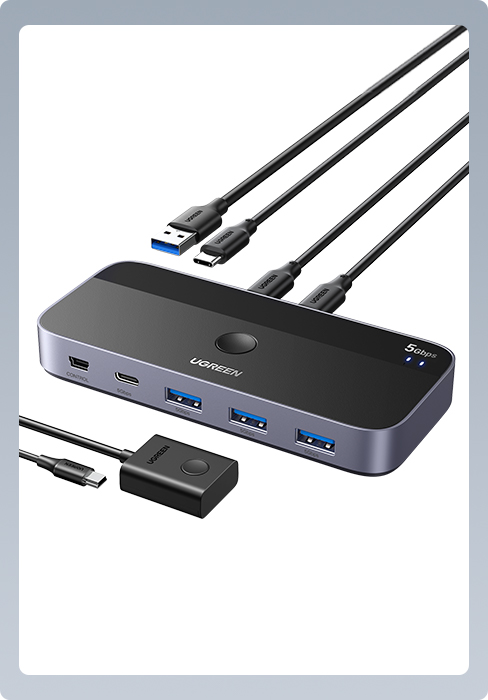
The UGREEN USB 3.0 Switch is a professional-grade 2-in-4-out USB sharing hub that enables seamless switching of up to 4 USB devices between 2 computers at blazing 5Gbps speeds. Designed for multitasking millennials, it supports high-power peripherals, requires no drivers, and features a compact, durable design powered directly from connected devices—perfect for boosting productivity in hybrid work setups.


| ASIN | B01N6GD9JO |
| Actuator Type | Push Button |
| Best Sellers Rank | 1,009 in Computers & Accessories ( See Top 100 in Computers & Accessories ) 1 in KVM Switches |
| Brand | UGREEN |
| Circuit Type | 1-way |
| Colour | Black |
| Compatible Devices | Card Readers, Keyboards, Laptops, Mouse, Printers, Scanners |
| Connectivity Protocol | Usb |
| Connector Type | USB 3.0 |
| Connector type | USB 3.0 |
| Contact Material | Metal |
| Contact Type | Normally Open |
| Contact type | Normally Open |
| Control Method | Touch |
| Control Type | Manual |
| Controller Type | Push Button |
| Country Of Origin | China |
| Current Rating | 2000 Milliamps |
| Current rating | 2000 Milliamps |
| Customer Reviews | 4.5 out of 5 stars 3,159 Reviews |
| Global Trade Identification Number | 06957303837687 |
| Included Components | 2 In 4 Out USB Switch |
| International Protection Rating | IP55 |
| Item Dimensions | 10.4 x 5.1 x 1.5 centimetres |
| Item Weight | 150 Grams |
| Manufacturer | Ugreen Group Limited |
| Manufacturer Part Number | 30768 |
| Material | Polycarbonate |
| Model Number | 30768 |
| Mounting Type | Surface Mount |
| Number of Items | 1 |
| Number of Positions | 1 |
| Operating Voltage | 5 Volts (DC) |
| Operating voltage | 5 Volts (DC) |
| Operation Mode | Manual |
| Operation mode | Manual |
| Smart Home Compatibility | Not Smart Home Compatible |
| Specification Met | Ip55 |
| Switch Type | Push Button |
| Terminal | Physical |
| Unit Count | 1.0 count |
| Upper Temperature Rating | 80 Degrees Celsius |
| Wattage | 10 watts |
L**D
Perfect as a Wireless Keyboard/Mouse switch!
I'm writing this review to serve as 'support' for others that might find themselves in a similar situation to me (because I couldn't find this answer when I was looking). My needs were simple. I had a set up consisting of 1x Samsung Ultrawide screen display, 2x PC's/Lap Tops, 1x Logitech MX Keys keyboard and 1x Logitech MX Master 3 mouse. I wanted the be able to quickly flip the keyboard and mouse from serving one of my systems to server the other. Samsungs built-in KVM nor Logitechs 'Flow' solution were options for me because one of my systems was my work Lap Top connecting to the internet via a VPN - so neither the Samsungs KVM or Logitechs 'Flow' recognised that system as being on the same network as my other (personal) system. I could have used the '1, 2, 3' switch keys found on both the keyboard and mouse to flick from one system to the other but, in practise, this always stopped the natural flow of things because of the conscious effort required to (a) select the relevant switch key on the keyboard followed by (b) turn the mouse upside down to then select the relevant switch key there too. I wanted a 'switch' that would house the Logitech Unifying Receiver to which both the keyboard and mouse had been assigned and would quickly and easily allow me (i.e. one button, one press) to toggle backwards and forwards between my 2 systems. I wanted this switch to be discreet in size and I wanted it to take it's power from the two systems it was server (ie.. not require a plug/AC/power socket connection). And I wanted it to be USB3.0 compatible for both performance and future-proofing reasons. This compact switch, that takes it's power from the machines its connected to, has given me exactly what I wanted. One button, one toggle, up to 4 devices shared. Quick, easy, trouble-free and instantaneous switching. I've stuck it to the side of my desk so neither it or its cables are visible but the recessed button is so easily found without having to consciously go looking for it, the transition from one system to the other is seamless and effortless. I can't recommend this device highly enough but must also mention UGREENS customer service support. If you post a question here about the device, they'll reply within minutes during office hours. 5 Stars all round. If your display has built-in KVM or you can utilise Logitechs 'Flow' software then, of course, that's the way to go... but those services are impeded, perhaps by something like VPN, then this is the Switch for you.
S**M
Cheapest option for KVM, great for WFH with monitor(s) that have multiple inputs
This device allowed me to connect a keyboard, mouse, USB webcam and a wireless receiver for a headset to 2 computers at the same time. I mounted it behind one of my screens with double sided tape to keep the massive amounts of wires out of sight. With 1 button, I can switch between the machines easily. I still need to switch my monitors to the other inputs manually if both machines are running simultaneously, but most modern monitors will just switch to the correct input automatically when one or the other machine are first powered on. Unfortunately this UGreen switch doesn't have an autoswitch feature, but that suits me and its literally one button press to switch. I've previously bought usb extension cables form UGreen and the quality is always top notch. Even the USB cables provided with this switcher are thick, sturdy cables that should last and work for a long time to come once treated properly. For those using this for working at home, one small bonus for me was that this passes through keyboard input to the laptop even before Windows has booted, so I can use my external keyboard to enter a Bitlocker pin and not have to pull out the laptop to use the built in keyboard. There's a lot of variables with this setup and it won't work for everyone, I'm just noting it here that the UGreen switcher did NOT cause any issues for me. If entering bitlocker pin with an external keyboard works for you now, including this switcher into the mix shouldn't change that.
I**T
Makes life so much easier!
Hybrid working means I have a laptop for in office days and a PC for working from home days when I need the extra graphics power. Some days I need to use both. This little box has made that so much easier. No more having to unplug a keyboard or mouse dongle from the laptop and crawl around on the floor to put it in the back of the PC and vice versa. They're all pluged into this little box, and with the press of a button it swaps between the 2 devices. For me, this is the height of convenience. I even have a little fan plugged in, so even if you're just using the one machine, you can still use it as a hub. You can power this externally, but it doesn't come supplied with a cable or plug. But it's there as an option if the devices you're wanting to power are needing too much energy. It works fine for most uses without. The one thing I'd change and the reason for dropping a star, is the cable ports. You have the ports to connect to the 2 devices on the back, and the other ports on the front. This means it doesn't look the tidiest as you'll have cables poking out of both sides. With my set up, it means it doesn't sit flush on the desk because of this, but it's a small price to pay for the convenience of it.
T**N
easy and totally functional
I use this every day - easy and totally functional
E**S
Fast, well designed, 4 USB 3.0 port switch between 2 systems
This is an amazing USB switch between working laptop and gaming PC. I have mouse, keyboard and fingerprint reader connected to it. I tried 3 different switches and this is the best: • Switches fast (1s) between systems in comparison with some other USB switches. • LEDs, indicating active computer, are not distracting and blinding in the dark, like on some other USB switches. • Switches between systems via very nice and easy push button. • Shares up to 4 USB 3.0 peripheral devices between two systems. • Plug-n-play, no drivers needed. • Backwards compatible with USB 2.0/1.1 • Can be powered via Micro USB 5V port, which also allows it to remember last active system. This switch worked nice with: • Benss PIN Code Free Fingerprint Reader for Windows 10 (£26), plug-n-play, no drivers needed, mounted on • USB 3.0 Adapter 90 Degree Right Angled USB Connector (£6), connected into USB switch to make reader surface point up. I use dual system and sometimes suspend one or another. To make sure that fingerprint reader (or any other shared device) keeps working after sleep, you need to make sure that Windows 10 is not powering it off: 1. Press [Windows Key] + X and choose "Device Manager" from the list. 2. Locate your fingerprint reader under "Biometric Devices" section. 3. Right click your fingerprint reader and choose "Properties". 4. Navigate to [Power Management] tab and uncheck "Allow the computer to turn off this device to save power". 5. Click OK to save changes.
S**0
Works through a Dell USB-C Hub
Like many, i'm using this to switch a keyboard (standard USB Dell keyboard) and mouse (Logitech Wireless Mouse) between a desktop PC and a work laptop. In my case the work Dell Latitude laptop has a single USB type C connection to a port replicator/hub and this device is connected to that hub. For the desktop PC, its a USB lead straight from PC to this device. All this really does is switch the 4 USB ports between two devices. You press the button and they disconnect from one and connect to the other. It works exactly like a USB hub that you're just turning on and off. No idea what the (not included) micro USB power port is for as I didn't need that. It does come with the two USB leads for the devices which are nice long and thick cables which look decent quality. I've just velcro'd it to the side of my desk within easy reach. The device is very small and light. It works, whats not to like! Recommended.
J**.
Works great, but needs to be taped down
Works great, fantastic for switchability from my work laptop to personal pc, it doesn’t impact the speed, or connectivity of any devices. retains sound quality and all my custom buttons still work. Only criticism, the cables provided are VERY thick and weigh more than the device itself, which required a bit of double sided tape to fix else it will want to twist and constantly move, especially if you use a sit stand desk like I do.
J**D
Great purchase, much better than expected
I didn't have high expectations for this product but I'm pleasantly surprised. This worked straight out of the box and allows me to easily share my keyboard and mouse with my laptop and desktop PCs, much better than having to mess around behind with cables. The 2 USB cables that come with the product are surprisingly good quality and are quite sturdy even if they're not going to be moved around much. My only complaints about this are that I ideally want inputs and outputs on the same side rather than having inputs on one side and outputs on the other because my keyboard and mice cables have to bend round to the front of the unit to plug in which makes it a bit unsightly and messy, although I realise this is probably not the case for many other people (perhaps 2 inputs on the front and 2 on the back?). It would also be nice to have USB-B ports on the outputs rather than USB-A (it's not standard) but that's definitely me being overly fussy! Overall a very worthwhile purchase.
Trustpilot
2 weeks ago
2 weeks ago