

Desertcart purchases this item on your behalf and handles shipping, customs, and support to Tunisia.
❄️ Stay cool, game hard — the ultimate thermal upgrade your rig deserves!
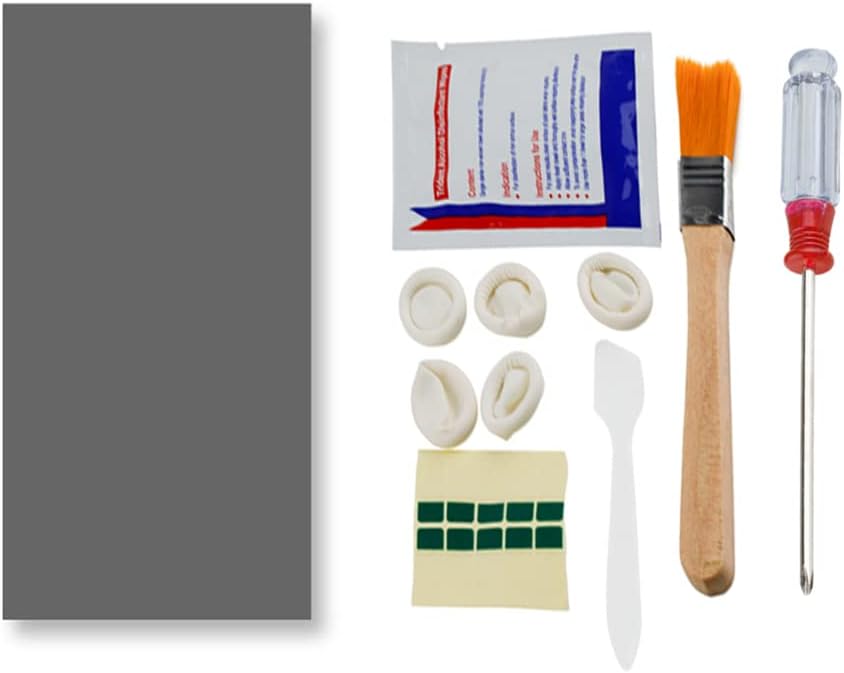
The PTM7950 40x80x0.25mm Phase Change GPU Thermal Pad by JOYJOM is a high-performance thermal interface solution designed for CPUs, GPUs, SSDs, and gaming laptops. Featuring an 8.5 W/mK thermal conductivity and a phase change at 45°C, it transforms from a solid pad to a paste under heat, ensuring superior contact and heat dissipation. Built for durability, it withstands over 1000 hours at 150°C and 1000 thermal cycles, maintaining ultra-low thermal impedance for consistent cooling. The kit includes all necessary tools for professional-grade installation, making it a top choice for enthusiasts seeking to reduce temperatures, noise, and throttling in high-demand devices.


| Best Sellers Rank | #13 in Silicon Grease |
| Customer Reviews | 4.5 out of 5 stars 843 Reviews |
T**D
Reduced my temps significantly at a great cost to performance ratio.
Great value thermal pad/paste. PTM is a phase change material that allows it to be applied as a thermal pad and with heat it will change into a paste. I have bought a few sets of these, and applied to 3 gpus, 2 laptops, a handheld, and my main computers CPU (did not delid, just used it in place of regular paste). I will mention, there is some talk on reddit about the JOYJOM PTM7950 not actually being true PTM7950. I am not that experienced that I would be able to tell the difference, but overall sentiment was that it still performs similarly enough that you will see good results. Adding that with the value of this brand being much cheaper than trying to go through other channels to get the guaranteed stuff, this is a no brainer for most. I noticed huge temperature drops in my Asrock RX 6900 XT and EVGA RTX 3080. I didn't use my i7 13700k without the JOYJOM PTM paste so I can't compare there, but I have not experienced any throttling and the temps are better than I expected with all the issues on the chip. My MSI GE66 Raider 11UE, my partners old Razer Blade 16, and my GPD Win 4 all also saw major temperature drops using these pads on their CPU and GPU's. This resulted in less noise as the fans didn't have to ramp up as high, and better performance. The kit these come with is also handy. I don't really use the finger gloves, but I could see them being nice if you have nice nails and don't want to get paste on them. The cleaning wipes and little brush are a nice touch as there is a good chance you will be cleaning off old paste with the install and these will help you clean up easily. I can safely recommend this to anyone looking to re-paste their computer/parts. I plan to continue buying this as needed myself as its performed well in my tests.
A**.
The best solution for gaming laptops!
As a specialist in servicing gaming laptops and professional graphics workstations, I recommend this thermal pad. In my opinion, it outperforms similar pads from ThermalGrizzly. Tested under full load. Highly recommended. Before use, cool it in the refrigerator, but not in the freezer. Be sure to clean the surface with 99% isopropyl alcohol. The price is quite reasonable. Experienced users will have no trouble installing it. Low temperature, Durability -3-5 years!
C**O
Pretty good
Pretty good. Temperatures 10 degrees lower. Doesn't even start the fan under light use.
E**G
Works well, difficult to work with
Works great instead of thermal paste, however it is a massive pain to work with. Getting the second thin plastic film off the pad without ripping it was nearly impossible, even after leaving it in the refrigerator for 45 minutes. Very frustrating, but it works well. CPU temps are lower.
M**Z
Creating a Permanent Phase Change Thermal Bridge to Survive Extreme Desert Heat.
I ordered this JOYJOM PTM7950 thermal pad for a friend's older ASUS laptop running an Intel Core i7 8750H processor. The computer was idling in the 70s and instantly slamming into its 88 degree thermal throttle limit the moment it was put under any real load. Traditional thermal paste is practically useless for these older gaming chassis out here in the brutal Indio summer heat. It just dries into chalk and pumps out over a few months of heavy thermal cycling. I was tired of applying standard grease just to have my friends asking me to redo their laptops every year and sounding like jet engines. The phase change material is totally different because it acts like a custom molded wax seal. It stays completely solid at room temperature which makes it incredibly easy to cut to size and peel the plastic film off with the included tweezers. The magic happens when the silicon hits 45 degrees Celsius. The pad actually melts into a highly conductive liquid that fills every microscopic scratch on the bare processor die. Once I applied over the direct die, the copper heatsink was perfectly seated against the chip before screwing it down with the provided screwdriver. You have to use a crisscross pattern to slowly squish the material down so you get maximum contact. To properly cure the material you have to run a heavy multi core benchmark for ten minutes to force the processor to maximum temperature. After three full cycles of heating the pad into a liquid and letting it cool completely off the laptop sat securely at 71 degrees under maximum load. That gave the processor a massive thermal buffer and stopped the fans from constantly screaming. It was so stable that I was able to leave the machine rendering and remote back into my home server to check on my own projects without worrying about the laptop overheating. The included cleaning wipes and brush made prepping the bare dies a breeze and the 40x80mm sheet gave me plenty of leftover material for future repairs. FYI, I used UPSIREN UTP-8 14.8w/mk Thermal Putty for the VRMs and VRAM chips, For the pictures, I show what it looked like after I took the heatsink off. There was way too much paste and putty everywhere. It even had thermal putty applied over two VRAM chip locations that weren't even installed (6GB instead of 8GB VRAM installed). I then show the PTM7950 and Upsiren thermal putty applied. Another shows Cinebench running and averaging only 71 degrees (HWiNFO64) Celsius when before the redo was idling in the 60s and 70s. I'll eventually redo my desktop with this. The last picture was Speccy showing the laptop only idling at 32 degrees after. This is night and day from what the laptop was doing before. PTM7950 is amazing and will outlast the silicon itself.
S**L
PTM Worked Well
Replaced a gaming laptops old Liquid Metal application with this PTM. I didn’t use anything else in this kit, but the PTM was enough for two GPUs, two CPUs, with plenty left over. Not too hard to apply, just make sure you have some very nice tweezers to pull off the plastic and chill it in the fridge before cutting and using.
C**6
I Recommend this for direct die cooling.
I did not know how much performance I was leaving on the table..... *** Warning long review *** I used this on: 1. Bought used 2023 zephyrus G14 AMD Ryzen 9 7940HS RTX 4060 mobile 2. Bought new 2020 Zephyrus G14 AMD Ryzen 9 4900HS RTX 2060. 3. New Gigabyte RTX 3090 4. Used open box ASUS ROG ally with the 54w settings enabled in the deep bios (I use a program to get into the hitting settings you don't see in the normal bios screen) AMD universal form browser) 5. Using the leftover scraps on random stuff. South ridge chipset in my old windows 7 retro gaming PC, Nvidia GeForce 1060 Although the stuff in category 5 was pointless. I just didn't want to waste the leftovers. Now to the nitty gritty. Everything loved the PTM7950. Idk how there is any bad reviews. Yes removing the plastic can be difficult, especially when cutting to size for specific applications. Putting it in the fridge helps. I used the freezer method because I'm hot handed and if you don't pre cool your hands. The PTM7950 we'll just immediately soften up with the fridge method. The freezer method makes it stiff enough to easily peel off the plastic before it absorbs the heat from your fingers. And make sure you get the plastic off both sides. The easiest method I came up with: 1. I cut the pcs to the sizes of the various gpus and apus. 2. Instead of peeling one side and applying it to the die like I've seen in various tutorials, I stuck it to the heat sink where the stain is from the previous thermal compound. (Yes I thoroughly cleaned the heat sink, but there is a dye shaped discoloration on all the various heatsinks.) 3. I put the heat sink in the fridge. Because of the thermal mass when you're handling the other plastic peel. The cooled heatsink prevents the PTM7950 from getting instantly soft. It's transferring the warmth of your hand to the cooled heatsink. So I didn't photograph every device. Just 1 laptop and my rog ally. My 2023 Zephyrus G14 surprised me the most. I didn't know how much performance was missing. The 2023 model came with liquid metal on the processor. My gut said it was at risk of shorting out and when I checked the liquid metal almost fully seeped out to some exposed components on the main board. So with the bad liquid metal and old GPU thermal paste. The 7940HS would pull a max of 45w total at 95c. The RTX 4060 would max out between 60-70w 81C under load. With the PTM750 my mind was blown I couldn't believe the performance I was seeing..... Lord Lord Lord The Ryzen 9 7940HS regardless of how I loaded the CPU/iGPU (idle rtx4060) it can pull up to 90w @95.1c. Boost clocks are high and IGPU clocks are high. Actually I had no clue the Radeon 780m could even boost to 3ghz!!! Before the CPU would down clock blew base clock to try and maintain IGPU performance Games that are more GPU heavy vs CPU heave allowed the RTX 4060 mobile to peak at 157w and hover around 120-123W sustained @ 81c when I ran 3dmark steel nomad stress test. 20 loops default. I ran cyberpunk path tracing enabled, dlss auto, frame gen to stress the system 30-35W on the CPU, 90-120w GPU depending on what's going on. I love these improvements. The 4060 use to cap out at 60-71w and the GPU NEVER saw 2.5Ghz before the PTM7950. I was convinced Asus choked off the performance at 1.9ghz. Not anymore lol. Lastly. PS3 emulation. In infamous 2 I'm going 40-42fps now (ran on the CPU and iGPU) my desktop 5950x and RTX 3090 cant do more than 25-30FPS.... So the other device I have pictures is my busted ROG ally. The previous owner messed up the BIOS and removed the PTM7950 like thermal interface material for regular thermall past. So I tweaked the firmware to allow 50w to the z1 extreme chip. It would maintain 50w for a few seconds and then thermal throttle down to about 30-40w depending on the game. Now it holds 50w no problem with mixed CPU / iGPU loads 86C. Boost clocks maintained. High iGPU clocks. Under a CPU only stress test wit will drop to 47w 95c Welp my fingers are on fire. I hope this review helpful. Enough. It's a a good product that I will use on anything with bear dies (no metal heat spreaders). I've watched various YouTubers online use this on desktop CPUs with no issues. Linus tech tips for my example so give it a try.
B**3
Works great!
Not honeywell branded be careful, I didn't realize that until I read a few reviews. I was so worried about fixing my over heating RTX 3070 (Zotac) I just hit purchase. Now I will say that INSTANTLY my temps went from 90 GPU 105+ GPU hotspot to 71 GPU 85 GPU Hotspot. So yes these pads do work. I was getting a black screen with audio about 20 minutes into play deadlock. Now I was able to play a 45 min match no problem at safe GPU temps. As of right now I recommend the purchase. I forgot to take a picture of the thermal pad applied but here's a before picture of the thermal paste that spread and dried out!
A**S
Hohe Grafikkarten Temperaturen/Hotspots? Hiermit ist schluss!
Habe mir dieses Thermopad gekauft da meine Red Devil RX 6800 XT immer eine 25-30° höhere Hotspot temperatur hatte als die normale Temperatur. Man muss sagen dass das Auftragen für jemanden der das zum ersten mal macht etwas fummelig ist - ich habe mir extra dafür eine kleine Pinzette zuvor gekauft und für mich war es das auf jeden Fall wert. Nun gut was sagen die Temperaturen nach den Wechsel auf die PTM7950? Cyberpunk 2077 1440P alles auf Max, kein Raytracing - GPU ist Übertakted und zieht ca. 330W. Voher: GPU Temp: 75° Hotspot: 97-105° Nacher:GPU Temp: 70° Hotspot: 85-89 Ich bin wirklich überrascht wie gut Thermopads geworden sind, damals hieß es ja quasi immer nur das Thermopads soviel schlechter seien als Paste, aber diesen Unterschied hätte ich wirklich nicht erwartet. Achtung: Das Thermopad brauch einige Zeit(Bei mir waren es 2-3 Tage) mit Last bis man die wirklich richtigen Temperaturen sehen kann, es muss sich quasi etwas verflüssigen und sich besser auf den Chip verteilen was evtl. etwas dauern kann - allerdings hat man hier den Vorteil das sich die Temperatur nicht mehr verschlechtern wie bei Wärmeleitpaste nach einigen Monaten, für die Langlebigkeit auf jeden Fall top!
T**M
Re-paste my laptop Legion 5 Pro 2021
Took a risk buying this, there were 3 issues: - Product listing has "Brand: JOYJOM" but the paste should have been made by Honeywell. - Cost (I paid £25.46) is far higher than any thermal paste I know of. - Posted from China or USA (I can't tell), not sure how I'd get a refund if it's not right. I used it to re-paste my laptop Legion 5 Pro 2021 16ACH6H because the processor reached 104°C using Arctic MX4. It worked as you can see in my screenshot attachments (they were running Cinebench r23) and reducing the temps in some of my games by up to 20°C. They provided provided tools but I think they were inappropriate, why do I need a screwdriver and a brush? They should have provided a tweezer instead to remove the plastic covering the pad.
A**D
Good Product
Everything was as expected and had some left over as well for future. Good Quality!
K**U
The PTM7950 is incredible and absolutely worth it.
alright, this is a game changer, first of all the packaging was pretty good, i didn't expect the packaging to be so good. The thermal pad actually does wonders, before using the pad, every gaming session, my CPU temps were always 95+ and the performance due to the thermal throttling was pretty awful. I played for an hour after applying the ptm7950 pad, and the temps only touched 81° C. it's ridiculously good, and i do think this is the original one because the packaging and stuff looked pretty premium. totally worth the buy, also my laptop is HP Pavillion Gaming 15 with Ryzen 5 3550H and gtx 1650
A**ー
フィルムを剥がす時に形状が崩れやすいので注意を。
よく冷えます。
Trustpilot
1 week ago
1 week ago