


🚀 Elevate your home network to pro-level speed and security — don’t get left buffering!
The ASUS RT-AX57 AX3000 WiFi 6 Router delivers cutting-edge dual-band wireless speeds up to 3000 Mbps, powered by the latest 802.11ax standard. Designed for busy homes and gaming setups, it supports MU-MIMO and OFDMA for efficient multi-device connectivity. With built-in lifetime AiProtection security and parental controls, plus seamless expandability via AiMesh and Alexa compatibility, it’s the ultimate router for professionals demanding fast, secure, and reliable internet.


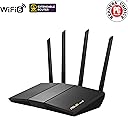



| ASIN | B0BTTZVVNC |
| Antenna Location | Business, Gaming, Home |
| Antenna Type | Fixed |
| Best Sellers Rank | #14,482 in Computers & Accessories ( See Top 100 in Computers & Accessories ) #448 in Computer Routers |
| Brand | ASUS |
| Built-In Media | Power adapter, Quick start guide, RJ-45 cable, RT-AX57 Networking router, Warranty card |
| Color | BLACK |
| Compatible Devices | Gaming Console, Personal Computer, Smart Television, Smartphone, Tablet |
| Connectivity Protocol | Wi-Fi |
| Connectivity Technology | Ethernet, Wi-Fi |
| Control Method | App, Touch |
| Controller Type | App Control, Push Button, Web GUI |
| Coverage | Multiple devices |
| Customer Reviews | 4.3 out of 5 stars 683 Reviews |
| Data Transfer Rate | 3000 megabits_per_second |
| Frequency | 5 GHz |
| Frequency Band Class | Dual-Band |
| Item Dimensions L x W x H | 9.06"L x 5.28"W x 2.2"H |
| Item Type Name | Network router |
| Item Weight | 13.12 ounces |
| LAN Port Bandwidth | Gigabit |
| Manufacturer | ASUS |
| Maximum Upstream Data Transfer Rate | 1750 megabits_per_second |
| Mfr Part Number | RT-AX57 |
| Model Name | RT-AX57 |
| Model Number | RT-AX57 |
| Number of Antennas | 4 |
| Number of Ports | 5 |
| Operating System | App, Linus, Mac OS, Windows |
| Other Special Features of the Product | Access Point Mode, Alexa Compatible, Internet Security, Parental Control, QoS |
| RAM Memory Installed | 256 MB |
| Router Firewall Security Level | High |
| Router Network Type | dual-band |
| Security Protocol | WPA2-Enterprise, WPA3-Personal, WPS |
| Special Feature | Access Point Mode, Alexa Compatible, Internet Security, Parental Control, QoS |
| UPC | 195553864619 |
| Unit Count | 1 Count |
| Voltage | 110 volts |
| Warranty Description | 3 Years Warranty |
| Wi-Fi Generation | WiFi 6 |
| Wireless Communication Standard | 802.11a, 802.11ac, 802.11ax, 802.11g |
| Wireless Compability | 802.11a, 802.11ac, 802.11ax, 802.11g |
K**S
If you’re a gamer or someone who relies on connection speed.
I’m a gamer and remote worker, So I wanted Two things from this router. 1. was to get better Wifi and connection speeds/stability and with updated technology in general which means this thing has newer technology than what was available in my basic router that My ISP provides. 2. I needed options to see security and other features not available to me from my other router. So I got that and then some. With the ability to customize my router settings unlike with my ISP router I was able to setup the newer technology in the Menu. Which is the router settings page. Firefox worked perfectly and connected to the router immediately. The router setup was easy but I was cautious. It prompted to UPDATE FIRMWARE which I and almost everybody recommend just make sure theirs no other programs running on the PC. I used Asus recommendations on their website for best security. I couldnt mess with these settings on my old router because my ISP locked down the page. I would recommend this if you need a more reliable router than your ISP provides. Its much better, trust me. I instantly saw the speed increase and it doesnt buffer at all when watching TV or on PC. Very smooth. So the gaming is far better experience than before. Im getting better latency in games like MW3 which has terrible servers to begin with. Sure you can’t get rid of the packet burst completely because of this. But this helps very much and Im glad I bought this. In the future who knows I might get something better and use this for its mesh capability. So there is that option. But honestly I couldn't ask for much more. Just make sure you research and turn off certain features that you dont need. Asus has recommendations that should help even in the settings page UI. Side note, I love MSI and ASUS boxes their nice quality.
M**L
Great router
Replaced my tp-link router as soon as I heard about a possible ban on tp-link in the US. I’ve had the router for a couple months now and it’s very reliable. The app makes it easy to manage your home network and perform updates. Really great value. Only thing I had issues with was the initial setup. I had to enable location services for the app for my phone to connect to the router using the app. Also, the instructions only have router set up with a modem. It’s doesn’t have a fiber set up. If your home internet doesn’t use a modem, a coax cable plugging into the network device, but only an Ethernet cable. Then that’s all you need to plug in.
C**N
High performance WIFI 6 Router - 20+ devices
Best in class Wifi 6 router, I've had another Asus router I bought in 2018 and gave that one to my parents. Pairs great with my Surfboard SB6121 and delivers excellent speed for the money. Range is great too, and covers a 1000sqft condo. The router is always connected to 20+ devices in my home and performs flawlessly.
F**D
Good router, but there are better for just a little more money
This is a decent router, and very easy to set up and reliable. But for usually about $10 more, the AX5400 really does a much better job. All the features plus a few, and blasts through the walls much better and better coverage. Definitely worth the extra cost. I am upgrading to the AX5400.
J**R
Excellent.
Fast downloads, firmware updates through the app keep it running good. Excellent for Xbox One X gaming.
D**.
Linux Kernel crashes, 5 minute drops in internet service. Proof in the logs. Less than 1 yr old.
Less than a year old, drops internet frequently - like 2-3 times a day. Logs show a restart but router is on UPS. Tech guys tell me more likely internal software crashing. Logs show 5 minute gap in normal time sequence where about 480 lines in log detail Linux kernel restarting. I work from home and this disconnects my VPN. While PC tries reconnecting it is unusable, like hung. Mostly inconvenient but when happens during Zoom/Teams calls its catastrophic. I avoid presenting in meetings now. Screenshot is my last few lines leading up to crash and first few lines after.
C**N
Great range in Brownstone Home
Good range, have had it now for 3 years, 0 issues.
K**S
So far so good!!
I've had the ASUS AX3000 WiFi 6 Router (RT-AX57) for a month now and so I figured that would give me enough time to see just how well the router is holding up. Originally, I was using the router provided by my ISP but at some point it just started periodically going down and would have to restart the router every time this happened. The router is pretty old as well so I was thinking about getting an upgrade(wi-fi 6) from my ISP but after reading some comments on the community page, it seemed you had to have a certain internet speed in order to get the upgrade. There was a recommendation to buy my own router and just put the new router in DMZ mode and so I decided I would go this route with the RT-AX57. Setting the router up was pretty painless with identifying the router on my old router being the most challenging part. Everything connected once I used their wizard and I didn't have to do any additional setup for the second router I've been using as an access point. Since I setup the RT-AX57, I've only once experienced a slight drop in connection and just recently, I had to restart my second router but that has pretty much been the only two noticeable occurrences. Things have been so far so good and I'm glad I went forward with the upgrade as the drops from the ISPs router were getting pretty annoying.
ن**ف
المنتج جميل لكن الفيش نظام أمريكي
المنتج بطل لكن يعيبة الفيش ما يتوافق الفيش أمريكي اذا ناوي تشتريه مر أقرب محل واطلب محول فيش الربط صعب نوعا ما لكن أول ما تربط أمورك زينه التطبيق أنجليزي بالكامل التغطية تمام 8/10 وشكرا.....
R**S
Excelente Router
Excelente router, este modelo en especial es muy bueno, las antenas son largas, lo cual es muy decuado, funciona perfecto y es rápido en general, muy discreto y excelente cobertura. Además por el precio, es una excelente compra. Recomendado al 100.
M**Y
This might not be for you
If you are looking something like vpn, dns, void blocking, parental control (too basic), website filtering, asus app access from outside. Those said is not working after my so many test. Accessing this using data or outside wifi is too slow still will not connect (for some time but often) this is my personal experience. I am about to buy a new router soon.
O**A
De lo mejor
Muy bien router, tiene bloqueo de dispositivos, firewall, control remoto
C**E
La mejor opción para empezar
Tengo un plan grande de Internet pero no le sacaba provecho por el módem base de la compañía, busque varias opciones y llegue a este por precio y calidad, ni una sola queja al contrario todo excelente! Y puedo disfrutar de jugar sin nada de lag al máximo tanto por cable como wifi y tener otros dispositivos sin restricción, tiene demasiada personalización aprovechen este producto
Trustpilot
4 days ago
3 days ago